Tabulator: Issues with large datasets
The table seems to have issue with large datasets. I setup a test file with 131,040 records with 70 fields. The rendering when scrolling vertical or dragging to the middle or to the bottom starts to choke.
http://gis.civilsolutions.biz/Tabulator_LargeData.htm
I profiled it using Chrome and it looks like its having issues with the scroll update taking a long time. I'v created a table widget kind of like Tabulator but with a lot less nice features. It uses RactiveJS to handle the rendering of the records and I use virtual scrolling. RactiveJS team have spent a lot of time making the rendering of the DOM fast. You may want to switch out the backend rendering to there library.
I was hoping to switching to Tabulator because of the nice inline controls but I really need it to handle large datasets. I'll gladly send you my implementation using RactiveJS if your interested in using it as a reference.
 donnyv
All 10 comments
Hi donnyv
Is it easy for you to generate data or modify your example, so that one can easyer find out, what triggers the problem ,like divide in half number of columns in data and so on. I did some extensive testing after 3.2 came out. up to 15'000 rows, but only y 10 cols. was fast enough at the time. Maybe that could make it easier for Oli to make the necessary changes.
And a standard example to test that routinely in the examples of docu would be a great help and safeguard.
Cheers, Michael
 michaelongithub
on 3 May 2018
michaelongithub
on 3 May 2018
This is a smaller dataset with 35 col and 131,040 rows.
http://gis.civilsolutions.biz/Tabulator_SmallerData.htm
donnyv
on 3 May 2018
Hi Oli
I revamped my old speed tests a little bit, to be able, to test this more systematically.
PC:
Intel(R) Core(TM) i7-4790 CPU @ 3.60GHz, Win 10, 16 GB RAM
Results with FEW columns only (<10). Not paged display.
NO progressive Ajax rendering. All Data loaded in 1 piece with
$('#' + idTabulatorTableDiv).tabulator("setData", tableData);
If rowformatter for text is plaintext: NO problems up to 150000. Did not go higher.
if rowformatter = textarea: ok with 100000 but with 150000:
go to end (scroll or Ctrl PgDn)
then press PgUp reapeatedly or keep pressed: display corrupts. Nothing or partial
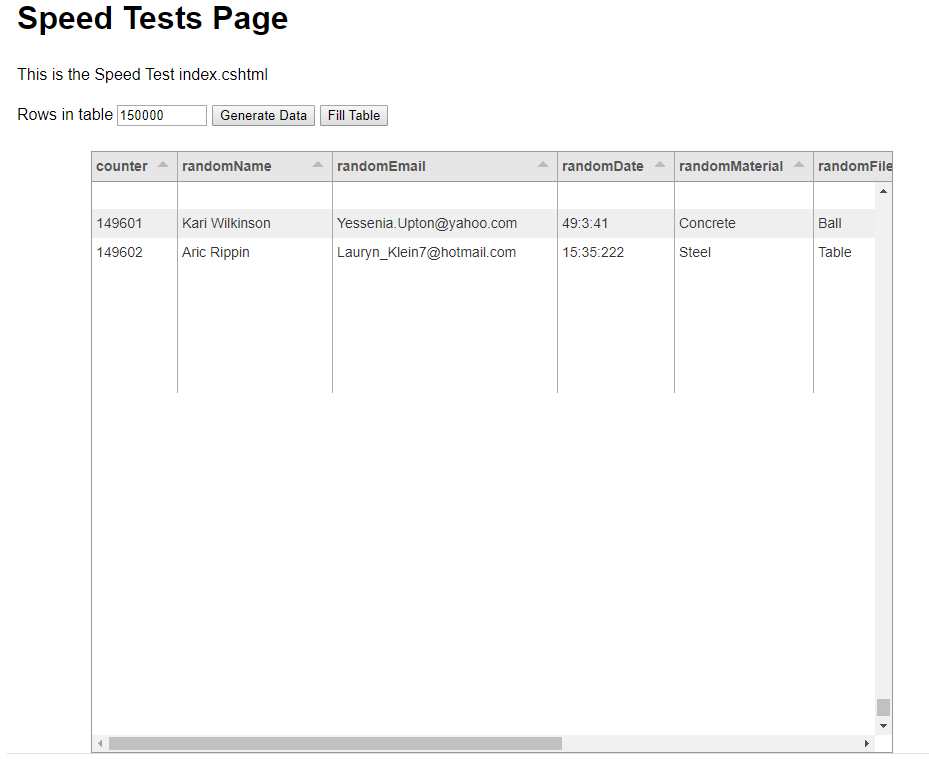
Also maybe interesting generally: Load times (secs:milisecs)
With textarea formatter
generatedData numer of rows: 50000
fillTabulatorTable START: 27:926
fillTabulatorTable END: 36:566
generatedData numer of rows: 100000
fillTabulatorTable START: 0:159
fillTabulatorTable END: 19:538
generatedData numer of rows: 150000
fillTabulatorTable START: 5:636
fillTabulatorTable END: 32:546
With plaintext formatter only
generatedData numer of rows: 100000
fillTabulatorTable START: 0:816
fillTabulatorTable END: 27:128
generatedData numer of rows: 150000
fillTabulatorTable START: 9:632
fillTabulatorTable END: 44:763
It is of course debatable, if this type of loading / display is recommendable at all.
Would it be helpfull, to extent my tests for dependency of column number (would have to extend my test program a little)
Cheers, Michael
michaelongithub
on 4 May 2018
Preeliminary results for increasing column numbers.
I extended my test a little to investigate the speed dependency on column numbers. Tested only with plaintext formatter.
Generally I can say that tabulator seems to be quite sensitive to that. With larger column numbers, sluggishnes of rendering increases.
Good news:
tabulator does not brake in my test up to 150000 rows and 75 columns.
Also: horizontal srcolling gets a bit sluggish but still acceptable.
Problem: Initial rendering however starts to exceed 1 minute! And in general is slow with many cols.
Generally initial rendering time is muche more sensitive to number of cols than number of rows.
With increasing cols >=15 or so and higher rows (>=10000) starts to get sluggish:
PGDn / PGUp: 2 secs and more (but stays around 3+ secs for 150000 rows and 75 columns.
Scrolling vertical with scrollbar button can become very sluggish if drawing even up to 5 - 10 secs.
So it seems clear, that there is great performance sensitivity to number of columns.
If you need more extensive and systematic tests to analyze the cause, please let me know.
Hope this helps.
Cheers Michael
michaelongithub
on 4 May 2018
Some more results:
went back to only 10 cols and plaintext formatter:
500000 and 1'000000 rows
load from js array in memory
500'000: load time: 2 mins
1'000'000: load time: 6 mins
Reactivity vertical: PgUp/Down, still ok
Scroll, somtimes slightly sluggisch, but acceeptable.
So all the tests I made also can give hopefully useful indications, for what use cases tabulator works in the present implementation when there is the requirement to load all data at once.
And again: it is debatable, if such use cases could not be handled differently in the GUI. (Paging, progressive loading, showing only a few colums and than having a dialog for the details and so on)
Cheers Michael
michaelongithub
on 4 May 2018
The table widget I mentioned that I implemented using RactiveJS loads data progressively, uses virtual DOM to display rows and uses a virtual scrollbar. It displays over 90 fields and it renders fine.
I think once the initial data is loaded into memory it really shouldn't matter how many rows are loaded. The bottleneck then becomes how the DOM is being managed.
Heres an example of 500,000 rows with virtual scrollbar. All data loaded client side.
http://mleibman.github.io/SlickGrid/examples/example-optimizing-dataview.html
donnyv
on 4 May 2018
@olifolkerd Maybe it would help to use a custom scrollbar for large tables with virtual scrolling?
 chdh
on 4 May 2018
chdh
on 4 May 2018
Hey @donnyv @michaelongithub
Thanks for all the feedback, it is useful to get such great benchmarking.
The bottleneck comes from jQuery and the amount of additional bloat that it adds to the rendering process. When Tabulator 4,0 is released (around July this year) i will be removing all the jQuery from it so it will be much faster.
It isnt the number of rows that slows it down, that is handled by the Virtual DOM, it is the number of columns. At the moment the virtual DOM only affects the vertical scroll not the horizontal, so large numbers of columns will slow down the render time, this will also be addressed in the 4.0 release. This was not a priority for the rendering system in 3.0 since most usage cases for Tabulator have featured a lot of rows and not many columns, as this is becoming a more requested feature it has been included in the road map.
Only the visible rows plus a small number of rows either side of the visible area are rendered, that is how the Virtual DOM works. and padding is used to adjust the scroll bar, so that is definitely not where the issues are. I would certainly not be looking to use custom scrollbars as they are a non standard UI component that will not fit in correctly with inbuilt browser styles, and they play no part in the speed of the rendering process.
Thanks for the info, i will let you know how things are progressing once i start work on 4.0
Cheers
Oli
 olifolkerd
on 9 May 2018
olifolkerd
on 9 May 2018
Hi all,
TL;DR - UI rendering & response can be improved by using Web Workers as much as possible.
The JavaScript runtime is a single threaded environment, so it can only do one thing at a time, and has to divide its processing time between all of its activities. You may want to look into "Web Workers" which allow you to offload a lot of your computations to their own worker thread. The only limitation is that the main thread and the worker threads can only communicate with each other by passing messages back and forth. This means Web Workers cannot modify the DOM directly (but instead, for example, they can pass back a message to the main thread that specifies how the DOM should be changed).
Essentially, all DOM manipulation must be done by the main thread, but nearly everything else can be offloaded to one or more Web Worker threads. Two perfect candidates to put on their own worker thread(s) are any interactions with Local Storage, and especially ALL of your network activity. Let a worker thread handle all of the AJAX calls to your backend. You can have the worker retrieve the data and then take care of as much of the initial filtering, sorting, grouping, formatting as it can, then finally just pass a JSON object back to the main thread. You'll have to experiment a bit to find the best way to divide the labor. Worker threads can enable predictive/proactive data fetching & caching in anticipation of likely user choices. You can also have a worker take care of "reactivity" by opening its own Websocket connection and subscribing to a published live data feed, which allows the remote service to push changes to the client as they happen. Changes are received by the worker thread, optionally processed, and then passed back as a message to the main thread which can then update the DOM as necessary.
Bonus Points: If you wanna get _really_ fancy, you could experiment with a subtype of Web Worker called a "Service Worker". These are similar in that they are background processes, BUT they can continue running after the user has navigated away from the website... in fact, service workers can even continue running after the browser has been shutdown and exited! Combined with Local Storage capabilities, this opens up all sorts of interesting possibilities. Live data can be retrieved _continually_ and trigger custom events. You can even handle offline changes in the client, e.g. when there is no network connection, your service worker can accumulate any changes the user has made while offline, and then synchronize all its data the next time it connects to the network.
Anyway, I hope these suggestions are helpful.
Tabulator is awesome. Kudos for yanking jQuery out of it!
_
 DaveLampton
on 4 Jul 2018
DaveLampton
on 4 Jul 2018
Hey All,
To make it easier to notify everyone of progress with the rendering system i have created one issue #1437 where i will report progress.
Cheers
Oli :)
olifolkerd
on 23 Sep 2018
Related issues
 cemmons
·
3Comments
cemmons
·
3Comments
 iBek23
·
3Comments
iBek23
·
3Comments
 KES777
·
3Comments
KES777
·
3Comments
 tomheaps
·
3Comments
tomheaps
·
3Comments
 mindcreations
·
3Comments
mindcreations
·
3Comments
Most helpful comment
Hey @donnyv @michaelongithub
Thanks for all the feedback, it is useful to get such great benchmarking.
The bottleneck comes from jQuery and the amount of additional bloat that it adds to the rendering process. When Tabulator 4,0 is released (around July this year) i will be removing all the jQuery from it so it will be much faster.
It isnt the number of rows that slows it down, that is handled by the Virtual DOM, it is the number of columns. At the moment the virtual DOM only affects the vertical scroll not the horizontal, so large numbers of columns will slow down the render time, this will also be addressed in the 4.0 release. This was not a priority for the rendering system in 3.0 since most usage cases for Tabulator have featured a lot of rows and not many columns, as this is becoming a more requested feature it has been included in the road map.
Only the visible rows plus a small number of rows either side of the visible area are rendered, that is how the Virtual DOM works. and padding is used to adjust the scroll bar, so that is definitely not where the issues are. I would certainly not be looking to use custom scrollbars as they are a non standard UI component that will not fit in correctly with inbuilt browser styles, and they play no part in the speed of the rendering process.
Thanks for the info, i will let you know how things are progressing once i start work on 4.0
Cheers
Oli