Tabulator: changing max value for progress
Sorry for all the questions Oli...I've been holding out for 3.4!
I'm trying to show progress from a value in the current row, and thought I could cheat and use MAX for that value and avoid the calculation. Is there a way I can overflow the MAX with a function and use a different column?
For example, here I have total amount of work, and each milestone shows percentage complete. The thought would be to show the progress of each milestone (MS1,MS1,MS3) to the Total, which would be the max value.
total,MS1,MS2,MS3
123,100,50,20
431,200,100,20
35,34,33,32
I can get the total value using the extendExtension function as in:
Tabulator.extendExtension("format", "formatters", {
    maxvalue:function(cell, formatterParams){
      var data = cell.getData();
      console.log(data.total)
      return(data.total);
    }
but not sure how I can assign it to "MAX" for the progress.
Do you (or anyone) have any thoughts?
Thanks!
 YendorMc
All 4 comments
Hey @YendorMc
Haha, that's fine, ask as many as you like, it is great to see you are excited by the new version!
At the moment you could not pass that in, you would have to make your own custom formatter, see my answer to #878 on how to change the progress bar formatter, you would be able to access all the row data using the cell.getData() method.
That said i like the idea of being able to pass a callback into the max and min properties to allow for more complex formatting, i will add this idea to the roadmap for a future release.
Cheers
Oli :)
 olifolkerd
on 13 Feb 2018
olifolkerd
on 13 Feb 2018
Thanks for the lead Oli! That was super easy to do thanks to your brilliant code!
All I did was copy your code to my extendExtension, and added 2 lines of code...which overwrites max with the value that stays the same in my case...amazing!
    var data = cell.getData();
        max = data.maxi;
For those interested, I've posted a 'how to', and here's what it looks like:
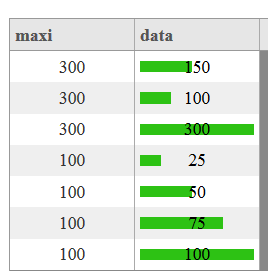
Using extendExtension ...I have two custom formatters, and will soon add more
Tabulator.extendExtension("format", "formatters", {
    numberfmt:function(cell, formatterParams){
      var num = cell.getValue();
      var tempnum = "";
      console.log(num);
      if (num == "0"){
           tempnum = "";
      }
      else if (num == ""){
         tempnum = "";
      }
      else if (isNAN(num)){
        tempnum = "";
      }
      else{
        tempnum = Number(num).toLocaleString();
      }
      return(tempnum);
    },
    //progress bar
    progressmaxpp:function(cell, formatterParams){ //progress bar
        var value = this.sanitizeHTML(cell.getValue()) || 0,
        element = cell.getElement(),
        max = formatterParams && formatterParams.max ? formatterParams.max : 100,
        min = formatterParams && formatterParams.min ? formatterParams.min : 0,
        percent, percentValue, color, legend, legendColor;

        //Added code here:
        //var data = cell.getData();
        //max = data.maxi;

               //updated to add pass in value.
        if(formatterParams.labelField){
                data = cell.getData();
                max = data[formatterParams.labelField];
                    //console.log(formatterParams);
                    //console.log(max);
                }
               //Stop adding code

        //make sure value is in range
        percentValue = parseFloat(value) <= max ? parseFloat(value) : max;
        percentValue = parseFloat(percentValue) >= min ? parseFloat(percentValue) : min;

        //workout percentage
        percent = (max - min) / 100;
        percentValue = 100 - Math.round((percentValue - min) / percent);

        //set bar color
        switch(typeof formatterParams.color){
            case "string":
            color = formatterParams.color;
            break;
            case "function":
            color = formatterParams.color(value);
            break;
            case "object":
            if(Array.isArray(formatterParams.color)){
                var unit = 100 / formatterParams.color.length;
                var index = Math.floor(percentValue / unit);

                index = Math.min(index, formatterParams.color.length - 1);
                color = formatterParams.color[formatterParams.color.length - 1 - index];
                break;
            }
            default:
            color = "#2DC214";
        }

        //generate legend
        switch(typeof formatterParams.legend){
            case "string":
            legend = formatterParams.legend;
            break;
            case "function":
            legend = formatterParams.legend(value);
            break;
            case "boolean":
            legend = value;
            break;
            default:
            legend = false;
        }

        //set legend color
        switch(typeof formatterParams.legendColor){
            case "string":
            legendColor = formatterParams.legendColor;
            break;
            case "function":
            legendColor = formatterParams.legendColor(value);
            break;
            case "object":
            if(Array.isArray(formatterParams.legendColor)){
                var unit = 100 / formatterParams.legendColor.length;
                var index = Math.floor(percentValue / unit);

                index = Math.min(index, formatterParams.legendColor.length - 1);
                legendColor = formatterParams.legendColor[formatterParams.legendColor.length - 1 - index];
                break;
            }
            default:
            legendColor = "#000";
        }

        element.css({
            "min-width":"30px",
            "position":"relative",
        });

        element.attr("aria-label", percentValue);

        return "<div style='position:absolute; top:8px; bottom:8px; left:4px; right:" + percentValue + "%; margin-right:4px; background-color:" + color + "; display:inline-block;' data-max='" + max + "' data-min='" + min + "'></div>" + (legend ? "<div style='position:absolute; top:4px; left:0; text-align:center; width:100%; color:" + legendColor + ";'>" + legend + "</div>" : "");
    }
});
JSON and Tabulator instance:
var jsondata = [
                {maxi: 300,data: 150},
                {maxi: 300,data: 100},
                {maxi: 300,data: 300},
                {maxi: 100,data: 25},
                {maxi: 100,data: 50},
                {maxi: 100,data: 75},
                {maxi: 100,data: 100}
                ];
console.log (jsondata);
$("#example-table").tabulator({
        height:600, // set height of table, this enables the Virtual DOM and improves render speed dramatically (can be any valid css height value)
        columnVertAlign:"bottom", //align header contents to bottom of cell
        columns: [
        {title:"maxi", field:"maxi", align:"center", width:100,headerSort:false},
        {title:"data", field:"data", align:"center", width:100,headerSort:false, formatter:"progressmaxpp",formatterParams:{legend:true,labelField:"maxi"}}
        ]
    });
Updated to allow pass-in for labelField to make it more intelligent like Oli! :)
YendorMc
on 14 Feb 2018
That said i like the idea of being able to pass a callback into the max and min properties to allow for more complex formatting, i will add this idea to the roadmap for a future release.
Was this actually implemented? I don't see anything in the documentation.
I really love this idea. It's such a useful feature.
 8483
on 13 Oct 2020
8483
on 13 Oct 2020
Related issues
 Honiah
·
3Comments
Honiah
·
3Comments
 alainpannetier
·
3Comments
alainpannetier
·
3Comments
 Manbec
·
3Comments
Manbec
·
3Comments
 soo1025
·
3Comments
soo1025
·
3Comments
 mindcreations
·
3Comments
mindcreations
·
3Comments
Most helpful comment
Thanks for the lead Oli! That was super easy to do thanks to your brilliant code!
All I did was copy your code to my extendExtension, and added 2 lines of code...which overwrites max with the value that stays the same in my case...amazing!
For those interested, I've posted a 'how to', and here's what it looks like:
Using extendExtension ...I have two custom formatters, and will soon add more
JSON and Tabulator instance: