Tabulator: improvement: align headfilters
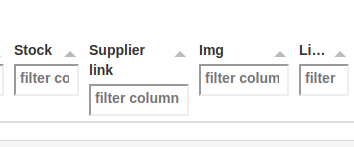
Hi! There is a situation when you want head title to wrap on two+ lines, and then you have head-filters misaligned which looks pretty ugly, see attach.
Would be nice if all head-filters would align each other by some rule.
 MikhailKlemin
All 7 comments
Hey,
You are in luck! There is already an option for this. the colVertAlign options allows you to specify the vertical alignment of the headers, in this case i would suggest you bottom align them:
$("#example-table").tabulator({
colVertAlign:"bottom", //align header contents to bottom of cell
});
Let me know if that helps.
Cheers
Oli
 olifolkerd
on 6 Jul 2017
olifolkerd
on 6 Jul 2017
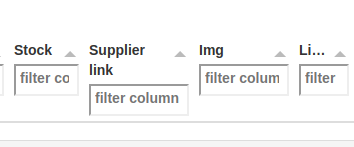
Hi there, sorry I am late, I added this option and nothing happens, the head-filter as misaligned as they were, tried either bootstrap and standard one..
Constructor:
$(document).ready(function() {
$("#example-table").tabulator({
responsiveLayout:false,
index: "ProductCode",
fitColumns:true,
height:1000,
sortable:true,
showLoader: true,
pagination:"local",
paginationSize:100,
tooltips:true,
colVertAlign:"bottom",
initialSort:[
{column:"TimeStamp", dir:"desc"}
],
cellEdited:function(cell){
var id = cell.getRow().getCells()[6].getValue();
var val = cell.getValue();
$.post('/comment', {"id": id, "com":val});
},
columns:[ //Define Table Columns
{title:"Product Code", field:"ProductCode", sorter:"string", align: "left", sortable:true,headerFilter:"input", minWidth:90,width:90},
{title:"Category", field:"Category", sorter:"string", sortable:true, align:"left",headerFilter:"input", minWidth:110, width:110,formatter:categoryFormatter},
{title:"Brand", field:"Brand",sorter:"string", align:"left", visible:true, headerFilter:"input",minWidth:90, width:90, formatter:"textarea"},
{title:"Product Title", field:"Name", headerFilter: "input", sorter:"string", align:"left", visible:true, tooltipHeader:true, minWidth:125, width:125, formatter:"textarea"},
{title:"Details", field:"Details", sorter:"string", formatter:"textarea", align:"left", visible:true,headerFilter:"input", minWidth:300},
{title:"Normal Price", field:"NormalPrice", sorter:"number", formatter:"money", align: "left", sortable:true,headerFilter:"input", minWidth:90, width:90},
{title:"Sale Price", field:"SalePrice", sorter:"number", formatter:"money", sortable:true, align: "left", headerFilter:"input", minWidth:110,width:110},
{title:"Color", field:"Color", sorter:"string", align: "left", sortable:true, headerFilter:"input", minWidth:75, width:75},
{title:"Size", field:"Size", sorter:"string", align: "left", sortable:true, headerFilter:"input", minWidth:75, width:75},
{title:"Stock", field:"Stock", sorter:"string", align: "center", sortable:true, headerFilter:"input",minWidth:75,width:75, formatter: stockFormatter},
{title:"Supplier", tooltipHeader:true, field:"Link", sorter:"string", align: "left", sortable:true, minWidth:90, width:110, headerFilter:"input",formatter:linkFormatter},
{title:"Img", field:"Image", sorter:"string", align: "left", sortable:true, minWidth:100, width:100, headerFilter:"input", formatter:imageLinkFormatter},
{title:"Listed", tooltipHeader:true, field:"Ebay", align: "center", headerFilter:"input", minWidth:60},
{title:"Ebay Link", field:"EbayLink", sorter:"string", align: "left", sortable:true, minWidth:75, width:120, headerFilter:"input", formatter:linkFormatter},
{title:"Updated", field:"TimeStamp", sorter:"date", align: "left", sortable:true, minWidth:110,width:130,headerFilter:"input"},
{title:"Comment", field:"Comment", sorter:"string", formatter:"textarea", align: "left", headerFilter:"input", visible:true, editor:"textarea", minWidth:75}
]
});
$("#example-table").tabulator("setData","/foo");
});
Apologies, that is an issue with the documentation, as of version 3.0 that option is now called columnVertAlign
$("#example-table").tabulator({
    columnVertAlign:"bottom", //align header contents to bottom of cell
});
I will get the documentation updated shortly
olifolkerd
on 7 Jul 2017
This works now great :-)
MikhailKlemin
on 7 Jul 2017
Documentation has now been updated to show the option as columnVertAlign
olifolkerd
on 9 Jul 2017
Hi @olifolkerd,
Is there a function like this for the rest of the rows, or just the headers? I have an img defining the row height and would like the text in adjacent columns centered vertically. I'm sure there is a simple way I'm missing...
Thanks.
 xXmrotsXx
on 9 Mar 2018
xXmrotsXx
on 9 Mar 2018
Hey @xXmrotsXx,
At the moment this isn't available by default, but you might be able to achieve it with some CSS tweaks.
Cheers
Oli
olifolkerd
on 15 Mar 2018
Related issues
 soo1025
·
3Comments
soo1025
·
3Comments
 alainpannetier
·
3Comments
alainpannetier
·
3Comments
 cemmons
·
3Comments
cemmons
·
3Comments
 Manbec
·
3Comments
Manbec
·
3Comments
 KES777
·
3Comments
KES777
·
3Comments
Most helpful comment
Apologies, that is an issue with the documentation, as of version 3.0 that option is now called columnVertAlign
I will get the documentation updated shortly