Tab-session-manager: Bookmark backup option
Use bookmarks to back up sessions.
4-Why not use Bookmark as a backup option, you can add extra data to the URL/Location or name entry of the bookmark to add extra metadata that TSM might need enable to restore the tabs.
_Originally posted by @brain8891 in https://github.com/sienori/Tab-Session-Manager/issues/641#issuecomment-741831819_
Using bookmarks is a good idea!
Thebookmarkpermission is an optional permission, so no user permission is required when updating. Bookmarks are an effective backup option because they are easily accessible even when TSM storage is broken. I will implement bookmark backup.
_Originally posted by @sienori in https://github.com/sienori/Tab-Session-Manager/issues/641#issuecomment-748029572_
 sienori
>All comments
Further suggestions:
1- Ability for users to choose backup folder, for example: [Bookmarks Menu/Random Folder/Add-ons backup/TSM/]
2- customizable bakup naming scheme with variables like, date format, number of tabs and device name, for example:
[Bookmarks Menu/Random Folder/Add-ons backup/TSG/backup of main device/ yyyy-mm-dd 990 tabs]
And on other devices:
[Bookmarks Menu/Random Folder/Add-ons backup/TSG/backup of my other device/ yyyy-mm-dd@tt-mm]
reasons: the device name will help avoid conclusions when syncing between devices, and appending the total number of all windows tabs helps with troubleshooting and for date format there is need no for an explanation.
3- customizable backup intervals in three categories:
A- when browser starts up
B- when browser terminate/exit/shutdown
C- on time intervals
Additionally each of these three backup type would be saved in a different folder for example:
[Bookmarks Menu/Random Folder/Add-ons backup/TSG/backup of main device/ Time interval/yyyy-mm-dd]
[Bookmarks Menu/Random Folder/Add-ons backup/TSG/backup of main device/ on shutdown/yyyy-mm-dd]
[Bookmarks Menu/Random Folder/Add-ons backup/TSG/backup of main device/ on startup/yyyy-mm-dd]
Also , the option to turn off all or some of these three type of backup.
4- To be more organized Each window would be in a separate folder with the Window ID, title and number of tabs
for example:
[Bookmarks Menu/Random Folder/Add-ons backup/TSG/backup of main device/on startup/yyyy-mm-dd@tt-mm 2000 tabs/ window ID= 9; title=school project; Tabs=900 ]
5- Also to be more organized, whether you use the [Name"] or the [location:] filed for the data needed by STG make the information there more easily understandable, and I think using the name field is the best choice.
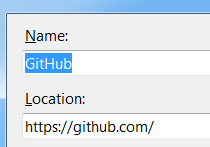
I am not sure what kind of data/metadata you will add for each tab/bookmark, for sure the back button history of tabs is not possible yet, but let say the order of a tab in the tab bar would be added to each bookmark then make it easily understandable by the user for example:
[Bookmarks Menu/Random Folder/Add-ons backup/TSG/backup of main device/on startup/yyyy-mm-dd@tt-mm 2000 tabs/ window ID= 9; title=school project; Tabs=900/ GitHub, TabbarLocation:1]
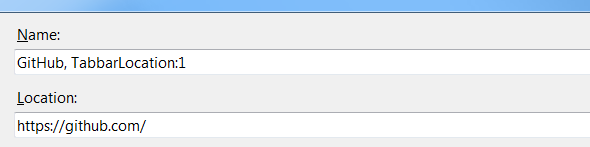
which means it is the first tab in that window
And for the title, I mean the Fireifox window title which can be modified by addons such as Window Titler or by add-ons that manages tabs such as Simple Tab Group
Thank you for this amazing add-on and I hope this helps :)
 brain8891
on 18 Dec 2020
brain8891
on 18 Dec 2020
Related issues
 WPFilmmaker
·
5Comments
WPFilmmaker
·
5Comments
 jar311
·
4Comments
jar311
·
4Comments
 Jbowman57
·
4Comments
Jbowman57
·
4Comments
 Adamfmc
·
5Comments
Adamfmc
·
5Comments
 gramireus
·
5Comments
gramireus
·
5Comments
Most helpful comment
Further suggestions:
1- Ability for users to choose backup folder, for example: [Bookmarks Menu/Random Folder/Add-ons backup/TSM/]
2- customizable bakup naming scheme with variables like, date format, number of tabs and device name, for example:
[Bookmarks Menu/Random Folder/Add-ons backup/TSG/backup of main device/ yyyy-mm-dd 990 tabs]
And on other devices:
[Bookmarks Menu/Random Folder/Add-ons backup/TSG/backup of my other device/ yyyy-mm-dd@tt-mm]
reasons: the device name will help avoid conclusions when syncing between devices, and appending the total number of all windows tabs helps with troubleshooting and for date format there is need no for an explanation.
3- customizable backup intervals in three categories:
A- when browser starts up
B- when browser terminate/exit/shutdown
C- on time intervals
Additionally each of these three backup type would be saved in a different folder for example:
[Bookmarks Menu/Random Folder/Add-ons backup/TSG/backup of main device/ Time interval/yyyy-mm-dd]
[Bookmarks Menu/Random Folder/Add-ons backup/TSG/backup of main device/ on shutdown/yyyy-mm-dd]
[Bookmarks Menu/Random Folder/Add-ons backup/TSG/backup of main device/ on startup/yyyy-mm-dd]
Also , the option to turn off all or some of these three type of backup.
4- To be more organized Each window would be in a separate folder with the Window ID, title and number of tabs
for example:
[Bookmarks Menu/Random Folder/Add-ons backup/TSG/backup of main device/on startup/yyyy-mm-dd@tt-mm 2000 tabs/ window ID= 9; title=school project; Tabs=900 ]
5- Also to be more organized, whether you use the [Name"] or the [location:] filed for the data needed by STG make the information there more easily understandable, and I think using the name field is the best choice.

I am not sure what kind of data/metadata you will add for each tab/bookmark, for sure the back button history of tabs is not possible yet, but let say the order of a tab in the tab bar would be added to each bookmark then make it easily understandable by the user for example:

[Bookmarks Menu/Random Folder/Add-ons backup/TSG/backup of main device/on startup/yyyy-mm-dd@tt-mm 2000 tabs/ window ID= 9; title=school project; Tabs=900/ GitHub, TabbarLocation:1]
which means it is the first tab in that window
And for the title, I mean the Fireifox window title which can be modified by addons such as Window Titler or by add-ons that manages tabs such as Simple Tab Group
Thank you for this amazing add-on and I hope this helps :)