Tab-session-manager: Import of .json Session file is not working
Short description
I exported the session into a .json file before formating my PC. Now, after a clean Windows 10 install I tried to import that .json file, but no Tabs are restored. The .json file contains all information of the around 50 Tabs (I opened it with Notepad++ to check the content)
Steps to reproduce
- Start browser with clean profile
- Install Tab Session Manager
- Import session (select file)
- Import session (click on "import" button)
Expected result
Tabs should be imported
Actual result
Nothing happens
Platform information
Windows 10
Firefox Developer 67.0b14
Version of Tab Session Manager: Version 4.5.2
Additional context
 olaims
All 7 comments
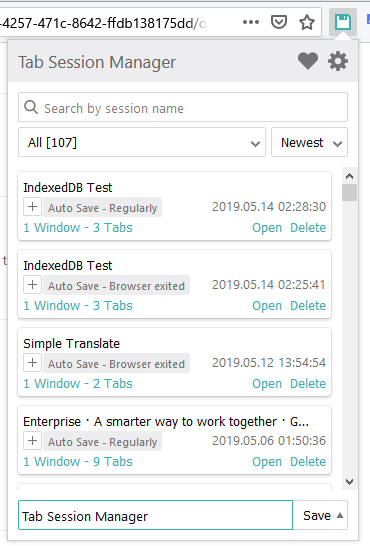
The imported sessions are displayed in the toolbar popup.
 sienori
on 28 May 2019
sienori
on 28 May 2019
It doesn't work for me either.
I import the .json backup I made, "1 session" is detected and I get the nice and dandy "Sessions imported." popup.
None appears anywhere.
EDIT: I followed instructions here, here and here, with just this
[debug] background/import: import()
Array [ {…} ]
background.js:1:67100
[debug] background/sessions: search() date 1564158686849 background.js:1:67100
[debug] background/sessions: =>search()
Array []
background.js:1:67100
[debug] background/save: saveSession()
Object { windows: {…}, windowsNumber: 1, windowsInfo: {…}, tabsNumber: 131, name: "Tab Session Manager", date: 1564158686849, tag: (1) […], sessionStartTime: 1564158657419, id: "7d5ade25-376d-482a-bc52-775bbd4042ee" }
 true background.js:1:67100
[debug] background/sessions: put()
Object { windows: {…}, windowsNumber: 1, windowsInfo: {…}, tabsNumber: 131, name: "Tab Session Manager", date: 1564158686849, tag: (1) […], sessionStartTime: 1564158657419, id: "7d5ade25-376d-482a-bc52-775bbd4042ee" }
background.js:1:67100
[debug] background/sessions: =>put() success
 mirh
on 29 Jul 2019
mirh
on 29 Jul 2019
I can confirm it also in Chrome 77.0.3865.75. and Firefox 69.0
After accepting the popup the console shows:
options.js:1 Uncaught (in promise) TypeError: Error in invocation of runtime.sendMessage(optional string extensionId, any message, optional object options, optional function responseCallback): Message length exceeded maximum allowed length.
at options.js:1
at new Promise ()
at c (options.js:1)
at Object.apply (options.js:1)
at ImportSessionsComponent.importSessions (options.js:22)
at Object.(options.js:22)
at Object.invokeGuardedCallback (options.js:22)
at Object.invokeGuardedCallbackAndCatchFirstError (options.js:22)
at x (options.js:22)
at H (options.js:22)
 uberkael
on 14 Sep 2019
uberkael
on 14 Sep 2019
I have a similar problem after a browser crash. The crash came directly after updating to FIrefox Developer 70.0b8, on MacOS.
I have session backups in JSON format. But when I try to import them in a new profile, I get this:
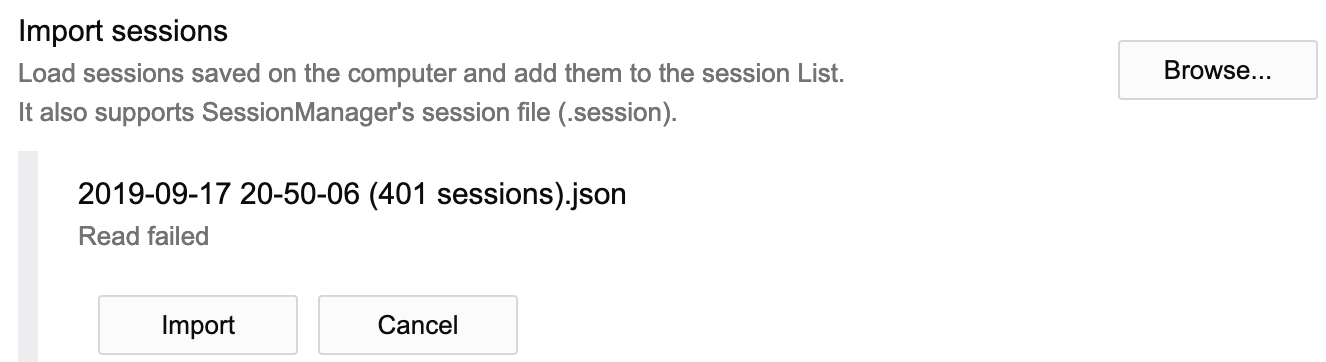
If I try to import anyway, I get a message saying "Session imported". But nothing is imported.
 kamidev
on 20 Sep 2019
kamidev
on 20 Sep 2019
I have nine months worth of backups but none of my old files seem to work. But if I create a new session in my fresh FIrefox profile, I can export it and import it back without problems.
With debugging turned on, I get error messages "Error processing windowTypes: This property is deprecated" when failing to read a JSON file.
https://user-images.githubusercontent.com/1655/65346272-a17b2100-dbdc-11e9-9683-0c87b8ae5dec.png
kamidev
on 20 Sep 2019
Since I had a fresh backup of my profile, I finally get my sessions back using @sienori:s helpful instructions here: https://github.com/sienori/Tab-Session-Manager/wiki/IndexedDB-Error.
kamidev
on 20 Sep 2019
I confirmed the problem where importing huge sessions failed. https://github.com/sienori/Tab-Session-Manager/issues/461
I fixed it in version 5.1.1. Thanks!
sienori
on 3 Nov 2019
Related issues
 rayman89
·
7Comments
rayman89
·
7Comments
 rnc
·
5Comments
rnc
·
5Comments
 aaaxx
·
4Comments
aaaxx
·
4Comments
 piroor
·
3Comments
piroor
·
3Comments
 gramireus
·
5Comments
gramireus
·
5Comments