Tab-session-manager: Memory leak in Firefox 59
Just updated Firefox 59 from 58.02, I noticed Firefox became unresponsive and is using over 2GB of ram, usually 500-700MB for the tabs I open.
I started Firefox in safe mode, with all addons disabled, no problems.
I started half of my addons, (binary search method) to quickly discover which addon caused the huge memory usage and unresponsiveness. In the end, it was Tab-Session manager.
To verify again, disabled all addons and left tab session manager enabled, restarted firefox, restored tabs and the issue is there again.
Enabled all addons except Tab Session manager, no problems.
Initially I thought it would be uBlock Origin, but it is not.
Edit: Exported all sessions as json file, deleted all sessions, deleted storage.js, then imported sessions. It seems that the issue is gone, but I noticed there is a spike of memory usage like +400MB for few seconds at start up then it goes back to normal, until the second restart. the issue remains. :(
I noticed though, that when opening task manager, and closing one of firefox's processes that has lots of ram usage, firefox becomes responsive and doesn't actually close!
 RebelliousX
All 8 comments
 sienori
on 18 Mar 2018
sienori
on 18 Mar 2018
Well, it was solved in v3.0 but all sessions are gone, even when importing them from JSON file nothing shows up. :/
RebelliousX
on 20 Mar 2018
@RebelliousX
Please refer to this issue: https://github.com/sienori/Tab-Session-Manager/issues/210
sienori
on 21 Mar 2018
@sienori Thanks for your hard work, I am closing this if you don't mind.
RebelliousX
on 22 Mar 2018
Hi, the problem comes back again after tab-session-manager's May 3, 2018 update, versin 3.1.1.
The problem is the same with @RebelliousX , except that my firefox with tab-session-manager eats over 6GB RAM instead of 2GB.
 TurnOffNOD
on 6 May 2018
TurnOffNOD
on 6 May 2018
@TurnOffNOD
What kind of operation will cause problems?
sienori
on 6 May 2018
Firefox version: 59.0.3. My firefox is auto updated, I didn't notice my firefox version (58 or 59.0.2 or 59.0.3) before the bug appeared.
Tab-Session-Manager: version 3.1.1 (addon panel says that last update is May 3, 2018).
Operating System: Win 7, 64bit. I installed 8GB RAM with my computer.
All my addons:
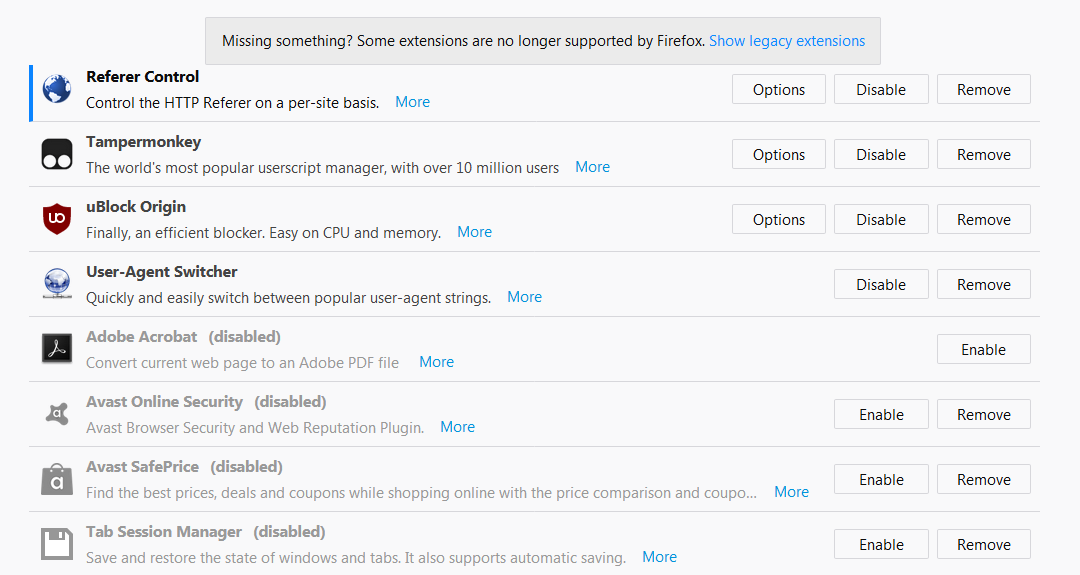
Among them, Adboe Acrobat addon and both Avast addons are always disabled, I never use them.
Tab-Session-Manager is disabled after the bug appeared.
If Tab-Session-Manager is not disabled, simply open firefox-now there is the "new tab" tab, then History-Restore Previous Session, wait some time and the RAM will be eaten.
TurnOffNOD
on 6 May 2018
I fixed the problem that increased memory usage when restoring session or closing a large number of tabs. 90390af
Also, I added option to use "discarded" property for lazy loading. 45719c3
Enabling this option will improve performance when opening tabs.
I think that this problem is solved in the latest version.
sienori
on 28 Oct 2018
Related issues
 Aezaeo
·
5Comments
Aezaeo
·
5Comments
 hirvinen
·
5Comments
hirvinen
·
5Comments
 rnc
·
5Comments
rnc
·
5Comments
 hyperfekt
·
5Comments
hyperfekt
·
5Comments
 jar311
·
4Comments
jar311
·
4Comments
Most helpful comment
I fixed the problem that increased memory usage when restoring session or closing a large number of tabs. 90390af
Also, I added option to use "discarded" property for lazy loading. 45719c3
Enabling this option will improve performance when opening tabs.
I think that this problem is solved in the latest version.