Syspass: Problem with authenticator installation
sysPass Version
3.0.5
Describe the bug
Similar as https://github.com/sysPass/plugin-Authenticator/issues/15
May I know any solution for this problem? Thanks.
Event log
entrypoint: Starting with UID : 9001
setup_app: Setting up permissions
setup_composer_extensions: syspass/plugin-authenticator:^v2.0
~ /var/www/html
run_composer: Running composer
./composer.json has been updated
Loading composer repositories with package information
Updating dependencies (including require-dev)
Your requirements could not be resolved to an installable set of packages.

  Problem 1
    - The requested PHP extension ext-xdebug * is missing from your system. Install or enable PHP's xdebug extension.


Installation failed, reverting ./composer.json to its original content.
 Envikia
All 34 comments
Same Problem here. Which command do you use?
 andrucha97
on 12 Mar 2019
andrucha97
on 12 Mar 2019
And where is your folder?
andrucha97
on 12 Mar 2019
@andrucha97 , I am using docker-compose.
And here is my conf
    environment:
    - COMPOSER_EXTENSIONS=syspass/plugin-authenticator:^v2.0
    volumes:
    - /etc/localtime:/etc/localtime:ro
    - /opt/docker/appData/syspass/conf:/var/www/html/sysPass/app/config
    - /opt/docker/appData/syspass/backup:/var/www/html/sysPass/app/backup
@Envikia it seems that 'require-dev' is set by default when composer is executed. I'll fix it in docker image.
Thanks for the feedback!
 nuxsmin
on 13 Mar 2019
nuxsmin
on 13 Mar 2019
@Envikia it seems that 'require-dev' is set by default when composer is executed. I'll fix it in docker image.
Thanks for the feedback!
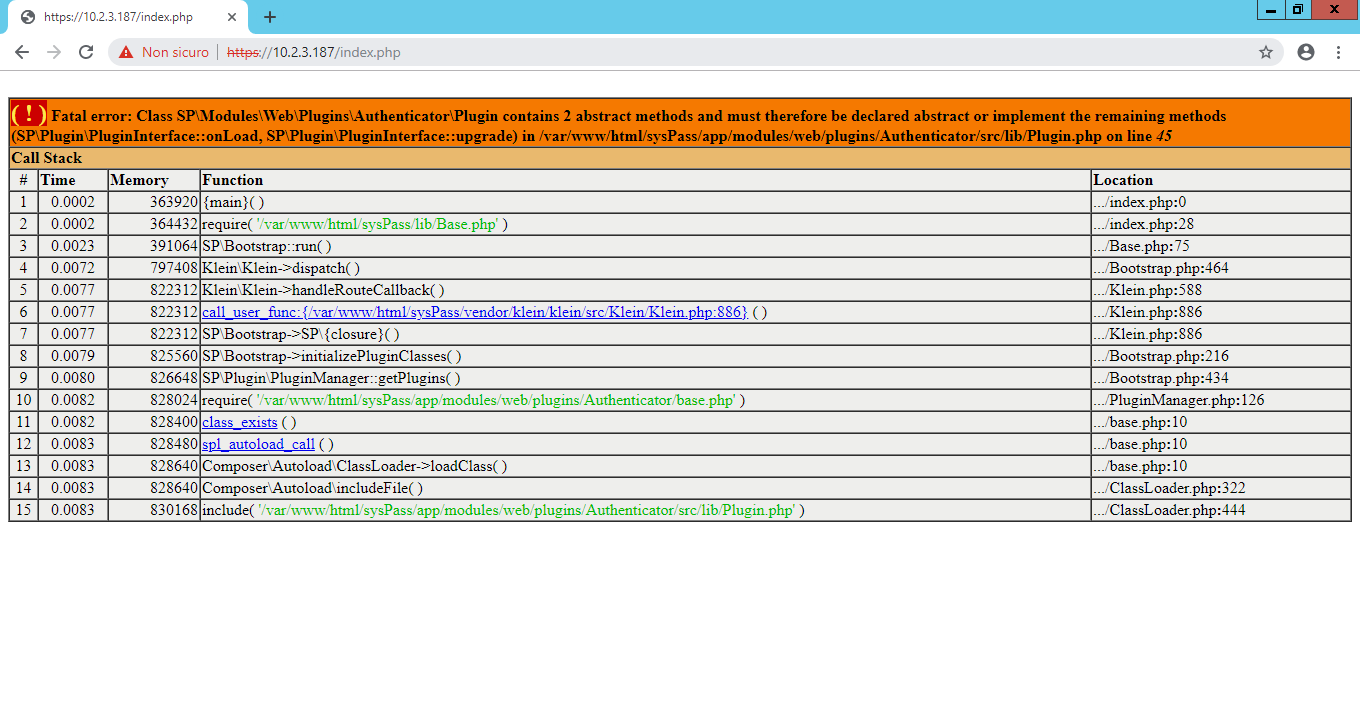
hi, which is the correct version to use this plugin? I'm testing latest 3.1.0rc2-dev, 3.1.0rc2, 3.0.5, latest, none of them seems working... with previous version i get the xdebug extension missing, with latest 3.1.0rc2-dev i get this:
 fragolinux
on 13 May 2019
fragolinux
on 13 May 2019
Hi @fragolinux
you need to update the plugin version too.
Regards
nuxsmin
on 25 May 2019
Hi @fragolinux
you need to update the plugin version too.
Regards
Hi @nuxsmin
May I know the correct version to use for syspass 3.0.5 ? Thanks.
I still got below log using COMPOSER_EXTENSIONS=syspass/plugin-authenticator:^v2.0
Updating dependencies (including require-dev)
Your requirements could not be resolved to an installable set of packages.

  Problem 1
    - The requested PHP extension ext-xdebug * is missing from your system. Install or enable PHP's xdebug extension.


Installation failed, reverting ./composer.json to its original content.
Hi, are you running on Docker?.
If not, you need to tweak the composer arguments to not include dev packages.
Regards.
nuxsmin
on 25 May 2019
HI @nuxsmin ,
Yes , I am running syspass on Docker Compose.
Envikia
on 25 May 2019
Hi, sorry I didn't notice about the comments on the issue...
Hello, some tweaks have been implemented in v3.1 docker images, so xdebug extension won't be required, but this version is only compatible with plugin's v2.1.
Regards
nuxsmin
on 25 May 2019
hi, still problems... using this syspass.yml:
version: '2'
services:
  app:
    container_name: syspass-app
    image: syspass/syspass:3.1.0-rc4
    restart: always
    environment:
      - COMPOSER_EXTENSIONS=syspass/plugin-authenticator:^v2.1
    ports:
      - 443:443
    links:
      - db
    volumes:
      - syspass-config:/var/www/html/sysPass/app/config
      - syspass-backup:/var/www/html/sysPass/app/backup
  db:
    container_name: syspass-db
    restart: always
    image: mariadb:10.2
    environment:
      - MYSQL_ROOT_PASSWORD=MYPASS
    ports:
      - 3306:3306
    volumes:
      - syspass-db:/var/lib/mysql

volumes:
  syspass-config: {}
  syspass-backup: {}
  syspass-db: {}
i get these logs:
syspass-app | setup_composer_extensions: syspass/plugin-authenticator:^v2.1
syspass-app | ~ /var/www/html
syspass-app | run_composer: Running composer
syspass-app | ./composer.json has been updated
syspass-app | Loading composer repositories with package information
syspass-app | Updating dependencies
syspass-app | Your requirements could not be resolved to an installable set of packages.
syspass-app |
syspass-app |   Problem 1
syspass-app |     - The requested package syspass/plugin-authenticator ^v2.1 is satisfiable by syspass/plugin-authenticator[v2.1.x-dev] but these conflict with your requirements or minimum-stability.
syspass-app |   Problem 2
syspass-app |     - The requested PHP extension ext-xdebug * is missing from your system. Install or enable PHP's xdebug extension.
syspass-app |
syspass-app | Running update with --no-dev does not mean require-dev is ignored, it just means the packages will not be installed. If dev requirements are blocking the update you have to resolve those problems.
syspass-app |
syspass-app | Installation failed, reverting ./composer.json to its original content.
syspass-app | /var/www/html
syspass-app | setup_locales: Setting up locales
syspass-app | Generating locales (this might take a while)...
syspass-app |   ca_ES.UTF-8... done
syspass-app |   de_DE.UTF-8... done
syspass-app |   en_GB.UTF-8... done
syspass-app |   en_US.UTF-8... done
syspass-app |   es_ES.UTF-8... done
syspass-app |   fr_FR.UTF-8... done
syspass-app |   it_IT.UTF-8... done
syspass-app |   nl_NL.UTF-8... done
syspass-app |   pl_PL.UTF-8... done
syspass-app |   pt_BR.UTF-8... done
syspass-app |   ru_RU.UTF-8... done
syspass-app |   da.UTF-8...cannot open locale definition file `da': No such file or directory
syspass-app |  done
syspass-app |   fo.UTF-8...cannot open locale definition file `fo': No such file or directory
syspass-app |  done
syspass-app | Generation complete.
syspass-app | ######
syspass-app | sysPass environment installed and configured. Please point your browser to https://172.18.0.3 to start the installation
syspass-app | ######
syspass-app | entrypoint: Starting Apache
hi, any update on this?
fragolinux
on 5 Jun 2019
Hello @fragolinux
Did you notice my comment?: https://github.com/nuxsmin/sysPass/issues/1281#issuecomment-495916896
Regards
nuxsmin
on 5 Jun 2019
Hello @fragolinux
Did you notice my comment?: #1281 (comment)
Regards
yes, and after that there's my comment where i show i'm using container 3.1 and plugin 2.1 and that didn't work, too, logs are there: https://github.com/nuxsmin/sysPass/issues/1281#issuecomment-497665701
fragolinux
on 5 Jun 2019
@fragolinux ooops, sorry, I'll take a look to the Docker image.
nuxsmin
on 5 Jun 2019
@fragolinux ooops, sorry, I'll take a look to the Docker image.
hi, news? Thanks
fragolinux
on 17 Jun 2019
Hello! I had the same problem and was able to solve by executing commands inside the container, to install php-xdebug and then install the plugin-authenticator via PHP Composer.
docker exec -it container_id /bin/bash
apt-get update

apt-get install php-xdebug

cd /var/www/html/sysPass/

php -r "copy('https://getcomposer.org/installer', 'composer-setup.php');"

php composer-setup.php

php -r "unlink('composer-setup.php');"

php composer.phar install --no-dev

php composer.phar require syspass/plugin-authenticator:^v2.0

CTRL + P + Q
I hope this can help.
 maurorosa123
on 4 Jul 2019
maurorosa123
on 4 Jul 2019
Sooo my Problem is not solved. I dont know what to do anymore :/
Non docker
@nuxsmin can you help me?
I tryed this time following:
apt-get update
apt-get install php-xdebug
cd /var/www/html/sysPass/
php -r "copy('https://getcomposer.org/installer', 'composer-setup.php');"
php composer-setup.php
php -r "unlink('composer-setup.php');"
php composer.phar install --no-dev
After this I get a error 500
The syspass.log says:
[2019-07-12 11:48:53] syspass.ERROR: logger {"message":"Could not set locale","caller":"SP\Core\Language::setLocales"}
Becouse the composer sets the right to root I do a:
chown -R www-data:www-data sysPass/
Nothing changes.
Here some other Logfiles:
Apache access.log:
192.168.0.157 - - [12/Jul/2019:11:51:58 +0200] "GET /sysPass/ HTTP/1.1" 500 734 "-" "Mozilla/5.0 (X11; Linux x86_64) AppleWebKit/537.36 (KHTML, like Gecko) Chrome/75.0.3770.100 Safari/537.36"
Apache error.log:
[Fri Jul 12 11:53:04.879134 2019] [php7:notice] [pid 79988] [client 192.168.0.157:37888] [ERROR] [Could not set locale] SP\\Core\\Language::setLocales
[Fri Jul 12 11:53:04.885127 2019] [php7:notice] [pid 79988] [client 192.168.0.157:37888] PHP Fatal error:  Class SP\\Modules\\Web\\Plugins\\Authenticator\\Plugin contains 2 abstract methods and must therefore be declared abstract or implement the remaining methods (SP\\Plugin\\PluginInterface::onLoad, SP\\Plugin\\PluginInterface::upgrade) in /var/www/html/sysPass/app/modules/web/plugins/Authenticator/src/lib/Plugin.php on line 45
[Fri Jul 12 11:53:04.885173 2019] [php7:notice] [pid 79988] [client 192.168.0.157:37888] PHP Stack trace:
[Fri Jul 12 11:53:04.885182 2019] [php7:notice] [pid 79988] [client 192.168.0.157:37888] PHP   1. {main}() /var/www/html/sysPass/index.php:0
[Fri Jul 12 11:53:04.885190 2019] [php7:notice] [pid 79988] [client 192.168.0.157:37888] PHP   2. require() /var/www/html/sysPass/index.php:28
[Fri Jul 12 11:53:04.885197 2019] [php7:notice] [pid 79988] [client 192.168.0.157:37888] PHP   3. SP\\Bootstrap::run() /var/www/html/sysPass/lib/Base.php:75
[Fri Jul 12 11:53:04.885204 2019] [php7:notice] [pid 79988] [client 192.168.0.157:37888] PHP   4. Klein\\Klein->dispatch() /var/www/html/sysPass/lib/SP/Bootstrap.php:464
[Fri Jul 12 11:53:04.885211 2019] [php7:notice] [pid 79988] [client 192.168.0.157:37888] PHP   5. Klein\\Klein->handleRouteCallback() /var/www/html/sysPass/vendor/klein/klein/src/Klein/Klein.php:588
[Fri Jul 12 11:53:04.885218 2019] [php7:notice] [pid 79988] [client 192.168.0.157:37888] PHP   6. call_user_func:{/var/www/html/sysPass/vendor/klein/klein/src/Klein/Klein.php:879}() /var/www/html/sysPass/vendor/klein/klein/src/Klein/Klein.php:879
[Fri Jul 12 11:53:04.885226 2019] [php7:notice] [pid 79988] [client 192.168.0.157:37888] PHP   7. SP\\Bootstrap->SP\\{closure:/var/www/html/sysPass/lib/SP/Bootstrap.php:198-253}() /var/www/html/sysPass/vendor/klein/klein/src/Klein/Klein.php:879
[Fri Jul 12 11:53:04.885233 2019] [php7:notice] [pid 79988] [client 192.168.0.157:37888] PHP   8. SP\\Bootstrap->initializePluginClasses() /var/www/html/sysPass/lib/SP/Bootstrap.php:216
[Fri Jul 12 11:53:04.885240 2019] [php7:notice] [pid 79988] [client 192.168.0.157:37888] PHP   9. SP\\Plugin\\PluginManager::getPlugins() /var/www/html/sysPass/lib/SP/Bootstrap.php:434
[Fri Jul 12 11:53:04.885246 2019] [php7:notice] [pid 79988] [client 192.168.0.157:37888] PHP  10. require() /var/www/html/sysPass/lib/SP/Plugin/PluginManager.php:126
[Fri Jul 12 11:53:04.885253 2019] [php7:notice] [pid 79988] [client 192.168.0.157:37888] PHP  11. class_exists() /var/www/html/sysPass/app/modules/web/plugins/Authenticator/base.php:10
[Fri Jul 12 11:53:04.885259 2019] [php7:notice] [pid 79988] [client 192.168.0.157:37888] PHP  12. spl_autoload_call() /var/www/html/sysPass/app/modules/web/plugins/Authenticator/base.php:10
[Fri Jul 12 11:53:04.885266 2019] [php7:notice] [pid 79988] [client 192.168.0.157:37888] PHP  13. Composer\\Autoload\\ClassLoader->loadClass() /var/www/html/sysPass/app/modules/web/plugins/Authenticator/base.php:10
[Fri Jul 12 11:53:04.885273 2019] [php7:notice] [pid 79988] [client 192.168.0.157:37888] PHP  14. Composer\\Autoload\\includeFile() /var/www/html/sysPass/vendor/composer/ClassLoader.php:322
[Fri Jul 12 11:53:04.885279 2019] [php7:notice] [pid 79988] [client 192.168.0.157:37888] PHP  15. include() /var/www/html/sysPass/vendor/composer/ClassLoader.php:444
Would be cool if you can help me and also (normaly my install path ist /var/www/html/
andrucha97
on 12 Jul 2019
Here are locale information:
root@sysPass /var/www/html/sysPass/app/config # locale
LANG=de_DE.UTF-8
LANGUAGE=
LC_CTYPE="de_DE.UTF-8"
LC_NUMERIC="de_DE.UTF-8"
LC_TIME="de_DE.UTF-8"
LC_COLLATE="de_DE.UTF-8"
LC_MONETARY="de_DE.UTF-8"
LC_MESSAGES="de_DE.UTF-8"
LC_PAPER="de_DE.UTF-8"
LC_NAME="de_DE.UTF-8"
LC_ADDRESS="de_DE.UTF-8"
LC_TELEPHONE="de_DE.UTF-8"
LC_MEASUREMENT="de_DE.UTF-8"
LC_IDENTIFICATION="de_DE.UTF-8"
LC_ALL=
Also found some php 7.2 in your files... maybe thats the Issue when I use php 7.3.4-2
https://github.com/nuxsmin/sysPass/blob/master/composer.json
andrucha97
on 12 Jul 2019
Use:
php composer.phar require syspass/plugin-authenticator:^v2.1.0-dev
So it's working
cd /var/www/html/sysPass/
php -r "copy('https://getcomposer.org/installer', 'composer-setup.php');"
php composer-setup.php
php -r "unlink('composer-setup.php');"
php composer.phar install --no-dev
php composer.phar require syspass/plugin-authenticator:^v2.1.0-dev
 Lightningpicture
on 12 Jul 2019
Lightningpicture
on 12 Jul 2019
Yipi it works :) @Lightningpicture helped me with ^v2.1.0-dev
I had another issue with the database but that was fixed after adding the missing table:
CREATE TABLE `PluginData` (
  `name` varchar(100) COLLATE utf8_unicode_ci NOT NULL,
  `itemId` int(11) NOT NULL,
  `data` blob NOT NULL,
  `key` varbinary(2000) NOT NULL,
  PRIMARY KEY (`name`,`itemId`),
  CONSTRAINT `fk_PluginData_name` FOREIGN KEY (`name`) REFERENCES `Plugin` (`name`) ON DELETE CASCADE ON UPDATE CASCADE
) ENGINE=InnoDB DEFAULT CHARSET=utf8 COLLATE=utf8_unicode_ci
can we expect an official update from @nuxsmin ?
without messing around with custom patches and loosing compatibility with his container...
thanks in advance
fragolinux
on 15 Jul 2019
Hi @nuxsmin ,
I am also seeking an official update for this issue. Thanks in advance!
Appreciate major on syspass:3.0.5 firstly because it is the most stable version.
I also have tested on 3.1.0-RC5 and summarized as below:
sysPass Version | Plugin Version | Error messages
---------------- | --------------- | ---------------
syspass:3.0.5 | plugin-authenticator:^v2.0 | Problem 1: The requested PHP extension ext-xdebug * is missing from your system. Install or enable PHP's xdebug extension.
syspass:3.1.0-rc5 | plugin-authenticator:^v2.0 | Problem 1: The requested PHP extension ext-xdebug * is missing from your system. Install or enable PHP's xdebug extension.
syspass:3.1.0-rc5 | plugin-authenticator:^v2.1 | Problem 1: The requested package syspass/plugin-authenticator ^v2.1 is satisfiable by syspass/plugin-authenticator[v2.1.x-dev] but these conflict with your requirements or minimum-stability. Problem 2: The requested PHP extension ext-xdebug * is missing from your system. Install or enable PHP's xdebug extension.
Envikia
on 23 Jul 2019
please check if you have installed the following php extension: php-xdebug
I updated to rc5 yesterday. Also got this error:
Problem 1: The requested package syspass/plugin-authenticator ^v2.1 is satisfiable by syspass/plugin-authenticator[v2.1.x-dev] but these conflict with your requirements or minimum-stability.
But the plugin works fine.
andrucha97
on 23 Jul 2019
@Envikia Hello neither sysPass nor Authenticator plugin haven't released yet so composer will complain about a development version.
Regards
nuxsmin
on 23 Jul 2019
@Envikia Hello neither sysPass nor Authenticator plugin haven't released yet so composer will complain about a development version.
Regards
Hi @nuxsmin , even the stable version syspass:3.0.5 and plugin-authenticator:^v2.0 ?
Envikia
on 24 Jul 2019
@Envikia stable version is fine but a wrong parameter on composer command line running on Docker will complain about xdebug extension. This behavior has been changed in v3.1 docker version, but it will complain about Authenticator published version, which is on devel until master branch is updated
nuxsmin
on 24 Jul 2019
@Envikia stable version is fine but a wrong parameter on composer command line running on Docker will complain about xdebug extension. This behavior has been changed in v3.1 docker version, but it will complain about Authenticator published version, which is on devel until master branch is updated
@nuxsmin , thanks for the prompt feedback.
May I know will it fix on syspass:3.0.5 (i.e. 3.0.6) to compatible with plugin-authenticator:^v2.0? Thanks in advance.
Envikia
on 24 Jul 2019
Hi @nuxsmin ,
Any news about:
- syspass:3.0.5 compatible with plugin-authenticator:^v2.0 ?
- I tested the latest official syspass v3.1 release with plugin-authenticator:^v2.1 (Clean installed syspass:latest with Clean DB)
    image: syspass/syspass:latest
    environment:
    - COMPOSER_EXTENSIONS=syspass/plugin-authenticator:^v2.1
It's still failed to install...
entrypoint: Starting with UID : 9001
setup_app: Setting up permissions
setup_composer_extensions: syspass/plugin-authenticator:^v2.1
~ /var/www/html
run_composer: Running composer
./composer.json has been updated
Loading composer repositories with package information
Updating dependencies
Your requirements could not be resolved to an installable set of packages.

  Problem 1
    - The requested PHP extension ext-xdebug * is missing from your system. Install or enable PHP's xdebug extension.

Running update with --no-dev does not mean require-dev is ignored, it just means the packages will not be installed. If dev requirements are blocking the update you have to resolve those problems.

Installation failed, reverting ./composer.json to its original content.
/var/www/html
Thanks a lot!
Regards,
Envikia
on 20 Aug 2019
@Envikia really weird about composer...
Please let me find out the way to fix it
Thanks for the feedback!
nuxsmin
on 20 Aug 2019
FIxed in lastest Docker build. Pls update:

nuxsmin
on 20 Aug 2019
@nuxsmin,
Thanks for your prompt fix!
I tested syspass:latest and syspass:3.1.0, it is work now!
Could you also fix syspass:3.0.5 with plugin-authenticator:^v2.0 too?
Thanks in advance.
Regards,
Envikia
on 21 Aug 2019
Hi,
I'm quite new to all of this but from the looks of the above, it isn't exactly as straight forward like the syspass docker installation.
For everyone's good understanding, running syspass 3.1.0 and MariaDB 10.2 deployed via the docker compose file on a Synology NAS.
@nuxsmin
Is there any chance you could add the plugin installation procedure to the syspass documentation website for both new and existing syspass docker installations?
Thanks!
 OdieArbuckle
on 26 Jan 2020
OdieArbuckle
on 26 Jan 2020
Related issues
 onnwe934nfajen
·
6Comments
onnwe934nfajen
·
6Comments
 LordSchnaps
·
4Comments
LordSchnaps
·
4Comments
 deajan
·
4Comments
deajan
·
4Comments
 sdutina
·
6Comments
sdutina
·
6Comments
 matejzero
·
5Comments
matejzero
·
5Comments