Hello,
I was trying to find a Nginx config for sysPass but nothing found on the web. In the same time seems like there is no forum for such type of questions so I decided to write it here.
Can anybody share a Nginx config for sysPass 3.0 ? Thank you
 aqustiq
All 18 comments
Hello,
I haven't run sysPass on nginx but it shouldn't be quite far from an standard configuration, since it doesn't need any special requests management.
Please take care about that only public directory, index.php and api.php files should be accessible through the web server.
Regards
 nuxsmin
on 16 Aug 2018
nuxsmin
on 16 Aug 2018
Thank you nuxsmin for quick reply. I'll share here my nginx config here and maybe someone will be able to point me to right direction.
server {
    listen   80;

    server_name syspass.corp.XXX.com www.syspass.corp.XXX.com;
    return 301 https://$server_name$request_uri;
}

server {
    listen   443 ssl http2;
    server_name syspass.corp.XXX.com www.syspass.corp.XXX.com;
    root /opt/webroot/webapp/sysPass;

    client_max_body_size 25M;
    client_body_timeout 60;

    ssl_certificate        /opt/webroot/ssl/syspass.corp.XXX.com.crt;
    ssl_certificate_key    /opt/webroot/ssl/syspass.corp.XXX.com.key;
    add_header Strict-Transport-Security "max-age=31536000" always;

        location ~ \.htaccess {
                deny all;
        }

        location / {
                try_files $uri $uri/ /index.php;
        }

        location ~ \.php$ {
                include fastcgi_params;
                fastcgi_pass php-handler;
                fastcgi_param HTTPS on;
                fastcgi_index index.php;
                fastcgi_param  SCRIPT_FILENAME  $document_root$fastcgi_script_name;
        }
 }
Thanks for your contribution @aqustiq . I'll add this to the documentation.
Regards
nuxsmin
on 28 Aug 2018
@nuxsmin FYI this config not working. I'm getting blank page.
aqustiq
on 28 Aug 2018
I confirm this config call /index.php but the code return 404.
Maybe a non default router entry for '/' ?
 pierrehenrymuller
on 23 Sep 2018
pierrehenrymuller
on 23 Sep 2018
I confirm that the latest version of syspass (3.0-beta) has some issues with nginx. I agree with @pierrehenrymuller , maybe a non default router entry for '/'.
 sfolador
on 24 Sep 2018
sfolador
on 24 Sep 2018
Hello, sysPass is relying on a pseudo routing mechanism, since fully routing support would require to configure the web server side, and this could be a handicap for inexperienced users, so it uses the URL parameter ?url= and then parse its value to handle with the right controller and action.
This behavior requires to have a default index directive for URLs without a path, because the current router will try to handle every URL if a / route is set regardless a more specific route definitions like /index.php or /api.php
I'll try to find out a better implementation.
Regards
nuxsmin
on 24 Sep 2018
For moment I have put this config for / location, he redirect users to login page in first visit.
location / {
  rewrite ^/$ /index.php permanent;
}
pierrehenrymuller
on 25 Sep 2018
Hey,
I just made syspass 3.0 work with nginx and it works perfect. this is what i did.
cd ~
yum -y install bash-completion.noarch epel-release.noarch centos-release-scl centos-release-scl-rh scl-utils
install webserver(NGINX),php70,database(mariadb) and composer
yum -y install nginx mariadb-server mariadb rh-php70 rh-php70-php rh-php70-php-fpm sclo-php70-php-mcrypt rh-php70-php-ldap rh-php70-php-xml rh-php70-php-json rh-php70-php-gd rh-php70-php-pdo rh-php70-php-mbstring rh-php70-php-cli rh-php70-php-mysqlnd composer.noarch mod_ssl wget
enable and start NGINX
service nginx start
service nginx enable
comment the next lines in /etc/nginx/nginx.conf
// server {
// listen 80 default_server;
// listen [::]:80 default_server;
// server_name _;
// root /usr/share/nginx/html;
// Load configuration files for the default server block.
// include /etc/nginx/default.d/*.conf;
// location / {
// }
// error_page 404 /404.html;
// location = /40x.html {
// }
// error_page 500 502 503 504 /50x.html;
// location = /50x.html {
// }
// }
restart NGINX
systemctl restart nginx
systemctl enable nginx
add syspass.conf and paste a new NGINX server block in the file
vim /etc/nginx/conf.d/syspass.conf
server {
listen 80;
server_name syspass20.promea.tds.hq.org;
location / {
root /var/www/syspass;
index index.html index.php;
try_files $uri $uri/ =404;
}
error_page 500 502 503 504 /50x.html;
location = /50x.html {
root html;
}
location ~ .php$ {
root /var/www/syspass;
fastcgi_pass 127.0.0.1:9000;
fastcgi_index index.php;
include fastcgi_params;
fastcgi_param SCRIPT_NAME \$fastcgi_script_name;
fastcgi_param SCRIPT_FILENAME $document_root$fastcgi_script_name;
}
}
server_name: This is the domain you will be using for your site. Instead of localhost, we will use the public facing domain and www version of the domain you want to use.
root: This is the root directory for the site files.
try_files: What we are doing here is telling the server to display a 404 error when a given file is not found.
Restart NGINX
systemctl restart nginx
configure php.ini
vim /etc/opt/rh/rh-php70/php-fpm.d/www.conf
sudo sed -i 's/user = apache/user = nginx/g' /etc/opt/rh/rh-php70/php-fpm.d/www.conf
sudo sed -i 's/group = apache/group = nginx/g' /etc/opt/rh/rh-php70/php-fpm.d/www.conf
Add nginx to group apache(allows write to session.save_path)
usermod -aG nginx apache
systemctl enable rh-php70-php-fpm
systemctl enable mariadb.service
systemctl start mariadb.service
/usr/bin/mysql_secure_installation < y wget https://github.com/nuxsmin/sysPass/archive/3.0.0.18100801-beta.tar.gz cd /var/www chmod -R 750 /var/www/syspass/ systemctl restart nginx cd /var/www/syspass I'm still new to linux so sorry if something seems illogical .
password
password
y
y
y
y
EOFDownload syspass
unpack syspass and place it in the right path
tar -xzf 3.0.0.18100801-beta.tar.gz
mv sysPass-3.0.0.18100801-beta/ syspass
rm -rf 3.0.0.18100801-beta.tar.gzset the permissons
chown -R nginx /var/www/syspass/restart NGINX and start/enable php-fpm
scl enable rh-php70 bash
systemctl enable rh-php70-php-fpm.service
service rh-php70-php-fpm startgo to the syspass directory and run composer
composer install
 M1k13
on 1 Nov 2018
M1k13
on 1 Nov 2018
Hey guys sorry if I am repeating this issue but I am getting this issue (image attached).
My NGINX server is different, syspass is at "backend" of it.
Could you guys help me with that?
Really appreciate that!
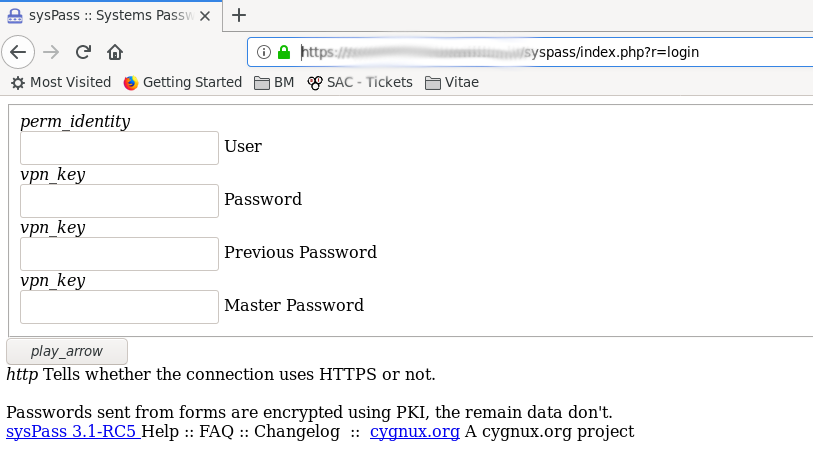
Sorry about my poor english
 brunobva
on 7 Aug 2019
brunobva
on 7 Aug 2019
Any idea?
brunobva
on 8 Aug 2019
@brunobva hello, it seems to be related to an issue loading CSS styles. Please take a look to web server log for any error messages (eg. 404)
Regards
nuxsmin
on 10 Aug 2019
Hey guys sorry if I am repeating this issue but I am getting this issue (image attached).
My NGINX server is different, syspass is at "backend" of it.Could you guys help me with that?
Really appreciate that!
_Sorry about my poor english_
I'm facing the same issue. I have a nginx acting as reverse proxy on my DMZ for all my published web services, and I don't really get why isn't properly redirecting
This is my non-working ngninx configuration
server {
       listen         80;
       server_name    pass.domain.com;
       return         301 https://$server_name$request_uri;
}
server {
# The IP that you forwarded in your router (nginx proxy)
  listen 443 ssl; # managed by Certbot
  ssl_certificate /etc/letsencrypt/live/domain.com/fullchain.pem; # managed by Certbot
  ssl_certificate_key /etc/letsencrypt/live/domain.com/privkey.pem; # managed by Certbot
  include /etc/letsencrypt/options-ssl-nginx.conf; # managed by Certbot
  ssl_dhparam /etc/letsencrypt/ssl-dhparams.pem; # managed by Certbot


error_log /var/log/nginx/pass.domain.com.error.log;
access_log /var/log/nginx/pass.domain.com.access.log;
# Make site accessible from http://localhost/
 server_name pass.domain.com;

# The internal IP of the VM that hosts your Apache config
 set $upstream 192.168.10.33;

 location / {

 proxy_pass_header Authorization;
 proxy_pass http://$upstream;
 proxy_set_header Host $host;
 proxy_set_header X-Real-IP $remote_addr;
 proxy_set_header X-Forwarded-For $proxy_add_x_forwarded_for;
 proxy_http_version 1.1;
 proxy_set_header Connection "";
 proxy_buffering off;
 client_max_body_size 0;
 proxy_read_timeout 36000s;
 proxy_redirect off;
 proxy_ssl_session_reuse off;

 }
}
I can see, as @nuxsmin suggested, it's a CSS issue
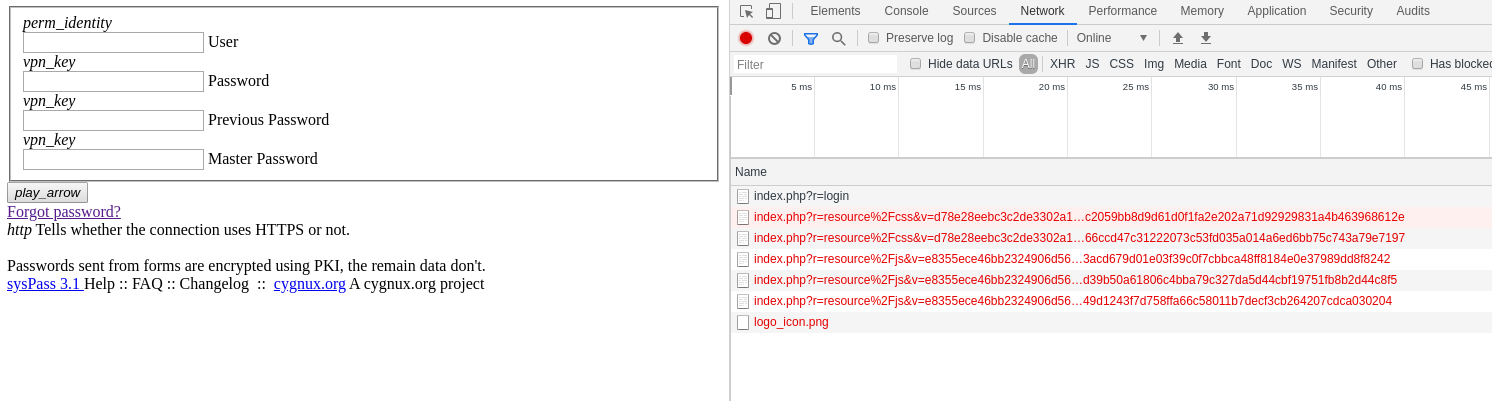
But logs doesn't say anything meaningful
error.log

[Thu May 07 19:46:52.273305 2020] [php7:notice] [pid 541] [client 192.168.10.25:42768] [INFO] [Extensions checked] SP\\Core\\PhpExtensionChecker::checkMandatory
[Thu May 07 19:46:52.274770 2020] [php7:notice] [pid 541] [client 192.168.10.25:42768] [INFO] [Saved icons cache] SP\\Core\\UI\\Theme::saveIcons
[Thu May 07 19:46:52.276987 2020] [php7:notice] [pid 541] [client 192.168.10.25:42768] [INFO] [Loaded actions cache] SP\\Core\\Acl\\Actions::loadCache
Can any experienced nginx user shed some light?
 adocampo
on 7 May 2020
adocampo
on 7 May 2020
@adocampo I think I'm running into the same issue as you. I have Syspass running in a Docker container with Nginx running in another container that acts as a reverse proxy for Syspass as well as some other web apps running in other containers. My Nginx configuration isn't significantly different from yours - I believe yours _should_ work fine.
If you take a look at your Chrome console window (F12 >> Console) and refresh the page, you should see Chrome complaining with something similar to the following:
Mixed Content: The page at 'https://syspass.mydomain.com/index.php?r=install/index' was loaded over HTTPS, but requested an insecure script 'http://syspass.mydomain.com/index.php?r=resource%2Fjs&v=e8355ece46bb2324906d566e5902e576&b=%2Fapp%2Fmodules%2Fweb%2Fthemes%2Fmaterial-blue%2Fjs&f=bootstrap-material-datetimepicker.min.js%2Cmaterial.min.js%2Cmdl-jquery-modal-dialog.min.js%2Capp-theme.min.js&h=a2eb7da346bf22c9c74dd6dd4a9c9ec0bc1a6f11bd1af4b835ba654da8e15c19'. This request has been blocked; the content must be served over HTTPS.
This request never shows up in the web server logs for Nginx because Chrome _itself_ blocked the request. If you look at the source code for the main Syspass page, it probably starts off like this:
<!DOCTYPE html>
--
  | <html lang="en">
  | <head>
  | <title>sysPass :: Systems Password Manager</title>
  | <meta http-equiv="Content-Type" content="text/html; charset=UTF-8"/>
  | <meta name="viewport" content="width=device-width, initial-scale=1.0">
  | <link rel="icon" type="image/png"
  | href="http://syspass.mydomain.com/public/images/logo_icon.png">
  | <link rel="stylesheet" href="http://syspass.mydomain.com/index.php?r=resource%2Fcss&v=d78e28eebc3c2de3302a16573c3a2c0f&h=d1aca18afbf2623b9a918a378d67933597ff71ffefaf5aaad8111b0795d8e92f"/>
  | <link rel="stylesheet" href="http://syspass.mydomain.com/index.php?r=resource%2Fcss&v=d78e28eebc3c2de3302a16573c3a2c0f&b=%2Fapp%2Fmodules%2Fweb%2Fthemes%2Fmaterial-blue%2Fcss&f=fonts.min.css%2Cmaterial.min.css%2Cmaterial-custom.min.css%2Cmdl-datetimepicker.min.css%2Cmdl-jquery-modal-dialog.min.css%2Cselectize-custom.min.css%2Ctoastr.min.css%2Cstyles.min.css%2Csearch-grid.min.css&h=2294bc0161846e14457adeab3e9dcfc0d49b160e8b82a96bb873ab9342d7a7de"/>
You'll notice that the links to the .css files are http instead of https.
What I believe is happening is this:
- Nginx receives HTTPS request for
syspass.mydomain.com. - Nginx proxies request over HTTP to the Docker container running Syspass at
172.xxx.xxx.xxx. - Syspass' PHP code generates the response for this page, and _that page_ contains the
httplinks for the stylesheet resources. - Chrome then parses the HTML response from the original request and attempts to download the CSS resources specified in the page, but it can't because the HTML response contains
httplinks for these resources instead ofhttps.
To me, this is a Syspass bug. The links to the CSS files should _ideally_ be specified as relative paths - that way the browser will be able to load the assets no matter where they come from.
@nuxsmin Apologies for the long comment/report on a closed issue, but I think this issue might need to be re-opened. Is this something that you can look into? I am not a PHP developer and don't have much of an idea how to try to fix this myself. As near as I can tell, the code between lines 18-20 of this file shouldn't generate http links to the stylesheets; ideally they would just generate relative links instead, and then this code won't need to know/care whether or not it's behind an HTTP or HTTPS connection. :)
 9numbernine9
on 13 May 2020
9numbernine9
on 13 May 2020
Hello team,
Same issue as adocampo here when using the Nginx RP as the frontend for https and trying to use syspass on the backend: CSS style loading issue and stuck there.
Thanks in advance for any hint that could point us in the right direction.
 Flheart2k20
on 30 May 2020
Flheart2k20
on 30 May 2020
Hi guys, I finally got it working with this nginx config file
server {
       listen         80;
       server_name    pass.example.com;
       return         301 https://$server_name$request_uri;
}

server {
# The IP that you forwarded in your router (nginx proxy)
  listen 443 ssl; # managed by Certbot
  ssl_certificate /etc/letsencrypt/live/example.com/fullchain.pem; # managed by Certbot
  ssl_certificate_key /etc/letsencrypt/live/example.com/privkey.pem; # managed by Certbot
  include /etc/letsencrypt/options-ssl-nginx.conf; # managed by Certbot
  ssl_dhparam /etc/letsencrypt/ssl-dhparams.pem; # managed by Certbot


error_log /var/log/nginx/pass.example.com.error.log;
access_log /var/log/nginx/pass.example.com.access.log;
# Make site accessible from http://localhost/
 server_name pass.example.com;

# The internal IP of the VM that hosts your Apache config
 set $upstream 192.168.10.33;

 location / {

 proxy_ssl_verify off;
 proxy_pass_header Authorization;
 proxy_pass https://$upstream;
 proxy_set_header Host $host;
 proxy_set_header X-Real-IP $remote_addr;
 proxy_set_header X-Forwarded-For $proxy_add_x_forwarded_for;
 proxy_http_version 1.1;
 proxy_set_header Connection "";
 proxy_buffering off;
 client_max_body_size 0;
 proxy_read_timeout 36000s;
 proxy_redirect off;
 proxy_ssl_session_reuse off;

 }
}
And setting application URL to https and forcing HTTPS as shown

Hope it helps
adocampo
on 31 May 2020
Hi guys, I finally got it working with this nginx config file
server {
       listen         80;
       server_name    pass.example.com;
       return         301 https://$server_name$request_uri;
}

server {
# The IP that you forwarded in your router (nginx proxy)
  listen 443 ssl; # managed by Certbot
  ssl_certificate /etc/letsencrypt/live/example.com/fullchain.pem; # managed by Certbot
  ssl_certificate_key /etc/letsencrypt/live/example.com/privkey.pem; # managed by Certbot
  include /etc/letsencrypt/options-ssl-nginx.conf; # managed by Certbot
  ssl_dhparam /etc/letsencrypt/ssl-dhparams.pem; # managed by Certbot


error_log /var/log/nginx/pass.example.com.error.log;
access_log /var/log/nginx/pass.example.com.access.log;
# Make site accessible from http://localhost/
 server_name pass.example.com;

# The internal IP of the VM that hosts your Apache config
 set $upstream 192.168.10.33;

 location / {

 proxy_ssl_verify off;
 proxy_pass_header Authorization;
 proxy_pass https://$upstream;
 proxy_set_header Host $host;
 proxy_set_header X-Real-IP $remote_addr;
 proxy_set_header X-Forwarded-For $proxy_add_x_forwarded_for;
 proxy_http_version 1.1;
 proxy_set_header Connection "";
 proxy_buffering off;
 client_max_body_size 0;
 proxy_read_timeout 36000s;
 proxy_redirect off;
 proxy_ssl_session_reuse off;

 }
}
And setting application URL to https and forcing HTTPS as shown
Hope it helps
Hello Adocampo, it works indeed with the recommended setup. Many thanks !
Flheart2k20
on 31 May 2020
This issue is still happening, and as identified by @adocampo the root cause is mixing HTTP and HTTPS code.
The quickest workaround:
- Edit:
vim lib/SP/Http/Uri.php
And edit below line:
    /**
     * Uri constructor.
     *
     * @param string $base
     */
    public function __construct(string $base)
    {
        #$this->base = $base;
        $this->base = 'index.php';
    }
 jlegido
on 22 Jan 2021
jlegido
on 22 Jan 2021
Related issues
 supkk
·
7Comments
supkk
·
7Comments
 DCWNZ
·
4Comments
DCWNZ
·
4Comments
 11anthonym
·
4Comments
11anthonym
·
4Comments
 bhu73
·
5Comments
bhu73
·
5Comments
 vmario89
·
5Comments
vmario89
·
5Comments
Most helpful comment
Thank you nuxsmin for quick reply. I'll share here my nginx config here and maybe someone will be able to point me to right direction.