Syspass: LDAP config doesnt save password
Dear @nuxsmin
Just short note that I've installed 3.0 from devel-3.0 branch. Software is masterpiece 🥇 , but there is an issue with LDAP connector ( I've use last version of FreeIPA server) :
When I preconfigure it and run in test all ok.

but when I've try to login with domain password I've receive this error:
Unexpected token in JSON
In command line :
Unable to connect to the LDAP server, referer
/var/www/html/lib/SP/Providers/Auth/Ldap/LdapStd.php(139): SP\Providers\Auth\Ldap\LdapBase->connect()\n#1 /var/www/html/lib/SP/Providers/Auth/Ldap/LdapBase.php(136): SP\Providers\Auth\Ldap\LdapStd->connect()\n#2 /var/www/html/lib/SP/Providers/Auth/Ldap/LdapBase.php(301): SP\Providers\Auth\Ldap\LdapBase->connectAndBind()\n#3 /var/www/html/lib/SP/Providers/Auth/AuthProvider.php(110): SP\Providers\Auth\Ldap\LdapBase->authenticate(Object(SP\DataModel\UserLoginData))\n#4 /var/www/html/lib/SP/Providers/Auth/AuthProvider.php(78): SP\Providers\Auth\AuthProvider->authLdap()\n#5 /var/www/html/lib/SP/Services/Auth/LoginService.php(154): SP\Providers\Auth\AuthProvider->doAuth(Object(SP\DataModel\UserLoginData))\n#6 /var/www/html/app/modules/web/Controllers/LoginController.php(63): SP\Services\Auth\LoginService->doLogin()\n#7 [internal function]: SP\Modules\Web\Controllers\LoginController->loginAction()\n#8 /var/www/html/lib/SP/Bootstrap.php(239): call_user_func_array(Array, Array)\n#9 [internal function]: SP\Bootstrap->SP\{closure}(Object(Klein\Request), Object(Klein\Response), Object(Klein\ServiceProvider), Object(Klein\App), Object(Klein\Klein), Object(Klein\DataCollection\RouteCollection), Array)\n#10 /var/www/html/vendor/klein/klein/src/Klein/Klein.php(886): call_user_func(Object(Closure), Object(Klein\Request), Object(Klein\Response), Object(Klein\ServiceProvider), Object(Klein\App), Object(Klein\Klein), Object(Klein\DataCollection\RouteCollection), Array)\n#11 /var/www/html/vendor/klein/klein/src/Klein/Klein.php(588): Klein\Klein->handleRouteCallback(Object(Klein\Route), Object(Klein\DataCollection\RouteCollection), Array)\n#12 /var/www/html/lib/SP/Bootstrap.php(446): Klein\Klein->dispatch()\n#13 /var/www/html/lib/Base.php(74): SP\Bootstrap::run(Object(DI\Container))\n#14 /var/www/html/index.php(28): require('/var/www/html/l...')\n#15 {main}, referer:
Then I found that saved password for this LDAP connection when I push "copy to clipboard is" * and not my password. ( IN xml file password stored correctly).
I look forward to hearing from you,
 nikitashestakovs
All 60 comments
Hi @nikitashestakovs, I'm using LDAP functions and I'll try to help you. About this password you are saying it is not saved, you can see the real password saved in the config file on app/config/config.xml. It appears that in the application it just shows * probably for security reasons. You can see in the app/modules/web/themes/material-blue/views/config/ldap.inc on line 136 this:
<input id="ldap_bindpass" name="ldap_bindpass" type="password"
class="mdl-textfield__input passwordfield__input mdl-color-text--indigo-400"
maxlength="128" value="<?php echo $configData->getLdapBindPass() ? '***' : ''; ?>"/>
So if you have a password it will always show * there, but in the config file should have the correct password.
What I can say about LDAP that I had some problems is that maybe password with some special characters (like '$') aren't saved correctly, try to edit the password in the config file on the <ldapBindPass> </ldapBindPass>
Also, most of the LDAP problems are with the correct "Search base". Try with a global search base like "CN=Users,DC=company,DC=com"; on "Bind User" put only the user like "username.lastname"; on "Group" field let it blank. Don't forget to insert the password again and use the CHECK button. If this works then you just need to correct your group and search base for what you want.
 Fizard
on 7 Jun 2018
Fizard
on 7 Jun 2018
I am seeing this as well. Further reason to believe something is up is that I will type the password in, check it and it works, I then save the config, the password changes back to "*" and I check again and it fails, I then once again type the password out and check and it works again. The only special character I am using is a '!', I will try a simple text password and update. I've checked in the config.xml file as well and everything including the password is correct there.
 Titus1024
on 18 Jun 2018
Titus1024
on 18 Jun 2018
Tried it with a simple 'Password1' password for testing and it gives me the same results. Unsure if this is related but when I check the config I also try importing LDAP users and I get the error 'Invalid Action' and there doesn't appear to be any related events in the viewer from that error or within the sysPass directories. I get the same outcome after saving the config as well.
Edit: I am on version 3.0-beta (300.18040302)
Titus1024
on 18 Jun 2018
Hello, the *** in the LDAP password box is a security behavior, since you won't be able to view the current password once it has been set. Be aware that if you try to save a password that matches *** it won't be saved since it's the fake password used to fill in the form.
Regarding the special characters, they're wrongly stripped out from the password, I'll fix it shortly.
Regards
 nuxsmin
on 18 Jun 2018
nuxsmin
on 18 Jun 2018
@Titus1024 it seems a wrong behavior on config form. Please let me find out what could be wrong.
nuxsmin
on 18 Jun 2018
Thanks @nuxsmin! If you need any additional information just let me know. Big fan of the platform!
Titus1024
on 18 Jun 2018
@nuxsmin sorry for some delay, I've double ckeck it with "easy password" only numbers - didn't help.
I can provide any information for debug, if you need it.
 bigturlte
on 19 Jun 2018
bigturlte
on 19 Jun 2018
Hi everyone! Unfortunately I'm facing exactly the same issue. Is there any way to hardcode password or add more traces to debug it?
 myrgy
on 19 Jun 2018
myrgy
on 19 Jun 2018
Hello everyone, it should be solved in the latest commit. It was a security token that wasn't sent in the request.
Thanks for the feedback!
nuxsmin
on 20 Jun 2018
Hate to be the bearer of bad news but I am still experiencing the same issue after using the most recent branch. Made sure to diff the files to confirm I was on the updated version as well.
Titus1024
on 20 Jun 2018
Has anyone been able to get this working on their instance of sysPass? Just want to make sure I am not the only one.
Titus1024
on 25 Jun 2018
@Titus1024 could you check out the sk parameter in the browser network console?. It should be sent after clicking on save button.
nuxsmin
on 25 Jun 2018
I am seeing sk:set and then what looks like a secure string. I then click the check button and I get sk:get with nothing after it.
Titus1024
on 25 Jun 2018
@nuxsmin Double checked - your fix didn't help
bigturlte
on 26 Jun 2018
@bigturlte @Titus1024 sorry, but I'm in a mess with this issue since I don't know what is the current issue, that is: Is it a password saving issue or is it a checking for objects issue instead?
Regards
nuxsmin
on 26 Jun 2018
Any luck with this @nuxsmin? Also is there anything that we can do to help? Provide logs, try things etc.
Titus1024
on 29 Jun 2018
Double checked, the password saved in my config.xml is the one I entered into the GUI.
Also, my syspass server can talk to the LDAP server (tried telnet on port 389).
By any chance, I do have spaces in my distinguished names, could this be an issue ?
 deajan
on 10 Jul 2018
deajan
on 10 Jul 2018
I can also confirm that the password saved in config.xml matches the one entered in the GUI.
Titus1024
on 10 Jul 2018
@deajan did the LDAP check work?. Do you mean that after saving the settings it didn't connect to LDAP anymore?
If I'm wrong, please let me know what's the facing issue.
Regards
nuxsmin
on 10 Jul 2018
@nuxsmin Nope, the LDAP check did not work (last log in #987 corresponds to the check), I got "Connection Error (bind)".
I'm not sure if it initially worked after upgrading, since my ldap server address got truncated.
deajan
on 10 Jul 2018
@deajan Could you check out the sysPass eventlog after performing an LDAP connection checking?. It should log some info about the Connection Error (bind) message.
nuxsmin
on 11 Jul 2018
@nuxsmin Posted error logs in #987 corresponding to Connection Error (bind)
But here's another problem, my sysPass eventlog does not grow, it stays at the last action after upgrading from v2, so I don't know what the eventlog entry corresponding to the error is.
I actually tried to empty my eventlog, which succeed but no new entries appear. Indeed eventlog is enabled. I also tried enabling syslog, but I don't find any entry in /var/log/messages neither.
I continued testing, having an alert for eventID 4740, I can confirm that my ldap bind user gets locked out because of bogus credentials (badPasswordTime attribute gets date from last bind try).
I can confirm that my ldap bind user works since sysPass v2 ldap bind works, from same server.
I did a check by adding the following line in LdapBase.php line 232
        $dn = $bindDn ?: $this->ldapParams->getBindDn();
        $pass = $bindPass ?: $this->ldapParams->getBindPass();

        $pass = 'myLdapBindPassword';
This worked so I'm pretty sure it's password related.
deajan
on 11 Jul 2018
@deajan
But here's another problem, my sysPass eventlog does not grow, it stays at the last action after upgrading from v2, so I don't know what the eventlog entry corresponding to the error is.
The new event log has an event based behaviour, so you would need to select which events do you want to be logged in the config view.
This worked so I'm pretty sure it's password related.
Is the correct password set in config.xml file?
nuxsmin
on 11 Jul 2018
@deajan Could you check out the sysPass eventlog after performing an LDAP connection checking?. It should log some info about the Connection Error (bind) message.
@nuxsmin Assuming everyone is experiencing the same issue, here is my event log for the Connection Error (BIND)
Connection error (BIND)
LDAP ERROR : Can't contact LDAP server (-1)
LDAP DN : CN=ldap_user,OU=Standard,OU=Accounts,DC=weccusa,DC=local
This is using the same settings as my 2.x version of sysPass which works properly, it is only in 3.x of sysPass that this issue appears to exist.
Titus1024
on 11 Jul 2018
@nuxsmin I do confirm that my LDAP bind password is correct in config.xml (also, does not contain special characters or spaces)
@Titus1024 I don't think this is the same problem, since my Connection Error (bind) triggers eventID4740 which means that sysPass reaches my AD server
deajan
on 11 Jul 2018
The new event log has an event based behaviour, so you would need to select which events do you want to be logged in the config view.
@nuxsmin Okay, enabled all eventlog entries (enable them all by default maybe ?)
I do have entries new, but none about the Connection Error (bind). Yes, 'exception' is enabled for eventlog :)
deajan
on 11 Jul 2018
@deajan it seems that LDAP events aren't listed in the config. Please add a new entry in config.xml file including ldap. errors (like the other ones saved).
I will allow to add entries manually, so you could use the preset and new ones.
nuxsmin
on 11 Jul 2018
@nuxsmin Just as I thought:
Erreur de connexion (BIND)
LDAP ERROR : Invalid credentials (49)
LDAP DN : someDN
Btw, shall I open another issue for the missing .ldap for eventlog ?
deajan
on 11 Jul 2018
@Titus1024 btw, Can you telnet your LDAP server from your syspass server on port 389? Also, did you disable selinux / apparmor for tests ?
deajan
on 11 Jul 2018
@deajan
Just as I thought:
Credentials are right in config.xml file, aren't them?
Btw, shall I open another issue for the missing .ldap for eventlog ?
Nevermind, I'll fix this shortly
nuxsmin
on 11 Jul 2018
@nuxsmin
I do confirm that my LDAP bind password is correct in config.xml (also, does not contain special characters or spaces)
I double checked by diffing config.xml from sysPass v2 (where LDAP works) and sysPass v3, it's the same password.
deajan
on 11 Jul 2018
@deajan sorry. This is really weird, since the demo site is working fine against IPA demo server (password "Secret123"). Please, let me find out what could be causing this issue.
Thanks for the feedback and testing!
nuxsmin
on 11 Jul 2018
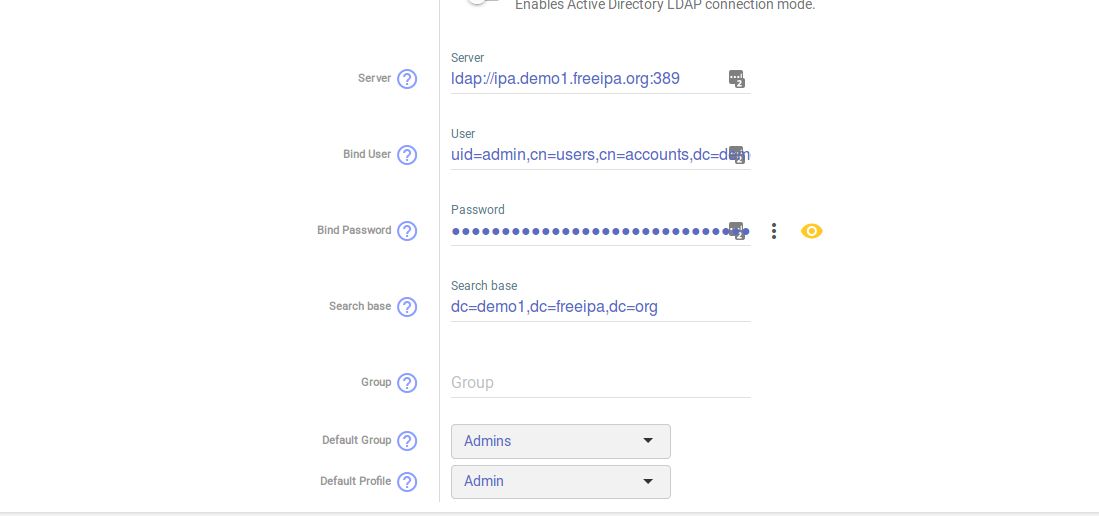

nuxsmin
on 11 Jul 2018
I actually tried to write $pass to stdout / file on LdapBase.php to be sure it is passed right, but this only gave JSON errors.
Could you give me a log function syntax, so I can write the password to syspass.log and see if it's well decrypted ?
deajan
on 11 Jul 2018
@Titus1024 btw, Can you telnet your LDAP server from your syspass server on port 389? Also, did you disable selinux / apparmor for tests ?
@deajan I can telnet to it yes, I've excluded sysPass from selinux as well.
Titus1024
on 11 Jul 2018
I can telnet to it yes, I've excluded sysPass from selinux as well.
@Titus1024 Fair enough, here are some pretty basic ideas I can think of:
Do you see any incomming connections with netstat on your LDAP server ?
Or do you see any outgoing connections with netstat on your sysPass server ?
Also, there's yesterday's fix for truncated ldap server name, does it apply to you ? I mean is your ldap server right in the interface ?
Cannot think of anything else, perhaps check that php-ldap is installed. Maybe switch to a newer php version (via SCL in CentOS) just to be sure...
deajan
on 11 Jul 2018
@deajan
Could you give me a log function syntax, so I can write the password to syspass.log and see if it's well decrypted ?
Sure...(lib/SP/Providers/Auth/Ldap/LdapBase.php)

It will be written to syspass.log file
nuxsmin
on 11 Jul 2018
@Titus1024 are you connecting to LDAP server through SSL?
nuxsmin
on 11 Jul 2018
@nuxsmin Got it !!!!
I added the following at line 234
        $dn = $bindDn ?: $this->ldapParams->getBindDn();
        $pass = $bindPass ?: $this->ldapParams->getBindPass();

        debugLog($dn);
        debugLog($pass);
Here's litterally what I got.
2018-07-11 23:16:10 - Loaded actions cache
2018-07-11 23:16:10 - No RSA encrypted data from request
2018-07-11 23:16:10 - CN=SysPass Active Directory Reader,CN=Users,DC=domain,DC=local
2018-07-11 23:16:10 - ***
2018-07-11 23:16:10 - Erreur de connexion (BIND)
So the real password given to the bind function is '*' (no I did not replace it in copy paste here)
deajan
on 11 Jul 2018
Thanks @deajan. I do see an established connection on 389 on my DC. Based off your last post it looks like it may be password related in the end though.
Titus1024
on 11 Jul 2018
@deajan Which was the action performed?, Login or checking for objects?
nuxsmin
on 11 Jul 2018
@nuxsmin Action was checking ldap settings. Checking import or importing also happens to give '*' password.
But when logging in, I get the right password in the logs.
deajan
on 11 Jul 2018
@nuxsmin Action was checking ldap settings. Checking import or importing also happens to give '*' password.
That is the right behaviour (security related), since you need to set the LDAP password when either checking or importing. The real -saved- password will only be used when logging in.
nuxsmin
on 11 Jul 2018
@nuxsmin Should the real password not be used when checking the LDAP configuration? I don't understand how it could confirm/verify the configuration if it's using the "*" password.
Titus1024
on 11 Jul 2018
What the actual f*? This is new to v3 then.
You mean every time I try to check LDAP binding or import an account, I'll have to retype the ldap bind password ?
Okay, then please have a big red warning about this on the ldap settings page since this is really not intuitive (and gave me headaches :()
deajan
on 11 Jul 2018
Also, group membership checks don't seem to work.
In sysPass v2 I get to see about 50 accounts, in sysPass v3 I get 500 accounts (computer accounts, groups... actually all kind of ldap objects I think).
Both syspasses have a group membership configured (ie user should be member of CN=SysPassGrp,OU=Groupes,DC=domain,DC=local) in order to appear in ldap search.
Huh, nevermind, ldap binding shows 500 accounts, importing test shows 50 which is accurate.
The UI just shows the filter in the binding settings where it is not used, whereas it is used in the importing section.
deajan
on 11 Jul 2018
@Titus1024
@nuxsmin Should the real password not be used when checking the LDAP configuration? I don't understand how it could confirm/verify the configuration if it's using the "*" password.
No, you would need to set -retype- the real password for importing/checking since it won't use the saved one because security reasons.
@deajan
What the actual f*? This is new to v3 then.
You mean every time I try to check LDAP binding or import an account, I'll have to retype the ldap bind password ?
Okay, then please have a big red warning about this on the ldap settings page since this is really not intuitive.
Yes, it's new in v3 and I agree that a notice should be added to avoid misunderstandings.
nuxsmin
on 11 Jul 2018
I see. @nuxsmin thanks.
Titus1024
on 11 Jul 2018
@Titus1024 Is your ldap problem still existing, nowing the password retype thing ? Also, is your ldap server uri complete in the gui ?
deajan
on 11 Jul 2018
@deajan
Group membership is being taken into account when checking for LDAP objects:
nuxsmin
on 11 Jul 2018
It is yes, BIND connection error, says it can't contact LDAP server. I'm heading out for the day but I'll do some more trial and error tomorrow. Thanks @deajan.
Titus1024
on 11 Jul 2018
@Titus1024 are you using Active Directory?, Did you set an IP address or hostname?
nuxsmin
on 11 Jul 2018
@Titus1024 Hope you'll find the fix :) Keep us informed.
@nuxsmin Yes group membership is indeed taken in account when trying the "check" button under "import settings". But when trying the check button under ldap bind settings, it's not.
I don't think this is a unusual behavior, it's just strange that the filter is in the UI section that doesn't use it.
deajan
on 11 Jul 2018
@nuxsmin I am using Active Directory yes, I've tried the hostname and IP.
Titus1024
on 11 Jul 2018
@nuxsmin Titus1024 said the following
I do see an established connection on 389 on my DC. Based off your last post it looks like it may be password related in the end though.
As of my understandings, the DC is definitly reached. In my environment, I use a 2012 R2 RODC server.
What's yours Titus1024 ?
If you happen to use SSL via ldaps, you should check if your certificate is recognized by the CA root certificates of your sysPass server.
If not using SSL, I can only think of a wireshark capture. Willing to provide a wireshark capture from my working environment in order to compare.
deajan
on 12 Jul 2018
@Titus1024 so it could be an SSL issue, since ADS requires binding on a secure connection. Be aware that setting a hostname will trigger a random server selection based on _msdcs DNS zone records. This behavior has been implemented since v2
nuxsmin
on 12 Jul 2018
@nuxsmin Titus1024 said the following
Hmm, sorry, many tasks at once...
nuxsmin
on 12 Jul 2018
As of my understandings, the DC is definitly reached. In my environment, I use a 2012 R2 RODC server.
What's yours Titus1024 ?
If you happen to use SSL via ldaps, you should check if your certificate is recognized by the CA root certificates of your sysPass server.
If not using SSL, I can only think of a wireshark capture. Willing to provide a wireshark capture from my working environment in order to compare.
@deajan I am using 2008R2. Not using ldaps.
I will continue to troubleshoot and update with what the cause is if I find it.
Titus1024
on 12 Jul 2018
Sorry to insist, but is there a quick note now on the LDAP password that says it isn't saved and has to be entered everytime ?
deajan
on 13 Sep 2018
@deajan definitely not, I'll add a side note about this behavior ;)
nuxsmin
on 13 Sep 2018
Related issues
 DCWNZ
·
4Comments
DCWNZ
·
4Comments
 matejzero
·
5Comments
matejzero
·
5Comments
 sdutina
·
6Comments
sdutina
·
6Comments
 RolfWojtech
·
5Comments
RolfWojtech
·
5Comments
 GGOUSSEAUD
·
6Comments
GGOUSSEAUD
·
6Comments
Most helpful comment
@bigturlte @Titus1024 sorry, but I'm in a mess with this issue since I don't know what is the current issue, that is: Is it a password saving issue or is it a checking for objects issue instead?
Regards