Synergy-core: Auto config selects the wrong IP address
I'd like to use autoconfiguration, but I have multiple interfaces on my PC (server). One interface is a physical network, and the other is a VM network that is internal-only for virtualbox instances.
After the upgrade to 1.6.2, autoconfiguration advertises both addresses, and my mac (client) only tries to connect to the internal-only network, which fails.
I suspect that there is a configuration option to fix this, but I have only used the interactive configuration so far, and I think it should be possible to mask out an interface via the interactive configuration.
 pcn
pcn
All 75 comments
This is an issue for me as well. It was working fine before a logout/login and now it's picking up VirtualBox's IP even though it's not running.
 RavynX
on 16 Jan 2015
RavynX
on 16 Jan 2015
Also facing the same issue. Both virtualbox and vpn IP addresses get chosen over the IP addresses on the local ethernet devices. An option to choose which interface/ip address to bind to in the GUI would solve this issue. It would be nice to e.g. just click the IP address of the interface you want to use, and then it becomes the active interface in bold.
 furlongm
on 11 Mar 2015
furlongm
on 11 Mar 2015
Just reproduced it with version 1.7.2.
Any word on this?
I would hate to have to enter ip addresses or even server name on my clients...
 gildas
on 19 May 2015
gildas
on 19 May 2015
Same issue here.....
Synergy tries to connect to the IP address of the computer which is running the service as a client
 sidewinder94
on 17 Jul 2015
sidewinder94
on 17 Jul 2015
Same problem here. The server listens on the local IP for VMWare Player and not the desired network which is shared with client computers. You should add an option to specify with network/IP the server should bind to: see #3566
 mindcreations
on 18 Aug 2015
mindcreations
on 18 Aug 2015
same problem +1
 cosmoslx
on 11 Dec 2015
cosmoslx
on 11 Dec 2015
same problem +1, Is there a work around?
 BGraco
on 18 Dec 2015
BGraco
on 18 Dec 2015
I have the same problem, it makes synergy unusable!!
 toshirov
on 29 Dec 2015
toshirov
on 29 Dec 2015
same here. Only way to override the auto IP (even if I enter the server IP address!) if I disconnect the client from Wi-Fi and then it will use the ethernet cable to connect.
 FineCutBodies
on 12 Apr 2016
FineCutBodies
on 12 Apr 2016
+1
Reported here: http://superuser.com/questions/1064306/how-can-i-force-the-synergy-server-to-use-a-specific-ip-address
And here: http://synergy-project.org/forum/viewtopic.php?f=19&t=1369&p=4348#p4348
 oucil
on 12 Apr 2016
oucil
on 12 Apr 2016
+1 This is an annoying bug for anyone using virtualbox users.
 ghost
on 20 Apr 2016
ghost
on 20 Apr 2016
+1
 jigawot
on 4 May 2016
jigawot
on 4 May 2016
+1
 mteutelink
on 13 May 2016
mteutelink
on 13 May 2016
+1. Running Synergy server on a Mac (10.11.3), Synergy 1.7.4, connected to both WiFi and Ethernet. Clients are PC and/or Linux. Typically uses Ethernet (desired) but sometimes starts up using WiFi, causing it to lose connection with client.
 mrunyon
on 18 May 2016
mrunyon
on 18 May 2016
Note for everyone simply writing "+1" in this thread.... There is a button to the right with a + and a smiley. Use that to do +1 (thumbs up) on someon elses comment instead of spamming.
 JoakimSoderberg
on 19 May 2016
JoakimSoderberg
on 19 May 2016
@JoakimSoderberg If I'm not mistaken, using the smiley doesn't make you a participant, and the more "participants" the thread has, the more attention this issue gets. It's common practice to +1 a thread to sign the petition so to speak and at least for my sake, I don't mind seeing that there are lots of other people in the same boat I am and that the issue is getting bumped.
oucil
on 19 May 2016
@oucil sounds weird if that is the case. The entire reason github added this was to get rid of all "+1" comments as I understand.... also if you subscribe to notifications in the right pane I guess you become a participant?
JoakimSoderberg
on 19 May 2016
And as this bug was first reported a year and a half ago (and prevents auto config working), the more attention it can get, the better 👍
 Endareth
on 20 Jun 2016
Endareth
on 20 Jun 2016
For those experiencing this limitation / bug, there's a temporary workaround that I just tested and which worked perfectly (at least on Win8/Win10). Before starting the Synergy app, open your network adapter list in Windows (right click Start Menu icon, select "Network Connections"), and disable any adapter you don't want used by Synergy (right click adapter, select "Disable"). Start Synergy. Go back and enable the previously disabled clients.
Would still REALLY like this issue dealt with, @nbolton @XinyuHou have you guys considered a simple fix like allowing us to specify a preferred MAC in the config file? This issue doesn't seem like one that a typical user might face, in fact, you might assume that only power users would encounter it... so forcing us to set a manual config option in the config file is not out of our comfort zone. We don't need anything fancy. Please and thanks.
oucil
on 20 Jun 2016
I would like to donate more to synergy, but I have so many issues using it between my Mac and PC at work.
Having to copy and paste text items multiple times, or having to render text as plain text to copy URLs between computers is quite a pain. But I look past that--however, this issue is preventing me from entering keyboard text into my Windows client and from getting work done efficiently. Please resolve this issue--I have donated a tiny bit more to get this issue some attention.
Binding to an IP sounds critical for a network-app, especially one that runs on Linux.
 mknawabi
on 22 Jun 2016
mknawabi
on 22 Jun 2016
Seems no one is working on this for a long time. It seems to be a simple option to give to allow the users to select IP address manually in advanced config
 vijayviji
on 8 Sep 2016
vijayviji
on 8 Sep 2016
This is likely going to be a 1.9.x change, as the remainder of the 1.8.x lifecycle will be fixing core functionality.
You can currently bind to a particular IP address by typing a local IP in to the poorly labelled "Interface" field in the settings window. This should work for both client and server configurations.
In the future we will likely add support for real interface names (e.g. "eth0" on Linux, and adapater names on Windows), via some kind of dropdown or priority list. This will only affect client side though.
 nlyan
on 9 Sep 2016
nlyan
on 9 Sep 2016
I imagine that you could make a small exception and fix just the field label if we've always been able to do this and this is the first we're hearing about it ;) This thread is coming up on 3 yrs old now after all.
oucil
on 9 Sep 2016
@nlyan @nbolton Please at least add a label next to the list of IPs on how to set this explicitly until 1.9
JoakimSoderberg
on 14 Nov 2016
If your on Mac, on server just go to system preferences/network/ethernet, then select "Using DHCP with manual address" and write the ip that was automatically given while using only DHCP.
This worked for me, Cheers!
 Dimaue
on 17 Dec 2016
Dimaue
on 17 Dec 2016
@Dimaue That's good advice. However, the purpose of this issue is to encourage the developers to improve synergy so that the extra steps aren't necessary. A selection for which interface's IP address to use would solve this.
pcn
on 17 Dec 2016
@pcn, We should be able to select several interfaces in that case. The scenario would be you have a docking station at work and at home you use a dongle or the RJ port of your laptop. (Or you have a USB dongle at work and one at home). In both situations you use Synergy and your laptop is the server.
Or maybe we should select all the invalid interfaces as to not be used.
I don't know for you, but these "not usable" interfaces come from my virtual switches et al. for Parallels, Virtualbox, Hyper-V, etc.
There is also the Wifi I am not a bit fan of using. I usually do not use Synergy in a meeting room or "on the go", only at a desk, which means a dongle, a docking station, etc. So, I would tend to remove the Wifi interface from that "usable" list. Other situations may vary.
gildas
on 20 Dec 2016
+1 BUMP ^^^
Same issue here. I have 3 IPs showing on my Mac Synergy settings (the server) and my windows Synergy (the client) is trying to connect to IP 3 of 3 (the local macOS VirtualBox interface)... ignoring my default en0 iface.
 michaeltarleton
on 14 Jan 2017
michaeltarleton
on 14 Jan 2017
The server should allow the user to choose which IP it uses to auto-config clients.
 Type1J
on 26 Jan 2017
Type1J
on 26 Jan 2017
Same issue here. I was assigned a new ip by the DHCP and my configuration became outdated
 castroflavio
on 5 Feb 2017
castroflavio
on 5 Feb 2017
+1
 volcaos
on 8 Feb 2017
volcaos
on 8 Feb 2017
+1
 EmmanVazz
on 16 Feb 2017
EmmanVazz
on 16 Feb 2017
I went to Mouse without Border because of this issue. Mouse without borders started giving me cursor issues and now I just reinstalled Synergy in hopes it would work. I am still having this issue from this thread. I have Hyper-V installed on my host machine which creates mulitple IP addresses. Synergy is auto choosing a private IP address which does not allow the client to connect. Why is this still an issue?????
 mwalters12
on 16 Mar 2017
mwalters12
on 16 Mar 2017
+1 auto config always selects the wrong IP address for the server on my machines, selecting either one of my NAS only ports, or more commonly, an internal bridge for VMs.
 mloftis
on 27 Mar 2017
mloftis
on 27 Mar 2017
Got an email about my unhappy purchase haha, this sole purpose of this 2 YEAR old bug is exactly why I do not use or recommend Synergy to my co workers until this is fixed. I have multiple adapters and it never ever picks the correct interface nor can I even select the appropriate interface (windows) and auto config is a joke.
Please fix this bug so I can actually use what I paid for.
 paintballer4lfe
on 27 Mar 2017
paintballer4lfe
on 27 Mar 2017
I have this same bug as well on macOS 10.12.3 as a host. I'm using a rMBP with both ethernet and WiFi. Even if WiFi is off, the Synergy server wants to use the local IP for the WiFi adapter, not the connected and in-use ethernet adapter. As such, I have to remember to enable WiFi when I'm docked for all my other home computers to talk to the Synergy server.
Very annoying.
I also got here via the "Are you unhappy with the purchase" e-mail from Synergy. I wouldn't say I'm unhappy, but this bug took me some time to figure out, and I'm actually quite stunned that it's as widespread as it is - dating back to December 2014?? Oh boy.
 hoserama99
on 27 Mar 2017
hoserama99
on 27 Mar 2017
ISTR the bug dates back further actually. As in it's always been there from the beginning...my Pro license dates back to early 2014 and it was a problem then, and ISTR it being a problem of mine before I went Pro. I'm just really surprised it's STILL here as it really only takes a little effort to add configuration options for it, a text box or drop down populated with what shows in the list it already paints!
mloftis
on 27 Mar 2017
I too got the "Are you unhappy with Synergy?" email..
I have stopped using Synergy because of this bug. It keeps binding to the wrong interface and IP. All I need is a pull down menu to select which IP address to listen on (Server) and that would fix it.
 danielfparker
on 27 Mar 2017
danielfparker
on 27 Mar 2017
Love your product, have used it for years.
One comment, it seems that Synergy sometimes gets confused as to which IP address to bind to when running VMWare with the VMs networking in ‘Bridged' mode.
quitting VMWare (and thus not having those IP addresses available) until after Synergy connects solves the problem, but that can be problematic in real-world scenarios.
Hope this is helpful to you.
 tonyfader
on 27 Mar 2017
tonyfader
on 27 Mar 2017
This is still a big problem, I agree with the others that having the option to manually choose the IP to isolate the server on would be an easy solution. Also, I didn't have any luck disabling or uninstalling the other network connections. Synergy picked up on them even when they had been cleaned from my network settings.

EDIT
I think I found a short-term fix for the multiple IP issue. I did a local network bridge with "Hamachi" (it's a network bridge solution commonly used for 'local multiplayer' gaming across the internet). If you start a hamachi server network on the central synergy computer [IE. the synergy server], and then sign in all of your synergy clients into the server as well (a maximum of 5 total connections with the free version), then all of the clients should connect perfectly. If you need to specify a server IP in the client config, use the IPV4 of the Hamachi server bridge network.

Do note, though, depending on your setup, Hamachi will increase latency by as much as 200ms (only in extreme situations will you see latency this high).
 Ulincsys
on 28 Mar 2017
Ulincsys
on 28 Mar 2017
+1
 joeljons
on 28 Mar 2017
joeljons
on 28 Mar 2017
The client code should look like this:
- Get all the IP addresses of the server by its name (DNS lookup).
- Try connect to all these IP addresses (round robin or parallel).
- Once be able to connect through one IP address, stop connecting to other IP.
Since there is at least one IP address lead to the real synergy server, you can guarantee the client can connect to the server. Those IPs of VM will not affect anything since we are dropping the connection due to unable to connect through them.
This solution is especially helpful in DHCP case like most company laptops running VM since you don't need to find the IP address on your server and enter IP address in your client every time.
 frankzdd
on 28 Mar 2017
frankzdd
on 28 Mar 2017
Used synergy successfully years ago. Problems now with new laptop, purchased Synergy Pro to go between Win10 laptop and Win8.1 machine. Was giving problems for weeks, even tried installing a Cisco switch between computers. Flaky connections, sometimes worked. Stop, restart service - 4 or 5 times, then maybe worked.
Turns out, it would connect to laptop as the server when the wifi adapter was active, but not the Plugable ethernet (USB-C Docking Station). Tried another plugable adapter (USB-3 to ethernet) - nope, wouldn't recognize. Did the disable thing recommended here as well.
The "Interface" manual IP setting didn't work either, as Synergy won't bind to the ethernet adapters.
Enough fussing around - moving on...
Dislike moving to the darkside, but Mouse without Borders is working fine.
 ederekGitHub
on 3 Apr 2017
ederekGitHub
on 3 Apr 2017
Same issue here. Seems that this issue persists since 2 years ago... Why isn't this fixed;o
 IncognitoCore
on 22 Apr 2017
IncognitoCore
on 22 Apr 2017
Came here to find out why I couldn't bind to the interface I needed, only to discover this issue. Please address this.
 plongitudes
on 2 May 2017
plongitudes
on 2 May 2017
Is there anyway to get a response back from Symless team? I tried Twitter, nothing. I could really use this with my PC/Mac setup at work, but this issue stops me from using your product that I paid for.
mwalters12
on 4 May 2017
+1
 willbo4r
on 3 Jun 2017
willbo4r
on 3 Jun 2017
This is really annoying, especially because I payed for the software. I have to deactivate all interfaces (VMware, VPNs), otherwise I cannot use Synergy. I hope this will be fixed soon, shouldn't be really a big thing, just add a field to define the server IP address, like in the client configuration.
 samuelba
on 10 Jun 2017
samuelba
on 10 Jun 2017
+1
 Brianchat
on 18 Jun 2017
Brianchat
on 18 Jun 2017
I'm using virtualbox and synergy server uses the wrong ip address. To not being able to change which interface is to be used is not an acceptable for a commercial software solution.
 frog75
on 23 Jun 2017
frog75
on 23 Jun 2017
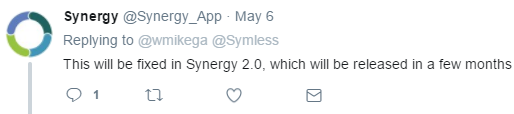
Here is the response I got back form Synergy on Twitter when asking about this specific issue.
mwalters12
on 23 Jun 2017
+1. I paid for the software, I don't want to change any settings in my computer or find a workaround. I want an option where I can just type in the ip address of the server. I don't think this is complicated to implement, I believe the auto-configuration is already picking in the ip address that is considered as the main ip address of the network and send this ip address in the application flow to start the services. So just add the text-field for the ip address in the main interface or give my money back.
 vdegenne
on 30 Jun 2017
vdegenne
on 30 Jun 2017
@vdegenne Could you pls use the upvote button? I get notifications all the time because 200 frakkin people can't just use the upvote feature. So fckin annoying..
ghost
on 30 Jun 2017
you get notifications bc this is a damn buggy final product. We all get notifications!
willbo4r
on 30 Jun 2017
I'd like to home in on the relevant code.
Searched for auto and I see these results:
https://github.com/symless/synergy/search?p=1&q=auto&type=&utf8=%E2%9C%93
None of these results jump out to me as relevant for the Server's automatic configuration IP selection, which is indicated as the bold font IP address in the Qt ui under "IP addresses: ". Searching on the that term I come up with this Qt xml and the subsequent field of interest, m_pLabelIpAddresses:
https://github.com/symless/synergy/blob/master/src/gui/res/MainWindowBase.ui#L163
The field is never explicitly mentioned anywhere else in the codebase.
In the xml MainWindowBase.ui file we can see that we are working with this hierarchy of elements:
 <widget class="QMainWindow" name="MainWindowBase">
  <widget class="QWidget" name="centralwidget">
   <layout class="QVBoxLayout" name="verticalLayout_2">
   ...
    <item>
     <widget class="QGroupBox" name="m_pGroupServer">
      <layout class="QVBoxLayout">
       <item>
        <layout class="QFormLayout" name="formLayout">
         <item row="0" column="0">
          <widget class="QLabel" name="label_2">
           <property name="text">
            <string>IP addresses:</string>
           </property>
          </widget>
         </item>
         <item row="0" column="1">
          <widget class="QLabel" name="m_pLabelIpAddresses">
           <property name="text">
            <string notr="true"/>
           </property>
          </widget>
         </item>
        </layout>
None of those higher level elements are mentioned except for the MainWindowBase in MainWindow.h:
https://github.com/symless/synergy/blob/master/src/gui/src/MainWindow.h#L63
QString getIPAddresses(); looks interesting. Here we see where it bolds the text for IPs matching "192.168.*":
https://github.com/symless/synergy/blob/master/src/gui/src/MainWindow.cpp#L972
and it is called only once in the code, here:
https://github.com/symless/synergy/blob/master/src/gui/src/MainWindow.cpp#L116
Which looks strangely familiar: m_pLabelIpAddresses->setText(getIPAddresses()); And now I get it. GitHub search does not match substrings separated by ->. Charming.
All right, so we have the general vicinity of the code located. I don't have a sane dev box at the moment, so this is about as far as I'd like to go before actually compiling and hacking through this. First step would be to hardwire an appropriate IP address and ensure at least that works. Then play around with the Qt ui elements and do the elegant fix for a patch.
Cheers,
Joe
 jhgorse
on 5 Jul 2017
jhgorse
on 5 Jul 2017
It has been a couple of months now and yet no release? Really wish this was fixed.
 meanbunny
on 24 Aug 2017
meanbunny
on 24 Aug 2017
Yep, still an issue. Another ''pro" user here.
_Sent from my Google Nexus 5X using FastHub_
ghost
on 26 Aug 2017
Any update on this?
 wmikega
on 5 Dec 2017
wmikega
on 5 Dec 2017
Still an issue unfortunately...
 jaitaiwan
on 23 Nov 2018
jaitaiwan
on 23 Nov 2018
Got this issue on a Linux client.
First tried changing serverHostname=
Then changed autoConfig=true to false. That was a success.
 tonyalpskog
on 26 Jan 2019
tonyalpskog
on 26 Jan 2019
Still an issue, Synergy server keeps on selecting VM interface even if I set the interface to my LAN IP
 Qianli-Ma
on 6 Apr 2019
Qianli-Ma
on 6 Apr 2019
Still an issue in 1.10.2-stable-8c010140. Would like to be able to have Synergy be able to "forget" old IPs or be aware of network switches.
 Noshtzy
on 18 May 2019
Noshtzy
on 18 May 2019
I cannot believe this is still an issue, I down graded from 2 to 1 specifically because I thought they fixed all these old bugs.. Kinda of want to find another solution now. Another "pro" user here
 danner26
on 21 May 2019
danner26
on 21 May 2019
This is clearly never going to get fixed by the maintainers. Closing.
pcn
on 24 Jun 2019
This is clearly never going to get fixed by the maintainers. Closing.
Closing the issue ensures they will never fix it, why not just leave it open?
danner26
on 3 Jul 2019
Reopened. Thanks @danner26
 nbolton
on 5 Aug 2019
nbolton
on 5 Aug 2019
Better late than never? I've moved onto other products myself :) . Good luck
wmikega
on 5 Aug 2019
will this be fixed, i am still getting this. I cant use synergy because of this
 arunhotra
on 23 Aug 2019
arunhotra
on 23 Aug 2019
Ignore my last, mixing up issues.
@arunhotra What happens when you connect manually?
nbolton
on 24 Aug 2019
I've figured out a workaround that should get things right under certain scenarios. I think it may work for the others.
My setup:
synergy: 1.10.3
Main IP address: 10.10.1.xxx
VMWare vmnet1: 192.168.202.1
VMWare vmnet8: 192.168.40.1
Google leads me here because Synergy wrongly advertise 192.168.202.1 as server address which client can't connect. Inspired by https://github.com/symless/synergy-core/issues/4251#issuecomment-312969133 , I changed VMWare's network from 192.168.x.x to 10.44.x.x , both of them, that 44 is bigger than 10.
And it works. 😄 My 10.10.1.xxx address got advertised and ready to connect.
 ttimasdf
on 24 Sep 2019
ttimasdf
on 24 Sep 2019
My workaround was to use synergyc to run the following in terminal
$ /Applications/Synergy.app/Contents/MacOS/./synergyc your-server
 youngpson
on 24 Oct 2019
youngpson
on 24 Oct 2019
I believe I just successfully worked around it in Windows 10 by assigning an Interface Metric to each interface. For each active network interface:
- Right click "Properties"
- Select "Internet Protocol Version 4", click "Properties" button, then "Advanced" at the bottom right
- Un-tick "Automatic metric" and assign a metric (just pick a number) -- the interface with the lowest metric has the highest priority and will be the interface Synergy chooses to advertise. (Example: Set your preferred adapter to 1, and all others to a number larger than 1.)
Restart Synergy and it works. 😄
Edit:If Synergy respects the interface metric properly then this is more of a feature request than a bug report. 😄 Auto config only selects the "wrong" IP address if you haven't set an Interface Metric for each active network interface, which is an important setting when you have multiple network interfaces active.
 jruberto
on 6 Nov 2019
jruberto
on 6 Nov 2019
My workaround was to use synergyc to run the following in terminal
$ /Applications/Synergy.app/Contents/MacOS/./synergyc your-server
Thank you @youngpson, your solution worked on windows as well!
For others still having this issue: on client machine, in synergy settings set logging level to 'debug'. Then when attempting to connect in the log you'll see a command similar to this:
"C:/Program Files/Synergy/synergyc.exe" -f --no-tray --debug DEBUG --name PC-NAME --ipc --stop-on-desk-switch --enable-drag-drop --enable-crypto --profile-dir "C:\Users\username\AppData\Local" 192.168.1.149:24800
Simply change the ip to correct one and manually run this command and it should connect.
 mindaugasw
on 11 Dec 2019
mindaugasw
on 11 Dec 2019
hum. My main interface is configured with metric 1, but synergy still choose my hyper-V virtual Adapter with a 5000 metric.
Any idea ?
 Arckame
on 18 Dec 2019
Arckame
on 18 Dec 2019
I found the solution for me here: https://members.symless.com/forums/topic/374-how-do-i-change-which-ip-address-used-in-server/?tab=comments#comment-1219
On the server side: put the IP you want to expose in the Interface text field (in my case it was 10.55.0.2) and disable auto config.
On the client side: disable auto config, select to connect as Client and input the server ip in the text field.
On the server I had to add the client in the drag&drop area (I put it on the right side) and when I started both it connected the machines and all working via TLS.
 alesrebec
on 15 May 2020
alesrebec
on 15 May 2020
Related issues
 Celant
·
4Comments
Celant
·
4Comments
 LeTink
·
4Comments
LeTink
·
4Comments
 130s
·
3Comments
130s
·
3Comments
 xmstspider
·
4Comments
nbolton
·
5Comments
xmstspider
·
4Comments
nbolton
·
5Comments
Most helpful comment
I imagine that you could make a small exception and fix just the field label if we've always been able to do this and this is the first we're hearing about it ;) This thread is coming up on 3 yrs old now after all.