Synergy-core: Mouse is slow on a high DPI Windows client
When using synergy with a standard DPI server and a High DPI client the mouse is extremely sluggish. When using a mouse connected directly to the client machine the speed of the pointer is normal. Changing the pointer speed on the client has no effect. Changing on the server does but makes the mouse much too fast on the server machine.
My guess is the mouse deltas are not being adjusted for DPI.
This is on both windows client and server (windows 8.1)
 JohnSully
All 39 comments
I hit this today with a HDPI laptop client and a linux server. Quick work around is to just bump the dpi higher on the mouse using the built in buttons. Would be nice to not have to do that tough.
 jtmcdole
on 6 Aug 2015
jtmcdole
on 6 Aug 2015
@jtmcdole @JohnSully
Could you try this workaround please?
- Go to Synergy installed directory
- Right click synergyc.exe
- Click Compatibility tab
- Click Change settings for all users
- Change Compatibility mode to Windows 7
- Tick Disable display scaling on high DPI settings
 XinyuHou
on 8 Nov 2016
XinyuHou
on 8 Nov 2016
Operating Systems
Server: Windows 10
Client: Windows 10Synergy Version
1.8.4
Steps to reproduce bug
Setup Windows 10 server on a normal DPI computer.
Connect with a high DPI Windows 10 client
Move mouse to high DPI client, mouse moves slower than it used to
Other infoThis problem started occurring on Synergy 1.8.4. It makes Synergy very difficult to use, to the point I am no longer using it.
XinyuHou
on 5 Dec 2016
I've got a variation to this issue as well:
Operating Systems
Server: Windows 10 -> 5k High DPI Monitor
Client: MacOS Sierra -> 5k iMac High DPI MonitorSynergy Version
1.8.4
Steps to reproduce bug
Setup Windows 10 server on a High DPI computer.
Connect with a high DPI MacOS Sierra client
Move mouse to high DPI client, mouse moves twice as fast as the host machine's mouse speed.My back of the napkin math says that the high DPI host isn't scaling the mouse rate correctly for the client's DPI resolution considering the host's DPI/rate.
XinyuHou
on 5 Dec 2016
This appears to be happening again in 2.0.
Server: Win 10 @125%
Client: Win 10 @200%
Mouse moves very slowly on client screen.
 fuzzzerd
on 6 Feb 2018
fuzzzerd
on 6 Feb 2018
I also experience this with 2.0.5.
Server: Mac OS 10.12.6 (Mac mini with 1920x1080 screen)
Client: Win 10 @175% (Surface Pro 4)
Mouse moves very slowly on client screen.
 doublerebel
on 28 Feb 2018
doublerebel
on 28 Feb 2018
Why has this been closed? Synergy is still having this issue. If you connect from a 100% DPI server to a 200% DPI client, the mouse is half as fast, and vice versa. It's pretty unusable.
 RayKoopa
on 23 May 2019
RayKoopa
on 23 May 2019
@RayKoopa Have you tried v1.10.2?
 nbolton
on 23 May 2019
nbolton
on 23 May 2019
Yes, both server and client are on 1.10.2-stable-8c010140
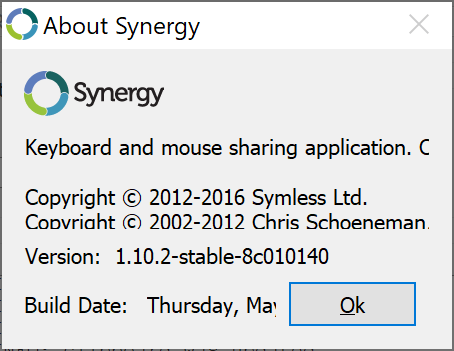
I also might want to add that the UI is squashed together on high DPI screens, the texts are bigger, but the controls and windows are not; the About dialog is barely readable at the moment :(
RayKoopa
on 23 May 2019
Ah, yeah, we're using an old version of Qt, so DPI on the GUI is an issue. Strange to hear that you're still having mouse move DPI issues on Windows. I'll reopen this issue in that case.
nbolton
on 23 May 2019
Thanks, and sorry for the rude entrance of mine :o
If you're stuck with the Qt version, the only real issue is the window size - it should be doubled on 200% which I do manually by resizing it, then everything looks correct enough. However, the About dialog is unresizable.
RayKoopa
on 23 May 2019
I have the same issue with 0.10.3. The server is in HDPI, and the client is in normal DPI.
Maybe config option to adjust mouse speed scaling could solve our problems? For example:
section: screens
    neworld:
        ...
    DESKTOP-FPMDBS9: ; my secondary PC
        ...
        mouseSpeedScaling = 0.75 ; I could fine tune this setting until I got exactly match.
end
Issue author could use >1 values to increase speed.
 neworld
on 15 Sep 2019
neworld
on 15 Sep 2019
I managed to adjust mouse speed by recompiling the application. Patch file: https://github.com/neworld/personal-aur-synergy/blob/master/trunk/adjust_low_dpi_mouse_speed.patch
2 times slower mouse speed makes much difference.
My setup:
- Host: 290 DPI
- Guest: 96 DPI
neworld
on 18 Sep 2019
Something like that, but Synergy should be able to automatically detect the DPI settings and scale accordingly.
RayKoopa
on 24 Sep 2019
Hell this makes Synergy unuseable :( I loved this tool.
Replaced my FullHD-TV with a 4K-TV and running it on 300%. Mouse on TV-Screen is very slow now.
Running 1.11.0 Basic on Server and Client.
 Quadratball
on 14 Jan 2020
Quadratball
on 14 Jan 2020
I just signed up and it's the same for me. HDPI Windows client. It makes it pretty unusable. Edit: I tried various settings and it didn't work, but now it's fine after a restart 🤷♂️
 adam-lynch
on 30 Jan 2020
adam-lynch
on 30 Jan 2020
Jumping in to share that I'm having this issue too. Server has a 1440p monitor at 100% scaling and I have a client with a 4k screen with 200% scaling. Mouse is about half as fast on the client. Very distracting and annoying.
 roughwood
on 17 Feb 2020
roughwood
on 17 Feb 2020
+1 just purchased this tool and have same issue when moving between new MBP and Windows Surface.
 beerMT
on 4 Mar 2020
beerMT
on 4 Mar 2020
Getting this too on 1.11 between a win 10 desktop with a standard definition screen that is the server and a win 10 laptop with a high dpi screen that is the client. Mouse is super slow on the laptop.
 samal-rasmussen
on 5 Mar 2020
samal-rasmussen
on 5 Mar 2020
Also getting this on 1.11.0, same as above; connecting on Windows 10 desktop with a standard definition screen that is the server and a Windows 10 laptop with a high dpi screen that is the client. Mouse is super slow on the laptop.
I would think this a fairly common config. Making Synergy unusable for me.
 empereor
on 12 Mar 2020
empereor
on 12 Mar 2020
Just thought I'd note; also having the same issue going from the same Windows 10 server to a MacBook Pro client, both running 1.11.0.
empereor
on 12 Mar 2020
@Jnewbon I'm sure we'd fixed this. Perhaps it regressed? Or maybe it's a new issue? Prioritized on backlog.
nbolton
on 14 Mar 2020
@nbolton, This is a very old problem newer fixed. The problem occurs if machines are using different DPI. For example, my server node uses ~300 DPI display while the guest node uses ~80 DPI. A small movement in the HiDPI machine means 3.75 times bigger movement on the guest. For my self I fixed by adjusting the code with the following diff:
diff --git a/src/lib/server/Server.cpp b/src/lib/server/Server.cpp
index 2d7a2da..bc11104 100644
--- a/src/lib/server/Server.cpp
+++ b/src/lib/server/Server.cpp
@@ -1911,7 +1911,10 @@ Server::sendDragInfo(BaseClientProxy* newScreen)
 void
 Server::onMouseMoveSecondary(SInt32 dx, SInt32 dy)
 {
-       LOG((CLOG_DEBUG2 "onMouseMoveSecondary %+d,%+d", dx, dy));
+       LOG((CLOG_DEBUG1 "onMouseMoveSecondary %+d,%+d", dx, dy));
+       dx = dx / 2;
+       dy = dy / 2;
+       LOG((CLOG_DEBUG1 "Adjusted to %+d,%+d", dx, dy));

        // mouse move on secondary (client's) screen
        assert(m_active != NULL);
Now my host sends all movements reduced by half. Still, it is not correct, but at least it works much better.
neworld
on 14 Mar 2020
@nbolton
This is the main reason I had to stop using Synergy. I was an early adopter of 4K and this was problematic back in 2014 when I opened the bug and still is today. I’ve subscribed to updates on this issue since that time hoping it would be addressed.
My setup has changed a lot since 2014 but I still deal with mixed DPI all the time.
JohnSully
on 14 Mar 2020
It's getting to the point where most high end laptops that IT professionals use have high dpi screens, so this is not a corner case any more.
samal-rasmussen
on 15 Mar 2020
I'm sure we'd fixed this.
Ah, I was mistakenly thinking of issue https://github.com/symless/synergy-core/issues/5648.
This bug is now a very high priority on our backlog, and we'll take a look soon. Patches welcome.
As @neworld rightly points out, this member function is the culprit:
@Jnewbon FYI
nbolton
on 17 Mar 2020
Server on Mac mini with regular dpi monitor, client on windows surface with hidpi display at 200% - mouse is twice as slow on HiDPI client. Not a deal breaker, but, not ideal. License purchased today for WFH.
 simon-clay
on 13 May 2020
simon-clay
on 13 May 2020
Any updates on this issue? It's been a few months and this is still a daily struggle in my workflow.
roughwood
on 29 Jun 2020
This is the highest priority issue on our backlog. We've been held up for a few weeks by some issues with our new CI system (Azure Pipelines) but @Jnewbon is pretty much finished with that fight. We'll do our very best to get the fix for this in the next update.
nbolton
on 4 Jul 2020
@nbolton hi, how's the progress for this problem, i have the similar problem.
 yangshao
on 9 Aug 2020
yangshao
on 9 Aug 2020
I just downloaded/installed Synergy today and this is still an issue - which version should contain the fix and when can we expect that to be released?
 epp-2k
on 17 Oct 2020
epp-2k
on 17 Oct 2020
Yep me too from a 15" macbook pro host to a windows 10 connected to 4k tv.
 Shkeats
on 29 Oct 2020
Shkeats
on 29 Oct 2020
@nbolton Is this still the highest priority issue in the backlog? It's been several months since you've communicated that. Is there a plan to fix this bug and what is the timeline?
roughwood
on 29 Oct 2020
Any progress here?
 ntrpnr
on 26 Dec 2020
ntrpnr
on 26 Dec 2020
Hi there, have been suffering from this for the longest time, even tried to upgrade to synergy Pro to see if that would resolve the issue (apparently not). Can we please have an update on progress? Thanks!
 johannchung
on 16 Jan 2021
johannchung
on 16 Jan 2021
Hi do you have some solution for this problem? it has been 6 years since this problem is proposed...
yangshao
on 9 Feb 2021
Unfortunately it's looking like the solution is going to be to search for alternative software and stop recommending Synergy. I can't believe this isn't fixed yet.
roughwood
on 10 Feb 2021
Really no excuse to not have this corrected yet. When developing this software, you'd think that would be one of the most basic unit tests that you'd run from the get go. Not a usable product until its fixed.
 JakeHenry
on 16 Feb 2021
JakeHenry
on 16 Feb 2021
This was the highest priority issue in your backlog in July 2020.
It's now May 2021 and this is still an issue in build 1.13.1-stable-063519a8.
Setting aside the fact that this issue was opened in 2014....
Do you have an update for when this will be fixed?
 rakki9999111
on 6 May 2021
rakki9999111
on 6 May 2021
Related issues
 legonigel
·
4Comments
legonigel
·
4Comments
 xmstspider
·
4Comments
xmstspider
·
4Comments
 bigbear3001
·
4Comments
bigbear3001
·
4Comments
 jasonosei
·
3Comments
jasonosei
·
3Comments
 straris
·
5Comments
straris
·
5Comments
Most helpful comment
Ah, I was mistakenly thinking of issue https://github.com/symless/synergy-core/issues/5648.
This bug is now a very high priority on our backlog, and we'll take a look soon. Patches welcome.
As @neworld rightly points out, this member function is the culprit:
https://github.com/symless/synergy-core/blob/0e7fef7ceb7fea577e3c1b9af5e73c890e188e0b/src/lib/server/Server.cpp#L1912-L2078
@Jnewbon FYI