Synergy-core: Windows prevented from automatically sleeping
Imported issue:
- Author: Michael Ryan
- Date: 2014-10-08 18:14:03
- Legacy ID: 4186
I have Synergy 1.5.1 running on Mac 10.9.5 (server), Mac 10.9.5 (client), and Win 8.1 Pro (client).
All systems are configured to sleep the display after 10 minutes of inactivity and sleep the system after 15 minutes. Both Mac systems sleep as expected, but the Win 8.1 system does not.
As mentioned in #4162, the Win 8.1 display will not automatically sleep unless the server is configured with "screenSaverSync = false". Once that feature is disabled, the display timeouts are controlled by the independent system settings. The Win 8.1 system itself will never automatically fall asleep.
Steps to reproduce:
- Run CMD in Administrator Mode.
- Type "powercfg -energy" and wait for it to complete. A report will be created at: C:\Windows\system32\energy-report.html
- Move/Copy that HTML file outside of C:\Windows (i.e., your Documents folder) and then open it in your web browser.
- Under Analysis Results: Errors, the following is reported:
System Availability Requests:System Required Request
The program has made a request to prevent the system from automatically entering sleep.
Requesting Process: \Device\HarddiskVolume4\Program Files\Synergy\synergyc.exe
When the Synergy client is stopped, the system is able to automatically fall asleep.
The above behavior may be intended for normal Synergy usage, but after manually sleeping all my systems each night, the Win 8.1 client wakes up to perform Scheduled Tasks and Regular Maintenance. Even though the Synergy server remains asleep at this point, the Win 8.1 client will not automatically fall back asleep.
So every morning, I find my Win 8.1 system awake and idle. Prior to disabling "screenSaverSync", the display was also on, which was even worse.
Expected
The client system should never automatically sleep while the server is awake, but when the server is sleeping, the client's system power settings should determine when the client automatically returns to sleep.
When "screenSaverSync" is enabled (set to TRUE), the Win 8.1 client display should fall asleep when the server does.
Actual
The client system never automatically falls asleep, even when the server is sleeping. The client system power settings are ignored or prevented from sleeping the computer.
The Win 8.1 client display will never fall asleep while "screenSaverSync" is enabled (set to TRUE), even when the server display and/or system is sleeping.
 nbolton
All 63 comments
I'm having the same experience with a Windows 7 SP1 x64 client. "powercfg -requests" shows that synergyc.exe is running operations that request both the display and the system to be on/available even when no keyboard/mouse input are entered on the Synergy host nor client system. My host is Win8.1 x64, and this has been an issue on at least the last few nightly builds. The host system turns on screensaver and sleeps as expected.
 BenFTW
on 13 Oct 2014
BenFTW
on 13 Oct 2014
Having the same issue here. I use laptops, to which the power is not always applied. This should activate a power profile that sleeps after a period of time, and if power goes critical, hybernates the machines.
Synergy interferes with the Windows 8.1 machines causing them to not sleep nor hybernate. Ultimately this means that when the battery runs down, the system literally just 'blinks off'. This in turn causes corruption and lost data.
Further, the screen-saver never kicks in on Windows 8.1 machines with Synergy enabled, which means the machines will not lock when idle. As a result, in our office, security policy negates the use of Synergy.
 TheRealWaldo
on 27 Oct 2014
TheRealWaldo
on 27 Oct 2014
Just want to confirm this is still an issue. The only option is to quit Synergy. Ideally, Synergy should let the computer sleep/hibernate in the absence of user input (mouse, keyboard).
 traycerb
on 1 May 2015
traycerb
on 1 May 2015
I'm not sure if this is the 100% correct github, but, I'm seeing this on win 8.1
 bluenote73
on 7 Jul 2015
bluenote73
on 7 Jul 2015
Seeing same behavior on win 8.1 with all latest updates (with macos 10.10.4 as server, and win 8.1 as client)
 mzazon
on 10 Jul 2015
mzazon
on 10 Jul 2015
Still an issue on Windows 10.
 twodice
on 3 Aug 2015
twodice
on 3 Aug 2015
Still affecting Win 8.1.
This is very important when using a laptop client. I've gone to work with an empty battery (unknowingly) multiple times now...
 ceribik
on 9 Aug 2015
ceribik
on 9 Aug 2015
Just bought Synergy. It's an annoying bug. Would be great to see a fix. Server OSX, Client W10. When using server, client will never go to sleep.
 orditeck
on 12 Aug 2015
orditeck
on 12 Aug 2015
Yup, confirmed still an issue in latest 1.7.4
On Wed, Aug 12, 2015 at 11:08 AM, Keven Lefebvre [email protected]
wrote:
Just bought Synergy. It's an annoying bug. Would be great to see a fix.
Server OSX, Client W10.—
Reply to this email directly or view it on GitHub
https://github.com/synergy/synergy/issues/4116#issuecomment-130336322.
mzazon
on 12 Aug 2015
Confirmed that it is an issue with 1.7.4. Even if the system can't sleep, it would be nice if it let the screen stay turned off.
 KingArthur10
on 12 Aug 2015
KingArthur10
on 12 Aug 2015
I'm using powercfg -requestsoverride to deal with this.
What's the point of buying (free) software if the bugs aren't dealt with?
May as well switch to the perfectly legal free binaries you can google under synergy binaries.
bluenote73
on 12 Aug 2015
Any update?.... I'm wondering too what's the point of buying the software if bugs like that take one year to get fixed... I'm only tagging latest contributors. Thanks for you work, we hope to see a fix soon. @XinyuHou @nbolton @speaker
orditeck
on 2 Sep 2015
Same issue on Windows 7. Hope to have a fix.
 WangFlx
on 17 Sep 2015
WangFlx
on 17 Sep 2015
I realised that starting the synergyclient on another System would wake up my Windows 10 (synergy server) from energy saving mode (S3) instantly. Energy saving was working when no synergy client was trying to connect.
So I disabled the "device can reactivate computer from standby" option from my network device config in windows device manager. This solved the problem for me.
 kiwal
on 21 Sep 2015
kiwal
on 21 Sep 2015
This is probably caused by the elevated process from the screensaver or UAC.
After screensaver deactivates, services doesn't restart a new process that has normal privilege.
 XinyuHou
on 3 Dec 2015
XinyuHou
on 3 Dec 2015
Still seen in late 2016. Windows 10 client, Linux server. Both running 1.8.5-stable.
 Quip11
on 20 Nov 2016
Quip11
on 20 Nov 2016
Continuing to experience this issue, looking for resolution. Thanks!
 nsimoneaux
on 23 Dec 2016
nsimoneaux
on 23 Dec 2016
Will this ever be fixed? A comment from symless would be nice.
 brandondtran
on 12 Feb 2017
brandondtran
on 12 Feb 2017
Would love to know what's being done about this bug.
 brettonlewis
on 2 Mar 2017
brettonlewis
on 2 Mar 2017
I have been using Synergy for years... just switched from mac client (no sleep issues) to a windows client and thought my problems were related to DisplayLink dock. Glad i stumbled on this.
Just installed 1.8.8 but there is nothing in the changelog - so i don't have high hopes.
I donated a long time ago - but it is hard to want to support development further when i see this bug is now 2.5 years old and the developer has never commented.
Sad
 alphadog00
on 4 Mar 2017
alphadog00
on 4 Mar 2017
For now, i have to use a batch file to stop the synergy service if i want my machine to sleep - so i have to touch the laptop 2 times a day - awake and sleep. I would like to know why the mac client has no problem with this, but the windows client does.
alphadog00
on 4 Mar 2017
Just a confirmation that using powercfg -requestsoverride works for me on win10, see http://www.haphazard.me/technology/synergy-server-and-windows-7-screensaver some detailed steps
 infernix
on 4 Mar 2017
infernix
on 4 Mar 2017
Thanks Infernix. Is that a one time setting? After that the system will sleep as it should? Or is it something that has to be set every time you want it to sleep - like at night?
alphadog00
on 4 Mar 2017
One time
infernix
on 4 Mar 2017
Just try unchecking the "this device can wake up windows from sleep" button from your network adapter in the device manager.
I think this was working for me, though i am not using synergy anymore :(
kiwal
on 4 Mar 2017
I am using synergy (Win10 client) and this fixed the issue for me. Thank you!
Quip11
on 10 Mar 2017
Can confirm what @infernix says works perfect. Just follow instructions at http://www.haphazard.me/technology/synergy-server-and-windows-7-screensaver
 2braincells2go
on 27 Mar 2017
2braincells2go
on 27 Mar 2017
Joining this to say "me2" using a Windows 10 client running within Linux QEMU+KVM with VGA pass-through.
Since the powercfg overrides work, this is only a matter of someone who knows the Windows APIs to implement a fix and a pull request (or fork it if this goes neglected for more years).
Anyone familiar with that?
 kylemanna
on 10 May 2017
kylemanna
on 10 May 2017
This post is 3 years old, and there's STILL no built-in fix. That's just unacceptable.
 TheRevDrJ
on 28 Aug 2017
TheRevDrJ
on 28 Aug 2017
The powercfg link fixes it. As for an automated built-in, I'd rather they spent their time on Wayland support.
Quip11
on 28 Aug 2017
In this case, the time spent to fix it has to be able to be measured by minutes. I would have thought that in 3 years, they could have spent a few of those minutes to implement this.
But, you're right, there's a fix, at least.
TheRevDrJ
on 28 Aug 2017
I had forgotten why I stopped using synergy several years ago, this issue was the reason.
 schnee72
on 10 Sep 2017
schnee72
on 10 Sep 2017
Well, for what it's worth, the fix posted above works flawlessly. I think it's about the coolest utility ever -- at least as far as cleaning up my desk goes!
TheRevDrJ
on 10 Sep 2017
Is there an active, non-legacy labeled ticket for this issue? Still experiencing in Windows 10. I have NOT checked the powercfg link yet as I just found this ticket. However, I agree that this is a silly bug to have stuck around for 3 years... come one guys. Can you take a bit and figure out where the actual issue is please? The utility is cool but not allowing my screensaver to kick in is really annoying.
 msmithng
on 2 Oct 2017
msmithng
on 2 Oct 2017
I have my doubts this will ever be fixed. Received a "special offer" to upgrade to a new version (3 i think). Did not upgrade as not paying for anew version when old one never worked correctly:)
 oleteacher
on 2 Oct 2017
oleteacher
on 2 Oct 2017
Great. I just looked at the powercfg link. I'll need to try that tomorrow. Might work, might not... EDIT: I misread the content of the page and didn't see it had a 'client' section.
msmithng
on 2 Oct 2017
I'm running my server on MacOS, client on Windows 10, and it definitely
works, Michael.
On Sun, Oct 1, 2017 at 10:40 PM, Michael Smithng notifications@github.com
wrote:
Great. I just looked at the powercfg link and that's not going to work for
me at all as my server is running on MacOS and not Windows. Sigh.—
You are receiving this because you commented.
Reply to this email directly, view it on GitHub
https://github.com/symless/synergy-core/issues/4116#issuecomment-333434437,
or mute the thread
https://github.com/notifications/unsubscribe-auth/Ad9NWi8cDWlJgJzXMlDNKOUrnqGPjHz2ks5soFsvgaJpZM4Ct55D
.
--
Rev. Dr. Jonathan Mellette
Senior Pastor, Oak Park United Methodist Church
(903) 229-3000
"We know that God makes all things work together for good for those who
love God, who are called according to his purpose" (Romans 8:28).
TheRevDrJ
on 2 Oct 2017
Thanks TheRevDrJ. I will check it out. But seriously... Symless team, please address this.
msmithng
on 2 Oct 2017
I was able to fix this by unchecking the screensaver option on my server.
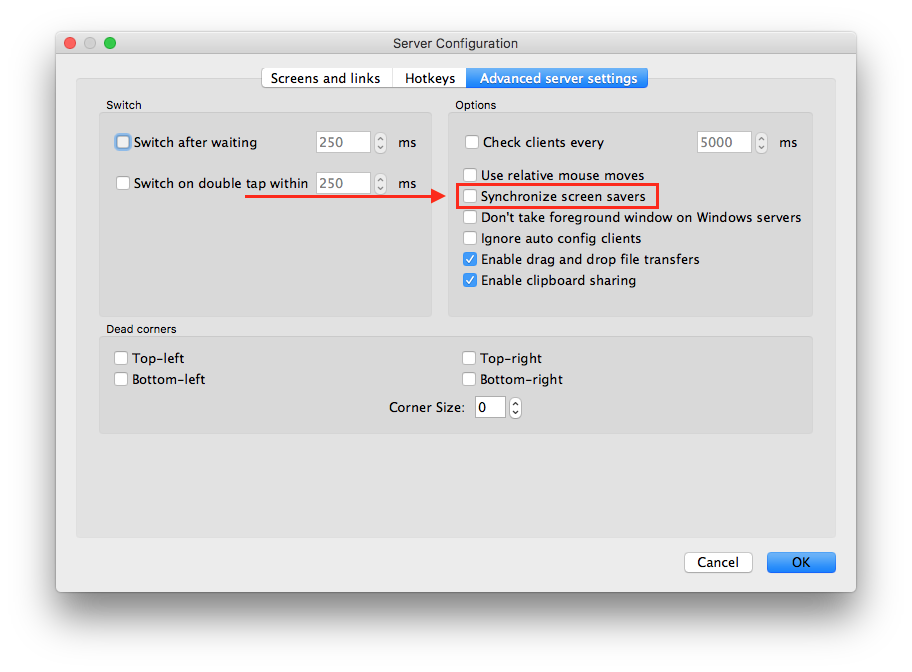
 Donaldini
on 27 Nov 2017
Donaldini
on 27 Nov 2017
I just bought the new Synergy, and it seems to be afflicted with the same issue. You can see I posted 2.5 years earlier on this same bug report. I had utilized the powercfg fix but it seems the new Synergy has different process and service names, so needs new commands. Below are the commands I used, which in very light testing, seem to be working.
powercfg -REQUESTSOVERRIDE process synergy-core.exe system display awaymode
powercfg -REQUESTSOVERRIDE service "Synergy" system display awaymode
I only did those 2, not sure if all the other processes are needed. FYI the new processes are named:
synergy-core.exe
synergy-service.exe
synergy-service-controller.exe
... and the new service is named:
Synergy
traycerb
on 4 Dec 2017
Win10 1703 running Synergy1 (until a 32-bit Synergy2 comal along for Linux) - the powercfg dodge worked for me - powercfg -requestsoverride PROCESS synergyc.exe DISPLAY
No need to type in full path to process, do need to put quotes around any process with a space in the name.
Check by entering powercfg -requestsoverride and synergyc.exe should be in there.
Reverse by entering powercfg -requestsoverride PROCESS synergyc.exe (no DISPLAY)
Thanks for the info - cheers all
Mac
 Capecutterman
on 10 Jan 2018
Capecutterman
on 10 Jan 2018
This is still happening with Synergy 2.0.12-beta. Please reopen
 felixfbecker
on 12 Nov 2018
felixfbecker
on 12 Nov 2018
Running the 2 commands in https://github.com/symless/synergy-core/issues/4116#issuecomment-348851134 seems to fix it (but really Synergy should not require running these commands)
felixfbecker
on 12 Nov 2018
Please reopen
Done 😄
nbolton
on 12 Nov 2018
Btw, it is not just preventing automatic sleep. I am using this on my Surface Pro, and when I press the power button, the device goes to sleep and then immediately turns back on (showing the lock screen). I have to press it again and the second time it works. But if I forget, next time I pull it from my bag it's hot and the battery drained since it was on the whole time. This does not happen when Synergy is not running.
felixfbecker
on 12 Nov 2018
Does anyone know if this occurs on systems running the same OS? I actually
uninstalled for this reason alone but at that point I was cross-platform.
I even paid for the upgrade to v2 but that seems like money that's dust in
the wind at this moment.
On Mon, Nov 12, 2018 at 9:57 AM Felix Becker notifications@github.com
wrote:
Btw, it is not just preventing automatic sleep. I am using this on my
Surface Pro, and when I press the power button, the device goes to sleep
and then immediately turns back on (showing the lock screen). I have to
press it again and the second time it works. But if I forget, next time I
pull it from my bag it's hot and the battery drained since it was on the
whole time. This does not happen when Synergy is not running.—
You are receiving this because you commented.
Reply to this email directly, view it on GitHub
https://github.com/symless/synergy-core/issues/4116#issuecomment-437973534,
or mute the thread
https://github.com/notifications/unsubscribe-auth/AB3m0kBQAwQfzrzT9yeEprhDM4cF2l9Vks5uubaPgaJpZM4Ct55D
.
msmithng
on 12 Nov 2018
I was able to fix this by unchecking the screensaver option on my server.
Donaldini's suggestion above worked for me on synergy server 1.8.8. My problem wasn't with Windows, it was a macOS client running 1.8.2 that wasn't activating its screensaver. Unchecking that checkbox on synergy server fixed it.
It's great to have it working now. It's been not working for me as long as I can remember. Synergy is an awesome utility. I've depended on it daily for at least a decade now maybe more. The fix for me was within synergy and if it weren't and I had to type commands or set something in a config file I wouldn't complain. I'm disappointed by the several critical and expectational responses in this thread. I'm a paid user and I don't feel that I'm owed my screensaver working or that anyone has a responsibility to do things the way I want, or conform to what I believe is right .
 vayulove
on 15 Jan 2019
vayulove
on 15 Jan 2019
@nbolton Please re-open this issue as it's still happening both with and without the screensaver option enabled!
 dunestorm333
on 6 Oct 2019
dunestorm333
on 6 Oct 2019
Please re-open this issue
@dunestorm333 Hi there, the issue was reopened Nov 12, 2018.
nbolton
on 7 Oct 2019
Having the same issue. Client mode keeps surface awake, even when on a different network (school) than where my host is (home).
Couldn't you just make it so that, if it isn't connected to a host, it won't try to keep the device awake, trying to connect?
Windows 10 Pro V. 1803 Build 17134.855
Surface Pro 4
Synergy build 1.10.3-stable-ca35737a Sept 3, 2019
How has this gone for over two years and not been resolved?
I have bought both Synergy 1 Pro and Synergy 2 (which was returned to Beta) and can't reliably use either one. Synergy 1 Pro has this power issue and Synergy 2 is glitchy in its connections. I stopped using both for over a year, hoping the issues would be resolved, but the issues are still there...
WHERE IS OUR MONEY GOING, IF NOT TO IMPROVE THE DEVELOPMENT OF THIS SOFTWARE?!
 nalorin
on 16 Oct 2019
nalorin
on 16 Oct 2019
WHERE IS OUR MONEY GOING, IF NOT TO IMPROVE THE DEVELOPMENT OF THIS SOFTWARE?!
I get being frustrated, but this level of impatient and demanding is downright ugly..
vayulove
on 16 Oct 2019
Lol, issue is 5y old.
bluenote73
on 16 Oct 2019
"I get being frustrated, but this level of impatient and demanding is downright ugly."
If this were an open source project, or if it had been an issue for only 3 or maybe 6 months, I could understand. But an issue like this extending past a year, let alone 2-5 years, for a paid product is downright ludicrous.
It may be an ugly level, but it's totally justified.
nalorin
on 16 Oct 2019
Hi @nalorin, to see where the money is being invested, please view the releases page on GitHub.
We prioritize based on various sources such as tech support feedback, refund feedback, forum posts and GitHub issues.
Please remember that we have a very small team, and patches are always welcome (the project is still open source; remember to "Think free as in free speech, not free beer" — Richard Stallman).

nbolton
on 30 Oct 2019
I have the same issue on my Surface Pro 4. Disabling screen saver sync does not help, neither do the powercfg overrides. I didn't find a definite answer in the Microsoft documentation but I assume none of the powercfg settings work with Modern Standby anymore.
The only workarounds are manually stopping either the client or the server before putting the device to sleep.
 szeiger
on 28 Nov 2019
szeiger
on 28 Nov 2019
I noticed this issue as well but thought it was a problem with my windows settings until I saw this bug report. Im running Win10 20.04 running Synergy 1.10.3 as a client to an ArchLinux Synergy server of the same version
 makcuber
on 15 Oct 2020
makcuber
on 15 Oct 2020
Just want to add my voice - this issue is still present and I'm yet another user asking for a fix
 scott-force
on 7 Apr 2021
scott-force
on 7 Apr 2021
We tried and tried to use this software in our school, but lots of issues and never got any help from creator. IT department made everyone uninstall.
Check out https://www.microsoft.com/en-us/garage/wall-of-fame/mouse-without-borders/
oleteacher
on 7 Apr 2021
I have this issue also, any suggestions other than stopping the client?
 ConfuZe-d
on 11 Apr 2021
ConfuZe-d
on 11 Apr 2021
I am personally waiting for the fix. Until then, I plugged all my monitors on a power bar and turn them all off at once... Not elegant, but it does the job. ;)
 KwazyFwog
on 11 Apr 2021
KwazyFwog
on 11 Apr 2021
I am personally waiting for the fix. Until then, I plugged all my monitors on a power bar and turn them all off at once... Not elegant, but it does the job. ;)
It sadly doesn't work for my laptop that is on constantly, the desktop (host) does not have this issue and the power plan on that holds steady
ConfuZe-d
on 12 Apr 2021
I'm seeing the same issue
 snowtr
on 5 May 2021
snowtr
on 5 May 2021
Don't hold your breath on it getting fixed.
They're more concerned with releasing their next major version of the software so they can continue to pay for their Porsches and mansions. They clearly don't care one iota for their existing customer base. We've already paid and are smart enough to not give them any more of our money, so they're going to continue preying on the naiive consumers who don't know any better, yet, instead.
It seems like they (like a certain naiive user here) don't know the difference between free and open-source software and commercial open-source software. The former is expected to have bugs that only get fixed as the community feels inclined to so do, the latter is expected to fix bugs (or at least assign them to be fixed by a competent party) within a reasonable timeframe.
This bug has been active for over 6.5 years - let that be a sneak peak into how Symless operates. It's clear, now, that the only reason that they developed their software as open-source is so they can make bank on the original sale and then pass the buck to the "community" to provide future support.
Symless embodies everything that's wrong with the commercialization of open source anything.
nalorin
on 5 May 2021
Related issues
 spacepluk
·
5Comments
spacepluk
·
5Comments
 ColinCreamer
·
5Comments
ColinCreamer
·
5Comments
 xmstspider
·
4Comments
xmstspider
·
4Comments
 laur89
·
5Comments
laur89
·
5Comments
 sangwoo-joh
·
4Comments
sangwoo-joh
·
4Comments
Most helpful comment
Just a confirmation that using
powercfg -requestsoverrideworks for me on win10, see http://www.haphazard.me/technology/synergy-server-and-windows-7-screensaver some detailed steps