Synergy-core: Error: could not get session id for process
Imported issue:
- Author: Eun Taik Lee
- Date: 2014-09-30 06:30:20
- Legacy ID: 4175
Steps to reproduce:
- Launch Synergy
- Press Start
Expected : Synergy starts without any problem
Actual : Synergy does not start and gives below error message
ERROR: could not get session id for process id 32004
ERROR: failed to launch, error: ?????? ??? ?????? ???? ?? ??????.
INFO: backing off, wait=10s, failures=44
Versions and operating systems:
Synergy version : 1.5.1(1.6.0 beta also has the same problem)
OS : Windows 7 SP1
Temporary workarounds:
launch synergy in CMD using below command
START /SEPARATE C:/"Program Files"/Synergy/synergys.exe -f --no-tray --debug DEBUG --name my_computer --stop-on-desk-switch --enable-drag-drop --log "C:/Program Files/Synergy/log/synergy.log" -c "C:/Users/1/AppData/Local/Temp/qt_temp.m55048" --address :24800
Additional comments:
pid 32004 has session id of 0 while synergy is running with session id 1.
 nbolton
All 27 comments
I have same issue
 ukjin1192
on 14 Nov 2014
ukjin1192
on 14 Nov 2014
Fixed in 3a66309 (1.6.1)
nbolton
on 18 Dec 2014
This bug seemed to have returned? Out of the blue, my Synergy 1.6.2 running on Windows 8.1 Pro is having this issue. Using the command from the temporary workaround solves it.
 Pimorez
on 15 Jan 2015
Pimorez
on 15 Jan 2015
got another one:
NOTE: connecting to service...
NOTE: connection established
NOTE: starting client
NOTE: config file: C:/Users/reeda/AppData/Local/Temp/qt_temp.Hp8400
NOTE: log level: ERROR
activeDesktop:Default
ERROR: could not get session id for process id 5948
 the-wes
on 23 Jan 2015
the-wes
on 23 Jan 2015
Windows 8.1
the-wes
on 23 Jan 2015
another:
INFO: starting new process
activeDesktop:Default
ERROR: could not get session id for process id 5224
INFO: starting new process
INFO: drag and drop enabled
synergys.exe: no configuration available
ERROR: failed to launch, error: process immediately stopped
INFO: backing off, wait=10s, failures=49
NOTE: starting server
NOTE: config file: C:/Users/[user]/AppData/Local/Temp/qt_temp.H11932
NOTE: log level: INFO
INFO: service command updated
the-wes
on 1 Apr 2015
For me I noticed this was tied to the 'Ignore auto config clients' setting under Configure Server. When I have that checked then I get this error, but if I go and uncheck it and restart the server then the error goes away.
Windows 7.1 Enterprise
Synergy v1.7.3 Pro
 ccusic
on 2 Jun 2015
ccusic
on 2 Jun 2015
Oddly, I have been getting a related problem on the past few nightly builds, but I have not been getting the "failed to launch" part or "backing off" part. Instead, it simply continues to say that "Synergy is Starting". Additionally, the workaround does not seem to be helping.
UPDATE: Adding config option and the corresponding file seems to make the workaround work.
 actapia
on 16 Jul 2015
actapia
on 16 Jul 2015
I got this with 1.8.2-stable-36cd521 on Windows 10, so not fixed
[2016-08-12T09:38:32] INFO: activeDesktop:Default
[2016-08-12T09:38:32] ERROR: could not get session id for process id 7940
 thomashagstrom
on 12 Aug 2016
thomashagstrom
on 12 Aug 2016
Can confirm this is still occurring often for me.
Operating System: Microsoft Windows 10 Enterprise (x64)
Version: 1.8.2-stable-36cd521
[2016-09-20T17:13:26] INFO: service command updated
[2016-09-20T17:13:26] INFO: starting new process
[2016-09-20T17:13:26] INFO: activeDesktop:Default
[2016-09-20T17:13:27] INFO: starting new process
[2016-09-20T17:13:27] INFO: drag and drop enabled
synergys.exe: no configuration available
[2016-09-20T17:13:28] ERROR: failed to launch, error: process immediately stopped
[2016-09-20T17:13:28] INFO: backing off, wait=2s, failures=1
[2016-09-20T17:13:30] INFO: starting new process
[2016-09-20T17:13:30] INFO: activeDesktop:Default
[2016-09-20T17:13:30] INFO: starting new process
[2016-09-20T17:13:30] INFO: drag and drop enabled
synergys.exe: no configuration available
[2016-09-20T17:13:31] ERROR: failed to launch, error: process immediately stopped
[2016-09-20T17:13:31] INFO: backing off, wait=4s, failures=2
[2016-09-20T17:13:35] INFO: starting new process
[2016-09-20T17:13:35] INFO: activeDesktop:Default
[2016-09-20T17:13:35] INFO: starting new process
[2016-09-20T17:13:35] INFO: drag and drop enabled
synergys.exe: no configuration available
 ngj5-beasTxx
on 20 Sep 2016
ngj5-beasTxx
on 20 Sep 2016
Just updated to 1.8.3 and am getting this error.
 ekbarber
on 30 Sep 2016
ekbarber
on 30 Sep 2016
I'm also experiencing this with 1.8.3 on Windows 10 Pro (x64) v.1511 build 10586.63. Can't use Synergy at all at the moment.
 geozza
on 3 Oct 2016
geozza
on 3 Oct 2016
I have had better success using Synergy on Windows 10 after saving my configuration then using the option use existing configuration to point to it as someone else pointed out.

ngj5-beasTxx
on 4 Oct 2016
@ngj5-beasTxx Could you please open a new issue for this config file problem. It doesn't seem related to this issue #
 nlyan
on 5 Oct 2016
nlyan
on 5 Oct 2016
@nlyan It's related as it's workaround for those experiencing this issue. It seems to have eliminated the errors I had previously posted from Synergy's log and it now works every time I boot up.
ngj5-beasTxx
on 5 Oct 2016
I'm getting this issue on 1.86-stable and synergy is not working all of the sudden
 klhurley
on 1 Jan 2017
klhurley
on 1 Jan 2017
I'm seeing this issue as well after upgrading to 1.8.7.
 roberthafner
on 24 Jan 2017
roberthafner
on 24 Jan 2017
FYI - somehow a day or so ago, after I updated my client on linux to 1.8-7 but left the server on window 1.8-6, the server config was unable to be found on windows. There was a file path saved in the "use config file" section, but the file was gone. Server had been running fine up until something caused it to just stop, and when it tried to start again, it immediately failed complaining about being unable to find the config, but it was looking in a /tmp location with an autogenerated name as well. I had to stop everything, re-run the config wizard (which oddly enough still showed all my defined screens), and save as a config. Even that wasn't enough to make it run, but the error changed. Finally I upgraded the server to 1.8-7 and as a last resort clicked the "register" again and clicked through with the existing key, and finally it started running again. Definitely a love-hate relationship going on with synergy here...
 bharsh
on 15 Feb 2017
bharsh
on 15 Feb 2017
I'm also experiencing this on 1.8.7.
 ngerakines
on 16 Feb 2017
ngerakines
on 16 Feb 2017
I had the same issue so I found out that i got two different versions of Synergy. When installed the same versions problem had gone.
 ghost
on 14 Jul 2017
ghost
on 14 Jul 2017
Currently experiencing this issue on version 1.8.8 as well. Just reinstalled Synergy on both PC's and both are on 1.8.8 and both running x64 windows 10.
 nscharrer
on 11 Sep 2017
nscharrer
on 11 Sep 2017
This is still an issue, no doubt. The workaround https://github.com/symless/synergy-core/issues/4105#issuecomment-251487641 worked for me.
 kdubau
on 26 Nov 2019
kdubau
on 26 Nov 2019
I was fidgeting around with these errors. Here's the fix that worked for me. 2 windows 10 PCs both connected wirelessly.
both: Elevate - as needed
host: Network - Enable Auto Config slave: manual (deselect)
both: Screen name - left default "easy name" the PC is assigned but
host: "Screens and links" tab, Screen name - used the ip address given in the main screen of Synergy 1 Basic. Host had two but one was in bold and used that one. AND added "easy name" as Aliases on both screens.
Ran server without right clicking and needing administrator privileges.
- This is after opening private and public port for app on both PCs firewall.
 oggusfoo
on 28 Nov 2019
oggusfoo
on 28 Nov 2019
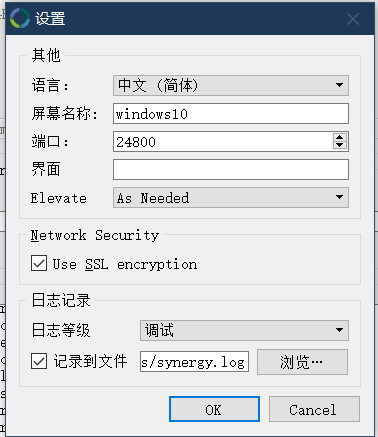
this is help me ,set the log level is debug. then i found the client port must same port. so I change the port to be the same. finally it was fine.
 shaoyi-robin-zhou
on 17 Aug 2020
shaoyi-robin-zhou
on 17 Aug 2020
Also having this issue. Still no fix?? Two weeks ago Synergy was working fine, then I stopped using it for a second and now getting this same error. Between Windows 10 and the new Big Sur Mac OS. Not sure what could be.
 brpetrucci
on 28 Mar 2021
brpetrucci
on 28 Mar 2021
I have the same issue using 1.8.7-stable-9799e96. Quite upsetting.
I have noticed however, that setting the log level to Debug1/2/3 makes the issue disappear. Fascinating.
Hopefully that'll help developers and/or other clients.
 adriantut
on 22 May 2021
adriantut
on 22 May 2021
Hi @adriantut Synergy is currently at 1.13.1-stable and 1.14-rc. Could you please update to the latest version?
 andreacndn
on 25 May 2021
andreacndn
on 25 May 2021
Related issues
 legonigel
·
4Comments
legonigel
·
4Comments
 spacepluk
·
5Comments
spacepluk
·
5Comments
 jenelcohen
·
3Comments
jenelcohen
·
3Comments
 nbeazy
·
4Comments
nbeazy
·
4Comments
 xmstspider
·
4Comments
xmstspider
·
4Comments
Most helpful comment
I got this with 1.8.2-stable-36cd521 on Windows 10, so not fixed