Synergy-core: Gnome StatusIcon API is becoming deprecated
Hello,
As of 2014, the Gtk StatusIcon API has been deprecated and will soon stop being included in the desktop environment.
I am currently running on elementary OS Loki (the current development version) and the team has decided to drop the StatusIcon already.
This GNOME document discusses possible migration paths for different purposes.
When I brought up the issue with the elementary OS team. One of the suggestions was that synergy use a Switchboard plug (an entry in the elementary OS settings panel)
Ideally, you would change your UI to be in accordance with the GNOME guidelines or the elementary OS guidelines.
I will be able to help with this issue in about a month time. If the decision is made to ignore it, I will fork synergy's UI.
There seems to be a pull request similar to this issue: https://github.com/symless/synergy/pull/4194
 matzipan
All 6 comments
Do you mean remove tray icon and accord with GNOME guidelines?
I will be able to help with this issue in about a month time.
Please help us by create a pull request. We are using Qt for our GUI. If have anything related to compiling GUI, feel free to contact us.
 XinyuHou
on 5 May 2016
XinyuHou
on 5 May 2016
This bug has arrived to recently released Ubuntu 17.10, as ubuntu Team moved to Gnome 3.16, as they announced few months ago.
Any chance you can fix this anytime soon? Having Synergy windows open all the time is kind of little PITA....
@matzipan I suggest to add word "Tray icon" in bug title, as it took me some time to find that this bug was already reported, as most "Mortals" refer to this small icon, as "Tray icon"
 LeadManPL
on 2 Nov 2017
LeadManPL
on 2 Nov 2017
As a workaround I stopped using Synergy GUI on a server and instead I configured this command to run automatically when my Gnome session starts:
$ /usr/bin/synergys -f --no-tray \
    --debug INFO \
    --name luna \
    -c /home/ekontsevoy/.synergy.conf \
    --address :24800
    --serial-key 724F7F3E12323.....12E
I imagine a similar command exists for a client as well.
 kontsevoy
on 20 Dec 2017
kontsevoy
on 20 Dec 2017
So you actually do not remove the track icon and having the window open all the time is also not required. The application can be closed, it runs in the background, but it's just not possible to see/reopen it via the tray icon.
So the solution GNOME advises is to use proper APIs and stuff for it. E.g. music players can use a direct API and have stuff in the notification, file sharing services can use libcloudproviders and have direct integration intro Nautilus.
Theoretically, your place would possibly best in the settings for "displays" in GNOME. However, there you have to advocate to GNOME to add appropriate APIs.
FYI, here are how other's solved this issue:
- https://github.com/nextcloud/client_theming/issues/173
- https://github.com/nitroshare/nitroshare-desktop/issues/204 (there are more links to resources in there)
- https://github.com/telegramdesktop/tdesktop/issues/3830
- …
A good workaround for now is to use the TopIcons Plus GNOME extension which brings back these icons for now.
 rugk
on 8 Sep 2018
rugk
on 8 Sep 2018
Recently I upgraded my Ubuntu 16.04 LTS to 18.04 LTS and at first all system tray/status icons showed up. But then most of them disappeared. TopIcons Plus did help, but I has its own issues in combination with other gnome shell extensions. So I uninstalled it again. I got most icons back by uninstalling indicator-application and all the other unity indicators:
sudo apt purge indicator-application indicator-appmenu indicator-bluetooth indicator-common indicator-datetime indicator-keyboard indicator-messages indicator-power indicator-printers indicator-session indicator-sound
Some needed a env XDG_CURRENT_DESKTOP=Unity in the Exec-line of the .desktop file, like dropbox and discord.
But when starting synergy via autostart, I got this error message:
System tray unavailable. Don't close your window.
Synergy does work though, I just had no icon.
When I started synergy manually, it worked without issues, no error message and I got a system tray icon. So I was wondering and found out, that if you delay the start of synergy a bit, it works.
So I added this line to my ~/.config/autostart/synergy.desktop file:
X-GNOME-Autostart-Delay=5
And the issue is gone.
 Corben78
on 9 Sep 2018
Corben78
on 9 Sep 2018
Hi,
I had the same issue.
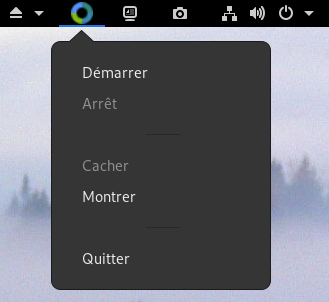
A workaround for me on Debian Unstable with Gnome 3.34 was to install those extensions:
https://extensions.gnome.org/extension/615/appindicator-support/
https://extensions.gnome.org/extension/1031/topicons/
 vincentmigot
on 23 Oct 2019
vincentmigot
on 23 Oct 2019
Related issues
 jasonfisherjlf
·
4Comments
jasonfisherjlf
·
4Comments
 130s
·
3Comments
130s
·
3Comments
 LeTink
·
4Comments
LeTink
·
4Comments
 Celant
·
4Comments
Celant
·
4Comments
 jenelcohen
·
3Comments
jenelcohen
·
3Comments
Most helpful comment
Hi,
I had the same issue.
A workaround for me on Debian Unstable with Gnome 3.34 was to install those extensions:
https://extensions.gnome.org/extension/615/appindicator-support/
https://extensions.gnome.org/extension/1031/topicons/