Synergy-core: Synergy fails to get desktop path, no drop target available
- Start Synergy
- Often, error "failed to get desktop path, no drop target available, error=2" is printed
- Always when this error occurs, Drag and Drop doesn't work
Synergy 1.7.4, Windows Vista, 7, 8, 8.1, 10
 the-wes
All 55 comments
"SHGetFolderPath is deprecated in vista, but use it for xp support"
But yet, XP is not supported.
Sounds like we need to use the new function here.
the-wes
on 25 Aug 2015
@the-wes bug fix will be in 1.8.1
 XinyuHou
on 16 Sep 2015
XinyuHou
on 16 Sep 2015
Can we get an option to just outright disable drag and drop while we're at it?
 spronkey
on 19 Sep 2015
spronkey
on 19 Sep 2015
Works fine on Windows 10 but on Windows 7 it fails find the path.
v1.8.0 alpha-85088ba
 vanowm
on 21 Nov 2015
vanowm
on 21 Nov 2015
latest beta - failing:
ERROR: failed to get desktop path, no drop target available, error=2
 vrtareg
on 22 Jul 2016
vrtareg
on 22 Jul 2016
latest release - same for me ...
vrtareg
on 10 Aug 2016
v1.8.2-stable-36cd521 same here
 nullfx
on 16 Aug 2016
nullfx
on 16 Aug 2016
Just updated to 1.8.2 after being almost begged to by an email from Synergy and now nothing works due to the same error!
[2016-08-17T10:34:27] ERROR: failed to get desktop path, no drop target available, error=2
 threespoons
on 17 Aug 2016
threespoons
on 17 Aug 2016
same for me - no reply from vendor.
Looks like they are busy with new releases and don't care about bug fixing ...
vrtareg
on 17 Aug 2016
I went back to v1.7.5 (only on a windows 10 client; Ther server side is still v1.8.2.).
(Don't forget to uninstall 1.8.2 before re-installing 1.7.5.)
It looks to work fine, although getting the same error message:
[2016-08-30T01:21:10] ERROR: failed to get desktop path, no drop target available, error=2
 rmSoft
on 29 Aug 2016
rmSoft
on 29 Aug 2016
I get this error message on Windows 10 (latest version): 1.8.2-stable-36cd521.
 trentapple
on 1 Sep 2016
trentapple
on 1 Sep 2016
I'm running 1.8.3-stable-db918b on Windows 7x64. Same error.
"ERROR: failed to get desktop path, no drop target available, error=2"
 damacguy
on 3 Oct 2016
damacguy
on 3 Oct 2016
I have the same bug on Windows 10 x64 running Synergy 1.8.3-stable-db9181b.
"ERROR: failed to get desktop path, no drop target available, error=2"
 the-spyke
on 10 Oct 2016
the-spyke
on 10 Oct 2016
Got a workaround to work. This should do while waiting for a fix.
My previous setup: Server (Win10) - 1.8.4, Client (Ubuntu) 1.8.4
My server is also getting the same error:
ERROR: failed to get desktop path, no drop target available, error=2
My current working setup: Server - 1.8.3, Client 1.8.4
Downgraded server. Client connecting again.
 jmamundin
on 13 Oct 2016
jmamundin
on 13 Oct 2016
Same here. I'm on Windows 10 (host) & macOS Sierra (client). With synergy 1.8.4
 RemiKalbe
on 14 Oct 2016
RemiKalbe
on 14 Oct 2016
Same issue. Server - Win 10 1706, client Win 10 1511. I went back to Synergy 1.7.6 and that works fine. (1.7.5 is newest version available as an alternate download at http://symless.com/download/?alt. I had 1.7.6 locally.)
 LizJB
on 21 Oct 2016
LizJB
on 21 Oct 2016
Server is Win 8 64bit, Synergy 1.8.4 stable
Client is Win 7 64bit, Synergy 1.8.4 stable
Same problem here. Opening the Synergy tool on both devices somehow magically fixed the drag and drop capability, at least for now.
 xpac1985
on 31 Oct 2016
xpac1985
on 31 Oct 2016
Server and client on Win 7 64-bit with 1.8.5 stable
Same issue, opening the window on both had no effect.
 russellsch
on 4 Nov 2016
russellsch
on 4 Nov 2016
Hi,
ERROR: failed to get desktop path, no drop target available, error=2
client & server: win7pro sp1
Synergy: v1.8.5-stable-a18eba7
I'm not a C++ nor windows programmer, still I did some investigation with the hypothesis that something might be missing in the registry.
- Ran SysInternal's ProcessMonitor to watch registry queries (& more)
- included the program block that generates the error
if (SUCCEEDED(SHGetFolderPath(NULL, CSIDL_DESKTOP, NULL, 0, desktopPath))) {
            m_desktopPath = String(desktopPath);
            LOG((CLOG_DEBUG "using desktop for drop target: %s", m_desktopPath.c_str()));
        }
        else {
            LOG((CLOG_ERR "failed to get desktop path, no drop target available, error=%d", GetLastError()));
        }
- tested with win 8.1pro (as client) to compare
- tested with 3 different windows 7 pro installations (32 & 64, physical & virtual) (as client & server)
So far
- win 8.1 did not give the error, and all win 7 machines did.
- I did not noticed any relevant (from my understanding) differences in the registry queries and results with regards to the SHGetFolderPath function
- One main difference between 7 and 8.1 tests, is the path used in the attempt to CreateFile:
- win7
synergys.exe    8544    RegCloseKey HKU\.DEFAULT\SOFTWARE\Microsoft\Windows\CurrentVersion\Explorer\User Shell Folders  SUCCESS
synergys.exe    8544    CreateFile  C:\Windows\System32\config\systemprofile\Desktop    NAME NOT FOUND  Desired Access: Read Attributes, Disposition: Open, Options: Open Reparse Point, Attributes: n/a, ShareMode: Read, Write, Delete, AllocationSize: n/a
- win8.1
synergyc.exe    3028    RegCloseKey HKCU\Software\Microsoft\Windows\CurrentVersion\Explorer\User Shell Folders  SUCCESS
synergyc.exe    3028    CreateFile  C:\Users\Administrator\Desktop  SUCCESS
AND both 7 & 8.1 get the same
~ ~ ~
within the limits of my understanding and experience...
- I wonder why the desktopPath check is not more elaborate, considering that windows versions may (and seems to) behave differently.
- Adding the option to manually specify the desktop path (as suggested previously) sounds to me, for one, like a valid quick workaround,
and two, <%USERPROFILE%\Desktop> does not always point to the "actual" desktop (on one of my win 7 machines, the desktop folder is on another drive, but still <%USERPROFILE%\Desktop> points to the C:\Users\Username\Desktop folder!!)
thx :)
 claude-ws01
on 14 Nov 2016
claude-ws01
on 14 Nov 2016
Fix it! I'm on 1.8.7 and still have this error.
 ericR-123
on 8 Feb 2017
ericR-123
on 8 Feb 2017
ERROR: failed to get desktop path, no drop target available, error=2
1.8.8-stable-c30301e still same error, Windows 10 host, Windows 7 client.
 mhidro
on 8 Mar 2017
mhidro
on 8 Mar 2017
Same error 1.8.8 Windows 10 host, Windows 10 client.
trentapple
on 12 Mar 2017
I also hit this issue running 1.8.8 in win10.
 huwei88
on 16 Mar 2017
huwei88
on 16 Mar 2017
I have this issue 1.8.5 on win 7 host and client
russellsch
on 16 Mar 2017
Both machines running 1.8.8-stable-c30301e on Windows 10 build 14393 here. Same error message on both machines. Doesn't prevent use of the program though, just means I can't drag+drop between them. If automatic detection of the Desktop path is not working, perhaps an option to manually configure it would work?
 Road-hog123
on 27 Mar 2017
Road-hog123
on 27 Mar 2017
started having the same issue today. Uninstalling app from both clients (Mac OS 10.12 and Windows 10). Reinstalled... nothing...
 clomedico
on 28 Mar 2017
clomedico
on 28 Mar 2017
I have the same issue v1.8.8-stable-25a8cb2-Windows-x64 on Windows 10 build 14393.
 kndol
on 13 Apr 2017
kndol
on 13 Apr 2017
The problem was actually with McAfee ENS firewall policy that we have in
place. My imac is a "lab" computer in my office. ENS was updated and
blocked it. I permanently disabled the ENS firewall and it worked.
On Thu, Apr 13, 2017 at 1:34 PM, KnDol notifications@github.com wrote:
I have the same issue v1.8.8-stable-25a8cb2-Windows-x64 on Windows 10
build 14393.—
You are receiving this because you commented.
Reply to this email directly, view it on GitHub
https://github.com/symless/synergy/issues/4987#issuecomment-293969471,
or mute the thread
https://github.com/notifications/unsubscribe-auth/AZgnjKa_tyeuaPWBso7C97bcwyU5yRumks5rvlyugaJpZM4Fx_wo
.
--
Cheryl Lomedico
Email: [email protected]
clomedico
on 13 Apr 2017
The problem was actually with McAfee ENS firewall policy that we have in
place. My imac is a "lab" computer in my office. ENS was updated and
blocked it. I permanently disabled the ENS firewall and it worked.
I'm not using McAfee.
kndol
on 15 Apr 2017
No firewalls or AVs here.
mhidro
on 18 Apr 2017
Same issue on 1.8.8-stable-c30301e, Win10 15063.413
 oucil
on 23 Jun 2017
oucil
on 23 Jun 2017
just upgraded to 1.8.8 and first set of logs after re-connection (from
windows 10 laptop):
[image: Inline image 1]
Seems to work still
From Mac OS X sierra:
[image: Inline image 2]
On Fri, Jun 23, 2017 at 11:01 AM, Kevin Farley notifications@github.com
wrote:
Same issue on 1.8.8-stable-c30301e, Win10 15063.413
—
You are receiving this because you commented.
Reply to this email directly, view it on GitHub
https://github.com/symless/synergy/issues/4987#issuecomment-310689216,
or mute the thread
https://github.com/notifications/unsubscribe-auth/AZgnjEBEsBMYrTz-X5WwbFTmsedId7Dwks5sG9M_gaJpZM4Fx_wo
.
--
Cheryl Lomedico
Email: [email protected]
clomedico
on 23 Jun 2017
Same issue on synergy-v1.8.8-stable-25a8cb2-Windows-x64,
Server:Win10 Pro 1607 OS Build 14393.1358
Client:Win10 Home 1703 OS Build 15063.447
Today suddenly do not work.
 nicky2983
on 28 Jun 2017
nicky2983
on 28 Jun 2017
here's my update from #5419
Cubuss commented on Feb 28
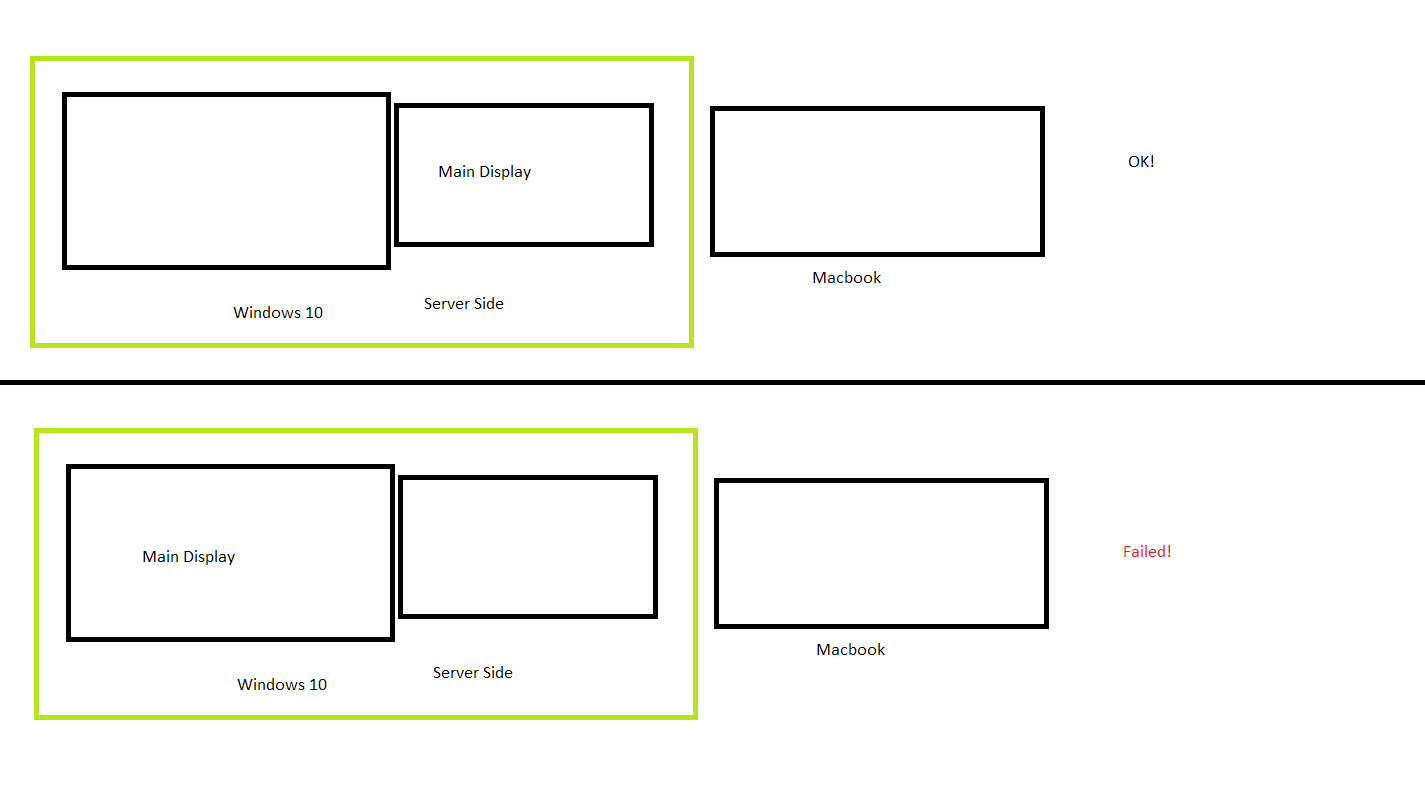
For people who aren't able to drag n drop files between 2 windows 10 PC's try the following:
Go to "Configure Server..." then drag both pc 1 grid up en press Ok then hit Apply.Im able to drag and drop files without any issues after following those steps.
_As silly as it may sound..._
I tested Cubuss's advice, to move the computer icons 1 grid up (in the server's configuration), with 2 win7 machines and it worked (!!!), drag'n drop now works, BUT FYI it did not work with the "elevate" setting at "always".
Go figure !?!
thx @Cubuss.
claude-ws01
on 3 Jul 2017
That worked for me! two windows 10 running 1.8.8. Moving the icons up and changing "elevate" to as needed.
 Jameskholliman
on 7 Jul 2017
Jameskholliman
on 7 Jul 2017
Just got this working with the following setting suggestions from this thread and troubleshooting
OSes:
Windows 10 running 1.8.8-stable-25a7cb2
Fedora 26 running 1.8.8-stable-25a7cb2
Settings
~~~~~~~~~~
Both Systems:
Disable "Use SSL Encryption" on both systems
Set Port to default, 24800 on both
Windows 10, Client:
Choose Client with "Auto config" unchecked, then fill the Server IP filled in. Once IP is
filled click the "Auto config" checkbox
Set "elevate" to "As needed" on the Windows system under Edit>Settings>Elevate
Fedora 26, Server
Choose Server
Set to "Configure Interactively", set up Screen Name only under "Screens and Links",
disable "Enable drag and drop file transfers"
Set Windows to the middle screen, Fedora to the bottom screen, both center column in the grid
~~~~~~~~~~
Apply all of the settings on both, then start the server, then the client.
This resolved both the following error/warning messages for me:
"WARNING: failed to connect to server: Connection was refused"
and
"failed to get desktop path, no drop target available, error=2"
 mcswizzle
on 5 Nov 2017
mcswizzle
on 5 Nov 2017
The solution to get copy & paste working again is to disable "Enable drag and drop file transfers" in server menu Edit > Settings. Next stop and start server.
This solved the "failed to get desktop path, no drop target available, error=2" for me and copy & paste are working again.
 tinustate
on 24 Jan 2018
tinustate
on 24 Jan 2018
Still getting this error on startup.
Windows 7, Synergy 1.8.8-stable-25a8cb2
My Desktop is in an unusual place, but can not be moved back.
 seanvikoren
on 15 Feb 2018
seanvikoren
on 15 Feb 2018
Change "Elevate" from "Always" to "As Needed" :) This will fix the problem :)
I think it's connected with the fact that when you elevate the privileges you are doing it in user profile context so de facto you are not a regular user but the administrator.
 patefoniq
on 4 Jun 2019
patefoniq
on 4 Jun 2019
DRAG & DROP
v1.10.2 - works partially.
win7pro & win7ultimate
my users: administrator
agreed - Change "Elevate" from "Always" to "As Needed", otherwise get a "failed to get desktop path..."
works partially:
a. filename: "Synergy fails to get desktop path, no drop target available · symlesssynergy-core.txt: copies as "Synergy fails to get desktop path", truncated at the "," and without file extension.
b. copying a file that already exist on the destination overwrites WITHOUT user approval.
c. this filename will NOT copy: <(EWO) — test1.txt> ; without the "—", it copies fine.
claude-ws01
on 4 Jun 2019
I still have the error "failed to get desktop path, no drop target available, error=2" on server/client win7 with Barrier 2.3.2
It seems the same situation occurred 5 years ago :)
There is a solution for this issue, also even installing and old Barrier release?
Thanks
 Bistoman
on 11 Apr 2020
Bistoman
on 11 Apr 2020
is there any fix?
 Robinzon100
on 14 May 2020
Robinzon100
on 14 May 2020
they suck. I don't know why i waste my time with this anymore. same results for years.
 jacksoncool
on 15 May 2020
jacksoncool
on 15 May 2020
When a bug is present for more than 5 years with so many complaints it means that... the coder is dead :D
(I hope not)
Bistoman
on 16 May 2020
Did anyone figure this out?
 mcsab
on 20 May 2020
mcsab
on 20 May 2020
yes,
http:/www.sharemouse.com
jacksoncool
on 20 May 2020
http:/www.sharemouse.com doesn't work if you are in different networks. This is the reason why I am here as an ex sharemouse user
Bistoman
on 20 May 2020
valid point. I'm on the same network and it works pretty solid.
On Wed, May 20, 2020 at 1:51 PM Bistoman notifications@github.com wrote:
http:/www.sharemouse.com doesn't work if you are in different networks.
This is the reason why I am here as an ex sharemouse user—
You are receiving this because you commented.
Reply to this email directly, view it on GitHub
https://github.com/symless/synergy-core/issues/4987#issuecomment-631628702,
or unsubscribe
https://github.com/notifications/unsubscribe-auth/AA7ON6MTAFHMVTRDBVGAF6TRSQKDTANCNFSM4BOH7QUA
.
jacksoncool
on 20 May 2020
It worked after I changed the logging level for barrier (barrier>change settings>logging>logging level = debug instead of error), then stop and re-start
 Whiax
on 10 Sep 2020
Whiax
on 10 Sep 2020
The above comment fixed it for me. Really odd bug.
 EmmanVazz
on 17 Dec 2020
EmmanVazz
on 17 Dec 2020
The above comment fixed it for me. Really odd bug.
I don't think it fixed anything, since you changed the log level to Debug it is simply not displaying the errors.
 arnabsen1729
on 11 Jan 2021
arnabsen1729
on 11 Jan 2021
For me, i suffer from this problem too. But it turns out that it is because my keyboard has turn on scroll lock accidently and makes it not work. and have "ERROR: failed to get desktop path, no drop target available, error=2" this error. Turning off scroll lock on your keyboard and it will become normal again.
 cenzwong
on 8 Feb 2021
cenzwong
on 8 Feb 2021
I am also having this issue, turning on/off scroll lock didnt not fix it
 Jekabs123
on 16 Apr 2021
Jekabs123
on 16 Apr 2021
 ShineSmile
on 4 May 2021
ShineSmile
on 4 May 2021
If on windows this could be due to an app network option too(Public network vs private). No fixes above worked for me but changing the app network settings from private to public worked for me. Your mileage may vary with this but its all to do with your own network setup.
 dkilleensri
on 17 May 2021
dkilleensri
on 17 May 2021
Related issues
 LeTink
·
4Comments
LeTink
·
4Comments
 ColinCreamer
·
5Comments
ColinCreamer
·
5Comments
 xmstspider
·
4Comments
xmstspider
·
4Comments
 johnny-mac
·
4Comments
johnny-mac
·
4Comments
 martindale
·
5Comments
martindale
·
5Comments
Most helpful comment
That worked for me! two windows 10 running 1.8.8. Moving the icons up and changing "elevate" to as needed.