Syndesis: Datamapper fails with split in some cases
This is a...
[ ] Feature request
[ ] Regression (a behavior that used to work and stopped working in a new release)
[x] Bug report
[ ] Documentation issue or request
Description
We have had problems with datamapper causing errors when using split and aggregate steps. You can import this integration to see the error:
https://drive.google.com/open?id=1aNSEt21U-NW8tyUrGo5JbL23V_tkNMQc
Since it's an API provider, you need to invoke the flow with:
curl -X POST <url> -d '[{"id":2,"completed":1,"task":"task2"},{"id":3,"completed":1,"task":"task3"}]'
This is the resulting stacktrace (there are multiple errors so choose one you find most useful :D):
i-todo-integration-post-collection-2-6qkd4.log
 mmuzikar
All 33 comments
I'm seeing the same issue in integration from db -> split -> dm -> aggregate -> google sheets:
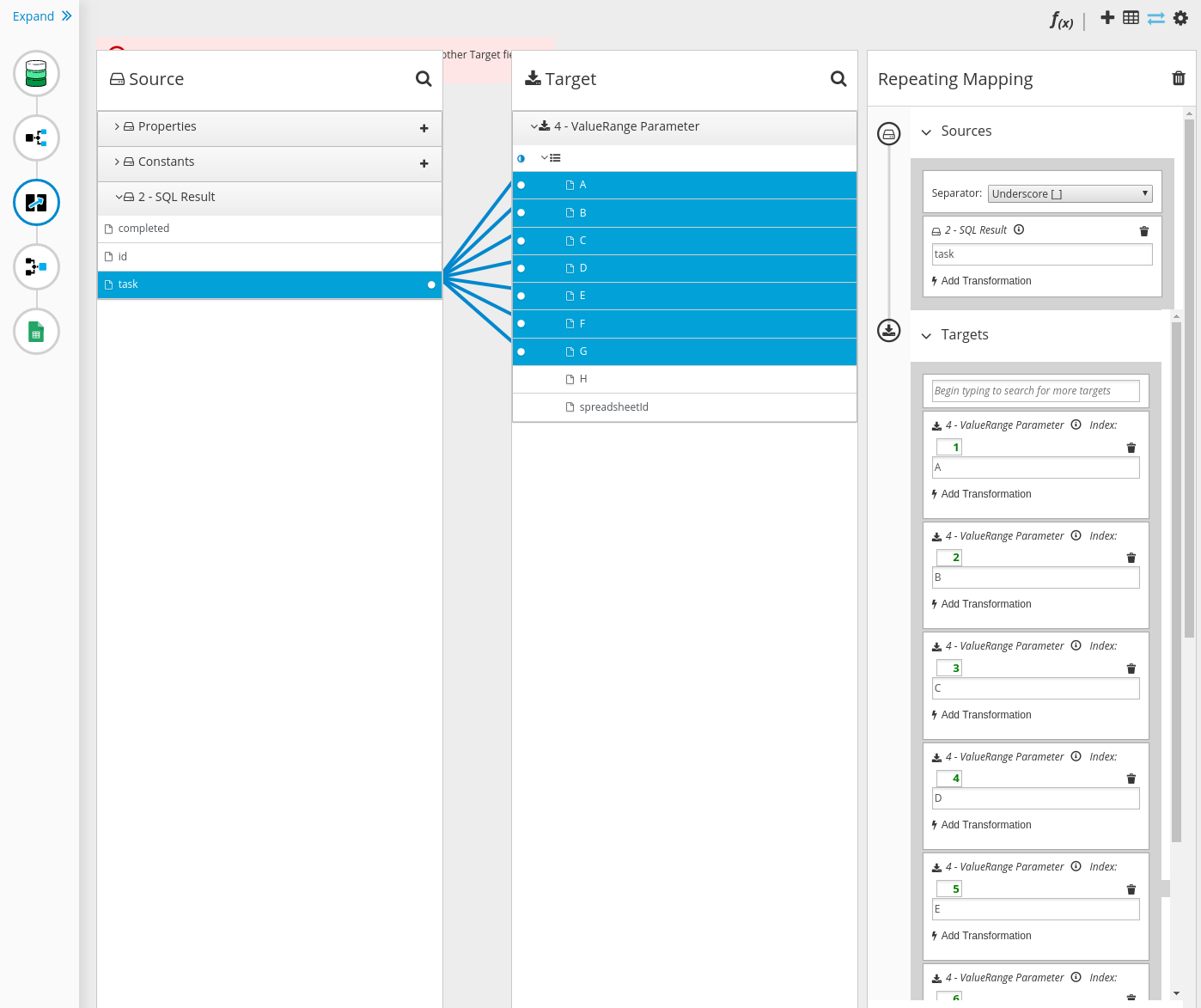
o.atlasmap.api.AtlasException: Errors: [A Target field contained in a collection can not be selected with other Target field: ['/<>/A']: docId='mapping.121775', path='null'], [A Target field contained in a collection can not be selected with other Target field: ['/<>/B']: docId='mapping.121775', path='null'], [A Target field contained in a collection can not be selected with other Target field: ['/<>/C']: docId='mapping.121775', path='null'], [A Target field contained in a collection can not be selected with other Target field: ['/<>/D']: docId='mapping.121775', path='null'], [A Target field contained in a collection can not be selected with other Target field: ['/<>/E']: docId='mapping.121775', path='null'], [A Target field contained in a collection can not be selected with other Target field: ['/<>/F']: docId='mapping.121775', path='null'], [A Target field contained in a collection can not be selected with other Target field: ['/<>/G']: docId='mapping.121775', path='null'],
    at org.apache.camel.component.atlasmap.AtlasEndpoint.onExchange(AtlasEndpoint.java:262) ~[camel-atlasmap-1.40.0.jar!/:1.40.0]
    at org.apache.camel.impl.ProcessorEndpoint$1.process(ProcessorEndpoint.java:71) ~[camel-core-2.21.0.fuse-740028.jar!/:2.21.0.fuse-740028]
    at org.apache.camel.util.AsyncProcessorConverterHelper$ProcessorToAsyncProcessorBridge.process(AsyncProcessorConverterHelper.java:61) ~[camel-core-2.21.0.fuse-740028.jar!/:2.21.0.fuse-740028]
    at org.apache.camel.processor.SendProcessor.process(SendProcessor.java:148) ~[camel-core-2.21.0.fuse-740028.jar!/:2.21.0.fuse-740028]
    at org.apache.camel.processor.DelegateAsyncProcessor.process(DelegateAsyncProcessor.java:110) [camel-core-2.21.0.fuse-740028.jar!/:2.21.0.fuse-740028]
    at org.apache.camel.processor.RedeliveryErrorHandler.process(RedeliveryErrorHandler.java:548) [camel-core-2.21.0.fuse-740028.jar!/:2.21.0.fuse-740028]
    at org.apache.camel.processor.CamelInternalProcessor.process(CamelInternalProcessor.java:201) [camel-core-2.21.0.fuse-740028.jar!/:2.21.0.fuse-740028]
    at org.apache.camel.processor.Pipeline.process(Pipeline.java:138) [camel-core-2.21.0.fuse-740028.jar!/:2.21.0.fuse-740028]
    at org.apache.camel.processor.Pipeline.process(Pipeline.java:101) [camel-core-2.21.0.fuse-740028.jar!/:2.21.0.fuse-740028]
    at org.apache.camel.processor.DelegateAsyncProcessor.process(DelegateAsyncProcessor.java:110) [camel-core-2.21.0.fuse-740028.jar!/:2.21.0.fuse-740028]
    at io.syndesis.integration.runtime.logging.ActivityTrackingInterceptStrategy$TrackDoneEventProcessor.process(ActivityTrackingInterceptStrategy.java:121) [integration-runtime-1.7.8.jar!/:1.7.8]
    at org.apache.camel.processor.DelegateAsyncProcessor.process(DelegateAsyncProcessor.java:110) [camel-core-2.21.0.fuse-740028.jar!/:2.21.0.fuse-740028]
    at org.apache.camel.processor.RedeliveryErrorHandler.process(RedeliveryErrorHandler.java:548) [camel-core-2.21.0.fuse-740028.jar!/:2.21.0.fuse-740028]
    at org.apache.camel.processor.CamelInternalProcessor.process(CamelInternalProcessor.java:201) [camel-core-2.21.0.fuse-740028.jar!/:2.21.0.fuse-740028]
    at org.apache.camel.processor.Pipeline.process(Pipeline.java:138) [camel-core-2.21.0.fuse-740028.jar!/:2.21.0.fuse-740028]
    at org.apache.camel.processor.Pipeline.process(Pipeline.java:101) [camel-core-2.21.0.fuse-740028.jar!/:2.21.0.fuse-740028]
    at org.apache.camel.processor.RedeliveryErrorHandler.process(RedeliveryErrorHandler.java:548) [camel-core-2.21.0.fuse-740028.jar!/:2.21.0.fuse-740028]
    at org.apache.camel.processor.CamelInternalProcessor.process(CamelInternalProcessor.java:201) [camel-core-2.21.0.fuse-740028.jar!/:2.21.0.fuse-740028]
    at org.apache.camel.processor.MulticastProcessor.doProcessSequential(MulticastProcessor.java:715) [camel-core-2.21.0.fuse-740028.jar!/:2.21.0.fuse-740028]
    at org.apache.camel.processor.MulticastProcessor.doProcessSequential(MulticastProcessor.java:638) [camel-core-2.21.0.fuse-740028.jar!/:2.21.0.fuse-740028]
    at org.apache.camel.processor.MulticastProcessor.process(MulticastProcessor.java:248) [camel-core-2.21.0.fuse-740028.jar!/:2.21.0.fuse-740028]
    at org.apache.camel.processor.Splitter.process(Splitter.java:122) [camel-core-2.21.0.fuse-740028.jar!/:2.21.0.fuse-740028]
    at org.apache.camel.processor.DelegateAsyncProcessor.process(DelegateAsyncProcessor.java:110) [camel-core-2.21.0.fuse-740028.jar!/:2.21.0.fuse-740028]
    at org.apache.camel.processor.RedeliveryErrorHandler.process(RedeliveryErrorHandler.java:548) [camel-core-2.21.0.fuse-740028.jar!/:2.21.0.fuse-740028]
    at org.apache.camel.processor.CamelInternalProcessor.process(CamelInternalProcessor.java:201) [camel-core-2.21.0.fuse-740028.jar!/:2.21.0.fuse-740028]
    at org.apache.camel.processor.Pipeline.process(Pipeline.java:138) [camel-core-2.21.0.fuse-740028.jar!/:2.21.0.fuse-740028]
    at org.apache.camel.processor.Pipeline.process(Pipeline.java:101) [camel-core-2.21.0.fuse-740028.jar!/:2.21.0.fuse-740028]
    at org.apache.camel.processor.CamelInternalProcessor.process(CamelInternalProcessor.java:201) [camel-core-2.21.0.fuse-740028.jar!/:2.21.0.fuse-740028]
    at org.apache.camel.component.timer.TimerConsumer.sendTimerExchange(TimerConsumer.java:197) [camel-core-2.21.0.fuse-740028.jar!/:2.21.0.fuse-740028]
    at org.apache.camel.component.timer.TimerConsumer$1.run(TimerConsumer.java:79) [camel-core-2.21.0.fuse-740028.jar!/:2.21.0.fuse-740028]
    at java.util.TimerThread.mainLoop(Timer.java:555) [na:1.8.0_191]
    at java.util.TimerThread.run(Timer.java:505) [na:1.8.0_191]
exported integration:
from-db-to-sheets-export (1).zip
Also when I wanted to edit datamaper step I have some hidden error message and it looks like split wasn't applied for DM:
 mmelko
on 10 Jul 2019
mmelko
on 10 Jul 2019
@riccardo-forina @gashcrumb can you please have a look, too?
I see that step ids get recreated once the user revisits existing steps and clicks through the configuration wizard. The new step ids break existing data mappings as they still use the old step ids as document ids.
I would expect the step configuration wizard to not overwrite existing step ids but keep the initial ids.
 christophd
on 11 Jul 2019
christophd
on 11 Jul 2019
BTW this is not related to integrations with split/aggregate only as I have used an integration without split/aggregate and I see the same data mapping being damaged
christophd
on 11 Jul 2019
@mmuzikar @mmelko could you please elaborate a bit on the part ... fails with split in some cases knowing what some cases means might help to spot the bug on my side. many thanks
christophd
on 11 Jul 2019
So there was an issue on the UI where the original step could lose data when updating a connection step. #6138 should fix that.
This moves us a bit further, but there is still something weird going on. Doing the same steps @mmuzikar reported, the error now becomes Could not find field from document for mapped field 'first_name'.
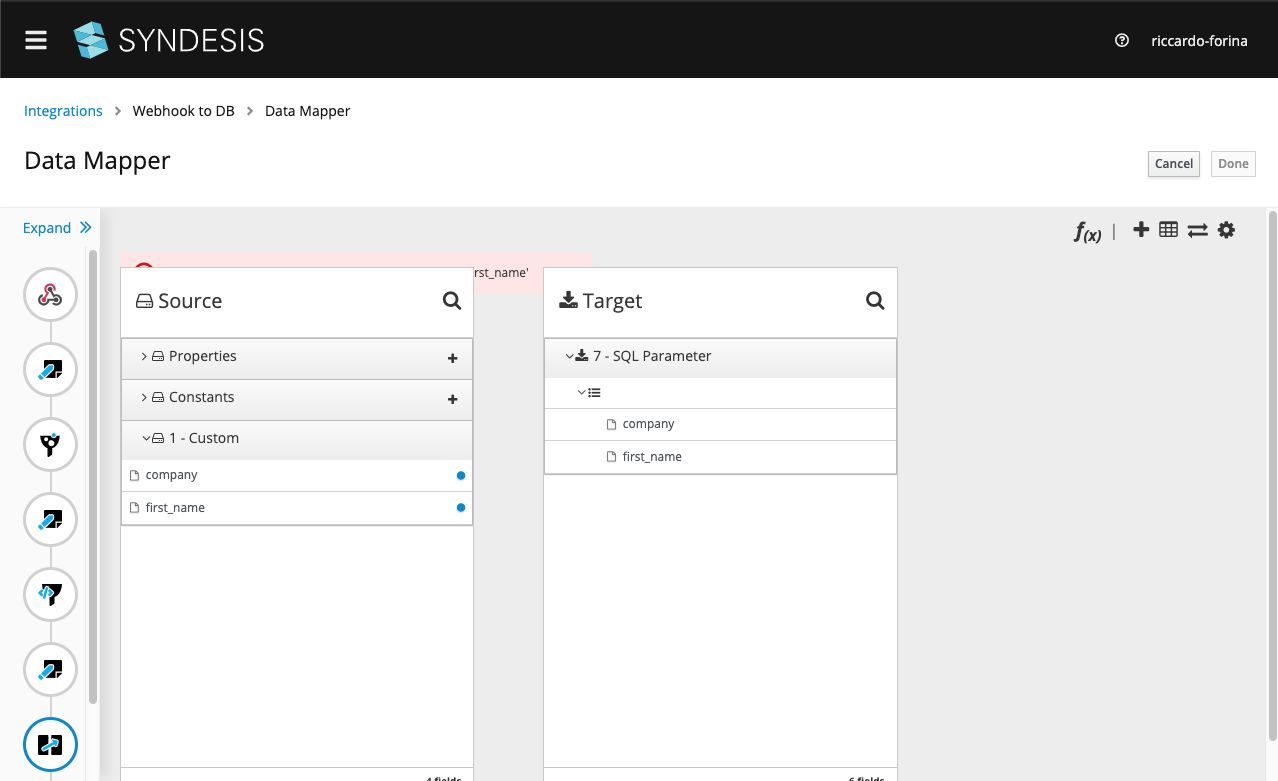
So I diffed the step object - the last one - from before and after the save and I see this:
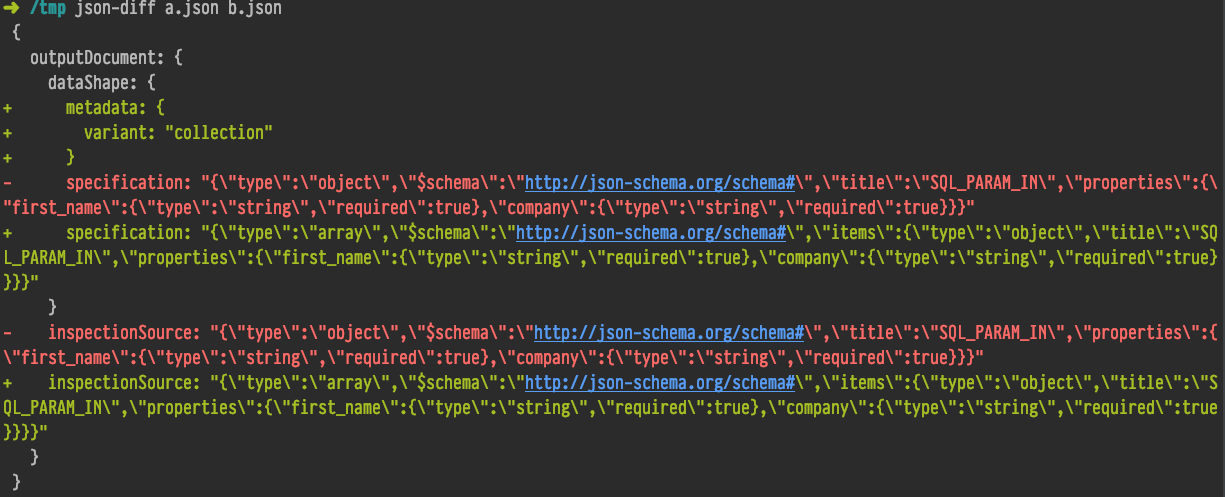
So basically the step's dataShape changed from an object to an array.
Not sure how to proceed further.
 riccardo-forina
on 12 Jul 2019
riccardo-forina
on 12 Jul 2019
@riccardo-forina the error Could not find field from document for mapped field 'first_name' is related to the SQL connector now using the array shape for batch update support. This is another issue that I can tackle.
christophd
on 12 Jul 2019
I think we have tackled this by fixing multiple problems that were all part of this one:
- #6138 fixes the data mapping when user reconfigures an existing step
- #6140 fixes missing support for unified json response data shapes (used in API provider) when having split/aggregate
- #6146 fixes the SQL connector batch update feature to break existing data mappings
christophd
on 12 Jul 2019
@christophd The changes you made sadly didn't seem to fix the issue for me. I also tried the integration @mmelko provided and that also didn't work. Could you please investigate what's wrong?
mmuzikar
on 17 Jul 2019
Did you recreate the integration from scratch or use an export?
 gashcrumb
on 17 Jul 2019
gashcrumb
on 17 Jul 2019
Please redo the integration from scratch and do not use an import to verify.
This is because the integration most likely has been created with a previous version of Syndesis 1.7.x and some things in there are not valid anymore with 1.7.11. There is no migration for these integrations as the incompatibility is only within different 1.7.x versions.
In case the issue on your side still exists after that it would be good to have a description of steps to reproduce. I still have no clear idea of what some cases means.
christophd
on 17 Jul 2019
Both, I run the test which setup the integrations from scratch and tried to import those integrations and re-create those mappings and both failed the same way.
Some cases means that it does not happen every time you use the split step, only in some curious scenarios we are not able to pinpoint the source of problems from.
mmuzikar
on 17 Jul 2019
Can you post an updated export?
gashcrumb
on 17 Jul 2019
Steps to reproduce the API provider case:
Create API Provider from this schema
Implement flow POST multiple tasks
Add split
Add aggregate
In between split and aggregate ad DB connection with query INSERT INTO todo (id, completed, task) VALUES (:#id, :#completed, :#task)
Add data mapper between split and DB and map id -> id, completed -> completed, task -> task
Add data mapper after DB and map the properties the same way
Publish the integration and run the CURL curl -X POST <url> -d '[{"id":2,"completed":1,"task":"task2"},{"id":3,"completed":1,"task":"task3"}]'
EDIT: updated export
TODO Integration post collection-export(1).zip
mmuzikar
on 17 Jul 2019
@gashcrumb small correction: this is the correct schema with the POST multiple operation
 asmigala
on 17 Jul 2019
asmigala
on 17 Jul 2019
It's not a good sign when I import that export, go to the data mapper pages before doing anything and see a data mapper error that it's unable to find the source document.
Also the integration fails to build on my minishift when I publish it, so kinda stuck. @christophd have you tried reproducing this locally, any luck?
gashcrumb
on 17 Jul 2019
Even if you try to create the integration from scratch, the data mappings seems to be broken right after you click the "Done" button
mmuzikar
on 17 Jul 2019
Hmm, I didn't at least see that behavior here, i.e. if I go back into a data mapper step the mappings are loaded properly. I guess though you're testing on 1.7.x?
gashcrumb
on 17 Jul 2019
Yes we are on 1.7.11
 mcada
on 17 Jul 2019
mcada
on 17 Jul 2019
I was not able to import the integration export.zip on my machine 😢 so clearly the integration is broken for some reason and therefore it is not able to run in that state.
christophd
on 17 Jul 2019
@christophd were you able to recreate the integration using the steps @mmuzikar provided? (see also my clarification regarding the swagger file)
asmigala
on 17 Jul 2019
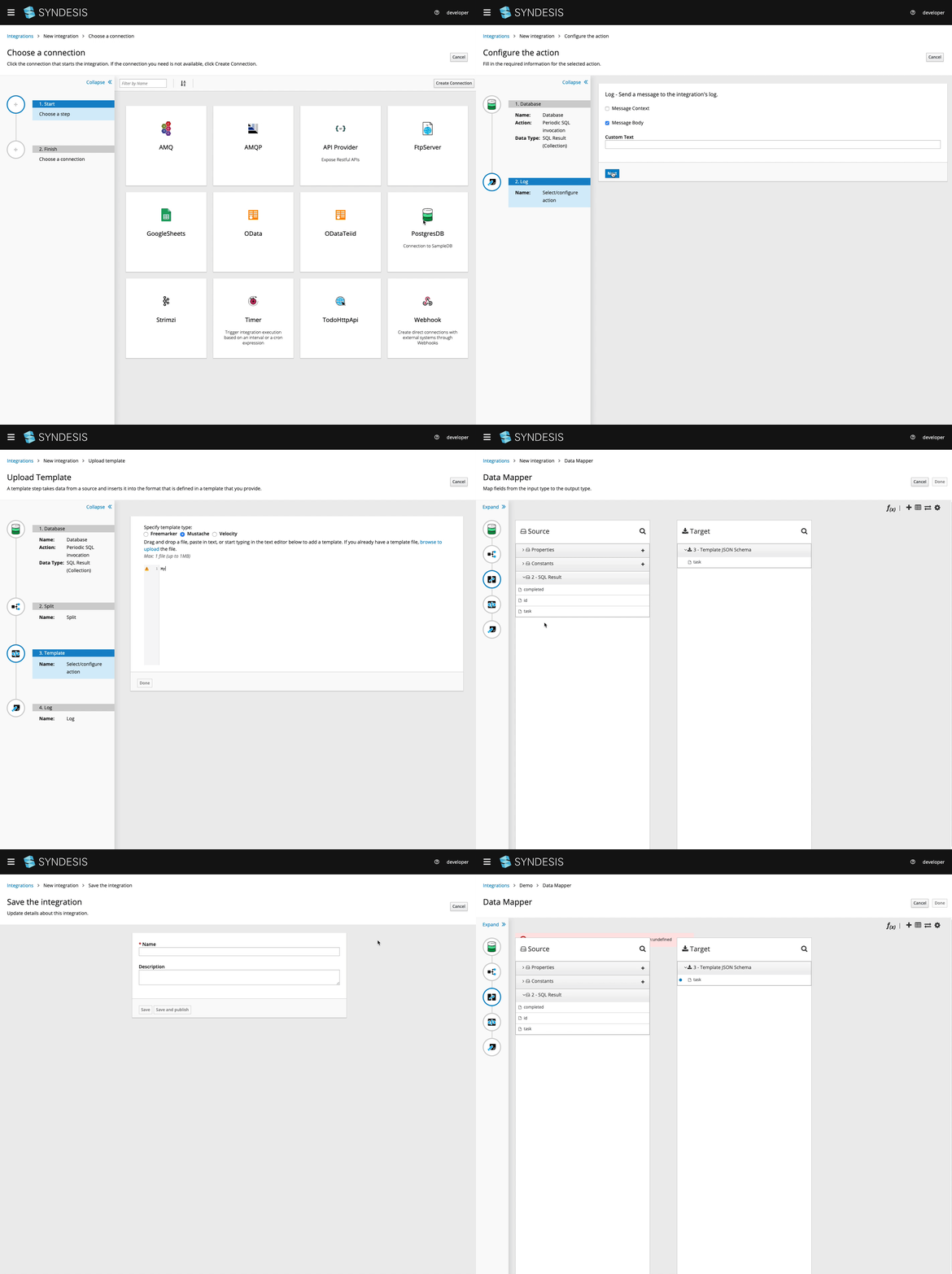
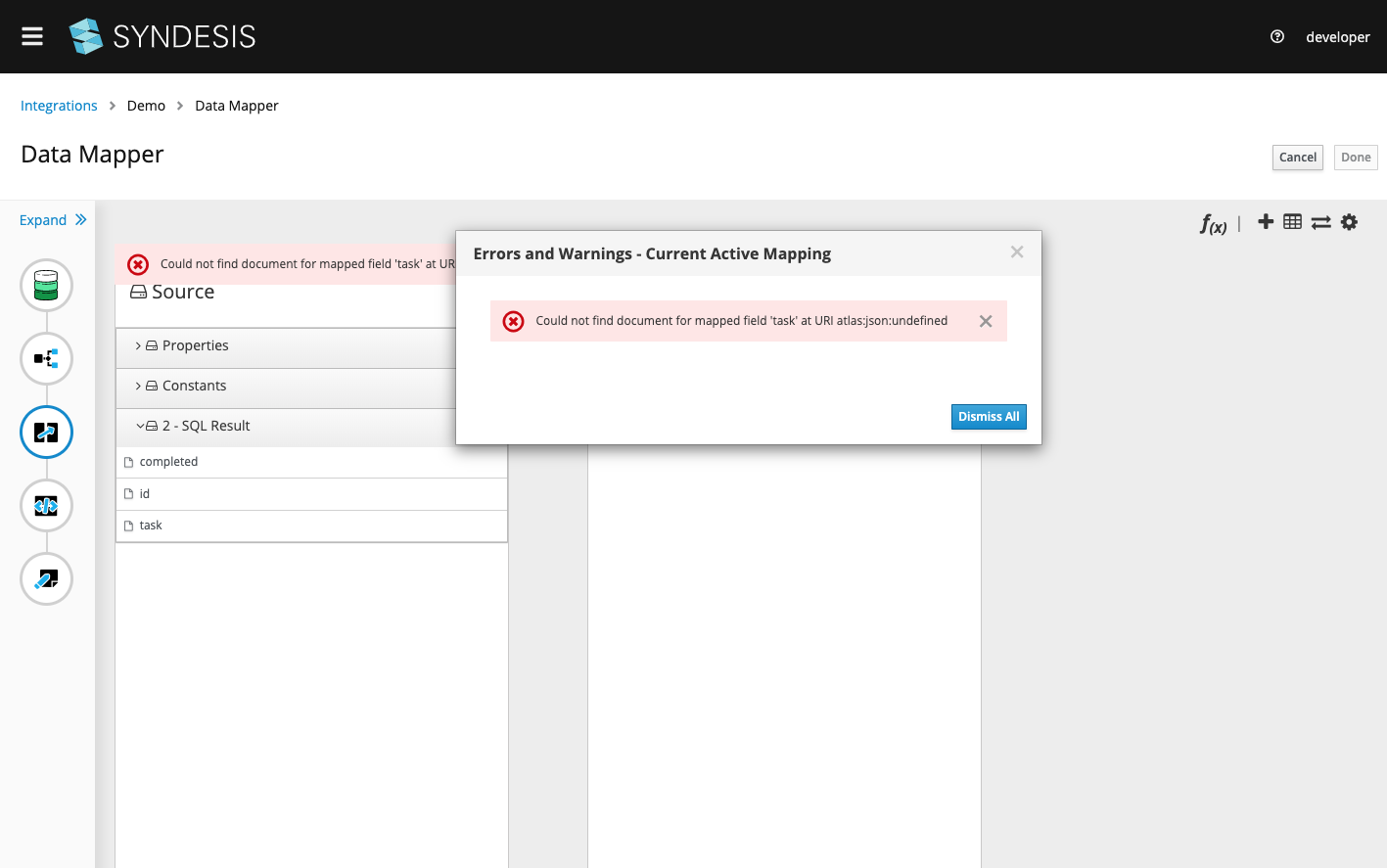
So I started to create some integration myself and I am hitting a bug that should have been fixed in #6151 where the data mapping is broken after save of the integration. Here is what I did to reproduce the error:
christophd
on 17 Jul 2019
Here is the error message from atlasmap:
christophd
on 17 Jul 2019
So the good news is that the error goes away once you manually redo the mapping after 1st save.
So the issue seems to only occur after the integration is saved for the 1st time. I was able to fix the mapping by redoing it and after 2nd save of the integration the mapping stays valid. I was also able to publish the integration then and verify that it is working.
christophd
on 17 Jul 2019
@mmuzikar @asmigala the CURL command is missing the content type header by the way. This is required otherwise the request will not be successful. I use following command and this is working for me after I have fixed the data mapping error manually:
curl -k -d '[{"id":2,"completed":1,"task":"task2"},{"id":3,"completed":1,"task"son" -H "Content-Type: application/json" -X POST <url>
Hey, I wonder if you exit the editor completely after saving if it'd work the first time. Or hit "save and publish" which does that for you.
gashcrumb
on 17 Jul 2019
No that does not help! Neither exit the editor after save nor using save and publish when saving for the 1st time.
christophd
on 17 Jul 2019
Yup, reproduced that here, lemme look into it.
gashcrumb
on 17 Jul 2019
Doesn't this look fishy in the atlasmap document that's in the integration:

And sure enough, look at the split step:

I'll go validate how that id is not getting set.
gashcrumb
on 17 Jul 2019
linked PR should finally be the last bit, I'll hide under a rock from this point on :rofl:
gashcrumb
on 17 Jul 2019
Thanks @gashcrumb this resolved my issue, let's see if it does the same to @mmelko
mmuzikar
on 18 Jul 2019
@gashcrumb solved both my issues and @mmelko 's issue :tada: . Do you want to investigate this further or can we consider this to be done and close this?
mmuzikar
on 19 Jul 2019
I think we can consider this done, if something comes up it should be a new issue probably anyways. Thanks!
gashcrumb
on 19 Jul 2019
Verified by QE.
mmuzikar
on 22 Jul 2019
Related issues
 sjavurek
·
5Comments
gashcrumb
·
4Comments
sjavurek
·
5Comments
gashcrumb
·
4Comments
 zregvart
·
3Comments
mcada
·
6Comments
zregvart
·
3Comments
mcada
·
6Comments
 SvenC56
·
5Comments
SvenC56
·
5Comments
Most helpful comment
Thanks @gashcrumb this resolved my issue, let's see if it does the same to @mmelko