Syndesis: [Conditional Flow] First condition can not be deleted
This is a...
[ ] Feature request
[ ] Regression (a behavior that used to work and stopped working in a new release)
[x] Bug report
[ ] Documentation issue or request
Description
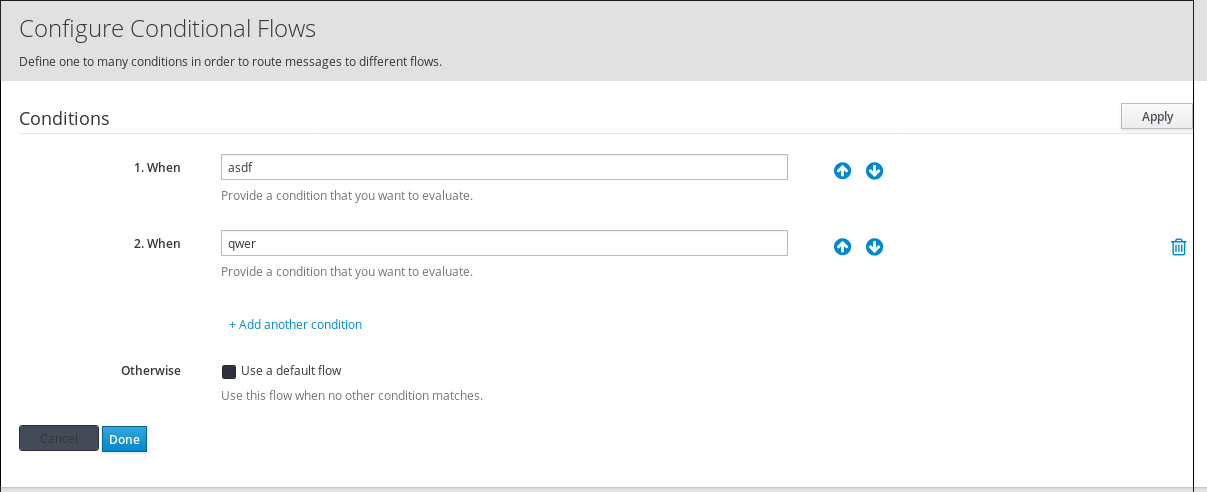
First condition can not be removed - there is no delete icon:
 mcada
mcada
All 8 comments
We actually have the same kinda of problem with the basic filter step, where it's an array and it should contain at least 1 value in it.
We could have the trash icon on the 1st row too and then just ensure in the click handler for that trash icon just adds an empty new row if that array is empty.
 gashcrumb
on 28 May 2019
gashcrumb
on 28 May 2019
Actually, don't we always want at least 1 condition? I guess the idea is the user just changes whatever value is there.
gashcrumb
on 28 May 2019
Yeah, I think we always want at least one condition for the conditional flow. And if we want no conditions, users should be able to just delete the conditional flow step.
 dongniwang
on 28 May 2019
dongniwang
on 28 May 2019
Makes sense to me. I also think for consistency's sake we should follow the same pattern as the basic filter then which has a similar layout and behavior, so I don't think this is a bug but an enhancement.
gashcrumb
on 28 May 2019
No. I am sorry, but this is a bug. When I want to keep second condition by deleting the first one, I can not do it - I have to push first condition to second place and then delete it - this is just stupid.
mcada
on 29 May 2019
I guess we could auto adjust the visibility of that 1st remove button. as long as we have more than one condition available the button is visible. When there is only one single last condition left the remove button is not displayed.
 christophd
on 29 May 2019
christophd
on 29 May 2019
Yup, that'd work fine, good call! That's also an approach I can apply to the react codebase pretty easily.
gashcrumb
on 29 May 2019
@christophd perfect idea, I like that!
mcada
on 29 May 2019
Related issues
 tplevko
·
5Comments
tplevko
·
5Comments
 sjavurek
·
5Comments
sjavurek
·
5Comments
 mmelko
·
5Comments
gashcrumb
·
4Comments
mmelko
·
5Comments
gashcrumb
·
4Comments
 blaggacao
·
5Comments
blaggacao
·
5Comments
Most helpful comment
Makes sense to me. I also think for consistency's sake we should follow the same pattern as the basic filter then which has a similar layout and behavior, so I don't think this is a bug but an enhancement.