This is a...
[ ] Feature request
[ ] Regression (a behavior that used to work and stopped working in a new release)
[X] Bug report
[ ] Documentation issue or request
Description
I want to create this integration:
sql select
split
  filter (I want only some elements from the collection)
aggregate (I want to continue with the collection)
datamapper (I want to concatenate all last names from the collection into one message)
activemq queue
When I use following flow:
1. start SQL
2. end AMQ
3. split
4. aggregate
The split has the none -> sql result datashape (correct), but the aggregate has amq-in(json instance in my case) -> sql result.
In this case, the aggregate should have the same datashapes as the sql select as I only filtered out some elements.
This results in two datamappers required by the ui:

 avano
avano
All 25 comments
@gashcrumb @christophd any thoughts on this?
avano
on 13 Mar 2019
maybe would be solved with #4881
avano
on 13 Mar 2019
Yeah, I think it should, at least it's worth a test once that PR is merged.
 gashcrumb
on 13 Mar 2019
gashcrumb
on 13 Mar 2019
I think at this point in your described steps 1-4 everything is fine and as expected. At this point there is no data mapper step yet between aggregate and amq so aggregate will have the same shape as amq. Once you add a mapper things change and aggregate will align to the new situation.
 christophd
on 13 Mar 2019
christophd
on 13 Mar 2019
To be a bit more precise in explanation the aggregate always adopts the input shape of the subsequent step and the output shape of the previous step.
In your described state the aggregate adopted the shapes according to the steps previous and subsequent to the aggregate which is amq-in(json instance in my case) -> sql result.
In addition to adopting the shapes the aggregate transforms the input shape from type single element to type collection.
In case you add a mapper to the picture the aggregate will align its shapes to the new situation.
@avano Can you please give that a try and report any concerns that you are seeing?
christophd
on 14 Mar 2019
@christophd
In addition to adopting the shapes the aggregate transforms the input shape from type single element to type collection.
This is what is not happening in my case and maybe it causes the confusion :-)
In my case, when I add aggregate, it has only SQL Result datashape and no collection.
edit: I also built the UI from Stan's PR and then the datashapes for aggregate were:
in: JSON (from the subsequent amq step)
out: none
according to your comment in the PR, I naively tried to change subsequent to prev but that resulted in errors in the console
avano
on 14 Mar 2019
@christophd
anyway, where the datashape should be place in the case? I would expect to place it between aggregate and amq step, because that is what I want to map really.
According to your comment the datashapes should look like this:
SQL       (in: whatever                out: SQL Result collection)
Split     (in: whatever                out: SQL Result single element)
Basic filter
Aggregate (in: json instance from AMQ  out: SQL Result collection)
AMQ       (in: json instance           out: whatever)
Then the UI would require 2 datamapper as it is now - why I should add the datamapper between Split and Aggregate (the output and input datashapes do not match)?
Shouldn't it be this way?
SQL       (in: whatever                out: SQL Result collection)
Split     (in: whatever                out: SQL Result single element)
Basic filter
Aggregate (in: whatever                out: SQL Result collection)
AMQ       (in: json instance           out: whatever)
I want to use basic filter between split and aggregate, should be the same datashape as in the initial SQL step.
When I would use some connector in between, then the datashapes should look like this according to my common sense :-)
SQL       (in: whatever                out: SQL Result collection)
Split     (in: whatever                out: SQL Result single element)
Connector (in: whatever, use datamapper between split and connector if necessary
                                       out: XML)
Aggregate (in: whatever                out: XML collection)
AMQ       (in: json instance           out: whatever)
This is how I imagine it at the first glance
avano
on 14 Mar 2019
In addition to adopting the shapes the aggregate transforms the input shape from type single element to type collection.
I have to adjust my previous statement. It should be:
In addition to adopting the shapes the aggregate transforms the output shape from type single element to type collection.
christophd
on 14 Mar 2019
@christophd yes, figured that out
avano
on 14 Mar 2019
This is option a)
SQL       (in: whatever                out: SQL Result collection)
Split     (in: whatever                out: SQL Result single element)
Basic filter
Aggregate (in: json instance from AMQ  out: SQL Result collection)
AMQ       (in: json instance           out: whatever)
This is option b)
SQL       (in: whatever                out: SQL Result collection)
Split     (in: whatever                out: SQL Result single element)
Basic filter
Aggregate (in: whatever                out: SQL Result collection)
AMQ       (in: json instance           out: whatever)
The only difference between a) and b) is the input shape of the aggregate. I say option a) is correct, because aggregate needs to adopt the input shape of the subsequent step.
This is because the subsequent step can also require a collection as input shape. In this case the aggregate transforms the type collection to type single element. In all other cases the input shape is just adopted as is.
Here is an example where the input shape is transformed in aggregate:
SQL           (in: whatever                out: SQL Result collection)
Split         (in: whatever                out: SQL Result single element)
Basic filter
Aggregate     (in: json schema element      out: SQL Result collection)
Google Sheets (in: json schema collection   out: whatever)
Why is that transformation of input shape required? This is best explained when adding a mapper in the split/aggregate:
SQL           (in: whatever                out: SQL Result collection)
Split         (in: whatever                out: SQL Result single element)
Basic filter
DataMapper    (in: SQL Result single element, out: json schema element)
Aggregate     (in: json schema element      out: json schema collection)
Google Sheets (in: json schema collection   out: whatever)
Note how the aggregate aligned to the new situation changing the output shape to json schema collection
christophd
on 14 Mar 2019
In case you add the mapper after the aggregate the aggregate also aligns to the new situation:
SQL           (in: whatever                out: SQL Result collection)
Split         (in: whatever                out: SQL Result single element)
Basic filter
Aggregate     (in: whatever          out: SQL Result collection)
DataMapper    (in: whatever,         out: json schema collection)
Google Sheets (in: json schema collection   out: whatever)
In your sample with AMQ the aggregate is not necessary in general as the AMQ connector can not handle input shapes of type collection. You should just use split:
SQL           (in: whatever                out: SQL Result collection)
Split         (in: whatever                out: SQL Result single element)
Basic filter
DataMapper    (in: whatever,               out: json instance)
AMQ           (in: json instance           out: whatever)
@christophd Question on that, since the data shape on the AMQ connector can be user specified, what if the user sets the input data shape on the end connection using JSON instance like:
[{"attr1": "val1", "attr2": "val1"}, {"attr1": "val2", "attr2", "val2"}]
We probably don't flag this as a collection, but technically I've provided an instance of some JSON that's a collection.
gashcrumb
on 14 Mar 2019
@christophd what I wanted to do was:
Select something from DB, filter something out with the filter and then send all last names as one message to AMQ using datamapper's concatenate.
Obviously I could do the filtering in the WHERE clause in the sql statement but I wanted to try the split and aggregate.
Plain SQL -> datamapper concatenate -> AMQ ( {"message":"test"} datashape ) worked well.
Is there any way how can achieve what I want with the split and aggregate?
avano
on 14 Mar 2019
@gashcrumb the split/aggregate meta lookup would still be able to auto transform the collection json instance to a single element and vice versa. This is what the meta descriptor lookup is doing. This is working for json schema and json instance shapes.
christophd
on 14 Mar 2019
@avano I think you should be able to do that with split/aggregate when adding the data mapper after the aggregate step
christophd
on 14 Mar 2019
@christophd
on current master, the aggregate claims to have SQL Result datashape:
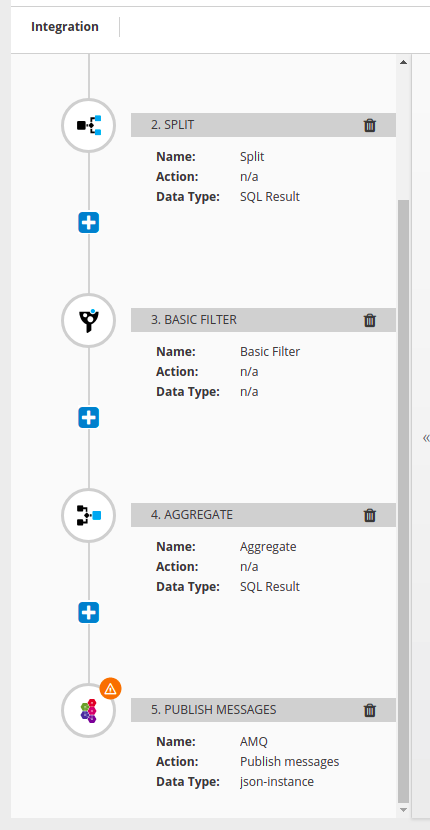
That is almost what I would expect - again, I would expect SQL Result (Collection)
When I add mapping between aggregate and amq, for some reason I now have [].message in the left column (message is from the amq step)
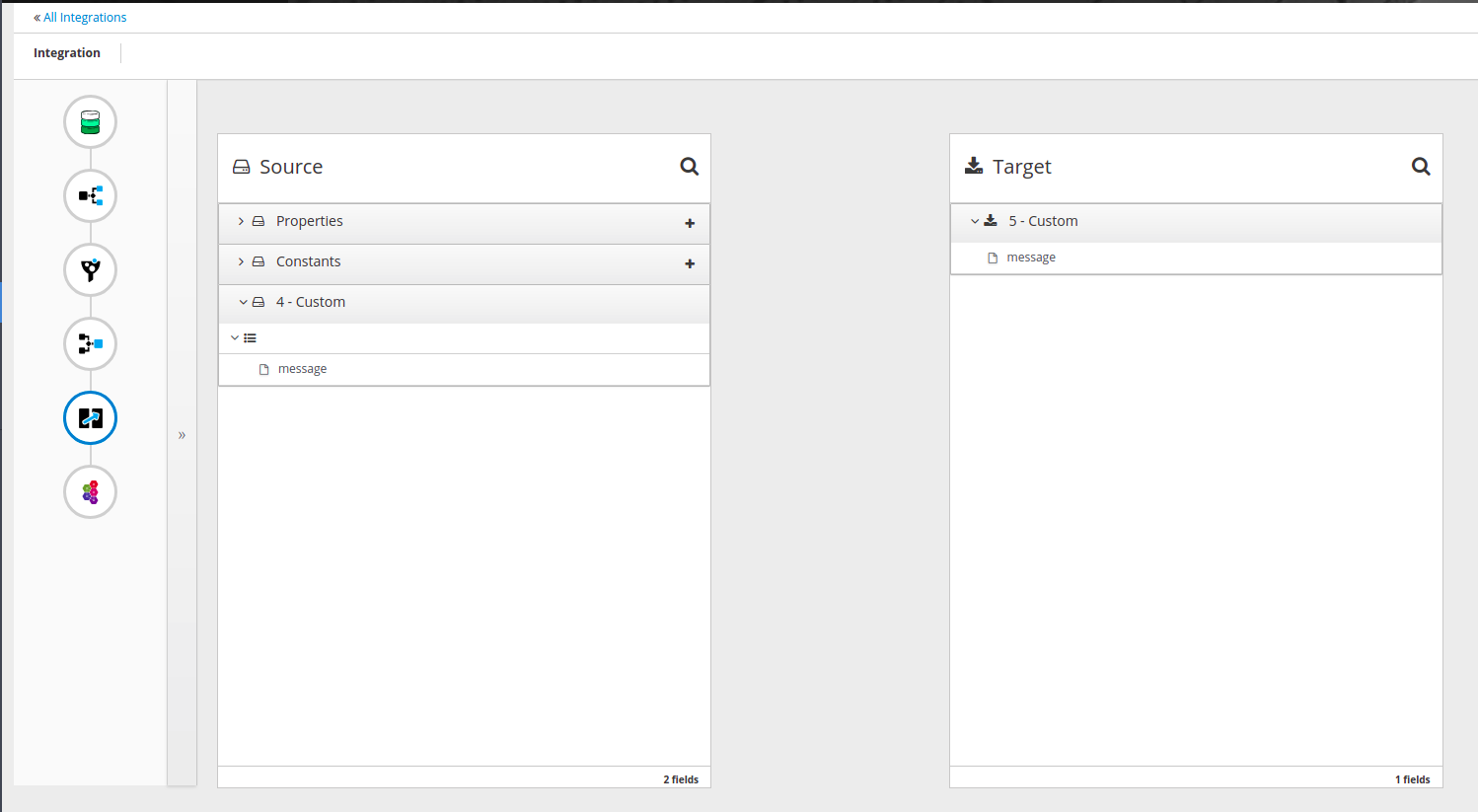
That doesn't look right to me
avano
on 18 Mar 2019
@avano any hints how to get amq broker/connection running so I can test this on my machine?
christophd
on 18 Mar 2019
@christophd
oc create -f https://raw.githubusercontent.com/syndesisio/syndesis-qe/master/utilities/src/main/resources/templates/syndesis-amq.yml
oc new-app syndesis-amq -p MQ_USERNAME=amq -p MQ_PASSWORD=topSecret
in syndesis just create connection with tcp://broker-amq-tcp:61616 , amq, topSecret
avano
on 18 Mar 2019
@avano thank you for the description the amq message broker works fine now
The issue came in a few days ago and a PR fixing this is on its way: https://github.com/syndesisio/syndesis/pull/4929
Many thanks!
christophd
on 18 Mar 2019
The latest issue with mixed-up data shapes for aggregate (also reported in #4905) is fixed now but there are still some errors showing up in the Syndesis server log.
com.fasterxml.jackson.databind.exc.MismatchedInputException: Cannot deserialize instance of `java.util.ArrayList` out of START_OBJECT token
--
  | at [Source: (String)"{
  | "name": "foo",
  | "completed": 0
  | }"; line: 1, column: 1]
This is because the user specifies the data shape for the AMQ connection with an json-instance and the meta data variant information (collection/single element) is not given in this case. This is why the server meta lookup hits the error and the UI is provided with non inspected data shapes. So the UI has no chance to display proper collection or single element hints.
Let me fix this on the server meta lookup.
@heiko-braun In my opinion this is a blocker as all integrations where the user defines the data shapes on the connection step (AMQ, Template, Webhook etc.) might run into the problem that data shapes for split/aggregate are not inspected in a consistent way. I think this fix should be backported to 1.6.x.
@avano I think with this particular issue being fixed we have sorted out the missing collection/single element hints on split/aggregate and we are now on the same page regarding data shape handling for split/aggregate. Do you agree?
christophd
on 19 Mar 2019
Ipdates the prio according to @christophd latest comment
 heiko-braun
on 19 Mar 2019
heiko-braun
on 19 Mar 2019
This is because the user specifies the data shape for the AMQ connection with an json-instance and the meta data variant information (collection/single element) is not given in this case.
@christophd how can I reproduce this?
other than that, it seems it behaves like I would expect now
avano
on 20 Mar 2019
@avano you can reproduce by defining a json-instance data shape for the AMQ connection. When placing the aggregate in front of the AMQ step the syndesis-server log should not have any errors. Also when you capture the request/response sent from UI to syndesis-server you should get a proper response for the aggregate descriptor lookup (path=steps/aggregate/descriptor). Sorry, that is a bit ugly to reproduce and verify.
christophd
on 20 Mar 2019
@christophd thanks! looks good now, closing
avano
on 20 Mar 2019
Related issues
 zregvart
·
3Comments
zregvart
·
3Comments
 tplevko
·
4Comments
tplevko
·
4Comments
 gaughan
·
5Comments
gaughan
·
5Comments
 SvenC56
·
5Comments
SvenC56
·
5Comments
 mcada
·
5Comments
mcada
·
5Comments