This is a...
[ ] Feature request
[ ] Regression (a behavior that used to work and stopped working in a new release)
[x] Bug report
[ ] Documentation issue or request
The problem
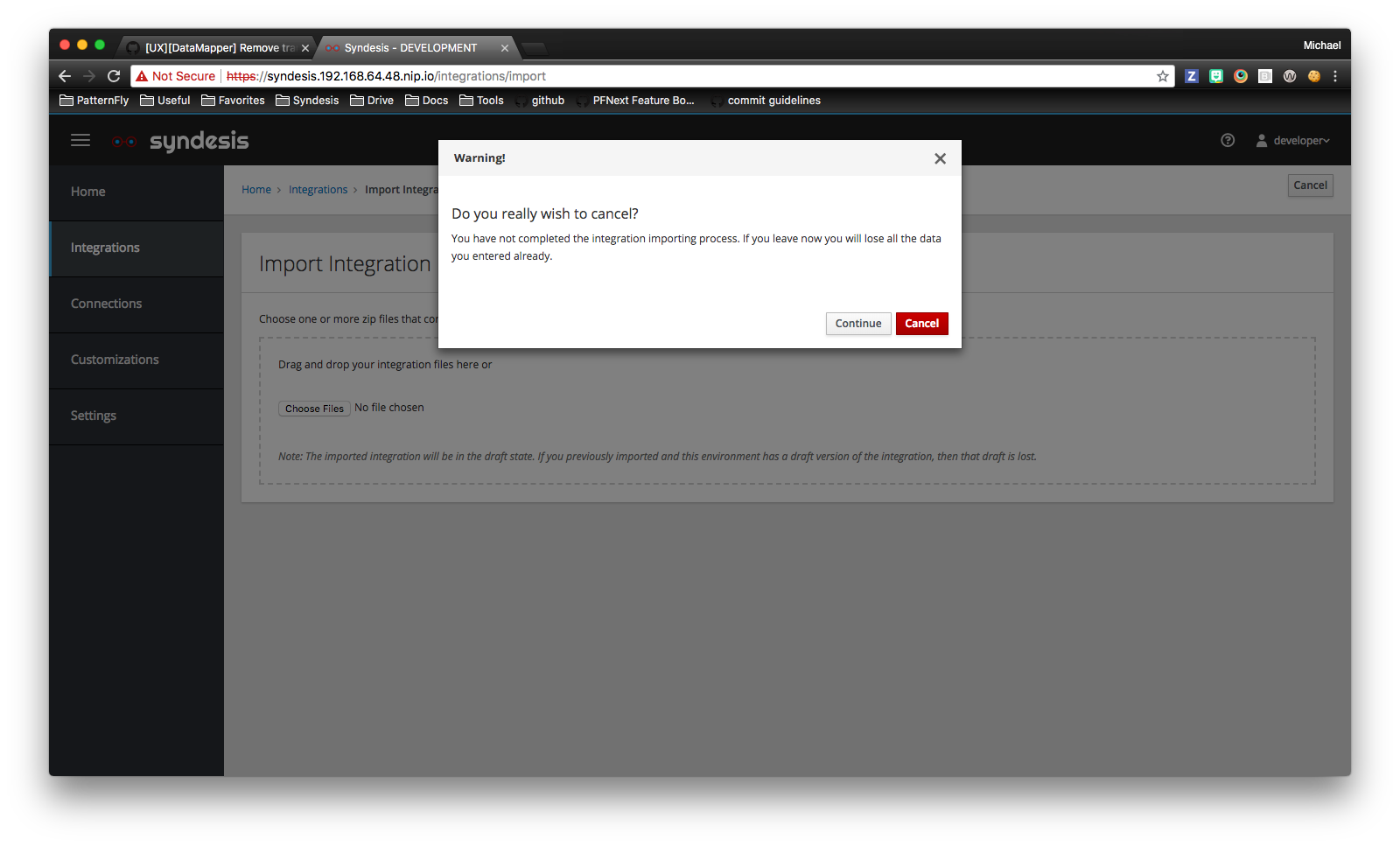
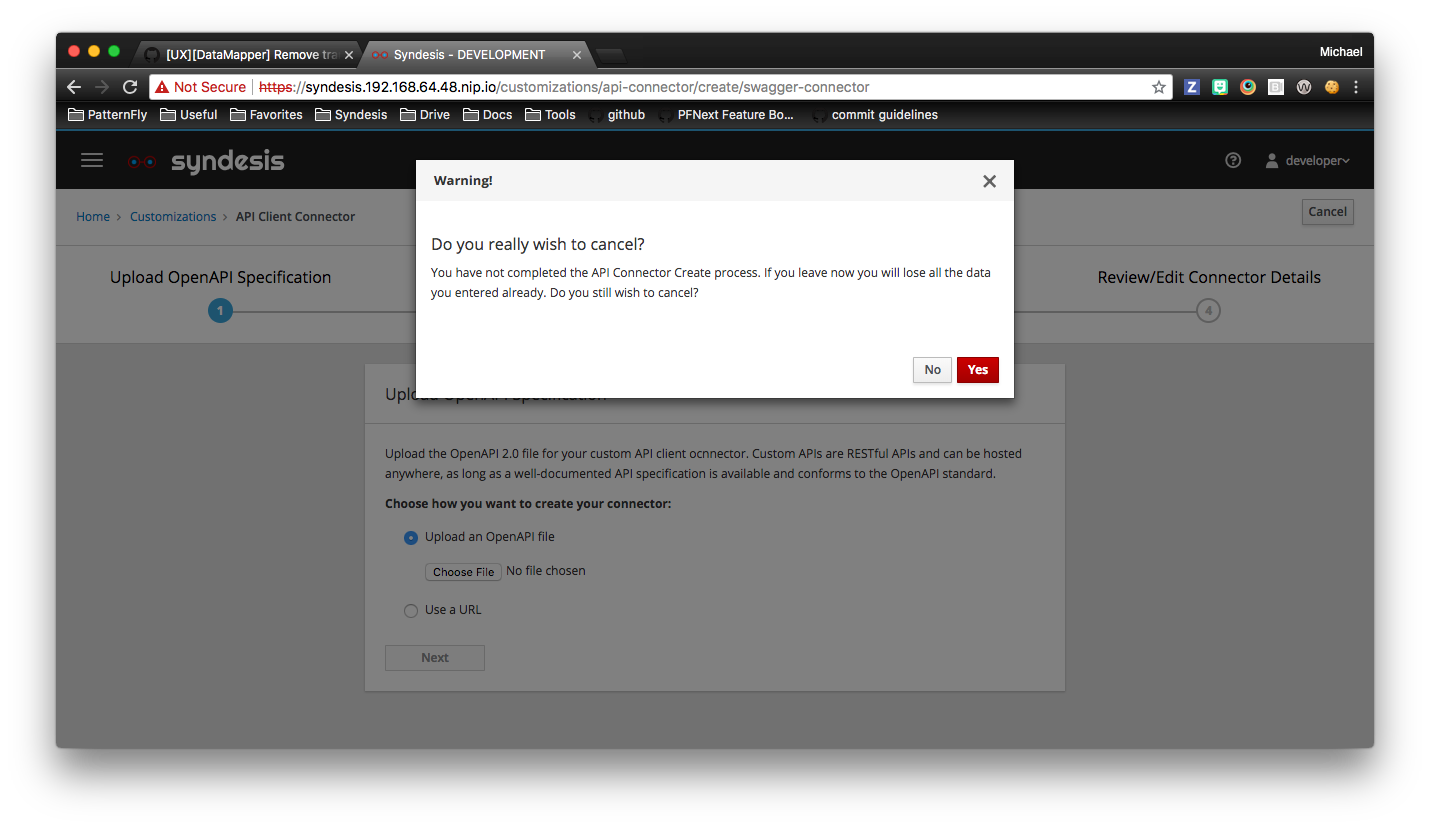
Looks like we need to update the layout and title, body, and button wording of these dialogs
- Cancel during in create API Connector workflow
- Cancel during integration import
This is potentially part of a larger discussion - should these buttons even have modal dialog confirmations?
The following workflow cancel buttons do not have a confirmation dialog - they just exit the workflow
- extension import
- create integration
- create connection
And assuming any of these workflows (including the first 2 mentioned in the issue) should have cancel confirmation modal dialogs, should the dialog only appear when you click the "cancel" button (current behavior), or should the modal appear when you navigate/cancel out of the workflow some other way? (click a link in the breadcrumbs, navigation, etc)
Screenshot
thoughts? @TovaCohen @amysueg @sjcox-rh @dongniwang @seanforyou23
 mcoker
All 20 comments
Yeah, beyond the first page ideally we should show are you sure prompts, at least for now. The create connection wizard does this on pages by implementing CanComponentDeactivate, probably worth following the same pattern -> https://github.com/syndesisio/syndesis/blob/master/app/ui/src/app/connections/create-page/configure-fields/configure-fields.component.ts#L72-L83
 gashcrumb
on 12 Jul 2018
gashcrumb
on 12 Jul 2018
Agreed that we should have a discussion about this. It's probably worth noting that we'll have the capbability of autosave (#3048) in the near future.
If autosave is happening, then create a connection or create an integration probably does not need Cancel confirmation dialog.
The API connector flow probably should have Cancel confirmation dialog for both clicking on Cancel and breadcrumb.
 dongniwang
on 12 Jul 2018
dongniwang
on 12 Jul 2018
It's probably worth noting that we'll have the capbability of autosave in the near future.
Right, true, though I wonder if this is maybe something to consider for 7.1 or as a stopgap until we've implemented proper saving of not finished stuff.
gashcrumb
on 12 Jul 2018
Right, true, though I wonder if this is maybe something to consider for 7.1 or as a stopgap until we've implemented proper saving of not finished stuff.
Well, if that's the case, then I vote for having cancel confirmation dialogs once users have actually started a flow - e.g. after user uploaded a file, put in an URL, or any other situations where new changes/data has been introduced, etc.
dongniwang
on 12 Jul 2018
Sorry to be so tardy in responding. Hope this is still helpful.
I'm just going to comment on the text in the Cancel modals. I don't know enough to contribute to the discussion about when they should appear.
I think the title, "Warning!" is fine.
Replace "wish" with "want", for example:
Do you really want to cancel?
In the integration importing modal, remove "all the".
Replace "leave" with "cancel", so this is the message:
You have not completed the integration importing process. If you cancel now you will lose data you already entered. Do you still want to cancel?
The "Continue" button is confusing. The user might think it continues the cancellation. And the user might think that the Cancel button cancels the cancellation, even thought it is red.
Since the question in the modal is, "Do you really want to cancel?", how about just "No" and then "Yes" for button labels?
Oh - I see that the API Connector Create modal already has No and Yes, so I think the other one should change to No and Yes.
For the text in this one:
Warning!
Do you really want to cancel?
You have not completed the Create API Connector process. If you cancel now you will lose data you already entered. Do you still want to cancel?
No ... Yes
Hope that helps.
 TovaCohen
on 18 Jul 2018
TovaCohen
on 18 Jul 2018
@TovaCohen thanks! Updated the API Connector cancel dialog, and the integration import cancel button was removed (https://github.com/syndesisio/syndesis/issues/2587), so we're good there.
@gashcrumb re: adding CanComponentDeactivate to the integration workflow, is that something you think I should be able to do, or do you think it would be better to get a UI dev to implement? I looked at it in the create connection workflow and it looks a bit over my head, but maybe it looks more complicated than it is :)
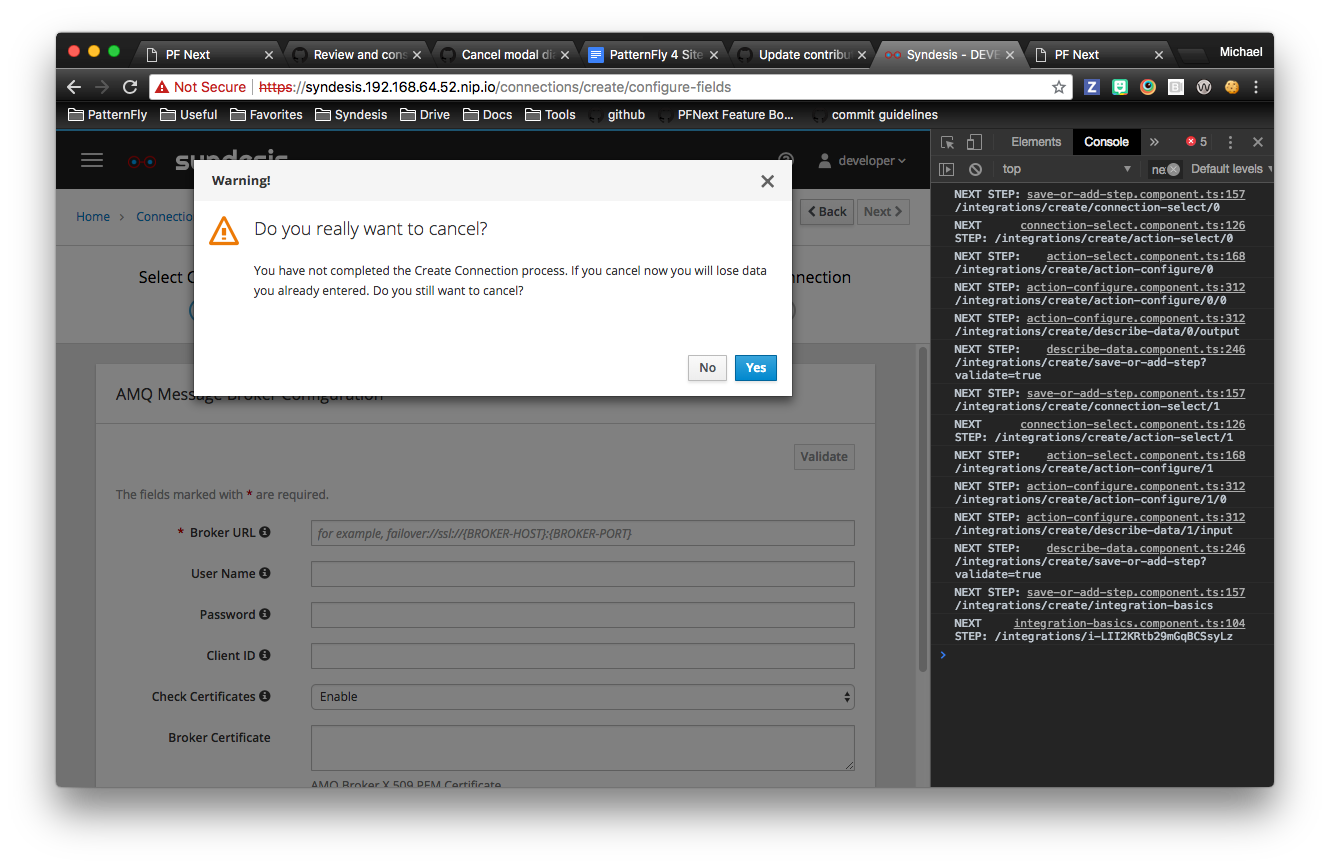
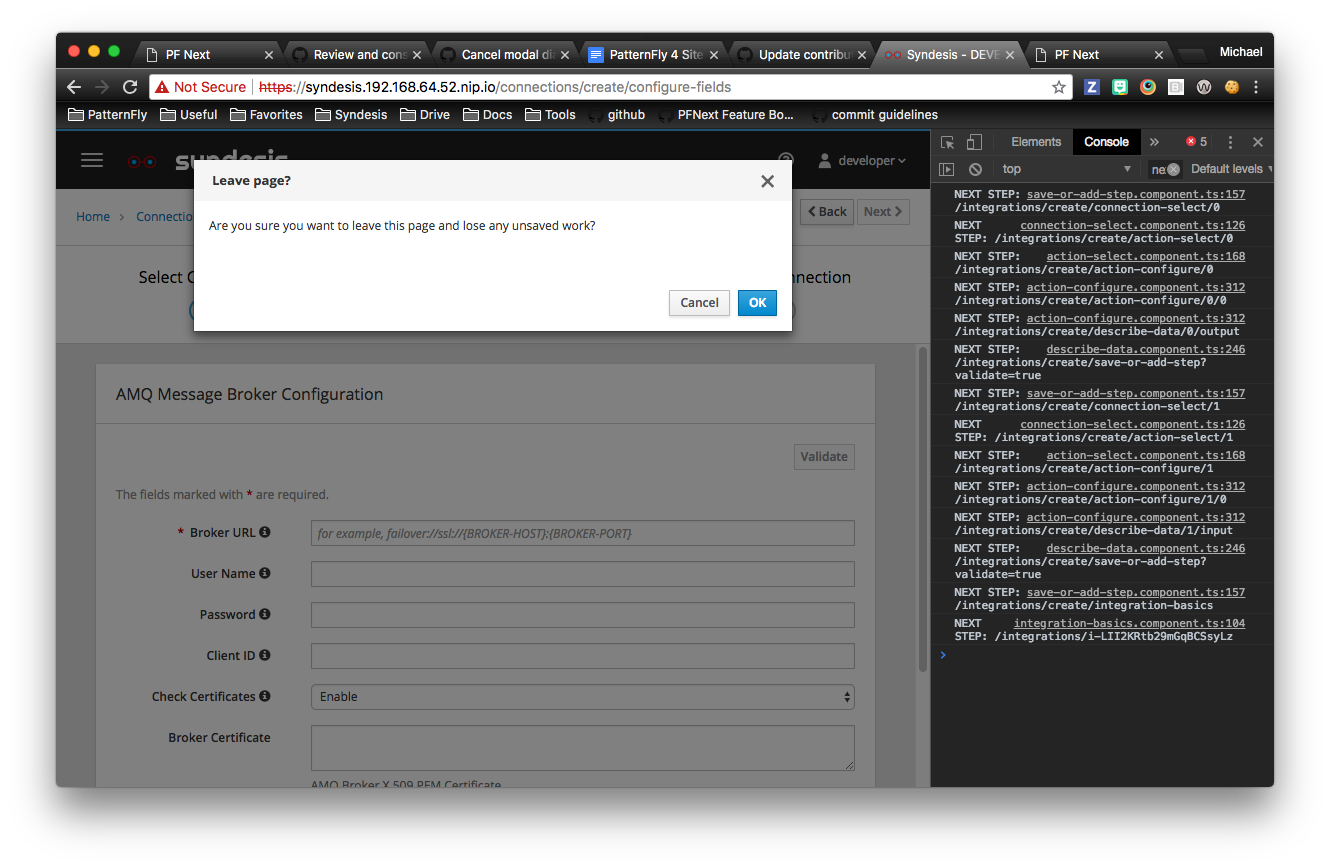
@dongniwang do you think there should be a modal on the "cancel" button on the create connection workflow? Currently you only get a confirmation modal if you try to navigate away from the wizard using anything but the cancel button (clicking in the breadcrumbs, top or left nav, etc). Here's what that modal looks like.

mcoker
on 19 Jul 2018
@michael-coker - yeah, I think as soon as the user enters any data, we should have a confirmation modal, and that's for both navigating away from the wizard and interacting with the cancel button.
dongniwang
on 20 Jul 2018
@gashcrumb created a PR to add a modal when you click "cancel" in the integration editor. https://github.com/syndesisio/syndesis/pull/3143
It only pops up on one step (integration-basics). Did I do it right? I'm assuming it would be a bad approach to make that same change to each step in the editor, because we would be repeating a lot of code.
Is there a better way to do that? Or could this be integrated into the CanDeactivate guard work?
mcoker
on 20 Jul 2018
@michael-coker Since you seem to be working on this, I've added it to the current sprint.
 heiko-braun
on 24 Jul 2018
heiko-braun
on 24 Jul 2018
@heiko-braun thanks!
@gashcrumb did you see my comment above re: adding a modal to the cancel button in the integration editor?
Also created a PR for the connection wizard - https://github.com/syndesisio/syndesis/pull/3171
mcoker
on 24 Jul 2018
@TovaCohen I added a modal to the create connection workflow cancel button. I mimicked the wording you provided for the API connector cancel modal. Is this OK or want me to update it?
Modal Title:
Warning!
Modal body header:
Do you really want to cancel?
Modal body:
You have not completed the Create Connection process. If you cancel now you will lose data you already entered. Do you still want to cancel?
mcoker
on 24 Jul 2018
That looks fine to me, Michael!
TovaCohen
on 24 Jul 2018
@TovaCohen thanks! I'm implementing a modal to appear in the integration creation/edit process if you try to navigate out of the workflow without saving your work. Do you think that the wording for both navigating away from the process (clicking on a link in the breadcrumbs, navigation, etc) and clicking the "cancel" button should have the same wording, or should that wording be different?
This is also a question I have about the create connection process. Currently the modal for "cancel" and just navigating away from the workflow are different....
cancel
navigate away
mcoker
on 25 Jul 2018
Hmmm. I think that if a user navigates away and gets a modal that says "Do you really want to cancel?" they might be confused because they didn't explicitly cancel something. So even though navigating away and cancelling have the same result, I think modals that specifically address what the user just did are more helpful. I think both modals that you show in the images above are fine, except, in the Navigate Away modal, I'd like to replace Cancel/OK with No/Yes.
TovaCohen
on 25 Jul 2018
@TovaCohen agreed. And for the cancel modal in the integration workflow, what should the body look like? Modeling after the create connection cancel modal, it should say something like "You have not finished the Create Integration process." Can we come up with a single sentence to use there for canceling out of a "create integration" and "edit integration" workflows, or do you think the modal should say "You have not finished the Create Integration process" when creating and "You have not finished the Edit Integration process" when editing?
mcoker
on 25 Jul 2018
Sorry I didn't think of this before -- could we change to:
You have not finished creating the integration. and
You have not finished creating the connection.
Rather than referring to the "Create Integration process" and the Create Connection process? This would make it easier to not capitalize unnecessarily/inconsistently.
Thinking aloud about editing an integration.--- This implies that there was a complete, saved version, right? I'm stumped on how Syndesis would know that I didn't finish editing an integration. Did I enter some parameter or add a step, but then I did not select Save as Draft? Is that when this message would appear?
I guess we need different messages for creating and editing because you can't save a new integration until it is complete. You have to finish creating the integration. But when you are editing, you just have to save what you added. Does that make sense? So for canceling while editing an integration:
Warning!
Do you really want to cancel?
You have not saved your updates to the integration. If you cancel now you will lose data you entered. Do you still want to cancel?
No Yes
TovaCohen
on 25 Jul 2018
Re: the cancel button wording, I think that's a lot better. However, it's worth noting this is the current API Connector cancel button modal wording.
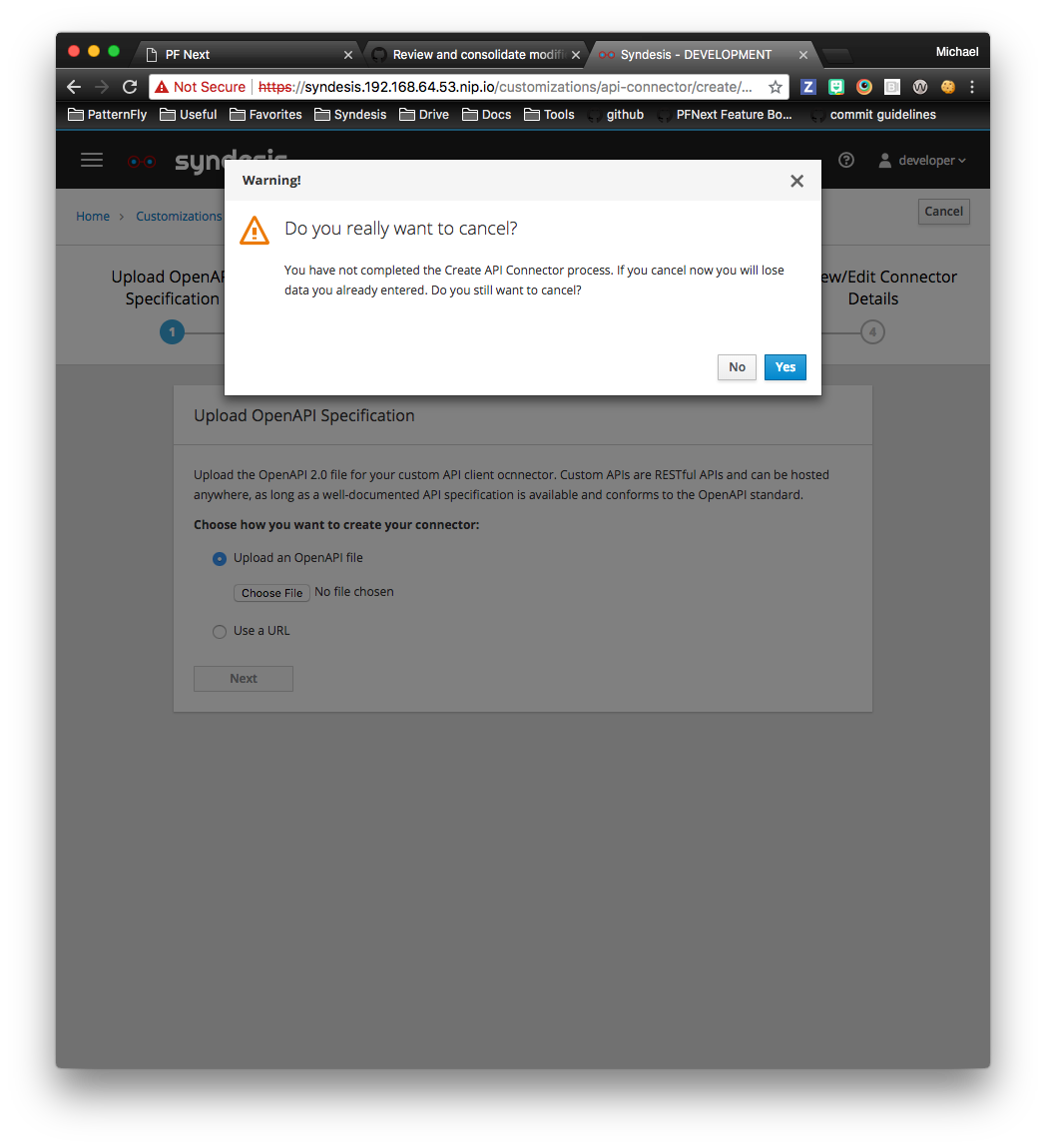
That's where the wording from the cancel button in the create connection workflow came from. Should that modal change, too?
mcoker
on 25 Jul 2018
Yeah, sorry. I keep making more work for you :-(
So the distinct sentence would be:
You have not finished creating the API client connector.
I'm really glad you are making sure all the messages are consistent!
TovaCohen
on 25 Jul 2018
I'm stumped on how Syndesis would know that I didn't finish editing an integration.
This is a very good point. I've been focused on implementing some of the code and hadn't considered this yet.
@gashcrumb per our discussion in https://github.com/syndesisio/syndesis/pull/3143, I've been implementing the guard on each edit component. How would I know when to activate the guard after someone goes into the edit process and makes a change without saving? And then to disable the guard after saving, until they make another edit?
And since @TovaCohen is suggesting a unique modal for the guard and the cancel button, would that mean I need to implement the guard on each component, and a modal for every cancel button?
mcoker
on 25 Jul 2018
@gashcrumb per our discussion in #3143, I've been implementing the guard on each edit component. How would I know when to activate the guard after someone goes into the edit process and makes a change without saving? And then to disable the guard after saving, until they make another edit?
I guess at the moment we don't track when a change on an integration has been performed and so then would be "dirty" and require a save. We'd want to implement that in the current flow service and will probably need to add a metadata item in the integration object when it's saved, so the route guard can know if the integration has been saved to determine if it should prompt or not.
gashcrumb
on 1 Aug 2018
Related issues
 mmelko
·
5Comments
mmelko
·
5Comments
 mcada
·
6Comments
mcada
·
6Comments
 sjavurek
·
5Comments
sjavurek
·
5Comments
 zregvart
·
3Comments
zregvart
·
3Comments
 gaughan
·
5Comments
gaughan
·
5Comments