Syndesis: "Save as draft" and "publish" buttons
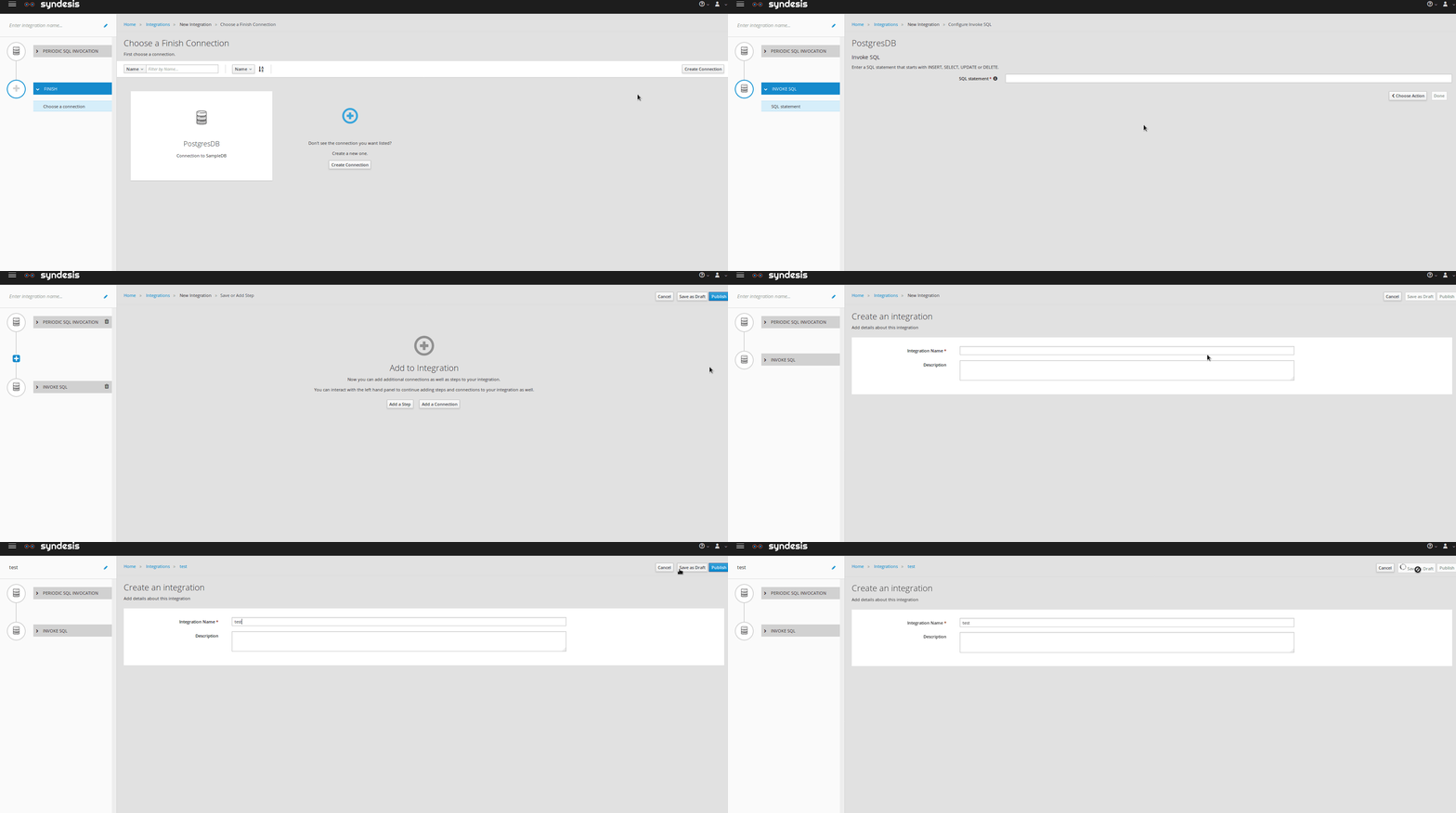
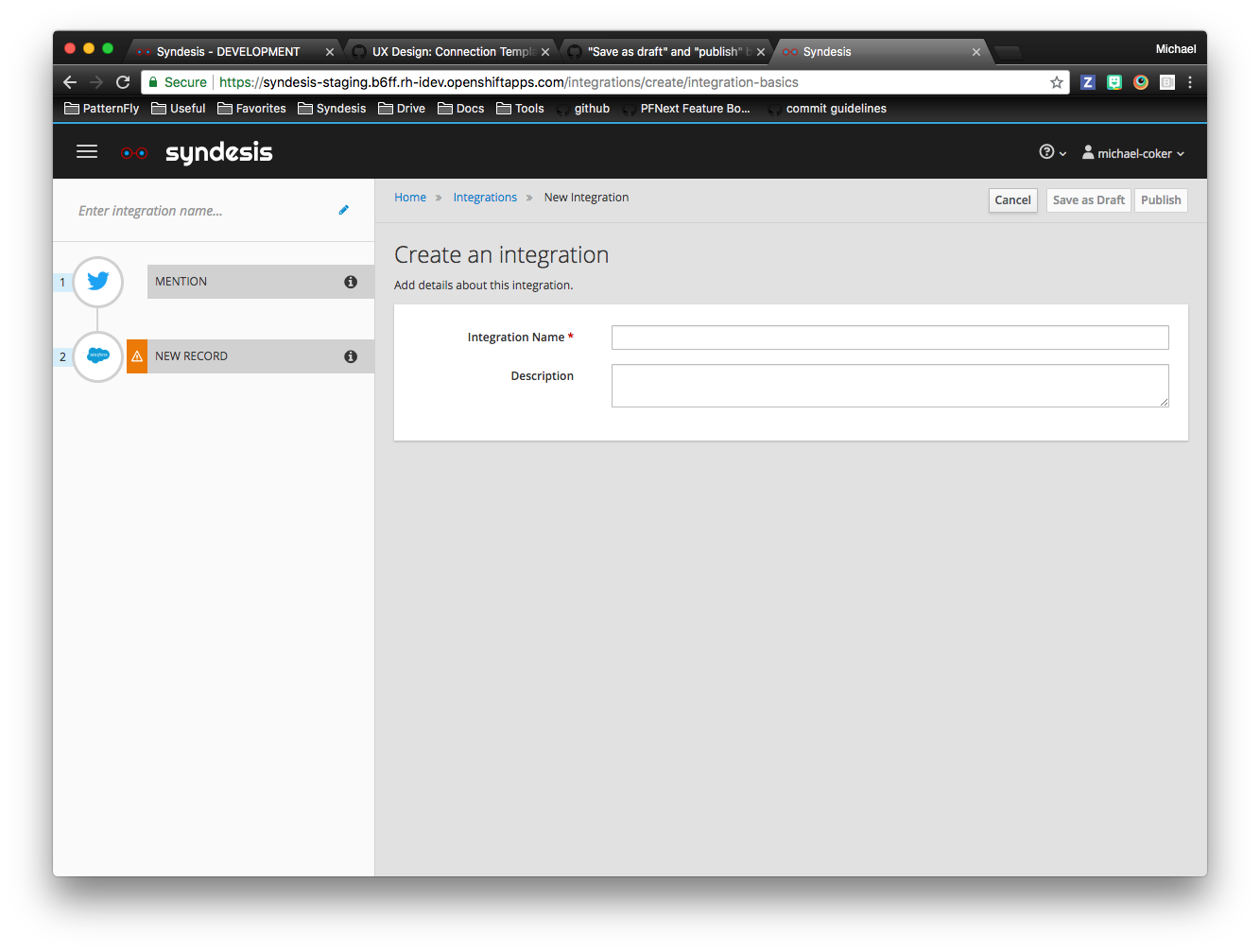
The "Save as draft" and "Publish" buttons are present even after I already selected one of the operations. There should probably be "Ok" and "Cancel" (maybe also "Go back") button only present, when creating integration.
 tplevko
All 20 comments
@sjcox-rh @dongniwang FYI
 gashcrumb
on 15 Feb 2018
gashcrumb
on 15 Feb 2018
@tplevko @gashcrumb @dongniwang The UX team wants to take some time to revisit buttons throughout iPaaS. There have been a lot of changes since we've come onboard that we feel that the buttons aren't consistent throughout. Also, as the app as grown and developed, some buttons don't make sense or buttons are missing, placed is various places, etc.
We are trying to determine when this would make sense in the spring cycle.
@amysueg, fyi. I placed the Notif/uxd label so we don't lose track of this.
 sjcox-rh
on 20 Feb 2018
sjcox-rh
on 20 Feb 2018
@sjcox-rh @amysueg fyi the notif/uxd label was removed so added it back.
 mcoker
on 6 Jun 2018
mcoker
on 6 Jun 2018
Maybe since the first "publish" and "save as draft" buttons both take you to the same screen to name the integration and set a description, those buttons should be replaced with "Next" before naming the integration, and then leave "publish" and "save as draft" on the final step where you name the integration?
mcoker
on 6 Jun 2018
ping @TovaCohen - the UXD team mentioned this might require an update to the documentation
mcoker
on 8 Jun 2018
Thanks @michael-coker Yes, if this changes, I'll need to update the user doc.
It's not clear to me what the problem is.
I might want to incrementally add a step and "Save as Draft" so I think having that button always present while you are creating, editing, or updating an integration is okay.
Same for "Publish".
I think that offering "Next" instead is not helpful. A user would see cues to "Add a Step" in the left and middle of the page, and "Next" in the upper right. How would a user know what to do?
I probably don't understand the problem.
 TovaCohen
on 8 Jun 2018
TovaCohen
on 8 Jun 2018
@TovaCohen oh sorry, this is only when you're creating an connection integration. You can't "publish" or "save as draft" from this step since you need to name the integration first.
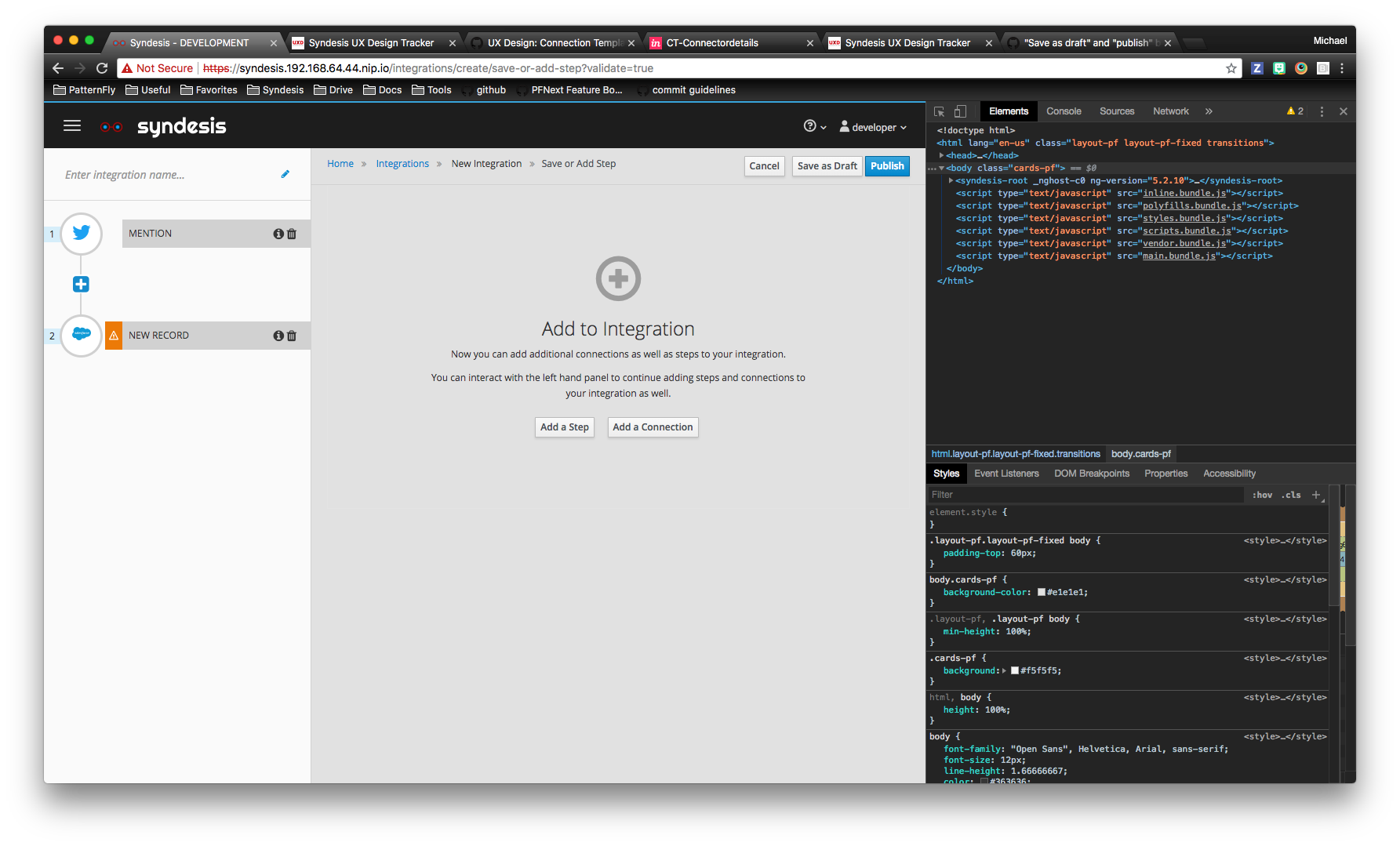
Clicking on either of those buttons when you are creating an connection integration takes you to this page, which has the same buttons that will either save as a draft or publish the integration.
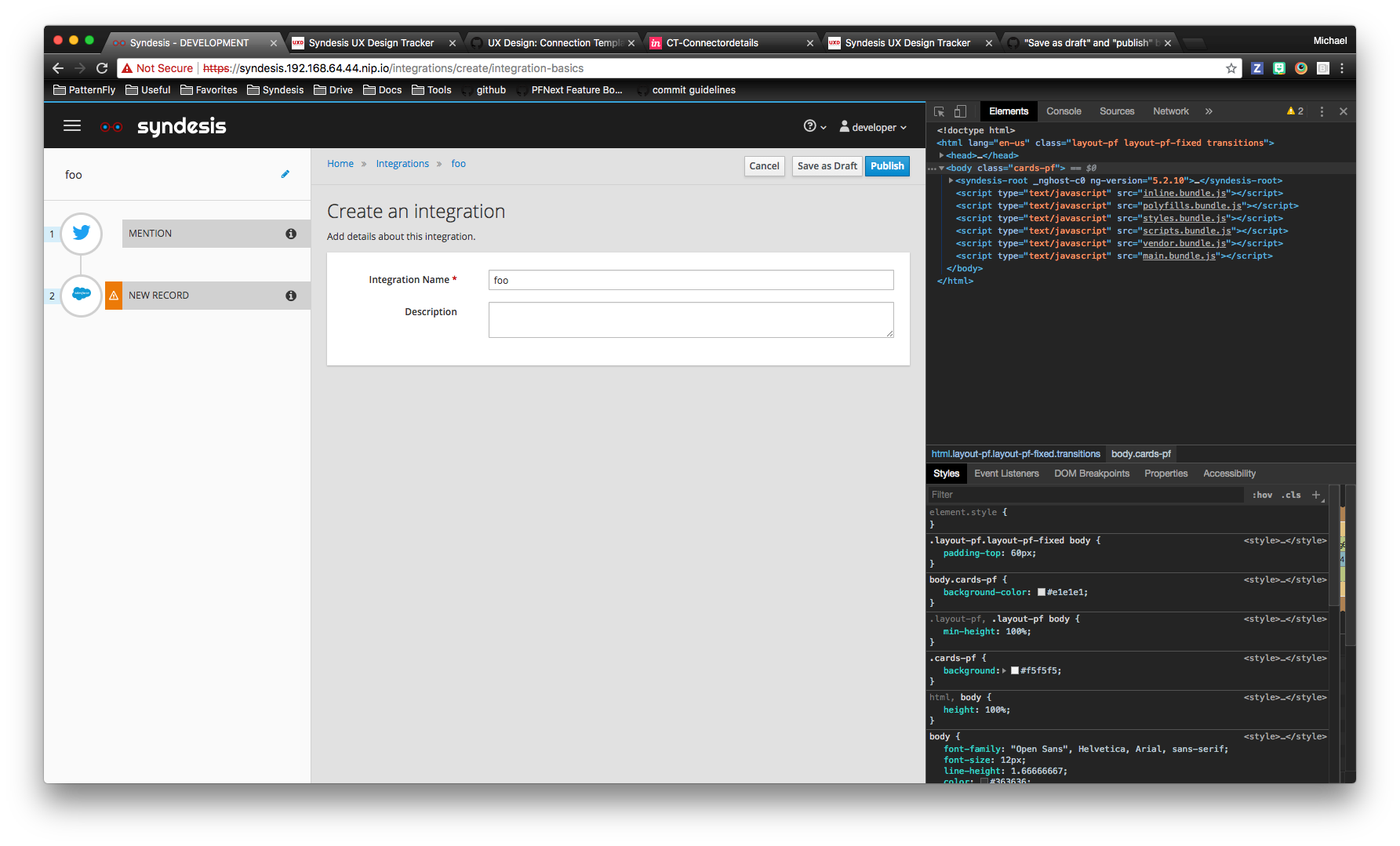
Editing an integration, on the other hand, should have both save as draft and publish on that page.
mcoker
on 8 Jun 2018
@michael-coker In the staging site, I cannot duplicate the behavior you are describing.
If you make any changes, let me know. And if I can help with anything, just ask :-)
TovaCohen
on 8 Jun 2018
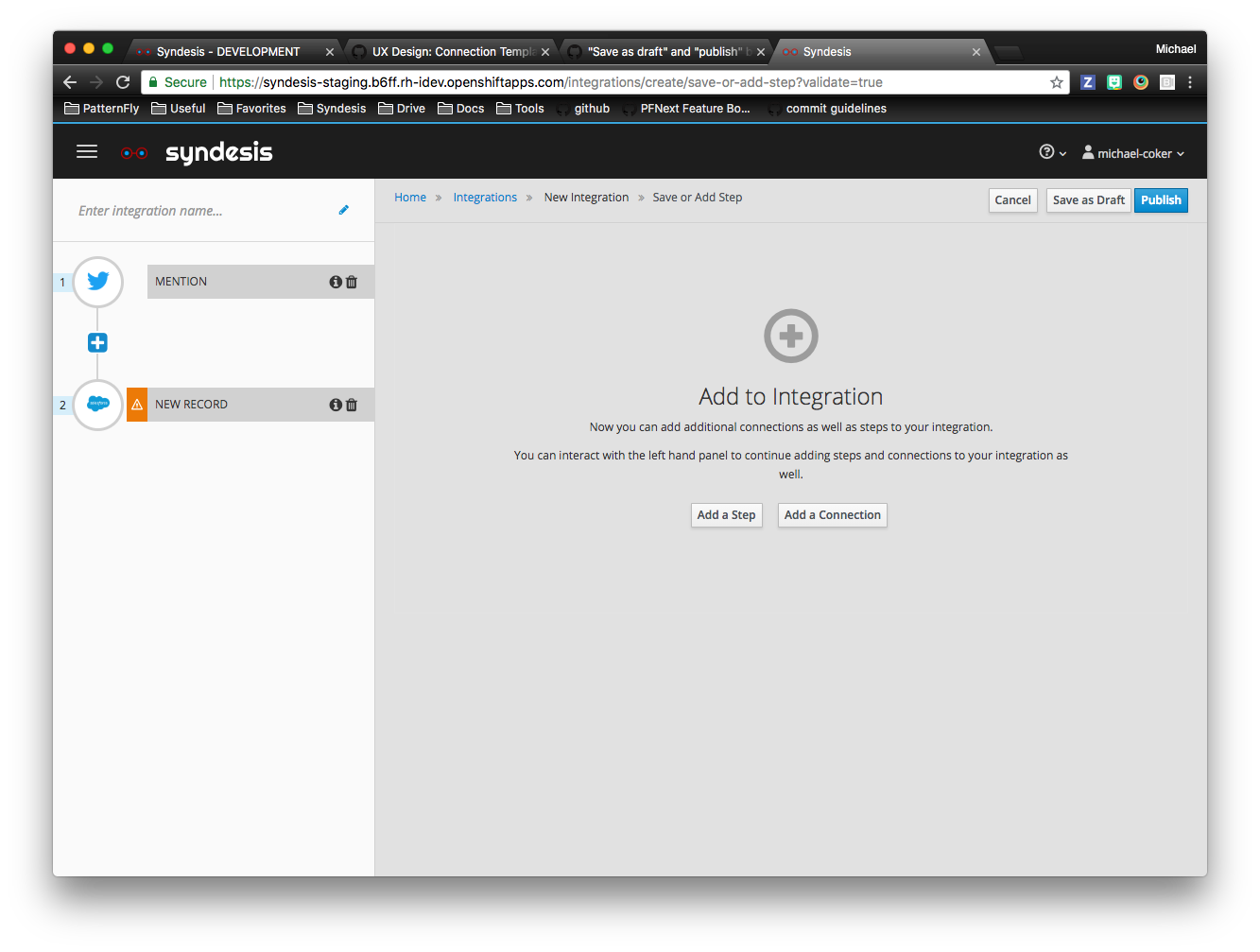
Oops! My apologies, I said "connection" above and meant "integration".
Here it is on staging - after choosing and configuring a start and finish connection for the integration, the resulting page has the "save as draft" and "publish" buttons - both of which take you to the step to name the integration, which has the same buttons.
mcoker
on 8 Jun 2018
A common application behavior is that the first time you try to save something, the application prompts you to give it a name. Another common behavior is that when you are done editing something, you close it. I suggest that Syndesis behave in this common way. Specifically:
- Replace the "Save as Draft" button label with "Save". This would always save the draft and keep the focus where it is. I can't remember why the button is labeled "Save as Draft". What am I forgetting?
- In the integration editor, do not display the "Publish" button before the integration has a name. Display only Cancel, Save.
- In the page where we prompt the user to enter an integration name, after entering the name, offer:
-- Cancel - displays the "Integrations" page. No change here.
-- Save - saves the integration and redisplays the integration editor. This is a change. Currently, this is "Save as Draft" and clicking it continues to display the page that prompts for the integration name.
-- Save and Close - saves the integration and displays the integration summary. This is new.
-- Publish - saves, publishes (or trys to), and displays the integration summary. No change here.
Currently, on the page that prompts for the integration name, after entering a name, if the user clicks "Save as Draft", Syndesis saves the integration but continues to display the page that prompts for the integration name. This needs to be fixed. At this point, the user will either want to continue editng the integration or stop editing the integration. We should offer them that choice. Hence, we need "Save" as well as "Save and Close".
Is there time now or soon to revisit the buttons as a whole, as SJ mentioned in her February comment?
WDYT?
TovaCohen
on 11 Jun 2018
In my previous comment, I forgot to say that I think there also needs to be a change to the buttons that appear in the upper right in the integration editor after the integration has a name.. Suppose I already saved my integration the first time, I gave it a name, and now I'm adding steps. Currently, the buttons that appear are
Cancel, Save as Draft, Publish. I think we should change this to:
- Close - If there have been updates since the last time you saved the integration, then Syndesis prompts you to indicate whether you want to save the integration. You indicate yes or no. Syndesis displays the integration summary. If there are no unsaved updates, then Syndesis just displays the integration summary.
- Save - same behavior as now for "Save as Draft" that is, Syndesis saves the integration, it is the draft version, the editor remains open.
- Publish - same behavior as now. That is, Syndesis tries to start running the integration, Syndesis displays the integration summary page, which indicates whether or not the integration gets published.
Currently, if the user is done editing an integration, but does not want to publish it, the alternatives for closing the integration editor are:
- Click the hamburger to display the left navigation panel and then click one of those options.
- In the breadcrumbs, click the name of the integration being edited to display it summary page.
- In the breadcrumbs, click "Integrations" to display the list of integrations.
Maybe that's okay. I'm not sure. But it seems like we should provide an easier, straightforward way to close the integration editor.
TovaCohen
on 12 Jun 2018
I like the idea of a 'Close' button, that helps distinguish it from 'Cancel' especially in some of the new designs where 2 instances of a cancel button are on the page. We did actually have a 'Done' button at one point. Generally I think while breadcrumbs are a good way of knowing where you are in the app they shouldn't be required for actually navigating back up a level in the app.
Renaming 'Save as Draft' to 'Save' makes sense to me. Also I could change this on the name/description page so it goes back to the 'save or add step' page easily enough, which then lets you continue editing or publish.
I don't even know why we really need to require a name at all to be honest.
Personally I think we should avoid using the name for the deployment/pod name in any fashion, at most use it as a label so that it's not required. And by using it for openshift resource names it imposes odd restrictions on what characters can be used. We should just use auto-generated IDs for all the runtime objects that get produced, we're managing the pods for the user.
gashcrumb
on 12 Jun 2018
Without an integration name, how would the customer distinguish one integration from another? Maybe I am misunderstanding what you are suggesting.
In the list of integrations, would we display icons to show which applications are in the integration? Is this good enough to distinguish one from another?
I wonder if a customer would have multiple integrations, which each integrate the same applications but use different user credentials? How would the customer distinguish one integration from another in this set of integrations?
TovaCohen
on 12 Jun 2018
I'm just saying it shouldn't be a requirement. But a name can be set on an integration and it would show up in the integration list. Also it's a far-fetched idea that probably won't have any traction :-)
gashcrumb
on 12 Jun 2018
I also asked Gary Gaughan and Eric Johnson, new members to the team, since they just went through the application and have given some good feedback as new users to the app.
From Gary:
- The first time I used the application, I paused for a moment to find the publish location. I was un familiar with a top right area for “next steps” etc I expected the bottom area for this functionality.
- The second item was that when I hit publish I didn’t know immediately if it was successful or not and if so can I move away for the screen. I stopped for a moment to think am I done or do I need to do something else before I move away and potentially loose the changes I made.
- As I looked at the GitHub thread just now, I was wondering should the button be labeled Save instead of Save as a draft?
- Sorry, I just saw Tova’s comment on Save vs Save as Draft at the bottom of the thread.
- Ideally it would be great to not have to save and instead have autosave functionality, similar to google docs etc
- Are there other ways to indicated that an integration has been changed and not published, different colors or shading maybe?
From Eric:
- For the button issue, I agree with both of Tova’s points at the bottom of the Github thread. I believe it makes sense to name the integration first and then proceed with building the integration. The system should catch an integration that is not ready to be published after the user attempt to press “Publish” whether or not it has a name.
- Renaming “Save as Draft” to “Save” will make it simpler to understand as they both have the same meaning but one has more words. Adding a “Save and Close” button will make it easier to move off the screen and work on a different integration.
- I also agree with Gary’s point about not expecting the buttons to be in the top right. Typically buttons for next steps or screens are at the bottom of a page. Perhaps they can be located at both the top and bottom of the screen. Not sure what the engineering/development challenges would be for autosave but that would be a home run if it comes to fruition.
mcoker
on 12 Jun 2018
Yeah, ideally we could auto-save each time the user winds up at that 'save or publish' page, as that's the point when the data should be consistent. But then we require entering the name up front.
I'd even be happy with generating goofy names by default like Docker does for containers, the user can always rename a given integration later.
gashcrumb
on 12 Jun 2018
Question is when do we make a decision on all this :-)
gashcrumb
on 12 Jun 2018
Eric and I also discussed was disabling the "save" and "publish" buttons when editing an existing integration until there have been changes made. That would also serve as a visual indicator to the user that they have unsaved/unpublished work.
mcoker
on 12 Jun 2018
The first time I used the application, I paused for a moment to find the publish location. I was un familiar with a top right area for “next steps” etc I expected the bottom area for this functionality.
Looks like @sjcox-rh is addressing this in the create connection template (design on the uxd tracker). It seems like the integration editor buttons should follow suit.
mcoker
on 12 Jun 2018
This issue has been automatically marked as stale because it has not had any activity since 90 days. It will be closed if no further activity occurs within 7 days. Thank you for your contributions!
![stale[bot] picture](https://avatars.githubusercontent.com/in/1724?v=4&s=40) stale[bot]
on 25 Nov 2018
stale[bot]
on 25 Nov 2018
Related issues
tplevko
·
5Comments
 mcada
·
6Comments
mcada
·
6Comments
 sjavurek
·
5Comments
tplevko
·
4Comments
sjavurek
·
5Comments
tplevko
·
4Comments
 mmelko
·
5Comments
mmelko
·
5Comments