Syncthing: Case-only renames break stuff
Mac is also (usually) case insensitive, like Windows in many respects, and probably needs about the same special handling.
 calmh
calmh
All 69 comments
Actually it's probably a bit crap on Windows too. What happens is we discover the new name when scanning, but when checking for deleted files we don't see the delete as we get a successful return from Lstat("foo") if there is a FOO so we get both the variants in the index. If there's Linux on the other side, it'll get both copies.
calmh
on 9 May 2015
This breaks stuff really bad. I've tried renaming back and forth on two connected devices (mac and linux) but failed to recover the sync. Error messages:
dst stat dir: stat ... no such file or directorypull: no available source devicedelete: remove: ... directory not empty
Anyone found a method for recovery?
 solsson
on 22 Jun 2015
solsson
on 22 Jun 2015
Rename to something that is not a case-variant on something that already exists. Rescan.
calmh
on 22 Jun 2015
Thanks. I had tried the corresponding rename manually on the other host, which obviously was a bad idea. Mac's filesystem is pretty interesting that it has the concept of case-only rename but it does case-insensitive validation to prevent duplicates.
solsson
on 23 Jun 2015
I've run into a form of this issue myself while considering moving to Syncthing fulltime, and it's a show stopper. I've tried renaming in both directions. Here's what I did and what happens:
Syncing Rename from OS X to Linux
touch myfileon OS X- Observe
myfilegets synced to Linux correctly. mv myfile MyFileon OS X.- Observe
myfileANDMyFileboth exist on Linux. - Now two files exist on both hosts when
myfileis synced back to OS X.
Syncing Rename from Linux to OS X
touch myfileon Linux- Observe
myfilegets synced to OS X correctly. mv myfile MyFileon Linux- Observe
myfileis deleted on OS X! - Observe
myfileOS X deletion is synced to Linux. The file is gone!
The second case, syncing a rename from Linux to OS X, is remarkably terrible. It results in _data loss_, which is unacceptable.
This issue has been open for 8 months. Are there any plans to add support for this?
 SergioBenitez
on 23 Jan 2016
SergioBenitez
on 23 Jan 2016
At some point yes, hence it being tagged as a v1.0 blocker. Unfortunately, as trivial as this all sounds it's actually genuinely difficult to get right, for all kinds of annoying reasons.
calmh
on 23 Jan 2016
What causes step 4 to happen in each case? It's not clear to me what kind of strategy would result in a file existing on one side getting deleted on the other.
SergioBenitez
on 23 Jan 2016
This
- mv myfile MyFile on Linux
actually translates into two operations on the Mac:
- Create
MyFilewith the same contents asmyfile - Delete
myfile
However, on Mac the two are the same so the first operation is effectively a no-op and the second operation deletes MyFile, myfile, MYFILE or whatever else may be available with any combination of cases.
We then go and look for MyFile (when we scan), which should exist as we've just created it. But it doesn't, so the user must have deleted it. Hence we note the deletion of MyFile and this gets synced back to the rest of the cluster.
To properly solve this we need to (at least) keep a case insensitive index in addition to the normal file index (so we can check for the existence of MyFile when we get an update for myfile), know by configuration or probing whether a given file system is case sensitive or not, and use a custom method that is not based on stat() to check for file existence.
We also need to decide what _should_ actually happen in the above situation. The mv is one thing, but what if you have MyFile and then create myfile on Linux? Do we just pretend it doesn't exist when syncing on Mac? When if you then rename MyFile to myfile on the Mac side, what happens to MyFile and myfile on the Linux side? Discuss.
calmh
on 23 Jan 2016
Just dropping by to throw in my thoughts and intuition about the last part of your post @calmh:
We also need to decide what should actually happen in the above situation. The
mvis one thing, but what if you haveMyFileand then createmyfileon Linux?
I think the most sane approach would be to treat the two files as different, as on Linux, and considering clashes on Mac (and other case-insensitive platforms) as a limitation that needs to be worked around.
Treating the filenames as identical would probably just be a trade for a different set of issues. For example, it would probably imply that the existence of two such files would have to be treated as a conflict on Linux, even if both files originated there and are truly different files. But is deleting/renaming one of them acceptable? And which one do you keep? And can one assume that the sets of characters that conflict in filenames on a Mac the same as on other platforms with case-insensitive filenames?
Do we just pretend it doesn't exist when syncing on Mac?
Yes, I guess. I would consider it a local limitation that only one of the files can exist at the same time. If the file is deleted on the Mac, the other file should be synced there as it is then no longer blocked by the file that was deleted.
When if you then rename
MyFiletomyfileon the Mac side, what happens toMyFileandmyfileon the Linux side?
The rename must surely rename MyFile on Linux as well. The question is to what, as myfile already exists. I guess there are two options:
1) Consider the rename a replacement of myfile which was invisible on the Mac. The main issue with this approach is that myfile is lost without confirmation, likely without the user being aware.
2) Consider the rename a sync conflict. One of the files would be renamed to a conflict filename and the other would be named myfile. Alternative, both files could be renamed to conflict filenames. Both files would be synced to both machines either way. The main issue with this approach is probably some user confusion about why the rename caused a conflict.
I think 2) is the best option, but maybe someone can think of an even better third one.
 Zero3
on 14 Feb 2016
Zero3
on 14 Feb 2016
I'm not sure any of my comments here will be directly relevant as my knowledge of Go and the internal workings of syncthing are very limited, hopefully at least I can convey my take on the problem and provoke some thinking about the problem, or be confirmed that syncthing can or can't function in that way.
Actually it's probably a bit crap on Windows too. What happens is we discover the new name when scanning, but when checking for deleted files we don't see the delete as we get a successful return from Lstat("foo") if there is a FOO so we get both the variants in the index. If there's Linux on the other side, it'll get both copies
It looks like Lstat returns a FileInfo type which contains the Name() of the file - is it possible on case-insensitive OS's to compare the Name() returned by Lstat to the file name input to Lstat? That should let you know if its a case difference so delete the entry from the index and change the delete routine on case-insensitive OS's to check if the file still exists elsewhere in the index before actually deleting it?
When a case-sensitive node creates foo then FOO, the case in-sensitive side would create foo, but then when FOO tries to sync do you check to see if the file already exists on the destination? Does a rename on a case-insensitive client generate a delete, then a create? So a create when the file already exists and the Name() value differs in case only is a file from a case-sensitive OS with only a case difference, so you can throw an error that files with only a case difference cannot exist on case-insensitive OS?
I would think throwing an error is better than having whichever file was last written to from a case only different set of files on one node to a single file on other nodes. You can tell which file has synced as the case will match whichever one synced successfully.
 chrisshearing
on 1 Jun 2016
chrisshearing
on 1 Jun 2016
I think Name() returns whatever you passed into Lstat, and not whats actually on disk. To get whats on disk you have to Listdir
 AudriusButkevicius
on 1 Jun 2016
AudriusButkevicius
on 1 Jun 2016
That's a shame, would adding in a Listdir call to get the on-disk filename to perform a case comparison significantly impact scanning performance? Or cause other issues?
chrisshearing
on 1 Jun 2016
Sadly you can't reach into the value behind Name() to adjust it. Regardless, it's a big chunk of work, which someone needs to undertake.
AudriusButkevicius
on 1 Jun 2016
It's also just half of the work as I think we still need to have a case insensitive lookup into the index to do some of the operations.
calmh
on 1 Jun 2016
hmm, this is a horrible problem! I'm probably repeating you here, but for my own understanding this helps:
Windows considers foo and FOO the exact same file when querying for it, as far as fileinfo.Name() is concerned whatever you asked for and was returned is the case on disk, so there is no way to compare filename currently on disk to a filename provided by change operation, only reading the folder contents and finding a case insensitive match in those results.
The only other place to be case insensitive would be as calmh says the index - when a scan is run and a file is found that needs an action, is a check made to see if that file exists in the index? and is that check case sensitive, if that comparison was changed to be case insensitive on the OS's that don't support case sensitive files would that fix the issue? Or is that what you are referring to by a case insensitive lookup into the index?
chrisshearing
on 1 Jun 2016
The only other place to be case insensitive would be as calmh says the index - when a scan is run and a file is found that needs an action, is a check made to see if that file exists in the index?
Yes. The scan is a two pass operation currently. One pass walks the filesystem and for every file found compares it to the index data in the database. If the file exists in the database and has the same time stamp, modification time, etc it is considered unchanged since last scan. The database lookup is _case sensitive_, so if a file name changes case it is considered a new file at this stage. This is what we expect from a rename - to pick up a new file that we haven't seen before, and scan it.
The next pass iterates over the contents of the database and verifies that the files mentioned still exist on disk, by doing lstat() calls. For a regular rename we pick up the disappearance of the old file here. But on case insensitive systems we will get back success when asking for Foo if fOO exists on disk - and the lstat() call doesn't return the actual file name on disk. (Go synthesizes it for the Name() method, but it's really just the name you asked for to begin with.)
The reason this is a two pass operation is that we can't in general keep the list of discovered file names in memory, as it may exceed the available RAM. We could, maybe, walk the filesystem and the database in lockstep to make it a single pass, but that would mean we hold a database lock for much much longer than we currently do which might have adverse side effects. We could change the second part to not do lstat() calls but instead do readdir() on the parent (with suitable caching).
We still need case insensitive database lookups on Windows and Mac when processing incoming updates. If we get an update from a peer saying "Here a new file called Foo!" we must be able to check if we already have a file called fOO since before to take appropriate action - stop the sync, ignore the file, flag it for conflict or whatever.
In https://github.com/syncthing/syncthing/issues/2739 I argue that we should switch to a case insensitive index by default to solve most of this. It's still a lot of work to get there.
calmh
on 1 Jun 2016
Thank you very much for the explanation of the scanning process, it is very helpful and makes the issue here easily understood!
The proposed changes in #2739 sounds like an excellent way to go, preventing potential silent data loss on particular OS's and adding the case sensitive functionality if needed by a part of the user base.
Unfortunately this seems like a very big change and probably a long term fix, which is probably unlikely to be shortened by me learning GO and trying to contribute, though if I can help I'll try.
We've rolled out syncthing to around 100 users now and this is seems a likely cause of #3070 ,but not confirmed, and the only issue left that I'm aware of causing an issue for us, but its pretty serious as files are being skipped- I'll have to warn users about doing case only renames, but they are non-technical and it will still happen.
I was wondering if you might have any suggestions on how we might track and delete duplicate entries in the index's on both nodes - so it can rescan and add back in a single entry? Is there an API call that can query and interact with the database? If I understand correctly then #863 suggests to me that once we get a duplicate entry in the index, it stays there and will cause issues with that filename permanently as its never removed?
That just made me think - if we have a scenario of
create foo
- creates index entry for foo
rename foo to FOO
- creates index entry for FOO
- foo entry still present on disk due to case-insensitive reply but meta data out of date as it wasn't picked up on the first scan?
rename FOO to FOO2
- marks foo and FOO as deleted
- creates entry for FOO2
rename FOO2 to foo
- marks FOO2 as deleted
- updates foo entry as present?
will the entry in the index for FOO which is marked as deleted do nothing as the delete operation was completed, or will it delete foo from disk? If it deletes this potentially means as soon as you do a case only rename on a case insensitive OS you break using that filename with that index?
It would be useful to be able to fix this for users without them reporting something they don't really understand until a fix is created
Thanks!
chrisshearing
on 2 Jun 2016
So you can't fix it easily, as every node in the cluster has the entry in the index which will get merged from others when they connect.
In the scenario you described, I'd expect both foo and FOO to reappear, but I am not sure hence why I wanted @calmh to comment, as I am not 100% sure this is the issue you are seeing in the bug you've opened previously.
AudriusButkevicius
on 2 Jun 2016
Whoops, I left a sentence in there which should have been changed - I meant to say this might be the cause of the other issue, not that it was definitely, sorry!
I suspected that the index sharing across the nodes would cause issues getting rid of the duplicate entries.
chrisshearing
on 2 Jun 2016
The only way to really fix it, is stop all instances of syncthing, delete the index from them at the same time and restart them.
AudriusButkevicius
on 2 Jun 2016
That was what I thought - doing that on our server instance is problematic, rescanning all the folders we have on there takes 10+ hours currently and will increase once we migrate all users over to syncthing,
I think its enough on the server node to remove the folder from the config and restart syncything, as a message does pop up that it removes indexes for folders no longer present in the config, then add the folder config back in and restart again to create the new index?
chrisshearing
on 2 Jun 2016
Yes, but when it connects to any other node it will pick up the faulty entry from the remote side.
AudriusButkevicius
on 2 Jun 2016
Yes, I meant in conjunction with stopping syncthing and deleting the index folder on the other node, sorry.
chrisshearing
on 2 Jun 2016
Today I ran into case handling issues after changing the case of a folder in Windows. As an attempt at a workaround, I've moved SyncThing data to ZFS case-insensitive filesystems on Linux and FreeBSD (must be done at FS create time, e.g. zfs create -o casesensitivity=insensitive whatever/syncthing)
This seems to prevent multiple copies from being created on FreeBSD/Linux, but I still have issues if I change the case on a Windows host.
Unlike MoveFile on Windows/NTFS, rename(2) seems to have no effect if trying to change the case of a file on a ZFS case-insensitive file system, so I'm not sure how to change the case of a filename without giving it a new name first.
 cascent
on 25 Sep 2017
cascent
on 25 Sep 2017
I can confirm. 1st: NFS cs mount, 2nd: Windows. Change letter case via Windows, then sync. If you connect an another machine, the Syncthing will perform and endless sync. RAM usage goes insanely high.
@cascent pointed me to remove all "File"/"file" cases, then remove indexes on all machines and let them start + index.
 er1z
on 22 Oct 2017
er1z
on 22 Oct 2017
Using @SergioBenitez's template I figured I would do some testing using MacOS to MacOS on HFS+ (case insensitive). The results are not reassuring. From the above it is obvious that this is a complex problem. I want to warn people running a Mac only network that there is a very real danger of data loss and inconsistent states between machines when changing filename case.
Syncing Rename and delete from OS X to OS X
touch AAA.txton machineA- Observe AAA.txt gets synced to machineB correctly.
mv AAA.txt aaa.txton machineA- Observe .syncthing.aaa.txt is created on machineB.
- Observe AAA.txt is unchanged on machineB.
rm aaa.txton machineA.- Observe AAA.txt and .syncthing.aaa.txt.tmp are unchanged on machineB.
- Syncthing GUI reports Up to Date on machineA and machineB even though they are not in sync. AAA.txt appears on machineB only.
echo 'hi mom' > aaa.txton machineA.- Observe the content of AAA.txt is overwritten on machineB but not the name! machineA Syncthing GUI indicates _Out of Sync_. MachineB Syncthing GUI indicates _Up to Date_.
echo 'hi dad> AAA.txt on machineB. Observe DDD.sync-conflict-20171022-223816-Q5T2JT6.txt is created and synced to both machines.
Thankfully we get an _Out of Sync_ warning on the first overwrite and a sync-conflict on the second. But the inconsistent state that appears at step 8 is a problem.
 uglygus
on 23 Oct 2017
uglygus
on 23 Oct 2017
I signed up for GitHub just to bump this issue.
I ran into this issue today on Windows in a folder. I was getting failed files with the error "file modified but not re-scanned, will try again later" because a windows folder was existing on different machines with different cases. I had to copy the files to a new folder, delete the original folder, sync, then change the folder name back to the original to resolve the problem. If I have to do this too many times it will be a deal breaker.
I like the fix suggested by the mighty calmh in #2739.
Add a check in the scanner for seeing more than one case variant of a given name in the same directory. If there is a match, blacklist the file (all variants), tag it as invalid in the database, and log a warning.
No data loss. If you wanted case sensitive this is your cue to reconfigure.
We still use the name from the actual FileInfo when performing operations (including renames) so we retain the correct casing.
Case preserving.
I won't try coding any of this, it would be counterproductive. But I would appreciate a fix.
edit: To temporarily resolve the problem I slightly rename the folders/files that are broken. Manually adding a single character from the offending Windows pc fixes it.
 MagneticCursor
on 8 Apr 2018
MagneticCursor
on 8 Apr 2018
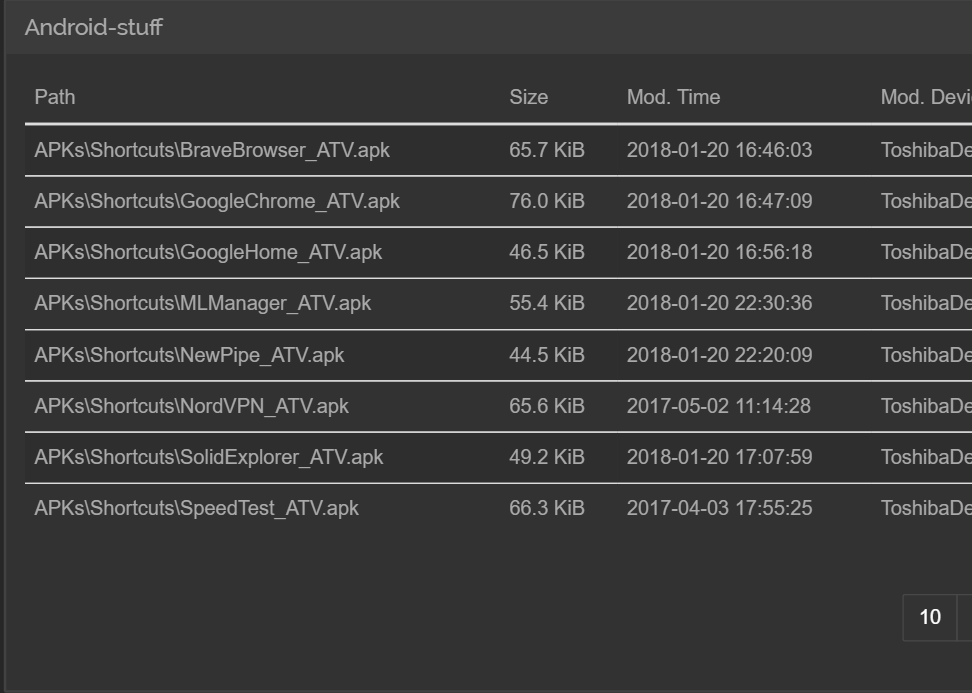
Running latest SyncTrayzor with latest SyncThing on Windows 10 1803, and the rename with case change only still seems to be a problem. I'm syncing to a Android (nVidia Shield TV) device.
Is this still a bug?
All these APK files where lower case only. They're still lower case on both of mye Android devices.
 o-l-a-v
on 11 May 2018
o-l-a-v
on 11 May 2018
It's still open, so it was not fixed.
AudriusButkevicius
on 11 May 2018
Is there any sensible workaround for this? I've had this issue countless times on our sync with 500,000~ files and 200k folders. Whenever a new device is added to our mesh of machines I'm finding every machine going from "Up to date" to "Syncing 99% xxx KiB" and I look at it, the windows machines usually have 1 single folder that renamed itself on the new machine to lower case instead of caps lock. Then the linux machine took a copy of both.
When I delete the lower case on both machines, all the other machines flip out thinking it deleted the upper case
The only solution I've found is to delete both versions on every computer and copy a backup version back into any computer, then they all sync fine again...
 ghost
on 30 May 2018
ghost
on 30 May 2018
@ggrats AFAICT there is no workaround for sharing between case-sensitive and case-insensitive filesystems, except switching al machines to case-sensitive filesystems. You can switch a macOS machine to use case-sensitive file system, but it is not easy (reformatting the whole disk required, as of high sierra, and i hear reports that it breaks Adobe Photoshop) and i have no idea how to do this in windows, which reportedly has other weird things broken
The fact that syncthing will silently duplicate and/or delete your data without telling you in this circumstance, should probably be more prominently featured in the documentation because otherwise people find out about it the hard way, and wind up on this thread, only to be told they are in trouble and there is no fix in sight.
 danmackinlay
on 30 May 2018
danmackinlay
on 30 May 2018
I haven't tested yet, but apperently you can enable case sensitivity for NTFS now:
https://www.windowscentral.com/how-enable-ntfs-treat-folders-case-sensitive-windows-10
o-l-a-v
on 30 May 2018
Hey that's nice, very new too. All the windows machines are windows 10 I'm pretty sure (we have 9 total) I'll give it a try. Thanks!
Consider it a "working" fix if I don't post any errors in the future. I have half a million files and 800GB of data so it's a decent test.
(edit1)
ONE machine doesn't have the update yet. I'll enable it on the rest and we'll see how it goes for the rest, the bug happens every few days for me so I'll see.
(edit2)
well I can't do it on any system because there's currently no way to do it recursively. If anyone knows how to implement it let me know. I've googled around for about 30 minutes and tested many commands. The only thing I found was case=force which sometimes makes directories that are newly created "CaseSensitive" but doesn't matter for anything already made.
ghost
on 30 May 2018
Here is some PowerShell that might do the trick for you:
```#Requires -RunAsAdministrator
<#
.RESOURCES
Windows Central - How to enable NTFS support to treat folders as case sensitive on Windows 10
https://www.windowscentral.com/how-enable-ntfs-treat-folders-case-sensitive-windows-10
>
Root of the folder you want to enable/ disable case sensitivity for
[string] $PathRoot = 'folder here'
Enable ($true) or Disable ($false) CaseSensitivity
[bool] $EnableCaseSensitivity = $true
Loop all folders, apply SetCaseSensitivityInfo
@(Get-ChildItem -Path $PathRoot -Recurse -Directory | Select-Object -ExpandProperty 'FullName') | ForEach-Object {
cmd /c ('fsutil.exe file SetCaseSensitiveInfo "{0}" {1}' -f ($_,$(if($EnableCaseSensitivity){'enable'}else{'disable'})))
}
o-l-a-v
on 30 May 2018
This discussion, although interesting, isn't directly relevant to this issue, meaning that about 20 people are getting pinged with each message they don't care about. Can you guys move this to the forum, please?
Feel free to link to your new forum post, of course, so the discussion isn't lost.
 canton7
on 30 May 2018
canton7
on 30 May 2018
Sure, but in 3 years these last 2 posts are your best fix for every windows system above 1803. Make every folder case sensitive.
ghost
on 30 May 2018
I just hit a similar problem, just started with syncthing.
Sync from Linux to Android got stuck with a little data left.
Tracked it to two images with the same name but one had uppercase and the other lowercase extension.
IMG_6973.jpg and IMG_6973.JPG
Was about to log a bug when I found this issue.
 diepes
on 25 Sep 2018
diepes
on 25 Sep 2018
Discovered the same problem:
Folder case changes are not synced on windows
File name changes trigger a warning and file is not copied.
example:
creating file "document.txt" wait until sync (I put some text in it so file had 1kb)
rename the file to "dOcument.txt"
this results in a sync problem. only tmp file appears in the folder
edit:
just got worse: syncthing deleted the wrong file due to this confusion
 theincogtion
on 21 Oct 2018
theincogtion
on 21 Oct 2018
In the last months I had 2 "near data loss" situations because of this issue. If I remove one of the 2 files on a unix machine it will delete the file on windows and resync the deletion to the unix machine. I had to recover it from the .stversions folder. At least this unintended deletion should be avoided by ST
 UsefulVid
on 10 Apr 2019
UsefulVid
on 10 Apr 2019
At some point yes, hence it being tagged as a v1.0 blocker. Unfortunately, as trivial as this all sounds it's actually genuinely difficult to get right, for all kinds of annoying reasons.
1.0 is out but this is still not addressed?
UsefulVid
on 10 Apr 2019
Nope, as this is not closed, it's clearly not addressed.
AudriusButkevicius
on 10 Apr 2019
Where is #2739 hung up? Spec is acceptable but noone is implementing yet, just needs a contributor to tackle it?
Also, I was initially confused by Audrius' instructions to resolve case duplication conflicts so here's a very explicit version:
Test Case
Given nodes L (case sensitive) and D (insensitive)
To create case duplication:
- L:
touch a - wait for sync
- L:
mv a A - wait for sync
L now has a and A, and and D has just a.
To resolve:
- L:
mv A Aside - wait for sync (make sure it has settled completely)
- Both L and A should now only have
Aside. - L:
mv Aside A
PS
I've run syncthing on Linux, Mac (case sensitive) and Android for a long time as the backbone of my personal data infrastructure. Thank you sticking it out with the burgeoning user base over the years.
 edrex
on 28 Sep 2019
edrex
on 28 Sep 2019
It's hung up on the hero we need stepping up and implementing it.
AudriusButkevicius
on 29 Sep 2019
Given nodes L (case sensitive) and D (insensitive)
_To create case duplication:_
* L: `touch a`

* wait for sync

* L: `mv a A`

* wait for sync
L now has
aandA, and and D has justa.
I just did the same thing by renaming documents to Documents. The really annoying part was that when I saw that the old documents is coming back I have deleted It (twice) and added some more files in Documents. After a while, all the files in Documents have disappeared except for the new ones... I have completely lost my documents.
I'm only syncing Linux an Android, not even Mac
This bug seems critical for me, I cannot trust Syncthing if my files are not safe in sync folder,
which by the way do not have any version policy by default.
This is just to emphasize that this 4+ years old issue really need to be addressed.
 mickours
on 3 Oct 2019
mickours
on 3 Oct 2019
Frankly, it's enough to push one back to the proprietary stuff. I get the impression from the thread above that no-one in the project knows how to fix this problem.
If that is the case, then: (1) it reflects poorly on the team (I would have thought); (2) given that Synthing is not (right?) beta software, it's something of a scandal (in that non-beta software should handle the basics, and this doesn't); (3) can't you find someone to fix it? If money is the problem, are you doing all you can to solicit donations?
Perhaps I should be franker yet: syncthing advertises itself as something that works, something that is safe; yet, it seems that it has been known for four years that, admittedly under certain conditions, it is not.
 LinuxOnTheDesktop
on 8 Oct 2019
LinuxOnTheDesktop
on 8 Oct 2019
@LinuxOnTheDesktop it's an open source project, with no commercial component. abusing the volunteer devs will only make them more likely to ragequit. Also I'm not a collab and I'd like to get this resolved so let's not get this issue locked.
edrex
on 8 Oct 2019
Given nodes L (case sensitive) and D (insensitive)
_To create case duplication:_* L: `touch a` * wait for sync * L: `mv a A` * wait for syncL now has
aandA, and and D has justa.I just did the same thing by renaming
documentstoDocuments. The really annoying part was that when I saw that the olddocumentsis coming back I have deleted It (twice) and added some more files inDocuments. After a while, all the files inDocumentshave disappeared except for the new ones... I have completely lost my documents.I'm only syncing Linux an Android, not even Mac
This bug seems critical for me, I cannot trust Syncthing if my files are not safe in sync folder,
which by the way do not have any version policy by default.This is just to emphasize that this 4+ years old issue really need to be addressed.
Something similar happened to me while doing sync between Linux and Android. I realized my class and personal notes had lowercase names, so I changed them to PascalCase, then at least 3 years of notes and other documents were instantly lost forever. I tried to recover them from a 3rd computer, but when I turned it on, files were deleted there too :(
Maybe there should be some kind of warning about the problem, something like "Beware, data loss could happen upon case sensitive renaming."
 rainbyte
on 18 Oct 2019
rainbyte
on 18 Oct 2019
Have a look at https://github.com/syncthing/syncthing/issues/2739.
On 18/10/19 6:04 pm, Audrius Butkevicius wrote:
This problem is exhibited as failing to sync some files, not disappearance of files. So something else happened.
—
You are receiving this because you are subscribed to this thread.
Reply to this email directly, view it on GitHub https://github.com/syncthing/syncthing/issues/1787?email_source=notifications&email_token=ABCMP764FPRQ2GV7ZESG5Q3QPFNX7A5CNFSM4BCT5RK2YY3PNVWWK3TUL52HS4DFVREXG43VMVBW63LNMVXHJKTDN5WW2ZLOORPWSZGOEBS77LY#issuecomment-543555503, or unsubscribe https://github.com/notifications/unsubscribe-auth/ABCMP74MTARHGOLNKHEQTBTQPFNX7ANCNFSM4BCT5RKQ.
--
Best Regards,
Frederick Zhang
Email: [email protected]
 Frederick888
on 18 Oct 2019
Frederick888
on 18 Oct 2019
I'm not 100% sure about the order of the events because of so the many moving parts involved, but I have seen the duplicated sets of files first. In the end both sets were deleted, once on a device and then on the other.
As mentioned in that issue, probably the "old" copy was deleted externally. Many apps were opened: the note taking app on the phone, the markdown editor on the desktop, the file managers, etc. The files could have been modified from any of then, bacause apps do not expect this kind of behaviour, resulting then in missing data.
Only a pair of the files being edited on the pc could be saved. Maybe because the vscode editor kept a copy in memory.
Have a look at #2739.
…
On 18/10/19 6:04 pm, Audrius Butkevicius wrote: This problem is exhibited as failing to sync some files, not disappearance of files. So something else happened. — You are receiving this because you are subscribed to this thread. Reply to this email directly, view it on GitHub <#1787?email_source=notifications&email_token=ABCMP764FPRQ2GV7ZESG5Q3QPFNX7A5CNFSM4BCT5RK2YY3PNVWWK3TUL52HS4DFVREXG43VMVBW63LNMVXHJKTDN5WW2ZLOORPWSZGOEBS77LY#issuecomment-543555503>, or unsubscribe https://github.com/notifications/unsubscribe-auth/ABCMP74MTARHGOLNKHEQTBTQPFNX7ANCNFSM4BCT5RKQ.
-- Best Regards, Frederick Zhang Email: [email protected]
rainbyte
on 18 Oct 2019
I had to abandon "syncthing" in favor of "resilio".
Once I tried to find a place where file names are processed and written to the database to bring all names and events to lower case, but a quick inspection of the code did not help, and the debugger turned out to be useless.
The problem with “syncthing” is that it considers “renaming” to be “delete + create” a file, and when we change the case of characters on a case-insensitive system, the file is created on the case-sensitive system, but if we change the case of characters on a case-sensitive system, the file is deleted on a case-insensitive system.
 ghostiam
on 18 Oct 2019
ghostiam
on 18 Oct 2019
And imho they need a better implementation to probe into file info
instead of relying solely on system APIs.
IIRC one hurdle that the syncthing team couldn't overcome was that in
case-insensitive (file)systems, if you ask the system API whether a file
exists using a filename in whatever case, it'll tell you yes regardless.
I'm not familiar with those systems so perhaps I'm being ignorant, but
it sounds like something that can be resolved by traversing the parent
directory as long as the inotify equivalent framework still reports
move/rename events normally. Less performant obviously, but no data loss
(which is the bottom line).
On 18/10/19 7:50 pm, Vladislav Fursov wrote:
I had to abandon "syncthing" in favor of "resilio".
Once I tried to find a place where file names are processed and written to the database to bring all names and events to lower case, but a quick inspection of the code did not help, and the debugger turned out to be useless.The problem with “syncthing” is that it considers “renaming” to be “delete + create” a file, and when we change the case of characters, it is deleted on another system, but not created.
—
You are receiving this because you are subscribed to this thread.
Reply to this email directly, view it on GitHub https://github.com/syncthing/syncthing/issues/1787?email_source=notifications&email_token=ABCMP7ZRP23NZGLZCHQGXU3QPF2HDA5CNFSM4BCT5RK2YY3PNVWWK3TUL52HS4DFVREXG43VMVBW63LNMVXHJKTDN5WW2ZLOORPWSZGOEBTM3OA#issuecomment-543608248, or unsubscribe https://github.com/notifications/unsubscribe-auth/ABCMP75DQWSRD2FCCUPOWW3QPF2HDANCNFSM4BCT5RKQ.
--
Best Regards,
Frederick Zhang
Email: [email protected]
Frederick888
on 18 Oct 2019
Please don't use the issue trackers for general discussions, head over to https://forum.syncthing.net for that.
 imsodin
on 18 Oct 2019
imsodin
on 18 Oct 2019
Will this ever be fixed?
May be just introduce an option in ST settings to make case-insensitive index on Win and Mac and display a warning to Linux users if ST founds a duplicate names in a single folder
 Xeenych
on 13 Jan 2020
Xeenych
on 13 Jan 2020
It's not as easy as it sounds as it would lead to data loss.
AudriusButkevicius
on 13 Jan 2020
May be just make the following changes?
Assuming database stores case-sensitive filenames.
I'm having files "FOO" and "foo".
So file_open("FOO") and file_open("foo") will succeed.
Wrap each file_open, file_close, file_delete, feile_exists or whatewer calls you are using in GO, so that on Windows FAT, NTFS or on any othe case insensitive filesystem:
- check if file exists
- get file's case-sensitive name
- If file's case-sensitive name doesn't match then the call should fail. Thus we are emulating case sensitive file system behaviour.
On Linux ST should check folder contents for similar filenames and produce warning if this folder is shared to Windows machine.
Xeenych
on 13 Jan 2020
Could I motivate somebody to solve this problem with a 100$ bounty limited to 3 months?
UsefulVid
on 13 Jan 2020
It’s definitely more than $100 of work. However FWIW I would also contribute to a bounty on this.
danmackinlay
on 13 Jan 2020
Again, getting case sensitive name it's not that easy, as for N directories deep file, you'll have to list every directory along the way.
I suggest you read this ticket in full, and if you have suggestions start a thread on the forum.
Causing excitement on the issue tracker without fully understanding the scope of the problem gives people false hope.
AudriusButkevicius
on 13 Jan 2020
There is already a bounty but its not liked to this thread: https://www.bountysource.com/issues/30288183-syncthing-should-be-case-insensitive-by-default
UsefulVid
on 14 Jan 2020
I also had this happening to me. I'm using elusively Linux. Lately I shared one folder with a Windows user. That user decided to rename "document.doc" to "Document.doc". That created a mess that I had to resolve manually. I also lost data because of it, because the document was edited on one side before the sync error was noticed. Linux will try to make a new document since the file doesn't exist yet. Then it syncs that "new file" over to Windows. Everything became even worse when the windows user renamed a folder (in the same way) that contained other synced files.
I disagree with the bountied solution "Syncthing should be case insensitive by default". Because On all other platforms except Windows this might be a valid use case. I wouldn't like all my files to be synced in the ignorant Windows-way. (Maybe that's why noone picked up that bounty yet :smile: )
I was just about to open a new issue for this, but now I realized that this is a known problem since 2015!! Since this issue causes potentially data loss, I'm wondering why there is no priority on it. It is certainly inconsistent which the top-priority statement on the syncthing website that everything will be done to prevent data-loss.
 ar-
on 31 Mar 2020
ar-
on 31 Mar 2020
On all other platforms except Windows this might be a valid use case.
Nope @ar- . MacOS is also case insensitive by default. I lost data while synchronizing between MacOS and Linux.
Therefore, I believe that "Syncthing should be case insensitive by default", but experienced users can disable this feature. (Yes, I know that I can create a case-sensitive file system on MacOS, but the system drive is case insensitive by default)
ghostiam
on 31 Mar 2020
Let me stop this discussion right there: Do not start discussing defaults or which systems are affected for the gazillionst time. The problem is well understood, it's just hard to fix.
Unless you intend to work on case sensitivity issues, do not post here.
If you feel the need to express something about this problem, do it on https://forum.syncthing.net/.
imsodin
on 31 Mar 2020
I have a possible solution to propose, that noone has thought of yet. that could be implemented to avoid any major conflicts and data loss for another 5 years.
As soon as there is a case sensitive change detected on any system (or at least on Linux) stop syncing the folder right away. Don't do anything anymore until the user has clicked on "Resume".
That is not a "fix" for the error, but at least a preventive measure to avoid all the follow-up issues.
ar-
on 31 Mar 2020
Please, read the whole issue/thread.
We had people repeatedly waltz in with "possible solutions" none of which are viable.
The hardest part about this problem is "detecting".
If you want to continue a discussion, I suggest you open a thread on the forum instead.
AudriusButkevicius
on 31 Mar 2020
Could this be circumvented on Windows by running syncthing in the WSL (and ignoring file permissions--I think the WSL defaults to chmod 777 and you'll want to make sure your usernames are consistent)? I don't know how the WSL handles case sensitivity, perhaps it depends on the underlying FS.
Edit: Syncthing works great in the WSL, just wish we had a drop-in Windows init script to facilitate autostart. I'm not sure if the Windows init syntax follows init.d, I will leave that for the Windows experts to weigh in on.
Edit 2:
/etc/init.d/syncthing
#!/bin/sh
### BEGIN INIT INFO
# Provides: syncthing
# Required-Start: $local_fs $remote_fs
# Required-Stop: $local_fs $remote_fs
# Should-Start: $network
# Should-Stop: $network
# Default-Start: 2 3 4 5
# Default-Stop: 0 1 6
# Short-Description: Daemonized syncthing.
# Description: Starts the syncthing daemon
### END INIT INFO

USER="user"
DAEMON=/usr/bin/syncthing

startd() {
    if ! start-stop-daemon -b -o -c $USER -S -u $USER -x $DAEMON; then
      echo "Couldn't start syncthing for $USER"
    fi
}

stopd() {
    dbpid=$(pgrep -fu $USER $DAEMON)
    if [ ! -z "$dbpid" ]; then
      echo "Stopping syncthing for $USER"
      start-stop-daemon -o -c $USER -K -u $USER -x $DAEMON
    fi
}

status() {
    dbpid=$(pgrep -fu $USER $DAEMON)
    if [ -z "$dbpid" ]; then
      echo "syncthing for USER $USER: not running."
    else
      echo "syncthing for USER $USER: running (pid $dbpid)"
    fi
}

case "$1" in
  start) startd
    ;;
  stop) stopd
    ;;
  restart|reload|force-reload) stopd && startd
    ;;
  status) status
    ;;
  *) echo "Usage: /etc/init.d/syncthing {start|stop|reload|force-reload|restart|status}"
     exit 1
   ;;
esac

exit 0
 cryobry
on 19 May 2020
cryobry
on 19 May 2020
@calmh and I recently discussed a different approach to tackle case in-sensitivity than Syncthing should be case insensitive by default. The general idea is to make Syncthing use the "real casing" with minimal added complexity/code paths. This means the changes are at the scanner and puller, not in the db. I'll write up the proposed changes/approaches for those two elements and a list of open questions/problems.
Scanner
Walking a filesystem already does report the real names. Case problems arise because of the second scanner step where deletions are detected by stating filenames as present in the db. The proposal here is to avoid that second step by directly comparing db contents while walking the filesystem, i.e. do https://github.com/syncthing/syncthing/pull/4584 again (PR status is merged, but was reverted later).
This means after a scan, all filenames in the db correspond to the real case on disk, regardless of the scenario (e.g. picks up case only renames on windows). This does not require any special treatment for windows and is beneficial to other systems as well, as we will do just one iteration instead of the two now.
Puller
Puller doesn't work in filesystem order, so we can't walk the filesystem at the same time as pulling like with the scanner. Here we need to get case right between the filename that we currently pull and what's on disk. The simplest option would be to list dir contents for every path component and look for a case insensitive match. Improving on that a bit is https://github.com/syncthing/syncthing/pull/6717 by using windows FindFirstFile syscall (obviously windows only though). Being able to detect a case difference still leaves the question of what to do with the ability, see 2 below.
Edit:
Actually the first step when pulling is in alphabetical order, so could be combined with walking a filesystem, detecting case conflicts early on. I did not consider that as an option, because it leaves a potentially very big time window for new case conflicts between that early check and the time the file is actually replaced on disk.
Open questions
- Cross-compatibility/config: Mac is also potentially affected, and windows might not be (win10 has option to be case-sensitive), maybe other's can be. When do we check for case collisions?
In principle it should be possible to detect case-insensitivity at folder startup: Create two case-colliding files in .stfolder and check whether one or two is there.
Another option would be to not bother, and just make case-insensitivity a folder level config switch, with somewhat sane defaults (e.g. true on windows&mac, false otherwise).
- What to do when detecting case conflicts?
I see two options:
(a) Make it a sync error, thus the user will have to fix the problem on a case-sensitive peer - just like with invalid filenames on windows currently.
(b) Create "case-conflicts" just like the current concurrent modification conflicts. I.e. with existing foo.txt and to be pulled Foo.txt, you end up with something like `Foo.case-conflict-timestamp-dev.txt".
I prefer (a), it immediately alerts the user that there is a problem and there's a clear solution. It also applies when two case-insensitive devices have different names: One of the two will have to rename to the other's case (though it might also be valid to shortcut this, i.e. if the files are the same, just names differ by case, automatically choose one of the names, e.g. the alphabetically first for consistency).
- How to detect correct case on mac?
The method with listing dir contents for all paths definitely works, might be slow though. Something more direct would probably require cgo, at least the little info I found on the topic is not accessible through syscall (https://stackoverflow.com/questions/370186/how-do-i-find-the-correct-case-of-a-filename) - and that's ugly. I tend to think it's not a big problem performance wise, and would hope testing could corroborate that, however if there is a clean and fast solution, that would obviously be preferable.
imsodin
on 8 Jun 2020
I'm still thinking about things so not 100% there yet, but I don't think we need to try and detect case insensitivity. The scanner should handle it regardless as mentioned, and what we need to detect at puller time is if we are on a case insensitive filesystem && there is a case conflict for the file about to be pulled. We can do that by Stat()in the file as we already do, and then checking if the returned filename is the same as we expect or not (like we already check for expected mtime/size/etc).
Assuming we can get the BetterStat() call somehow for all relevant platforms of course, but I think that will be a prereq... I'm leaning towards something listdir-based because we might as well run into this under Linux (on vFAT) as under Windows or macOS. (And both Windows and macOS use case sensitive filesystems sometimes.) Looking for magic syscalls on all platforms seems like a fool's errand.
If listdirs become too expensive the option we might add might be a casesensitive one, where the user promises under oath that the filesystem is case sensitive.
We can do some amount of caching as well. The actual Stat() call we can always do "live", and the name check is just to verify the casing of the name. If that uses a listdir result that is a few seconds old that should be fine. There is a risk of the user doing a case-only rename of precisely the file we are pulling precisely when we are pulling it, but I'm sure we have other similar races and it's not a major concern to me.
calmh
on 8 Jun 2020
Some comments:
- If order alphabetical, use walking - sounds crazy
- Config options with some sane defaults makes sense. I think we already have "check if underlying fs is fat" stuff for android, so we could try to extend this to detect extfat et al.
- Making the item failed makes sense, explaining why it failed. Conflicts of seemingly identical files is grim.
So having had a quick glance, it seems there is no equivalent of FindFirst in Linux.
Even lsof lies and gives whatever was passed when opening (or when stat'ing).
So things like extFAT will not work.
On OSX there is F_GETPATH option for fcntl, which I can't test as I don't own a fruit machine, but might do the right thing.
I guess I'd have a listdir implementation that is pretty much bullet proof, which we then can specialise with FindFirst methods or what not on individual platforms.
Also, is this 5 year old ticket the right place to discuss this?
It already has signal to noise ratio issues, so feels like a separate forum thread/pr/new issue would be better for a fresh start.
AudriusButkevicius
on 8 Jun 2020
Also, is this 5 year old ticket the right place to discuss this?
Wiki page containing general info and the "proposal" with open questions. My intention is that anyone can add info and we can update when we come to conclusions/agreements on open points: https://github.com/syncthing/syncthing/wiki/Filesystem-Case-Sensitivity
Forum thread for discussion: https://forum.syncthing.net/t/latest-case-insensitivity-proposal/15161
imsodin
on 9 Jun 2020
Related issues
 VBMCBoy
·
3Comments
calmh
·
3Comments
VBMCBoy
·
3Comments
calmh
·
3Comments
 itsbrianburton
·
4Comments
itsbrianburton
·
4Comments
 as-com
·
3Comments
as-com
·
3Comments
 trymeouteh
·
4Comments
trymeouteh
·
4Comments
Most helpful comment
@LinuxOnTheDesktop it's an open source project, with no commercial component. abusing the volunteer devs will only make them more likely to ragequit. Also I'm not a collab and I'd like to get this resolved so let's not get this issue locked.