Syncthing-android: Persistent notification of "Syncthing is Disabled"
For a few versions I've had a persistent notification hanging on all my Android devices running syncthing telling me that syncthing is disabled. I can't seem to find any settings to hide the notification so I'm reporting this as a bug. To avoid any confusion - I'm not talking about the "Syncthing is Running" notification.
I don't need to know if syncthing is off - I need to (optionally) know when it's running :)
Think if every app on your phone notified you it was not running :)
Joke aside - I very well could have missed some option - if I haven't - it would be nice to disable the notification or at least make it impersistent?
Version Information
App Version: 0.10.0 - from Google Play
Syncthing Version: blank / nothing happens when clicking in the "About" section?? - but latest version (0.14.40?)
Android Version: Android 4.1.2 + Android 6.0.1
 Larpon
All 26 comments
Yeah, ideally a notification should only appear when Syncthing is actively scanning or transferring data, like how every other sync app on Android behaves.
I guess this is probably more difficult than it sounds though, since this app is only a wrapper over Syncthing, and thus doesn't have as much control over and visibility into Syncthing's behavior as perhaps it should.
 Ajedi32
on 8 Dec 2017
Ajedi32
on 8 Dec 2017
Probably related to #994
Ajedi32
on 8 Dec 2017
I think issue 994 is unrelated though - it's about Oreo and battery usage. My oldest device with this issue is 4.1.2 - I haven't looked at the source so I'm not aware how the Android java code communicate with syncthing - but I'm guessing it's by the http API?
Larpon
on 8 Dec 2017
The reason I think 994 is related is because I suspect that's the reason why these notifications were added in the first place. They're necessary for apps targeting Oreo (regardless of what other versions of Android they're backwards-compatible with).
Ajedi32
on 11 Dec 2017
@Ajedi32 - ah sorry - I'm not up-to-date on those Oreo changes - it might be then :)
Larpon
on 12 Dec 2017
Issue is still there on Android 8.0.0
 PanderMusubi
on 7 Feb 2018
PanderMusubi
on 7 Feb 2018
@PanderMusubi Is the issue still there in recent version 0.10.8? According to PR https://github.com/syncthing/syncthing-android/pull/1046 the notification should be able to be prioritized and sent to bottom.
 Catfriend1
on 22 Apr 2018
Catfriend1
on 22 Apr 2018
Works as expected for me.
 akwala
on 22 Apr 2018
akwala
on 22 Apr 2018
@Catfriend1 unfortunately, yes. I see the icon at the top of the screen when syncthing is running and is disabled. And in both cases there is a notification whether it is disabled or running when I pull down the notification drawer and cannot get rid of that notification in both cases. When I slide the notification left or right, it simply bounces back.
PanderMusubi
on 24 Apr 2018
I am Sorry to hear that, maybe @capi can have a look at the ticket because I dont have Android 8.
Catfriend1
on 24 Apr 2018
Still present in version 0.10.8 (Android 4.1.2. Samsung Galaxy S3 mini)
Larpon
on 24 Apr 2018
@PanderMusubi You cannot dismiss the notification. On Android 8+, you can long-press the notification and hide it (that's an Android 8+ feature called "Notification Channels").
The way Syncthing works, it requires the service to be running. Unfortunately the fixes for Android 8+ (which now does not allow to registering for certain events via the AndroidManifest.xml any more) as a side-effect require the notification. Unfortunately my patches regarding the notification channels only help people on Android 8+. So @Larpon, with 4.1.2 you are currently absolutely affected by this and I don't have a short-term solution.
 capi
on 24 Apr 2018
capi
on 24 Apr 2018
Thanks for the extra info. Is this also related to https://www.davdroid.com/faq/automatic-synchronization-is-not-run-as-expected/ (as I have a One Plus 5T device)?
PanderMusubi
on 24 Apr 2018
That's something similar but not the same. It helps if you have Syncthing excluded from the optimized list as well. Since the service is running with foreground priority (hence the notification icon), it _should_ not change much, though.
capi
on 24 Apr 2018
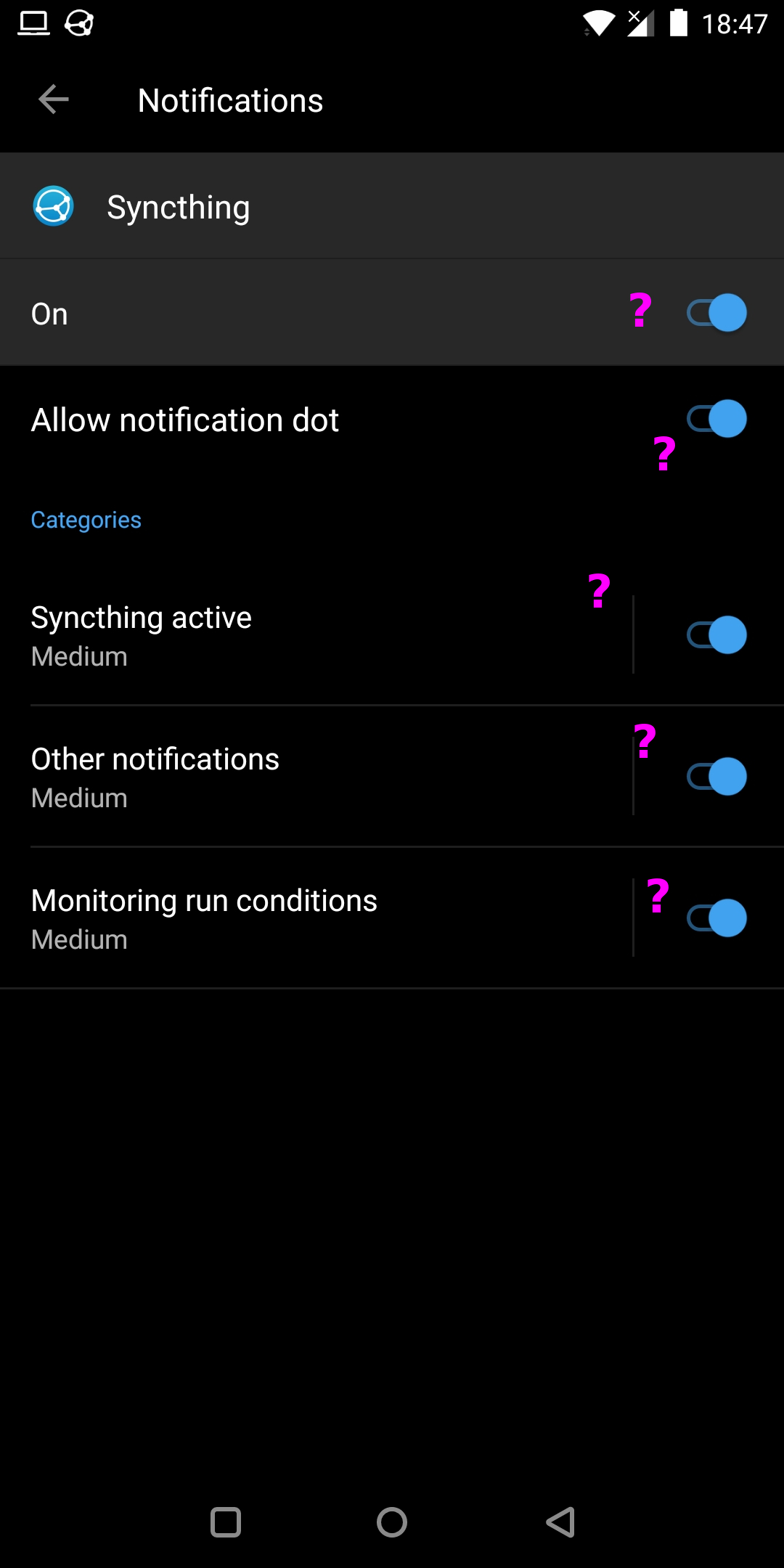
Here are two screenshots from 8.0.0 after sliding the notification a bit to the side and pressing the gear icon, perhaps someone can explain the ? in the image for documentation purposes.

PanderMusubi
on 24 Apr 2018
This has nothing to do with syncthing but general Android settings.
The toggle in the first screenshot will disable that notification (I think).
The "On" toggle will enable/disable all notifications of syncthing. The "Allow notification dot" will enable/disable the stupid notification dot (like on iOS), which indicates, this app currently has a notification inside the notification shade. The other toggles enable/disable that notification channel.
The more useful setting here is when you tap on the "syncthing active"§ or "monitoring run condition". There you can set it from medium to low, so it will not have an icon in the top bar and will be below the "normal" notifications and collapsed.
 wweich
on 24 Apr 2018
wweich
on 24 Apr 2018
An extensive guide I could find with a quick google is at https://gadgetguideonline.com/android/how-to-use-and-manage-notification-channels-in-android-oreo/
I'm surprised Google has no guide for users (there are tons of documentation for developers...). It's not really the most obvious UI from a user's perspective, in my opinion.
@PanderMusubi If you disable the "Monitoring run conditions" setting, you won't see the "Syncthing is disabled". You might see a "Synthing is using power" notification though, that's part of the Android system. Again, this has nothing to do with Syncthing, but is Android system. There are apps on the Play Store that hide this notification, though.
capi
on 24 Apr 2018
Thanks for the details. I agree that the UI is not easy to understand, and here is a developer speaking. Wondering how the average user experiences it. Perhaps the most essential part can find its way into https://docs.syncthing.net/users/faq.html or to some help available in the Android app. That part of documentation might even only be available when the app is on Android 8+.
PanderMusubi
on 25 Apr 2018
Thanks @capi. I had a hunch it would be because of some service related stuff. Does the service really have to run when syncthing is _not_ running? Seem like a waste of cycles? :)
Larpon
on 25 Apr 2018
@Larpon It doesn't actually _do_ anything, it's just the only way to prevent the process from being killed and therefore miss events. Unfortunately with Android 8 the previous method, where a non-running application was informed about certain events (WiFi change, power-plug/unplug, ...) is no longer available. There are APIs, that substitute most of the required functionality. Unfortunately they are available only starting API level 21 (I think), but we support back until 14. So we are stuck in the middle. We'd basically have to drop Android 4.4 and earlier, which is still very widely used.
I think that we can implement an hybrid approach, so that based on the Android version the application uses either the one or the other API. But until somebody comes around to actually implement this, we are stuck with the current approach.
I agree that that the current implementation is not optimal and is totally annoying especially for anybody below Android 8.
capi
on 25 Apr 2018
@capi indeed it gets replaced by the 'using power' notification. Do you know of any apps electively hiding that which are also FOSS in order to add them to F-Droid.
PanderMusubi
on 1 May 2018
Or would it be a possible feature for syncthing?
PanderMusubi
on 1 May 2018
@capi - thanks for explaining. I can see the dilema
Larpon
on 1 May 2018
@PanderMusubi On 8.1 (at least LineageOS 15.1) you can hide this notification by long-pressing it.
On Android 8.0 I have successfully used https://play.google.com/store/apps/details?id=com.iboalali.sysnotifsnooze (https://iboalali.com/hide-running-in-the-background-notification) to hide it, the source-code is available from https://github.com/iboalali/sysnotifsnooze
Important: I _cannot_ vouch for the code nor if the Play Store version is the same as the publicly available source-code. Use at your own risk.
Since this is some low-level work-around via a notification listener, I am strongly against adding this to Syncthing directly. The proper way will be to actually make Syncthing _not_ run in the background and use the appropriate "new" APIs.
capi
on 1 May 2018
I'm on OxygenOS 8.1 but will switch to LineageOS when that is supported a bit longer for my device. so if the "new" API will solve it all, I'm fine with it. Thanks for all the info.
PanderMusubi
on 1 May 2018
Duplicate of https://github.com/syncthing/syncthing-android/issues/1048 I suggest to consolidate first aid information into our faq and close one.
Catfriend1
on 7 May 2018
Related issues
 alerque
·
6Comments
alerque
·
6Comments
 dantuck
·
10Comments
dantuck
·
10Comments
 scienmind
·
6Comments
scienmind
·
6Comments
 endolith
·
8Comments
endolith
·
8Comments
 acornsirup
·
4Comments
acornsirup
·
4Comments
Most helpful comment
This has nothing to do with syncthing but general Android settings.
The toggle in the first screenshot will disable that notification (I think).
The "On" toggle will enable/disable all notifications of syncthing. The "Allow notification dot" will enable/disable the stupid notification dot (like on iOS), which indicates, this app currently has a notification inside the notification shade. The other toggles enable/disable that notification channel.
The more useful setting here is when you tap on the "syncthing active"§ or "monitoring run condition". There you can set it from medium to low, so it will not have an icon in the top bar and will be below the "normal" notifications and collapsed.