Synapse: Personal avatar shows-up as room avatar (with room power 0), while the user changes his/her avatar
Description
Despite the user is just a default role in the room (meaning not an admin nor moderator role). This user was able to change the room avatar (and possibly even more?).
Steps to reproduce
- User joining a room; where he/she didn't create this room (user has the default role only). In this case the '#welcome' room, configured in the Synapse as auto-join room.
- User tries to change the room avatar
- Avatar is successfully changed --> Which should NOT be possible with those limited rights! But it is possible.
The room "Change room avatar" permission level is set to "Moderator".
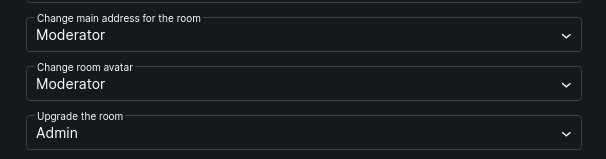
Meaning the users with default user level should not be allowed to change the avatar... I didn't validate if this user could even change more, maybe the name, description.. you know what..
Version information
- Homeserver: matrix.melroy.org
If not matrix.org:
- Version: 1.20.1
- Install method: Docker
- Platform: Docker container in Debian 10
 danger89
All 12 comments
Is this a version 5 room? (That's the default in 1.20.1, so if you didn't do anything special it will be v5.)
Can you provide the following from the devtools in Element Web (type /devtools) and then go to:
- "Explore Room State"
- "m.room.power_levels"
- You should see some JSON which shows all the power levels and specific power levels of users.
This might have some info you need to redact, but should just include some names / IDs.
 clokep
on 7 Oct 2020
clokep
on 7 Oct 2020
I used Element desktop, but I found the same information under Advanced Settings of the room, Open Devtools -> Explore Room state. And I entered m.room.power_levels.
To answer your first question, yes this is room version 5.
And now the JSON output (ps. the #welcome room was created by me, without changing anything; should be default as well):
{
  "type": "m.room.power_levels",
  "sender": "@melroy:melroy.org",
  "content": {
    "users": {
      "@melroy:melroy.org": 100
    },
    "users_default": 0,
    "events": {
      "m.room.name": 50,
      "m.room.power_levels": 100,
      "m.room.history_visibility": 100,
      "m.room.canonical_alias": 50,
      "m.room.avatar": 50,
      "m.room.tombstone": 100,
      "m.room.server_acl": 100,
      "m.room.encryption": 100
    },
    "events_default": 0,
    "state_default": 50,
    "ban": 50,
    "kick": 50,
    "redact": 50,
    "invite": 50
  },
  "state_key": "",
  "origin_server_ts": 1601931929492,
  "unsigned": {
    "age": 105597066
  },
  "event_id": "$Tnu_711AssA9JypbyoIf-Cpv659cTi74Yw7X8kpe3LM",
  "room_id": "!NMycWPdjdbUxLggXZF:melroy.org"
}
Looking back into the chat history, I did NOT see the message "[user x] changed the room avatar to". Meaning, maybe the user was not changing the room avatar at all. But that person was changing this personal avatar, reflecting in the room avatar (when there was no room avatar set yet by me).
My first conclusion was that this person was able to change the avatar. Another conclusion could still be that there is a bug in the server and/or Element (client-side), showing the wrong avatar.
danger89
on 7 Oct 2020
My first conclusion was that this person was able to change the avatar. Another conclusion could still be that there is a bug in the server and/or Element (client-side), showing the wrong avatar.
Did the room only have two users in it? I wonder if there is a client bug about how / when the user's avatar vs. a room avatar is used? (I think Element Web shows another user's avatar as the room avatar when you're in a private chat.)
When you go into "Explore Room State" -- is there a "m.room.avatar" option? If not, then the avatar has not been set.
clokep
on 7 Oct 2020
Yes only 2 users. Me (Admin role: power 100) and another user that registered on my server (default role: power 0).
After seeing his avatar appearing, I was kinda shocked, and change the room avatar myself with the one I wanted. Meaning there is definitely a room avatar set now. So too bad I can not know if m.room.avatar was set, before I set it. Stupid me.
Anyhow, it was suppose to be a #welcome room, so not a private room. That was my intention at least, by setting #welcome also as an auto-join room in the yaml settings.
EDIT: Can I see the history of changes that has been executed on the room settings?
danger89
on 7 Oct 2020
After reading all this, maybe the following steps makes it able to reproduce this issue:
- Create a new empty room (with only you). meaning you are the admin of this room
- Let another user (power rights: 0) join this room
- Let the other user change her/his personal avatar
- Check what the room avatar does (it shouldn't change, but it may..)
danger89
on 7 Oct 2020
Yes only 2 users. Me (Admin role: power 100) and another user that registered on my server (default role: power 0).
Thanks for the info! I was able to reproduce what you're seeing:
- Create a room.
- Have a second user join.
- Have the second user change their avatar.
- Observe the room's avatar in Element Web switch to the second user's avatar.
- Inspect the room state and note there is no m.room.avatar event.
- Update the room avatar.
- Observe the room's avatar in Element Web switch to the room avatar.
clokep
on 7 Oct 2020
Indeed.... so there you go.. The question is: is this wanted/a feature? Or a bug?
I think its a bug :+1:
EDIT: Client-side issue
danger89
on 7 Oct 2020
I have no idea if this is expected behavior since it doesn't have to do with Synapse!
Can you file one an issue with the details above in https://github.com/vector-im/element-web? Thank you!
clokep
on 7 Oct 2020
Created ticket in element: https://github.com/vector-im/element-web/issues/15411
danger89
on 7 Oct 2020
Thank you! 👍
clokep
on 7 Oct 2020
thank you as well :+1:
danger89
on 7 Oct 2020
Related issues
 richvdh
·
3Comments
richvdh
·
3Comments
 ptman
·
3Comments
ptman
·
3Comments
 flaki
·
4Comments
flaki
·
4Comments
 MurzNN
·
5Comments
MurzNN
·
5Comments
 ukcb
·
4Comments
ukcb
·
4Comments