Swr: Axios fetcher(METHOD POST) + NextJs SSR = Infinite Endless API calls
Using Method POST in Axios fetcher results in Endless API calls
Description / Observed Behavior
Using Method POST in Axios fetcher results in Endless API calls.
When using fetcher like
const fetcher = (url, data) => axios.post(url, data).then(res=>res.data)
const {data, error} = useSWR(['/api/v1/reports/statistics', data], fetcher)
Endless API calls. Infinite calling
But this happens only in SSR. And works fine with client Side rending.
Expected Behavior
Make only one API call during the server side rendering
Repro Steps / Code Example
const fetcher = (url, data) => axios.post(url, data).then(res=>res.data)

const StatisticsTable = ({criteria={}}) => {

    const {data, error} = useSWR(['/api/v1/reports/statistics', criteria], fetcher)

return <div>{data}</div>
}
Additional Context
SWR version - _0.3.3 to 0.3.5_

 vishnuvchandar
All 10 comments
const StatisticsTable = ({ criteria={} /** this will create a new object everytime **/}) => {
    const {data, error} = useSWR(['/api/v1/reports/statistics', criteria], fetcher)
    return <div>{data}</div>
}
Could you try this ?
const default = {}
const StatisticsTable = ({ criteria= default}) => {
    const {data, error} = useSWR(['/api/v1/reports/statistics', criteria], fetcher)
    return <div>{data}</div>
}
It would be great if you can provide codesandbox example
 promer94
on 26 Oct 2020
promer94
on 26 Oct 2020
Tried changing that.
Anyways, that doesn't seem to be a problem. because it worked fine with client side rendering.
However have reproduced the same in your sandbox.
You can see multiple calls going to endpoint /day
Here is the link. I have shared to your Id as well.
https://codesandbox.io/s/nice-wave-wy3ib?file=/pages/index.js
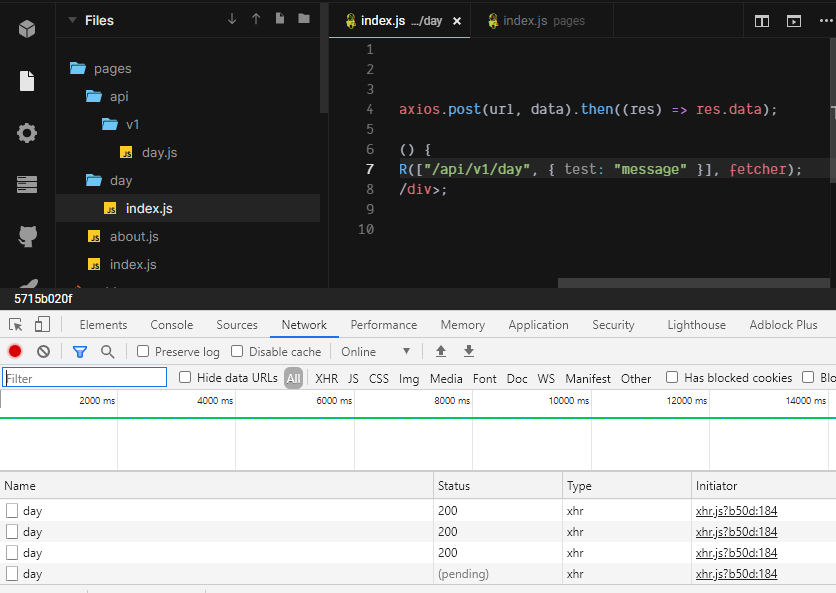
I have tested with axios and it works fine without SWR.
vishnuvchandar
on 26 Oct 2020
@vishnuvchandar I tried on your codesanbod example, the issue is when you pass an object to useSWR as first argument within next.js, each time the hashed key will be different
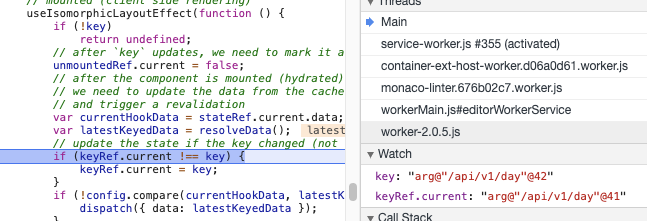
the weakmap in hash lib looks like following
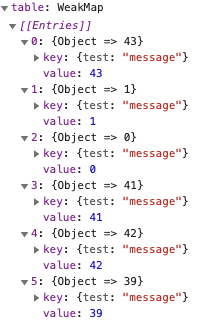
the solution to this could be
+const payload = { test: "message" }
export default function DayPage() {
-  const { data, error } = useSWR(["/api/v1/day", { test: "message" }], fetcher);
+  const { data, error } = useSWR(["/api/v1/day", payload], fetcher);
  return <div>Hello Day {data}</div>;
}
 huozhi
on 27 Oct 2020
huozhi
on 27 Oct 2020
// Don’t do this! Deps will be changed on every render.
useSWR(['/api/user', { id }], query)
// Instead, you should only pass “stable” values.
useSWR(['/api/user', id], (url, id) => query(url, { id }))
https://swr.vercel.app/docs/arguments#passing-objects
Hope this will help
promer94
on 27 Oct 2020
This doesnt solve my purpose. The criteria cannot be a default value. Its susceptible to change.
I want that to be a dynamically changing object based on the action i perform on the parent component.
Say i need to change a date range or something. On every state change of Criteria object, it has to make a call to my API with the updated values.
How should i do that with this apporoach??
How am i supposed to handle below scenario.
const StatisticsTable = ({ criteria }) => {
    const {data, error} = useSWR(criteria && ['/api/v1/reports/statistics', criteria], fetcher)
    return <div>{data}</div>
}
is it possible to pick out some primitive values (string, numbers or references of same object) from criteria and pass them as key of useSWR hook?
like
const {date} = criteria
useSWR(['/api/v1/reports/statistics', date.month, date.day], (url, month, day) => ...)
then it's easier for swr to convert the complex key as a consistent id to memorize. otherwise if the key is a different object each render, like a changing react prop, would be difficult to have an algorithm to mark it as consistent key during the entire runtime.
huozhi
on 27 Oct 2020
You can create a custom hook like this. But you should know deepcompare might cause some performance issues.
import { dequal } from "dequal/lite"
function useObjectSWR(key, fn, option) {
  const stableKey = React.useRef(key);
  React.useEffect(() => {
    // This could be slow
    if (!dequal(stableKey.current, key)) stableKey.current = key;
  });
  return useSWR(stableKey.current, fn, option);
}

export default function DayPage({ message }) {
  const { data, error } = useObjectSWR(["/api/v1/day", message], fetcher);
  return <div>{data}</div>;
}
is it possible to pick out some primitive values (string, numbers or references of same object) from
criteriaand pass them as key of useSWR hook?like
const {date} = criteria
useSWR(['/api/v1/reports/statistics', date.month, date.day], (url, month, day) => ...)
then it's easier for swr to convert the complex key as a consistent id to memorize. otherwise if the key is a different object each render, like a changing react prop, would be difficult to have an algorithm to mark it as consistent key during the entire runtime.
This shud work. But the only problem is not all the time all objects will be sent! Since its a filter criteria, it keeps building. However, i thought of Stringifying and Parsing it on the api side, which i believe shud work. Lemme know if its a right approach!.....
vishnuvchandar
on 27 Oct 2020
You can create a custom hook like this. But you should know deepcompare might cause some _performance issues_.
import { dequal } from "dequal/lite"
function useObjectSWR(key, fn, option) {
  const stableKey = React.useRef(key);
  React.useEffect(() => {
    // This could be slow
    if (!dequal(stableKey.current, key)) stableKey.current = key;
  });
  return useSWR(stableKey.current, fn, option);
}

export default function DayPage({ message }) {
  const { data, error } = useObjectSWR(["/api/v1/day", message], fetcher);
  return <div>{data}</div>;
}
Wo wo wo! This is way more complicated for what i need. As i mentioned in previous comment lemme know if Stringify Parse is a better way to handle this..
vishnuvchandar
on 27 Oct 2020
Stringifying surly can work! another way is to call useMemo to memorize criteria only when some props of it changed.
for swr side it just wants to have a consistent reference for different key argument when the value of key arg is really different.
close this issue since it's as designed, conversation can still be carried on here.
huozhi
on 28 Oct 2020
Related issues
 timurmaio
·
3Comments
timurmaio
·
3Comments
 frdwhite24
·
4Comments
frdwhite24
·
4Comments
 sergiodxa
·
4Comments
sergiodxa
·
4Comments
 loveholly
·
3Comments
loveholly
·
3Comments
 bywo
·
4Comments
bywo
·
4Comments