Swoole-src: Install swoole on docker php:7.2-alpine
Hello. I try to install swoole on php:7.2-alpine
this is my docker file
FROM php:7.2-alpine

RUN apk upgrade --update \
    && apk add --no-cache --virtual .build-deps \
    autoconf \
    gcc \
    && pecl install swoole \
    && docker-php-ext-enable swoole \
    && apk del .build-deps \
    && rm -rf /var/cache/apk/*
But I cant build image, I have an error, can someone help me?
running: phpize
Configuring for:
PHP Api Version: 20170718
Zend Module Api No: 20170718
Zend Extension Api No: 320170718
enable debug/trace log support? [no] : enable sockets supports? [no] : enable openssl support? [no] : enable http2 support? [no] : enable async-redis support? [no] : enable mysqlnd support? [no] : enable postgresql coroutine client support? [no] : building in /tmp/pear/temp/pear-build-defaultuseraidAGj/swoole-2.1.2
running: /tmp/pear/temp/swoole/configure --with-php-config=/usr/local/bin/php-config --enable-swoole-debug=no --enable-sockets=no --enable-openssl=no --enable-http2=no --enable-async-redis=no --enable-mysqlnd=no --enable-coroutine-postgresql=no
checking for grep that handles long lines and -e... /bin/grep
checking for egrep... /bin/grep -E
checking for a sed that does not truncate output... /bin/sed
checking for cc... cc
checking whether the C compiler works... no
configure: error: in/tmp/pear/temp/pear-build-defaultuseraidAGj/swoole-2.1.2': configure: error: C compiler cannot create executables Seeconfig.log' for more details
ERROR: `/tmp/pear/temp/swoole/configure --with-php-config=/usr/local/bin/php-config --enable-swoole-debug=no --enable-sockets=no --enable-openssl=no --enable-http2=no --enable-async-redis=no --enable-mysqlnd=no --enable-coroutine-postgresql=no' failed
The command '/bin/sh -c apk upgrade --update && apk add --no-cache --virtual .build-deps autoconf gcc && pecl install swoole && docker-php-ext-enable swoole && apk del .build-deps && rm -rf /var/cache/apk/*' returned a non-zero code: 1
 lotarbo
All 11 comments
post the config.log content
 matyhtf
on 10 Apr 2018
matyhtf
on 10 Apr 2018
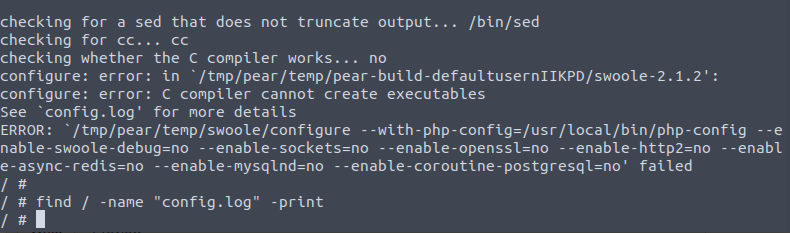
I try manual install in the container to see config.log. But I cant find this file.
find / -name "config.log" -print
and nothing.
lotarbo
on 10 Apr 2018
I try to install all that I found on my problem in google, end last error that i cant found in google ->
/swoole-src/src/os/linux_aio.c:23:27: fatal error: linux/aio_abi.h: No such file or directory
#include <linux/aio_abi.h>
FROM php:7.2-alpine
RUN apk upgrade --update \
&& apk add --no-cache --virtual .build-deps \
linux-headers \
&& pecl install swoole \
&& docker-php-ext-enable swoole \
&& apk del .build-deps linux-headers \
&& rm -rf /var/cache/apk/*
 khs1994
on 10 Apr 2018
khs1994
on 10 Apr 2018
@khs1994 thank you.
FROM php:7.2-alpine
RUN apk upgrade --update \
&& apk add --no-cache --virtual .build-deps \
linux-headers \
autoconf \
gcc \
libc-dev \
make \
&& pecl install swoole \
&& docker-php-ext-enable swoole \
&& apk del .build-deps \
&& rm -rf /var/cache/apk/*
this wotk fine, but i need some swoole options, so i try yes yes | pecl install swoole, but i dont need coroutine-postgresq. Is there a way to install the swoole through pecl with some options?
lotarbo
on 10 Apr 2018
with configure work fine, but I think this is not the most elegant solution)
FROM php:7.2-alpine

RUN apk upgrade --update \
    && apk add --no-cache --virtual .build-deps \
    linux-headers \
    autoconf \
    gcc \
    libc-dev \
    make \
    git \
    && git clone https://github.com/swoole/swoole-src.git \
    && ( \
        cd swoole-src \
        && phpize \
        && ./configure --enable-swoole-debug --enable-mysqlnd \
        && make -j$(nproc) && make install \
        ) \
    && rm -r /swoole-src \
    && docker-php-ext-enable swoole \
    && apk del .build-deps \
    && rm -rf /var/cache/apk/*
Thanks for your feedback, I will fix it later
matyhtf
on 11 Apr 2018
这个 yes no
无法详细设每个值 yes yes no yes | pecl install swoole 的结果是
running: /tmp/pear/temp/swoole/configure --with-php-config=/usr/local/bin/php-config --enable-swoole-debug=yes no yes --enable-sockets=yes no yes --enable-openssl=yes no yes --enable-http2=yes no yes --enable-async-redis=yes no yes --enable-mysqlnd=yes no yes --enable-coroutine-postgresql=yes no yes
 fanybook
on 11 Jul 2018
fanybook
on 11 Jul 2018
而且已经 apk add nghttp2 了
还是报 :/tmp/pear/temp/swoole/php_swoole.h:135:2: error: #error "Enable http2 support, require nghttp2 library."
这个问题 apk add nghttp2-dev 后解决了
fanybook
on 11 Jul 2018
还有 选择 --enable 时,必须输入 yes 才能 enable,输入 y 是不管用的
fanybook
on 11 Jul 2018
还有
pecl安装swoole提示未知类型php_socket 这是什么情况
已经 安了 sockets
fanybook
on 11 Jul 2018
Related issues
 onanying
·
3Comments
onanying
·
3Comments
 zuozhehao
·
3Comments
zuozhehao
·
3Comments
 andreybolonin
·
4Comments
andreybolonin
·
4Comments
 nick-zh
·
3Comments
nick-zh
·
3Comments
 AndyChanCode
·
3Comments
AndyChanCode
·
3Comments
Most helpful comment
with configure work fine, but I think this is not the most elegant solution)