Switchyomega: Failed to work on Firefox Nightly (57.0a1)
Hi.
There is a problem with SwitchyOmega not working with Firefox Nightly (57.0a1). Extension could be installed and configured, but will not respect proxy settings (all pages are opened through direct connection).
Next lines are seems to be associated with this error:
19:22:43.464 No matching message handler for the given recipient.  MessageChannel.jsm:634
19:22:47.818 Object { event: "proxyScriptLog", message: "Warning: Proxy script not initializ…", error: undefined, level: "warn" }  background.js:26
19:16:39.666 Attempt to set a forbidden header was denied: Connection  2551543060-bc_manager_core.js:78:107
19:17:23.980 XML Parsing Error: junk after document element
Location: jar:%moz-profile-path%/extensions/[email protected]!/partials/io.html
Line Number 1, Column 76:  io.html:1:76
If you need any additional information, feel free to ask.
 olloff
All 26 comments
Could you please right click on the extension icon, select "Download error log" from the menu and upload the file? Thanks in advance.
 FelisCatus
on 4 Aug 2017
FelisCatus
on 4 Aug 2017
Sorry, wasn't aware of this feature.
Options << Options#applyProfile [
    "ukraine-sanctions"
]
Options << Options#updateProfile [
    [
        "ukraine-sanctions",
        "direct",
        "awesome-proxy"
    ]
]
Options << Options#updateProfile []
ERROR: [1] Unhandled rejection:
 Error: Could not establish connection. Receiving end does not exist.
    (No stack trace)
From previous event:
    [25]</ChromeOptions</ChromeOptions.prototype.applyProfileProxyScript@moz-extension://49b09eb9-c500-4dc7-9e2f-033961087340/js/omega_target_chromium_extension.min.js:4720:7
    [25]</ChromeOptions</ChromeOptions.prototype.applyProfileProxy@moz-extension://49b09eb9-c500-4dc7-9e2f-033961087340/js/omega_target_chromium_extension.min.js:4636:14
    [31]</Options</Options.prototype.applyProfile@moz-extension://49b09eb9-c500-4dc7-9e2f-033961087340/js/omega_target.min.js:9591:20
    [31]</Options</Options.prototype.init/this.ready</<@moz-extension://49b09eb9-c500-4dc7-9e2f-033961087340/js/omega_target.min.js:9012:18
From previous event:
    [31]</Options</Options.prototype.init@moz-extension://49b09eb9-c500-4dc7-9e2f-033961087340/js/omega_target.min.js:9009:18
    Options@moz-extension://49b09eb9-c500-4dc7-9e2f-033961087340/js/omega_target.min.js:8834:7
    ChromeOptions@moz-extension://49b09eb9-c500-4dc7-9e2f-033961087340/js/omega_target_chromium_extension.min.js:4453:12
    @moz-extension://49b09eb9-c500-4dc7-9e2f-033961087340/js/background.js:214:13
    @moz-extension://49b09eb9-c500-4dc7-9e2f-033961087340/js/background.js:1:2
ERROR: {
    "event": "proxyScriptLog",
    "message": "Warning: Proxy script not initialized on handling: https://lh3.googleusercontent.com",
    "level": "warn"
}
https://lh3.googleusercontent.com
https://www.google.com
https://www.tumblr.com
https://52.docs.google.com
I'm not sure this is right, ukraine-sanctions switch contains only selected websites and was enabled on time of saving log file.
[SwitchyOmega Conditions]
@with result

*.vk.com +awesome-proxy
*.ok.ru +awesome-proxy
*.odnoklassniki.ru +awesome-proxy
*.mail.ru +awesome-proxy
*.kinopoisk.ru +awesome-proxy
*.yandex.ru +awesome-proxy
*.yadi.sk +awesome-proxy
*.ya.ru +awesome-proxy
2ip.ua +awesome-proxy
*.2ip.ua +awesome-proxy

* +direct
Yeah this this weird in that it says Error: Could not establish connection. Receiving end does not exist.
This is a known problem but I don't think we've found the actual cause of this. It says that the receiving end, which is the proxy script does not exist. But if it doesn't exist, then there should be no proxyScriptLog messages. It seems like an impossible situation for me.
But anyway, it works for me on build 2017-08-03. So I would say first update Nightly to the latest and then try again. Alternatively try Developer Edition as well so we will see the difference. Try it with a brand new user directory to be sure it wasn't something with other extensions or your settings. If you have some special configuration in about:config, please also give us some hint.
Sorry for providing such general ways of debugging, but please bear with me until I recognize what's going wrong.
FelisCatus
on 4 Aug 2017
Options << Options#applyProfile [
    "ukraine-sanctions"
]
Options << Options#updateProfile [
    [
        "ukraine-sanctions",
        "direct",
        "awesome-proxy"
    ]
]
Options << Options#updateProfile []
Options << Options#reset [
    "{\"schemaVersion\":2,\"-enableQuickSwitch\":false,\"-refreshOnProfileChange\":true,\"-startupProfileName\":\"ukraine-sanctions\",\"-quickSwitchProfiles\":[],\"-revertProxyChanges\":true,\"-confirmDeletion\":true,\"-showInspectMenu\":true,\"-downloadInterval\":1440,\"+proxy\":{\"bypassList\":[{\"pattern\":\"127.0.0.1\",\"conditionType\":\"BypassCondition\"},{\"pattern\":\"::1\",\"conditionType\":\"BypassCondition\"},{\"pattern\":\"localhost\",\"conditionType\":\"BypassCondition\"}],\"profileType\":\"FixedProfile\",\"name\":\"proxy\",\"color\":\"#99ccee\",\"revision\":\"15da8c701f1\"},\"+auto switch\":{\"profileType\":\"SwitchProfile\",\"rules\":[],\"name\":\"auto switch\",\"color\":\"#99dd99\",\"defaultProfileName\":\"direct\",\"revision\":\"15da8d2f691\",\"currentProfileName\":\"\",\"tempProfile\":{\"name\":\"\",\"profileType\":\"SwitchProfile\",\"defaultProfileName\":\"auto switch\",\"rules\":[{\"condition\":{\"conditionType\":\"HostWildcardCondition\",\"pattern\":\"*.vk.com\"},\"profileName\":\"awesome-proxy\",\"isTempRule\":true}],\"color\":\"#99dd99\",\"revision\":\"15da8d0d519\"}},\"-monitorWebRequests\":true,\"+awesome-proxy\":{\"profileType\":\"FixedProfile\",\"name\":\"awesome-proxy\",\"bypassList\":[{\"conditionType\":\"BypassCondition\",\"pattern\":\"127.0.0.1\"},{\"conditionType\":\"BypassCondition\",\"pattern\":\"[::1]\"},{\"conditionType\":\"BypassCondition\",\"pattern\":\"localhost\"}],\"color\":\"#d497ee\",\"revision\":\"15da8ca983c\",\"fallbackProxy\":{\"scheme\":\"socks5\",\"port\":<port2>,\"host\":\"<ip>\"},\"proxyForHttp\":{\"scheme\":\"http\",\"port\":<port1>,\"host\":\"<ip>\"},\"proxyForHttps\":{\"scheme\":\"https\",\"port\":<port1>,\"host\":\"<ip>\"},\"proxyForFtp\":{\"scheme\":\"https\",\"port\":<port1>,\"host\":\"<ip>\"},\"auth\":{\"proxyForHttp\":{\"username\":\"<username>\",\"password\":\"<password>\"},\"proxyForHttps\":{\"username\":\"<username>\",\"password\":\"<password>\"},\"proxyForFtp\":{\"username\":\"<username>\",\"password\":\"<password>\"}}},\"-showConditionTypes\":1,\"+ukraine-sanctions\":{\"profileType\":\"SwitchProfile\",\"name\":\"ukraine-sanctions\",\"defaultProfileName\":\"direct\",\"rules\":[{\"condition\":{\"conditionType\":\"HostWildcardCondition\",\"pattern\":\"*.vk.com\"},\"profileName\":\"awesome-proxy\"},{\"condition\":{\"conditionType\":\"HostWildcardCondition\",\"pattern\":\"*.ok.ru\"},\"profileName\":\"awesome-proxy\"},{\"condition\":{\"conditionType\":\"HostWildcardCondition\",\"pattern\":\"*.odnoklassniki.ru\"},\"profileName\":\"awesome-proxy\"},{\"condition\":{\"conditionType\":\"HostWildcardCondition\",\"pattern\":\"*.mail.ru\"},\"profileName\":\"awesome-proxy\"},{\"condition\":{\"conditionType\":\"HostWildcardCondition\",\"pattern\":\"*.kinopoisk.ru\"},\"profileName\":\"awesome-proxy\"},{\"condition\":{\"conditionType\":\"HostWildcardCondition\",\"pattern\":\"*.yandex.ru\"},\"profileName\":\"awesome-proxy\"},{\"condition\":{\"conditionType\":\"HostWildcardCondition\",\"pattern\":\"*.yadi.sk\"},\"profileName\":\"awesome-proxy\"},{\"condition\":{\"conditionType\":\"HostWildcardCondition\",\"pattern\":\"*.ya.ru\"},\"profileName\":\"awesome-proxy\"},{\"condition\":{\"conditionType\":\"HostWildcardCondition\",\"pattern\":\"kinopoisk.ru\"},\"profileName\":\"awesome-proxy\"}],\"color\":\"#47b\",\"revision\":\"15da8d30bfc\"}}"
]
Options << Options#applyProfile [
    "system"
]
ERROR: {
    "message": "An unexpected error occurred"
}
Options << Options#applyProfile [
    "ukraine-sanctions"
]
Options << Options#updateProfile [
    [
        "ukraine-sanctions",
        "direct",
        "awesome-proxy"
    ]
]
Options << Options#updateProfile []
Options << Options#patch [
    {
        "+awesome-proxy": {
            "revision": [
                "15da8ca983c",
                "15dab974edc"
            ],
            "fallbackProxy": {
                "scheme": [
                    "socks5",
                    "http"
                ],
                "port": [
                    <port1>,
                    <port2>
                ]
            },
            "auth": {
                "fallbackProxy": [
                    {
                        "username": "<username>",
                        "password": "<password>"
                    }
                ]
            }
        }
    }
]
Options << Options#applyProfile [
    "ukraine-sanctions",
    {
        "update": false
    }
]
Options << Options#applyProfile [
    "awesome-proxy"
]
Options << Options#updateProfile [
    [
        "awesome-proxy"
    ]
]
Options << Options#applyProfile [
    "ukraine-sanctions"
]
Options << Options#updateProfile [
    [
        "ukraine-sanctions",
        "direct",
        "awesome-proxy"
    ]
]
Options << Options#applyProfile [
    "direct"
]
Options << Options#updateProfile [
    [
        "direct"
    ]
]
Options << Options#applyProfile [
    "ukraine-sanctions"
]
Options << Options#updateProfile [
    [
        "ukraine-sanctions",
        "direct",
        "awesome-proxy"
    ]
]
Well, that's from 56.0
Strangely, I've got all-different results. Now it actually tries to send something through proxy returning an error SSL_ERROR_RX_RECORD_TOO_LONG.
Btw, I doublechecked the proxy and browsers, they're fine, all works perfectly if proxy configured in OS or browser settings, but failed when using extension.
olloff
on 4 Aug 2017
Then you've run into the old Firefox issue where HTTP proxies are wrongly treated as HTTPS proxies. https://bugzilla.mozilla.org/show_bug.cgi?id=1359417
I guess you are running out of luck now. Are you running the latest Developer Edition build? If so, then you probably need to find an older Nightly build, probably around 2017-07-15. When you doubt, try bisecting.
FelisCatus
on 4 Aug 2017
Thanks. When I test my browser connection settings I use HTTPS proxy in both HTTP and HTTPS settings. And it worked well, so I thought there must be no difference for extension which proxy type to use.
Surely I will try couple of older builds.
olloff
on 4 Aug 2017
Aaaaand either I'm dumb or its some strange things going on. Hopefully second.
I tried to launch extension over Chrome 62 (current Canary) and there are problems too. System proxy settings worked fine as always, but Switchy's settings emits error ERR_PROXY_CONNECTION_FAILED
Can it be similar problem?
Sadly, error log shows nothing this time except option changes.
Options << Options#applyProfile [
    "direct"
]
Options << Options#updateProfile [
    [
        "direct"
    ]
]
Options << Options#updateProfile []
Options << Options#applyProfile [
    "ukraine-sanctions"
]
Options << Options#updateProfile [
    [
        "ukraine-sanctions",
        "awesome-proxy"
    ]
]
I also dumped all net-internals events related to one of the tries, hope it helps - https://app.box.com/s/eib00mutsftbtmigadg3t087pw4dimiq
olloff
on 4 Aug 2017
Hi, i also happened this problem.I use macOS 10.11 with Firefox Nightly 57.0a1(2017-08-05) version.And I try to test it on single proxy profile and auto switch mode.All isn's work.Here is my log file.It will should be help you.
OmegaLog_1501932574885.txt
 Blackrose
on 5 Aug 2017
Blackrose
on 5 Aug 2017
Well, i checked some old builds and seems to be I've really got two completely different problems here.
Build 05-07-17 to 10-07-17 (i gave link to changelog from 09-07 because 10-07 probably was a cakeday and Mozilla team slacked) gave results very similar to current Developer Edition (long TLS handshake, SSL_ERROR_RX_RECORD_TOO_LONG error and clean Switchy error log).
Builds 11-07-17 to 16-07-17 gave all-different result similar to recent Nightly.
Here log from15-07-17 build
Aaaaand guess what? Chrome 60 (current stable) is also failed to work with Switchy. With clean error log.
olloff
on 5 Aug 2017
HI, for the ERR_PROXY_CONNECTION_FAILED one in Chrome, please visit chrome://net-internals/#proxy and check if your proxy settings are correct there. If it uses the wrong protocol, please correct it in SwitchyOmega. Usually it should be enough to just set one proxy for all URLs. If the settings shown are completely different from what you've configured, then please uninstall other extensions that may control proxy settings.
Also, please make sure that you really have an HTTPS proxy. These are pretty rare from my experience and maybe HTTP is what you are looking for. Well, if you really do, then there shouldn't be any problem using it.
Anyway, you can copy and paste the content on that page here. Please feel free to remove / changes the proxy server address to protect your privacy, but please leave the protocol / scheme untouched so that I can verify if SwitchyOmega is doing the wrong thing. A screenshot for the proxy settings section in SwitchyOmega would also be helpful. Again, please feel free to mask the server address.
FelisCatus
on 6 Aug 2017
For the Firefox one, what OS are you on?
There is another way to get more logs, which is in Menu > Addons and then Cog icon dropdown > Debug addons. Click on the Debug link under SwitchyOmega and navigate to the Console tab to see all logs related to SwitchyOmega. You can then copy them to a file.
In the meantime, I will do a quick check to see if there are any race conditions in the code that causes SwitchyOmega to send out messages before the proxy script is initialized.
FelisCatus
on 6 Aug 2017
For Firefox users: please see whether #1152 works for you. Please don't bother with the older Nightly builds -- just try it with the most updated one. Thanks.
FelisCatus
on 6 Aug 2017
@FelisCatus I love you the way only Firefox user can love his addon developer but #1152 doesn't seem to work on Nightly 05-08-17 log
what OS are you on
I'm using Windows 10 as my primary system, but doublechecked all statement with Windows 7 virtual machine@NAT.
Here's debug messages switchy-firefox57-debug.txt
olloff
on 6 Aug 2017
please visit chrome://net-internals/#proxy and check if your proxy settings are correct there
It all seems correct. No other extensions that could mess with proxy setting are installed (there are uBlock Origin, but I already checked clean profiles of Chrome 60 and Firefox 57 without it and got identical results).
proxy page - https://app.box.com/s/2qtotw6q86e6gil86r3tb7if72ex0g3x
switch page - https://app.box.com/s/nvawho1jfv133ueyfsqnui7uvic62qet
This was in form of PAC-script, encoded as base64:
/*OmegaProfile*"ukraine-sanctions"*15daea746d4*/var FindProxyForURL=function(init,profiles){return function(url,host){"use strict";var result=init,scheme=url.substr(0,url.indexOf(":"));do{result=profiles[result];if(typeof result==="function")result=result(url,host,scheme)}while(typeof result!=="string"||result.charCodeAt(0)===43);return result}}("+ukraine-sanctions",{"+ukraine-sanctions":function(url,host,scheme){"use strict";if(/(?:^|\.)2ip\.ua$/.test(host))return"+el-ninio-proxy";if(/(?:^|\.)vk\.com$/.test(host))return"+el-ninio-proxy";if(/(?:^|\.)ok\.ru$/.test(host))return"+el-ninio-proxy";if(/(?:^|\.)odnoklassniki\.ru$/.test(host))return"+el-ninio-proxy";if(/(?:^|\.)mail\.ru$/.test(host))return"+el-ninio-proxy";if(/(?:^|\.)kinopoisk\.ru$/.test(host))return"+el-ninio-proxy";if(/(?:^|\.)yandex\.ru$/.test(host))return"+el-ninio-proxy";if(/(?:^|\.)yadi\.sk$/.test(host))return"+el-ninio-proxy";if(/(?:^|\.)ya\.ru$/.test(host))return"+el-ninio-proxy";if(/(?:^|\.)kinopoisk\.ru\/$/.test(host))return"+el-ninio-proxy";return"+el-ninio-proxy"},"+el-ninio-proxy":function(url,host,scheme){"use strict";if(/^127\.0\.0\.1$/.test(host)||/^::1$/.test(host)||/^localhost$/.test(host))return"DIRECT";switch(scheme){case"http":return"PROXY <http/s-proxy>";case"https":return"HTTPS <http/s-proxy>";case"ftp":return"HTTPS <http/s-proxy>";default:return"HTTPS <http/s-proxy (i also tried a socks variant here but it seems not to support auth so i will try to test with that one)>"}}});
Server utilizes 3proxy which claims to support a http/s proxy over one instance, see
https://www.3proxy.ru/doc/man3/3proxy.cfg.3.html
proxy − HTTP/HTTPS proxy (default port 3128)
In any case proxy setting should be correct because system proxy settings are always work (for both Chrome and Firefox) and browser proxy settings are work fine with Firefox.
If you need access to proxy I use, feel free to ask, but I'll need to ask its owner first.
olloff
on 6 Aug 2017
So after couple of extra tries i've got to next headache.
Clearly we have two different problems:
- related to Chrome and Firefox builds pre-11-07-17:
- FoxyProxy gives ERR_PROXY_CONNECTION_FAILED error;
- Switchy gives ERR_PROXY_CONNECTION_FAILED error;
The only setup that certainly works for Switchy - single HTTP proxy entry, this way works both http and https pages.
I'm not certain about single SOCKS proxy entry, it probably works too.
- related to Firefox after-11-07-17 only:
- FoxyProxy works for HTTP and SOCKS (HTTPS not working but probably because FoxyProxy bug);
- SwitchyOmega use direct connection/system proxy settings nevertheless of selected proxy;
olloff
on 6 Aug 2017
@olloff I don't need the proxy to test since SwitchyOmega is only setting up the configuration, not making the actual request. Therefore, the only thing I can do is to make sure the settings are the same. But anyway, this seems to be a proxy configuration problem. Now it just boils down to finding the right configuration for you. Several things to try:
- Fill in the first line in proxy settings and ONLY the first line. Select HTTP as the protocol, not HTTPS. For the next tree lines, just select
(use default).
- It could be the case that HTTPS protocol is never supported but the man page is written in a confusing way. I've seen this happening for other servers.
- Try disabling SwitchyOmega and let Chrome pick up the system proxy settings. If you refresh that page on
chrome://net-internals/#proxy, you will see the system proxy settings printed out. Please try to configure SwitchyOmega in such a way that it shows you the same thing for system proxy (when you select the proxy profile, not the switch profile.)
- Again, if system settings work, then it is very unlikely that the proxy protocol is indeed HTTPS, since the Windows settings dialog does not support HTTPS protocol. (It does support
https://URLs but that's a different topic.)
- Again, if system settings work, then it is very unlikely that the proxy protocol is indeed HTTPS, since the Windows settings dialog does not support HTTPS protocol. (It does support
For the Firefox issue, I will try a few different things.
FelisCatus
on 8 Aug 2017
Hi Firefox users, please try the updated #1152, also known as "the 10x build". If something doesn't work at once, let's try it 10 times! :wink: Enjoy and see if it fixes your problem.
P.S. Yeah I know this is a hack, I just want to make sure it is absolutely not a race condition. I'll improve the handling later, if it works...
FelisCatus
on 8 Aug 2017
Concerning #1152:
here's the updated log from recent Nightly, I didn't strip repeating strings this time. Sorry to say, but it didn't really fixes the problem.
And let me thank you again you spend so much of your time helping me. In my defense I need to say, that's probably not a one-time case and I absolutely sure its not limiting by my configuration.
I tested this A-problem (which related to Chrome and Firefox Developer edition cases) multiple times on a different OS, with a different browser versions (in case of Chrome). I was not alone, couple of people I ask to help me got identical results.
Now the actions you've asking me to do. I just test it again the way you ask me to do it. I set up my system settings one-per-row and set up Switchy to use system proxy.
Windows settings dialog does not support HTTPS protocol.
If you trust my screenshots enough, here system HTTPS settings, net-internals settings and Switchy settings. Every time I've got the result, I checked net-internals/proxy to be sure settings are correct (its easy, when using system-wide settings there was a note _Source: SYSTEM_).
Here's what I got:
| | System | Switchy |
| ------- |-----------| ---------- |
| HTTP | SUCCESS | SUCCESS |
| HTTPS | SUCCESS | FAIL |
| SOCKS | FAIL | FAIL |
I know, there is problem with SOCKS auth on Chrome, so its kinda expected result, but HTTPS proxy works differently with Switchy using own and system-wide settings.
Now I realize my words cannot be trusted, I'm a cynical sociophobic former tech-support engineer, so I'll try to do whatever you'll ask me: video, screencast, photo with today's paper, notary-signed evidence of two respected members of community, etc.
olloff
on 8 Aug 2017
First, let me apologize if you feel offended. I'm not challenging your findings. I just want to state the fact that different projects and dialog use different terms. SwitchyOmega is using a different model and it does not correspond one-to-one with the system settings. I will explain this soon.
FelisCatus
on 8 Aug 2017
For this sreenshot: https://imgur.com/Ejsk8cM
It says proxy for HTTPS, not HTTPS proxy. It corresponds to the following set up in SwitchyOmega.
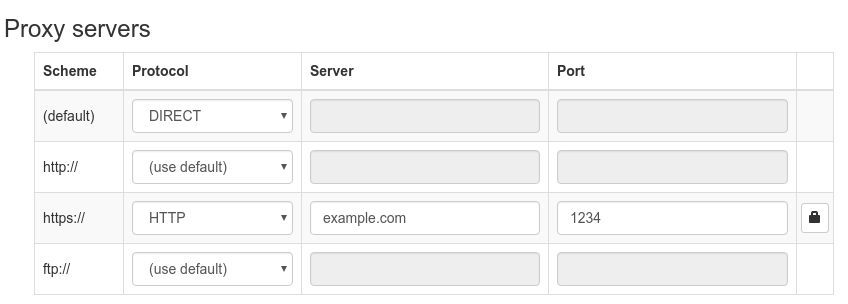
(Note the HTTP for the proxy protocol.)
To prove it works:

(Note that Chrome won't show you the http protocol explicitly if it is http.)
FelisCatus
on 8 Aug 2017
I know it is confusing, but scheme here says the URL scheme, not the proxy protocol. This is the model used by Chrome so SwitchyOmega followed that. SwitchyOmega let you configure the URLs you want to use the proxy with, and the protocol of the proxy itself.
I do trust your screenshot even without a notary. But how you interpret that screenshot differs. If you believe my understanding of Windows' and Chrome's model, the line labelled "Secure" in Windows really means "Use HTTP proxy" for https:// URLs. Everything else is sent using DIRECT connection. Evidence is given above.
I would like to thank you for coping with me so far and I apologize again for my wording. Let me know if it helps.
FelisCatus
on 8 Aug 2017
_> how you interpret that screenshot differs_
Sorry about that. Clearly my knowledge is not enough to diagnose and fix the problem, that's why I must call the expert.
Yeah, I'm easily got confused with different labels in system settings and Switchy settings. But I test all setup again on different source. This time I pick a http://retrovania-vgjunk.blogspot.ru/ and https://retrovania-vgjunk.blogspot.ru/ (its probably county-redirect from .com).
| | System | | Switchy | |
|-------------------------------------------|-----------|------------|-----------|-----------|
| | HTTP | HTTPS | HTTP | HTTPS |
| http://retrovania-vgjunk.blogspot.ru/ | SUCCESS | SUCCESS | SUCCESS | FAIL |
| https://retrovania-vgjunk.blogspot.ru/ | SUCCESS | SUCCESS | SUCCESS | FAIL |
tl/dr When I set up Secure proxy in system settings - it works for https pages, but when i set up https proxy for https:// in Switchy it fails.
And hurray, I've got first errors with this kind of setup: omegalog, but can't tell it any of them related to the problem A.
I realize I can use HTTP proxy for https:// in Switchy as I do now and if you sure it suppose to work that way, I have no reasons to not believe you. Probably I should ask 3proxy developer, if my config is wrong or I mistaken about HTTPS-proxy support.
olloff
on 8 Aug 2017
Thanks for your report. I'm glad that we've got some confirmation from 3proxy developers. He/she is right that HTTP proxies can support both http:// and https:// URLs and there's no reason that the proxy itself should use TLS unless you want some extra secure layers. The explanation was pretty clear and I think I will borrow that the next time I need to explain this.
Please let me know if everything is clear now. If not, I'm happy to further explain.
By the way, I'm proposing a new UI overhaul which tries to minimize such confusions while supporting proxy fallback. Please take a look and see if it helps or hurts. The idea is instead of having 4 rows with confusing labels, you start with ONLY one row which represents one proxy server and you can just fill it in. The confusing part about URLs are hidden behind the "Scheme" button. More rows can be added when you need to do fail-over.
FelisCatus
on 9 Aug 2017
The error in your log file happened when SwitchyOmega tries to color the icon differently and has nothing to do with the actual switching. Even if it fails, you will still get the same proxy servers, etc. It may break the coloring or cause the icon to display wrong colors. I've tracked that as a separate issue at #1159. Thanks for reporting this.
FelisCatus
on 9 Aug 2017
@FelisCatus Sorry for making it such a mess here. I'll try to stick to the main issue and to be more clear from now.
olloff
on 9 Aug 2017
See #1171 for detailed explanation. Further updates will be posted there.
FelisCatus
on 12 Aug 2017
Related issues
 DelingAlieZ10
·
3Comments
DelingAlieZ10
·
3Comments
 freb
·
3Comments
freb
·
3Comments
 zwdzwdzwd
·
3Comments
zwdzwdzwd
·
3Comments
 mrdulin
·
4Comments
FelisCatus
·
3Comments
mrdulin
·
4Comments
FelisCatus
·
3Comments