Swiper: Pagination component SCSS not included in production build
This is a (multiple allowed):
- [x] bug
- [ ] enhancement
- [ ] feature-discussion (RFC)
- Swiper Version: 3.1.2
- Platform/Target and Browser Versions: macOS FIrefox + Chrome
What you did
Included Swiper (React) along with pagination:
import SwiperCore, { Pagination } from 'swiper';
import { Swiper, SwiperSlide } from 'swiper/react';
import 'swiper/swiper.scss';
import 'swiper/components/pagination/pagination.scss';
Expected Behavior
Swiper slides and pagination bullets should be styled in the production build.
Actual Behavior
Swiper slides have styles (since the sideEffects fix in 6.1.0) but pagination bullets do not have any style rules. Issue only appears in production build; development is fine.
Seems to be related to #3734 / #3708, but only with the optional components.
My first thought is that the sideEffects aren't matching nested directories. I tried editing the sideEffects section of swiper's package.json from e.g. *.scss to **/*.scss, but that didn't seem to work.
Possible workaround: if I remove the scss imports from my .jsx file and move them into my .scss file (e.g. @import '~swiper/components/pagination/pagination.scss'), it seems to work. But importing them in jsx should work too.
 saltire
All 4 comments
Confirmed that this is still an issue. Thanks for the workaround.
Tying this to an issue reported in Gatsby, for the benefit of others who wander.
https://github.com/gatsbyjs/gatsby/issues/19446#issuecomment-553019807
 kisaraofpern
on 21 Oct 2020
kisaraofpern
on 21 Oct 2020
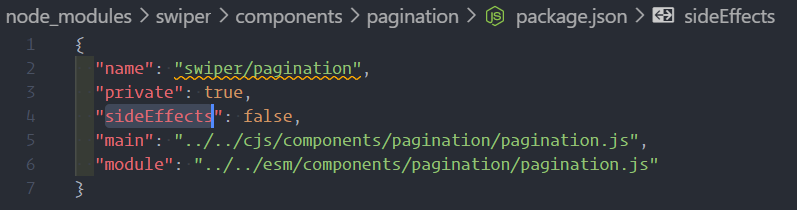
The cause of the issue is this sideEffects.
 xughv
on 30 Nov 2020
xughv
on 30 Nov 2020
I think
If you load the CSS file in JS. CSS configuration ideEffect:false , then it won't be packaged.
If you load CSS in a CSS file, there is no limit.
So you can use js to load custom CSS files, and then css loads CSS files that have no side effects.
 rzdong
on 22 Dec 2020
rzdong
on 22 Dec 2020
Using require instead of import is another quick workaround, works for me
 johnbede2000
on 25 Feb 2021
johnbede2000
on 25 Feb 2021
Related issues
 piotrosmola
·
20Comments
piotrosmola
·
20Comments
 brandonce
·
19Comments
brandonce
·
19Comments
 ockle
·
18Comments
ockle
·
18Comments
 mrtnbroder
·
18Comments
mrtnbroder
·
18Comments
 xavianaxw
·
17Comments
xavianaxw
·
17Comments
Most helpful comment
Using
requireinstead ofimportis another quick workaround, works for me