Swiper: IE11 - Prev/Next arrow Icons not displaying
This is a (multiple allowed):
- [x] bug
- [ ] enhancement
- [ ] feature-discussion (RFC)
- Swiper Version: 5.4.0 .
Platform/Target and Browser Versions: IE11 (see snapshot below) , Windows 10

Live Link or JSFiddle/Codepen or website with isssue: https://jsfiddle.net/syedongit/sk97xr2L/1/
What you did
I have tried checking if my IE11 settings are set to Enable Font downloads and they 're enabled
I've tried adding woff font file as a source to the font-face "swiper-icons"
I've tried adding the display:block and inline-block to the swiper-button-prev and swiper-button-next as per stackoverflow below:
https://stackoverflow.com/questions/27875232/ie-crossing-out-pseudo-element-css
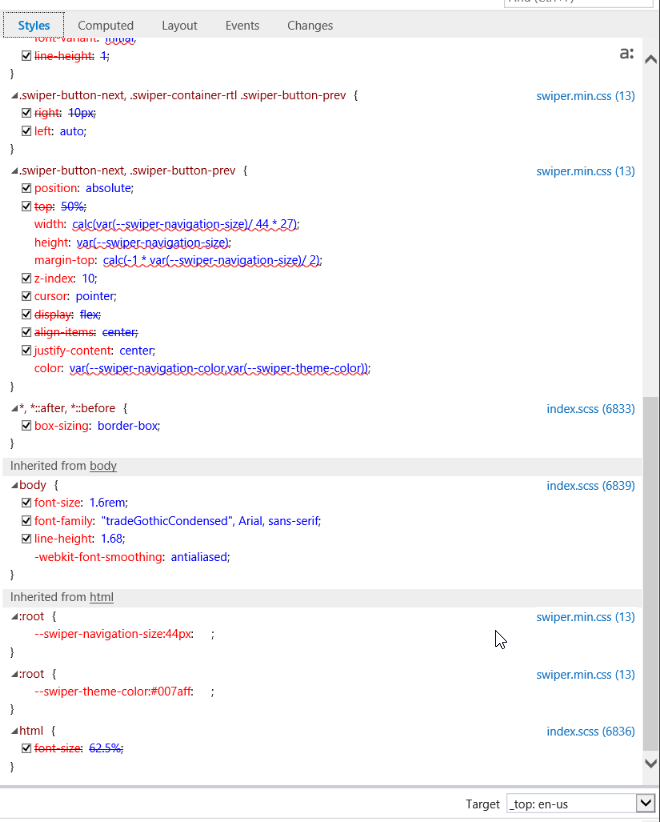
as you can see from snapshot below : display:inline-block and display:block on pseudo ::after elements get crossed out even though they're marked as "!important"
.horizontal_wrap .swiper-button-next::after, .horizontal_wrap .swiper-button-prev::after {
    display: block !important;
}
#swipe-next::after, #swipe-prev::after{
    display:inline-block !important;
}

There is something in IE11, which doesn't honor the swiper-icons fonts and are striked out. please see below snapshots for completed picture of Styles tab in IE11 Browser hierarchy:

Expected Behavior
I was hoping that the prev/next icon shows up on the slider for IE 11

Actual Behavior
The icons do not display on the front end for only IE 11, ( works on Edge, chrome and firefox )

P.S. Remember, an issue is not the place to ask questions. You can use Stack Overflow
for that.
Before you open an issue, please check if a similar issue already exists or has been closed before.
 syedongit
All 3 comments
Sorry, but IE is not supported by Swiper v5
 nolimits4web
on 19 May 2020
nolimits4web
on 19 May 2020
@nolimits4web Hey there, we created an application without knowing IE 11 was not supported as it's not mentioned anywhere other than the issue(s) here. it would be helpful if you include a type of "browser support" section within your documentation. Thanks!
 ahinkle
on 3 Jun 2020
ahinkle
on 3 Jun 2020
@syedongit ,
Try this. I've been debugging this for a bit - everything seems to work except for the prev/next arrows. I believe I fixed it by adding some of the legacy CSS:
@media all and (-ms-high-contrast:none) {
    .swiper-button-prev,
    .swiper-button-next {
      position: absolute;
      top: 50%;
      width: 27px;
      height: 44px;
      margin-top: -22px;
      z-index: 10;
      cursor: pointer;
      background-size: 27px 44px;
      background-position: center;
      background-repeat: no-repeat;
    }
    .swiper-button-prev.swiper-button-disabled,
    .swiper-button-next.swiper-button-disabled {
      opacity: 0.35;
      cursor: auto;
      pointer-events: none;
    }
    .swiper-button-prev,
    .swiper-container-rtl .swiper-button-next {
      background-image: url("data:image/svg+xml;charset=utf-8,%3Csvg%20xmlns%3D'http%3A%2F%2Fwww.w3.org%2F2000%2Fsvg'%20viewBox%3D'0%200%2027%2044'%3E%3Cpath%20d%3D'M0%2C22L22%2C0l2.1%2C2.1L4.2%2C22l19.9%2C19.9L22%2C44L0%2C22L0%2C22L0%2C22z'%20fill%3D'%23007aff'%2F%3E%3C%2Fsvg%3E");
      left: 10px;
      right: auto;
    }
    .swiper-button-next,
    .swiper-container-rtl .swiper-button-prev {
      background-image: url("data:image/svg+xml;charset=utf-8,%3Csvg%20xmlns%3D'http%3A%2F%2Fwww.w3.org%2F2000%2Fsvg'%20viewBox%3D'0%200%2027%2044'%3E%3Cpath%20d%3D'M27%2C22L27%2C22L5%2C44l-2.1-2.1L22.8%2C22L2.9%2C2.1L5%2C0L27%2C22L27%2C22z'%20fill%3D'%23007aff'%2F%3E%3C%2Fsvg%3E");
      right: 10px;
      left: auto;
    }
    .swiper-button-prev.swiper-button-white,
    .swiper-container-rtl .swiper-button-next.swiper-button-white {
      background-image: url("data:image/svg+xml;charset=utf-8,%3Csvg%20xmlns%3D'http%3A%2F%2Fwww.w3.org%2F2000%2Fsvg'%20viewBox%3D'0%200%2027%2044'%3E%3Cpath%20d%3D'M0%2C22L22%2C0l2.1%2C2.1L4.2%2C22l19.9%2C19.9L22%2C44L0%2C22L0%2C22L0%2C22z'%20fill%3D'%23ffffff'%2F%3E%3C%2Fsvg%3E");
    }
    .swiper-button-next.swiper-button-white,
    .swiper-container-rtl .swiper-button-prev.swiper-button-white {
      background-image: url("data:image/svg+xml;charset=utf-8,%3Csvg%20xmlns%3D'http%3A%2F%2Fwww.w3.org%2F2000%2Fsvg'%20viewBox%3D'0%200%2027%2044'%3E%3Cpath%20d%3D'M27%2C22L27%2C22L5%2C44l-2.1-2.1L22.8%2C22L2.9%2C2.1L5%2C0L27%2C22L27%2C22z'%20fill%3D'%23ffffff'%2F%3E%3C%2Fsvg%3E");
    }
    .swiper-button-prev.swiper-button-black,
    .swiper-container-rtl .swiper-button-next.swiper-button-black {
      background-image: url("data:image/svg+xml;charset=utf-8,%3Csvg%20xmlns%3D'http%3A%2F%2Fwww.w3.org%2F2000%2Fsvg'%20viewBox%3D'0%200%2027%2044'%3E%3Cpath%20d%3D'M0%2C22L22%2C0l2.1%2C2.1L4.2%2C22l19.9%2C19.9L22%2C44L0%2C22L0%2C22L0%2C22z'%20fill%3D'%23000000'%2F%3E%3C%2Fsvg%3E");
    }
    .swiper-button-next.swiper-button-black,
    .swiper-container-rtl .swiper-button-prev.swiper-button-black {
      background-image: url("data:image/svg+xml;charset=utf-8,%3Csvg%20xmlns%3D'http%3A%2F%2Fwww.w3.org%2F2000%2Fsvg'%20viewBox%3D'0%200%2027%2044'%3E%3Cpath%20d%3D'M27%2C22L27%2C22L5%2C44l-2.1-2.1L22.8%2C22L2.9%2C2.1L5%2C0L27%2C22L27%2C22z'%20fill%3D'%23000000'%2F%3E%3C%2Fsvg%3E");
    }
    .swiper-button-lock {
      display: none;
    }
}
Related issues
 RyanGosden
·
3Comments
RyanGosden
·
3Comments
 Hiralpandya
·
3Comments
Hiralpandya
·
3Comments
 Joshanity17
·
3Comments
Joshanity17
·
3Comments
 Uriziel01
·
3Comments
Uriziel01
·
3Comments
 lxmarinkovic
·
4Comments
lxmarinkovic
·
4Comments
Most helpful comment
@syedongit ,
Try this. I've been debugging this for a bit - everything seems to work except for the prev/next arrows. I believe I fixed it by adding some of the legacy CSS: