Swinject: [Question] iOS ViewControllers, Adapters and how to use the container around the app
Hello,
I would like to ask a question to the community here:
I am trying to move my code to use DI with Swinject, but I am not clear (and cannot find any good documentation) on what is the correct way to use the container, or best practices:
I have the following setup:
- we don't use Storyboards, we create Controllers in code
- We segue between some controllers (and usually we create the child controller just before the segue)
- We also have some adapters doing some databinding, so this adapter creates a lot of subcontrollers (used then in a collection view)
The main question is:
Should a Container be passed around the application as a dependency, should it be accessed directly from the appdelegate, should it define the whole graph, so that it is only used once when setting the first controller.
Supposing that the whole graph for each controller is done in the Container, we are not use about the following things:
Should the graph define every single dependency of the app, and the
Containershould only be used to resolve things once (the main controller)? So as a consequence: Should a controller contain as a dependency also the child controllers that it will segue to?Should we split the dependencies between controllers? As a consequence: should a controller have the
Containeras a dependency? Or should it access directly from the appDelegateUIApplication.shared.delegate.container.resolve(ChildController...)What about adapters? They need to instanciate controllers.
Does the adapter have theContaineras a dependency, or access it directly?
Then how can we test it?
Should we instead create a Factory and delegate to the factory the creation of controllers?
Then how do we test the factory 😭 ?
I hope you can help me clarifying some doubts!
If this discussion leads to best practices, I will be happy to summarise them and include them in the repo
 racer1988
All 7 comments
Thanks @racer1988 for the question. I welcome discussion here👍
 yoichitgy
on 1 Sep 2017
yoichitgy
on 1 Sep 2017
I guess everyone has its own idea of what "the correct way" is. As far as I know there is no best practices yet and it really depends on individuals :) From my experience I can suggest you to focus on few things in general:
To improve testability and reusability you should isolate your layers and focus on single responsibility. Your master view controller doesn't need to know about detail view controller (that doesn't work very well with segues). View controller also doesn't need to contain any business logic or navigation logic and in that case you don't need to access dependency container from there. There are different approaches how to achieve that (MVVM, Coordinator, Viper, MVP, Adapters etc...)
To avoid any pain with mocking dependencies for unit tests I recommend to simply inject dependency container into classes where it's needed. You can also use multiple child containers and create them based on the application flow. That prevents creating one massive dependency container.
On the end someone needs to instantiate the view controller so that could be the factory class which has container as a dependency. I found myself dealing with this separation too often so I created simple Coordinator framework to make my life easer. The concept might look like overkill, but it works very well with Swinject and it's also very handy when your application scales.
 bnsm
on 4 Sep 2017
bnsm
on 4 Sep 2017
@martinbanas Thanks for the input!
I surely agree that a good architecture with nice layer separation simplifies the use of containers too.
I just wanted to avoid ending up using the container as a ServiceLocator, which is clearly a anti-pattern.
So passing the container around was super weird for me.
I actually evaluated passing around a factory instead of the container.
This factory uses closures generated in the container for creation of controllers.
The closures are generated and assigned to the factory in the container.
so all code related to instantiation and dependency stays in the container, and the factory masks it by just providing a abstract interface.
I will have a look at your Coordinator. I see it fits mainly MVVM right?
racer1988
on 5 Sep 2017
@racer1988 I see what you mean now. I didn't explain the part with passing the dependency container enough, sorry about that :)
Injecting the container just everywhere it's not good idea. It's definitely better to inject explicit dependencies instead and try to reduce exposure of the container to the others. So I'm usually injecting the container only into high level classes (which is mostly factory).
I was wandering if the way, how you build your factory inside the container, doesn't lead to one massive container or what if your project is separated into multiple modules?
The Coordinator fits with MVVM very well but you can completely ignore MVVM part and use anything you want instead. There should be enough flexibility but I will appreciate any feedback :)
bnsm
on 7 Sep 2017
@martinbanas I definitely agree.
Probably with multiple modules, it is possible to make a container per module, maybe inside the module itself, so that in the main application, dependencies of each module can be taken directly from the sub-container (especially if you share the same DI container).
Regarding feedback, I opened https://github.com/martinbanas/coordinator/issues/1 to move the discussion to the related project :D
racer1988
on 9 Sep 2017
I had the same question, and stumbled upon this issue. Then I tried to take a look at the coordinator repository to see an example, yet to find out that it is gone.. Can some one wrap up how the coordinator pattern can fit in with injecting containers?
 Zeta611
on 12 Aug 2019
Zeta611
on 12 Aug 2019
@racer1988 I had the same question too. I looked all over the internet for some insight on how to structure an iOS app with Swinject and a specific architecture pattern. When @bnsm mentioned Coordinator framework, I saw that his repository link was dead but I looked around for that type of architecture and found this helpful link on Medium.
For those that are still not sure how to structure your code, I made this diagram that displays a mix of Coordinator with MVVM pattern:
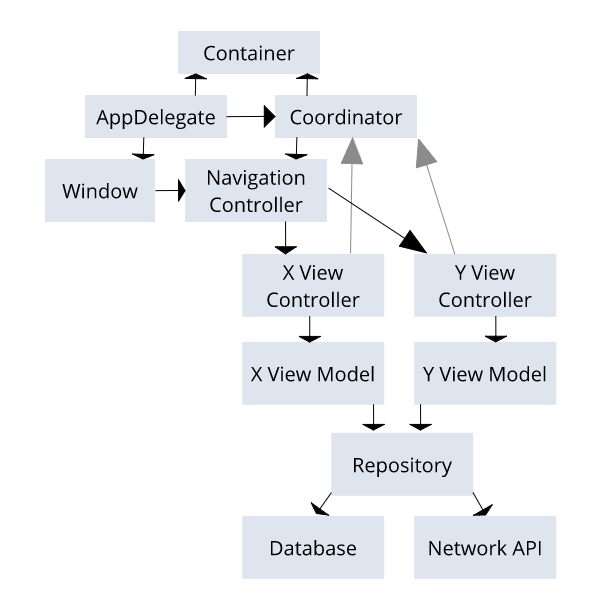
So I'll be as brief as possible: AppDelegate creates UIWindow, Container, and Coordinator objects. The UIWindow, as usual, sets rootView to UINavigationController. The Coordinator is instantiated with unowned references to UINavigationController and the Container, having access to them. The coordinator creates view controllers by resolving them from Container with their dependencies, then giving them a reference to itself using weak var and then pushing them to UINavigationController. You start doing this by calling the start() method from app delegate, pushing first view controller to navigation controller. Lastly, when you need the next view controller, the current one calls Coordinator to push next view controller, allowing you to create them with dependencies.
Here's my example code:
// AppDelegate
import UIKit
import Swinject

@UIApplicationMain
class AppDelegate: UIResponder, UIApplicationDelegate {

    let container = createContainer()
    var window: UIWindow?
    var coordinator : Coordinator?

    func application(_ application: UIApplication, didFinishLaunchingWithOptions launchOptions: [UIApplication.LaunchOptionsKey: Any]?) -> Bool {
        // Override point for customization after application launch.
        window = UIWindow(frame: UIScreen.main.bounds)
        window?.rootViewController = UINavigationController()

        coordinator = Coordinator(navController: window?.rootViewController as! UINavigationController, container: container)
        coordinator?.start()

        window?.makeKeyAndVisible()
        return true
    }
}
// createContainer() method, I put this in a separate file for organization purposes
extension AppDelegate {
    class func createContainer() -> Container {
        let container = Container()

        container.register(SearchResultsViewController.self) { resolver in
            let viewModel = resolver.resolve(SearchResultsViewModel.self)!
            return SearchResultsViewController(viewModel: viewModel)
        }

        container.register(SearchResultsViewModel.self) { resolver in
            return SearchResultsViewModel()
        }

        return container
    }
}


md5-d52e8a74a3d0d84a68edaeaca85525bc


```Swift
class MainViewController: UIViewController {
    public weak var coordinator: Coordinator?

    override func viewDidLoad() {
        // perform UI code here
    }

    @objc func displayNextView() {
        // assume this is a method use in an action given to a UIButton
        coordinator?.startNextViewController(data: "Example")
    }
@bnsm feel free to use this in your documentation if you think it could be a good starting point for someone new to this library. Also, I have a repo of a sample recipes app (still a work in progress) which uses this pattern, if anyone is interested in viewing it: https://github.com/OzzyTheGiant/boiledpotato_ios
@Zeta611 hope this helps you out
 OzzyTheGiant
on 28 Oct 2019
OzzyTheGiant
on 28 Oct 2019
Related issues
 igorkotkovets
·
7Comments
igorkotkovets
·
7Comments
 ManWithBear
·
8Comments
ManWithBear
·
8Comments
 movses-margaryan
·
5Comments
movses-margaryan
·
5Comments
 diwengrum
·
5Comments
diwengrum
·
5Comments
 drekka
·
3Comments
drekka
·
3Comments
Most helpful comment
@racer1988 I see what you mean now. I didn't explain the part with passing the dependency container enough, sorry about that :)
Injecting the container just everywhere it's not good idea. It's definitely better to inject explicit dependencies instead and try to reduce exposure of the container to the others. So I'm usually injecting the container only into high level classes (which is mostly factory).
I was wandering if the way, how you build your factory inside the container, doesn't lead to one massive container or what if your project is separated into multiple modules?
The Coordinator fits with MVVM very well but you can completely ignore MVVM part and use anything you want instead. There should be enough flexibility but I will appreciate any feedback :)