Swiftmessages: How to attach SwiftMessagesSegue viewcontroller to keyboard when keyboard appears.
I'm having trouble getting the view controller presented by SwiftMessagesSegue to stick to the top of the keyboard. When I present keyboard I tried moving the view up with the keyboardwillshowNotification observer and tried changing bottom constraint to take in keyboard's height neither have worked. What would be the best way to show view controller presented by SwiftMessagesSegue to stick to the top of the keyboard.
 stshelton
All 11 comments
This seems like a good feature to add. Lemme get back to you.
 wtmoose
on 17 Jan 2019
wtmoose
on 17 Jan 2019
Are there any updates on this?
 n3d1117
on 14 May 2019
n3d1117
on 14 May 2019
I haven’t worked on this, yet but thanks for the reminder.
wtmoose
on 14 May 2019
I'm just showing a plain old SwiftMessageView as an ActionSheet, the thing is that it has a UITextView on it and the keyboard is shown on top of it. Do you have any suggestion as to how I could move the SwiftMessageView to be on top of the Keyboard?
 CodingAleCR
on 14 May 2019
CodingAleCR
on 14 May 2019
Nevermind, I just figured I needed to adjust the bottom constraint for my ContentView whenever KeyboardDidHide or KeyboardWillShow notifications are received. Just laying it out there if anyone else need's it. Anyway, thanks.
CodingAleCR
on 14 May 2019
Thanks for sharing @CodingAleCR. I'm using a programmatic SwiftMessagesSegue with .centered layout, presenting a UINavigationController, and I can't seem to figure out exactly what constraint should be changed on keyboard show/hide notifications.
n3d1117
on 15 May 2019
I added first class support for this. If anyone wants toto check the head of master and let me know how it works out, I'll wait a bit before releasing.
````swift
// For view controllers
segue.keyboardTrackingView = KeyboardTrackingView()
/// Or, for views
config.keyboardTrackingView = KeyboardTrackingView()
````
KeyboardTrackingView its a view that automatically adjusts it's height based on keyboard events and can be used with Auto Layout to make views avoid the keyboard. When you supply an instance of KeyboardTrackingView as shown above, SwiftMessages automatically installs it such that the entire message view or view controller avoids the keyboard.
@stshelton @CodingAleCR @n3d1117
wtmoose
on 20 May 2019
@wtmoose Thank you very much for the update. Your solution is working fine for .bottom presentation style, however I'm using a .centered style View Controller with a limited height, and the result is the following:
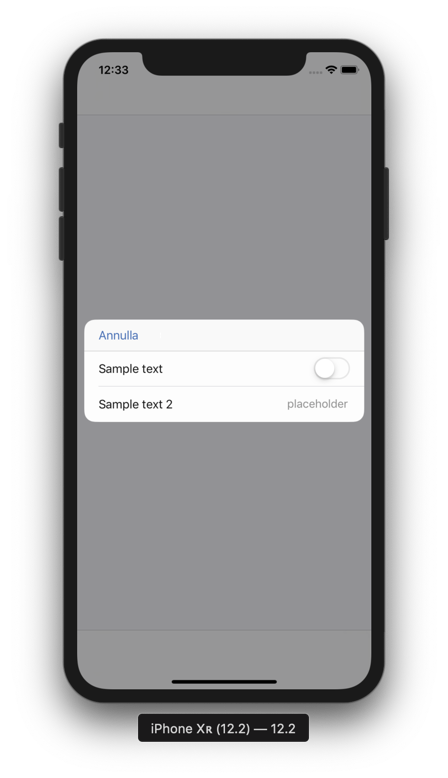
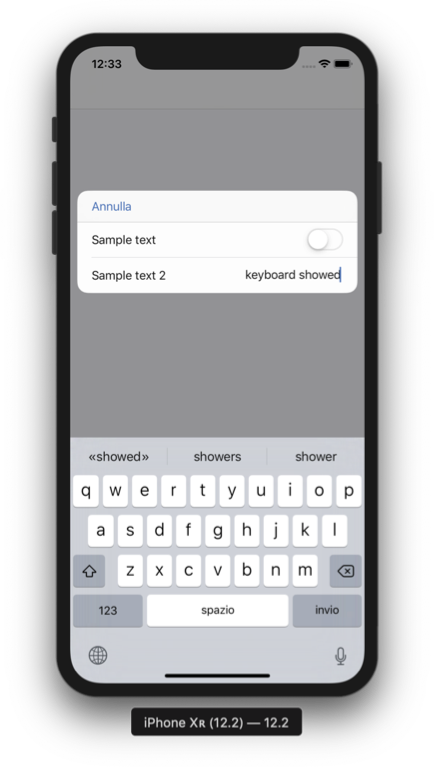
I think ideally the centered view should adjust its bottom constraint not relative to the whole keyboard height, but to the difference between the keyboard height and the view's bottom spacing. Do you think there's a way this can be achieved?
Thanks again for your time
n3d1117
on 21 May 2019
@n3d1117 Yep, I agree 100%. That is what I intended, but I didn't think my implementation through very well. Try the latest update and thanks for helping me test!
wtmoose
on 21 May 2019
@wtmoose Great stuff! Working perfectly now. Thanks a lot
n3d1117
on 21 May 2019
Fixed in 7.0.0
wtmoose
on 23 May 2019
Related issues
 chamitha
·
6Comments
chamitha
·
6Comments
 alper
·
6Comments
alper
·
6Comments
 andrey-zelenin
·
4Comments
andrey-zelenin
·
4Comments
 ch-muhammad-adil
·
4Comments
ch-muhammad-adil
·
4Comments
 JanBrinker
·
6Comments
JanBrinker
·
6Comments
Most helpful comment
This seems like a good feature to add. Lemme get back to you.