Swiftmessages: Remove button
Hi, thank you for this awesome library. I want to use in my project, but I cant seem to remove the button. I set the button Image and title to nil.
This is how the message show up
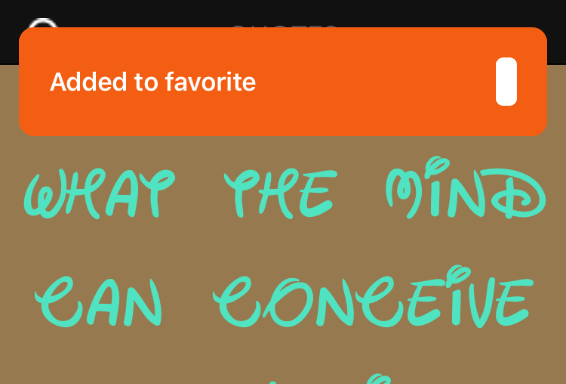
This is my code
`let view = MessageView.viewFromNib(layout: .cardView)
var config = SwiftMessages.Config()
    config.presentationStyle = .top
    config.interactiveHide = false
    view.configureTheme(.success)
    view.configureBackgroundView(width: 350)
    view.configureContent(title: "Added to favorite", body: nil, iconImage: nil, iconText: nil, buttonImage: nil, buttonTitle: nil, buttonTapHandler: nil)

    let color = UIColor(red: 243/255, green: 94/255, blue: 19/255, alpha: 1)

    view.configureTheme(backgroundColor: color, foregroundColor: UIColor.white)

    config.duration = .forever

    SwiftMessages.show(config: config, view: view)
    `
Thanks for your help..
 wawilliams003
>All comments
Setting the button property to nil doesn't remove it from the view hierarchy. Either set view.button?.isHidden = true or make a copy of the nib file and delete it.
 wtmoose
on 15 May 2018
wtmoose
on 15 May 2018
👍5
Was this page helpful?
0 / 5 - 0 ratings
Related issues
 ch-muhammad-adil
·
4Comments
ch-muhammad-adil
·
4Comments
 airspeed
·
7Comments
airspeed
·
7Comments
 CallMeSH
·
4Comments
CallMeSH
·
4Comments
 mattem86
·
4Comments
mattem86
·
4Comments
 allaire
·
3Comments
allaire
·
3Comments
Most helpful comment
Setting the button property to
nildoesn't remove it from the view hierarchy. Either setview.button?.isHidden = trueor make a copy of the nib file and delete it.