New Issue Checklist
- [x] Updated SwiftLint to the latest version
- [x] I searched for existing GitHub issues
Describe the bug
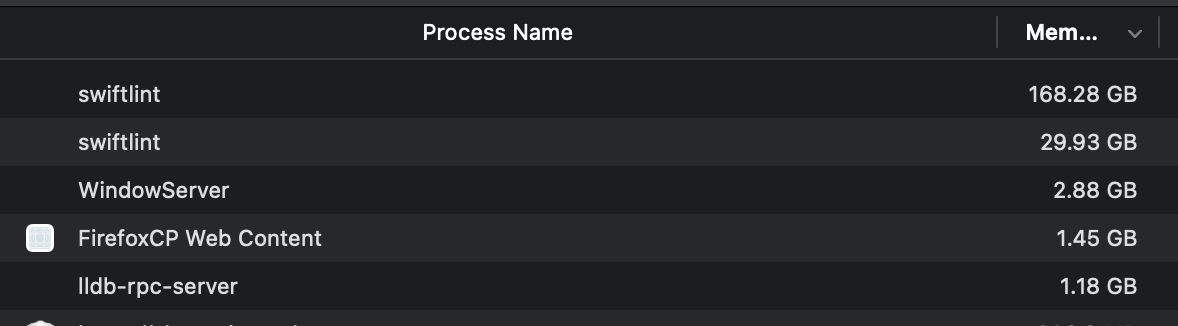
For some reason my swiftlint processes leak memory.
Complete output when running SwiftLint, including the stack trace and command used
N/A, I'm using SwiftLint via the VSCode extension.
Environment
- SwiftLint version (run
swiftlint versionto be sure)?
0.41.0 - Installation method used (Homebrew, CocoaPods, building from source, etc)?
Homebrew - Paste your configuration file:
disabled_rules:
  - trailing_comma
  - identifier_name
  - void_return
  - operator_whitespace
  - nesting
  - cyclomatic_complexity

line_length:
  - 100
  - 140

function_body_length:
  - 50

excluded: # paths to ignore during linting. Takes precedence over `included`.
  - .build
  - Example/Pods
  - Tests/CoreXLSXTests/XCTestManifests.swift
- Are you using nested configurations?
No - Which Xcode version are you using (check
xcodebuild -version)?
Xcode 12.2
Build version 12B45b - Do you have a sample that shows the issue?
N/A, this happened with multiple different projects for me, but I'm not sure what exact code snippet triggers it.
 MaxDesiatov
All 13 comments
Are you saying that once SwiftLint terminates it's still retaining memory? Or that the process of linting takes more memory than you'd expect? SwiftLint caches the contents of every file it's linting, and some indexes around them, that definitely contributes to significant memory usage.
 jpsim
on 9 Dec 2020
jpsim
on 9 Dec 2020
It doesn't look like it terminates at all, I'll check CPU time next time I see this. But even with caching tens of gigabytes of memory consumed don't seem to be normal. I'm using that VSCode extension for quite a long time, and this started happening only recently, maybe after I upgraded to 0.41.0. I run brew upgrade regularly, but I don't remember when exactly I upgraded.
MaxDesiatov
on 9 Dec 2020
The fact that SwiftLint isn't terminating is more concerning. Can you reproduce this running it from the command line?
jpsim
on 9 Dec 2020
I ran swiftlint in CLI on the same project that caused this issue in VSCode, and it terminated normally (in a fraction of a second).
MaxDesiatov
on 9 Dec 2020
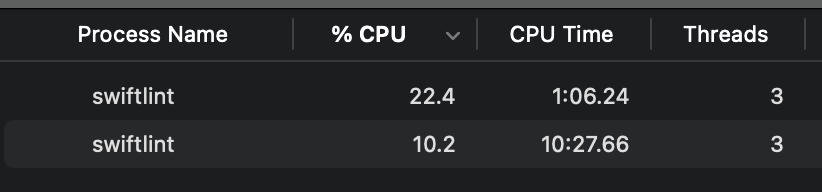
Got it now with CPU time, here you can see two processes running for minutes now. It's reproducible with CoreXLSX for me when I open and edit it in VSCode. I have it set up so that it runs SwiftLint every time I save a file in it.
MaxDesiatov
on 9 Dec 2020
Also, these processes don't die after I close VSCode, and their CPU load sticks to about 10-20% on average. Maybe they're stuck in some kind of a loop when interacting with SourceKit, or something like that?
MaxDesiatov
on 9 Dec 2020
Given that this doesn't happen from the command line, but rather from the VSCode extension, can you please open an issue there? I'm not familiar with it and I don't know how they integrate with SwiftLint.
jpsim
on 9 Dec 2020
I can open it there, but I hope it also stays open here. Regardless of what the VSCode extension is doing, I feel that it's a bug that SwiftLint can be stuck in such state, if that makes sense?
MaxDesiatov
on 9 Dec 2020
It might be a SwiftLint bug, it depends if the VSCode extension is using SwiftLint in an unsupported way.
jpsim
on 9 Dec 2020
Hi. Presumably there has been a bug in the latest version of my extension. As a temporary hot fix I shipped an old version.
My guess: the extension runs SwiftLint from the wrong directory (maybe even root instead of the current folder!).
If it's true, SwiftLint handles it very well. Will report back once I know for sure the next days.
Sorry for the inconvenience.
 vknabel
on 9 Dec 2020
vknabel
on 9 Dec 2020
I just had a look on the bug:
- the extension started SwiftLint from the wrong directory which essentially linted many projects
- the extension didn't kill SwiftLint when deactivated
=> SwiftLint does exactly what it has been told to do. No bug in this repo.
vknabel
on 10 Dec 2020
Awesome, thanks! This can be closed then.
MaxDesiatov
on 10 Dec 2020
Thanks for investigating!
jpsim
on 10 Dec 2020
Related issues
 BalestraPatrick
·
3Comments
BalestraPatrick
·
3Comments
 AliSoftware
·
3Comments
AliSoftware
·
3Comments
 bourquep
·
3Comments
bourquep
·
3Comments
 msanders
·
4Comments
msanders
·
4Comments
 ziryanov
·
3Comments
ziryanov
·
3Comments
Most helpful comment
It might be a SwiftLint bug, it depends if the VSCode extension is using SwiftLint in an unsupported way.