Swiftgen: Output Font file (generated) is empty!
I've used SPM in order to add SwiftGen to my project and I've added the fonts according to the Apple documention.
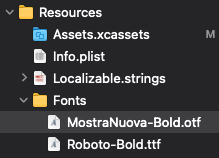
I don't get any error during the build phase and Assets.generated.swift file would be generated all enums.
But after it the output file of the font is empty.
Here is the swiftgen.yml file in which I use.
input_dir: ${PROJECT_DIR}/PROJECT_NAME/Resources/
output_dir: ${PROJECT_DIR}/PROJECT_NAME/Resources/

xcassets:
  inputs: Assets.xcassets
  outputs:
    templatePath: "${PROJECT_DIR}/Tools/SwiftGenerator/.build/checkouts/SwiftGen/templates/xcassets/swift5.stencil"
    output: Assets.generated.swift

fonts:
  inputs: Fonts
  outputs:
    templatePath: "${PROJECT_DIR}/Tools/SwiftGenerator/.build/checkouts/SwiftGen/templates/xcassets/swift5.stencil"
    output: Fonts.generated.swift
Here is the content of the Fonts.generated.swift file:
// swiftlint:disable all
// Generated using SwiftGen — https://github.com/SwiftGen/SwiftGen

// No assets found
 razor313
All 6 comments
Could you post the output of swiftgen config lint please? And check that it matches the paths of your project.
Note: your output_dir seems to be missing a / before Resources, but that's probably a copy-paste typo.
 djbe
on 20 Apr 2021
djbe
on 20 Apr 2021
I've corrected the path of the output_dir as you mentioned that was a copy-paste type.
Since I use the SPM I have to run this command swift run -c release --package-path Tools/SwiftGenerator swiftgen config lint rather than the swiftgen config lint
Here is the output of that command:
warning: found 1 file(s) which are unhandled; explicitly declare them as resources or exclude from the target
    /Users/USER_NAME/workspace/PROJECT_NAME/Tools/SwiftGenerator/swiftgen.yml

Linting swiftgen.yml
File swiftgen.yml not found.
I have no clue how I can pass the path of the swiftgen.yml
razor313
on 20 Apr 2021
Your template path is using xcassets stencil file for font.
templatePath: "${PROJECT_DIR}/Tools/SwiftGenerator/.build/checkouts/SwiftGen/templates/xcassets/swift5.stencil"
 mrtsamma
on 20 Apr 2021
mrtsamma
on 20 Apr 2021
@mrtsamma Oh wow, didn't even notice that, good catch!
@razor313 so yeah, using the right template will fix it. About the config lint question, append --config myConfig.yml should do it. You may have to specify the full path to it though, not sure.
djbe
on 20 Apr 2021
@mrtsamma Thank you very much, Nice catch.
@djbe It worked like a charm. As a suggestion, It would be better if SwiftGen could throw an error when get an unmatch template.
razor313
on 20 Apr 2021
The template exists. It's incompatible though.
You are manually providing your own template which just happens to be a built in one. When using templatePath, you're responsible for providing a compatible template.
djbe
on 20 Apr 2021
Related issues
 filip-zielinski
·
3Comments
djbe
·
6Comments
filip-zielinski
·
3Comments
djbe
·
6Comments
 AliSoftware
·
6Comments
AliSoftware
·
6Comments
 drjasonharrison
·
5Comments
drjasonharrison
·
5Comments
 IanHoar
·
7Comments
IanHoar
·
7Comments
Most helpful comment
Your template path is using xcassets stencil file for font.
templatePath: "${PROJECT_DIR}/Tools/SwiftGenerator/.build/checkouts/SwiftGen/templates/xcassets/swift5.stencil"