Swiftgen: Release binary for ARM (Apple Silicon)
It'd be nice if an arm64 or a universal binary is provided for the latest release.
 thii
thii
All 16 comments
Depends on your installation method:
- Cocoapods: not universal yet, will have to look into it.
- SPM/Mint: should already be supported, as it's compiled on your device
- Homebrew: impossible to do until Homebrew itself has complete arm64 support.
 djbe
on 14 Dec 2020
djbe
on 14 Dec 2020
Homebrew has been updated to 3.0.0 with support for Apple Silicon.
 cabeca
on 8 Feb 2021
cabeca
on 8 Feb 2021
For me that's not working.
brew update
brew install swiftgen

Error: swiftgen: no bottle available!
You can try to install from source with:
  brew install --build-from-source swiftgen
Please note building from source is unsupported. You will encounter build
failures with some formulae. If you experience any issues please create pull
requests instead of asking for help on Homebrew's GitHub, Twitter or any other
official channels.
 vani2
on 11 Feb 2021
vani2
on 11 Feb 2021
The Homebrew error is also mentioned in #811 and #820. Maybe these issues should be merged?
 FelixLisczyk
on 18 Feb 2021
FelixLisczyk
on 18 Feb 2021
I confirm it works with Mint:
➜  ~ mint install SwiftGen/SwiftGen
🌱 Finding latest version of SwiftGen
🌱 Cloning SwiftGen 6.4.0
🌱 Resolving package
🌱 Building package
🌱 Copying resources for SwiftGen: templates, Resources/Stencil-Info.plist, Resources/StencilSwiftKit-Info.plist, Resources/SwiftGen-Info.plist, Resources/SwiftGenKit-Info.plist ...
🌱 Installed SwiftGen 6.4.0
🌱 Linked swiftgen 6.4.0 to /Users/<redacted>/.mint/bin
 ricardopereira
on 3 Apr 2021
ricardopereira
on 3 Apr 2021
I confirm it works with Mint:
I've got error
~ % mint install SwiftGen/SwiftGen
🌱 Finding latest version of SwiftGen
🌱 Cloning SwiftGen 6.4.0
🌱 Resolving package
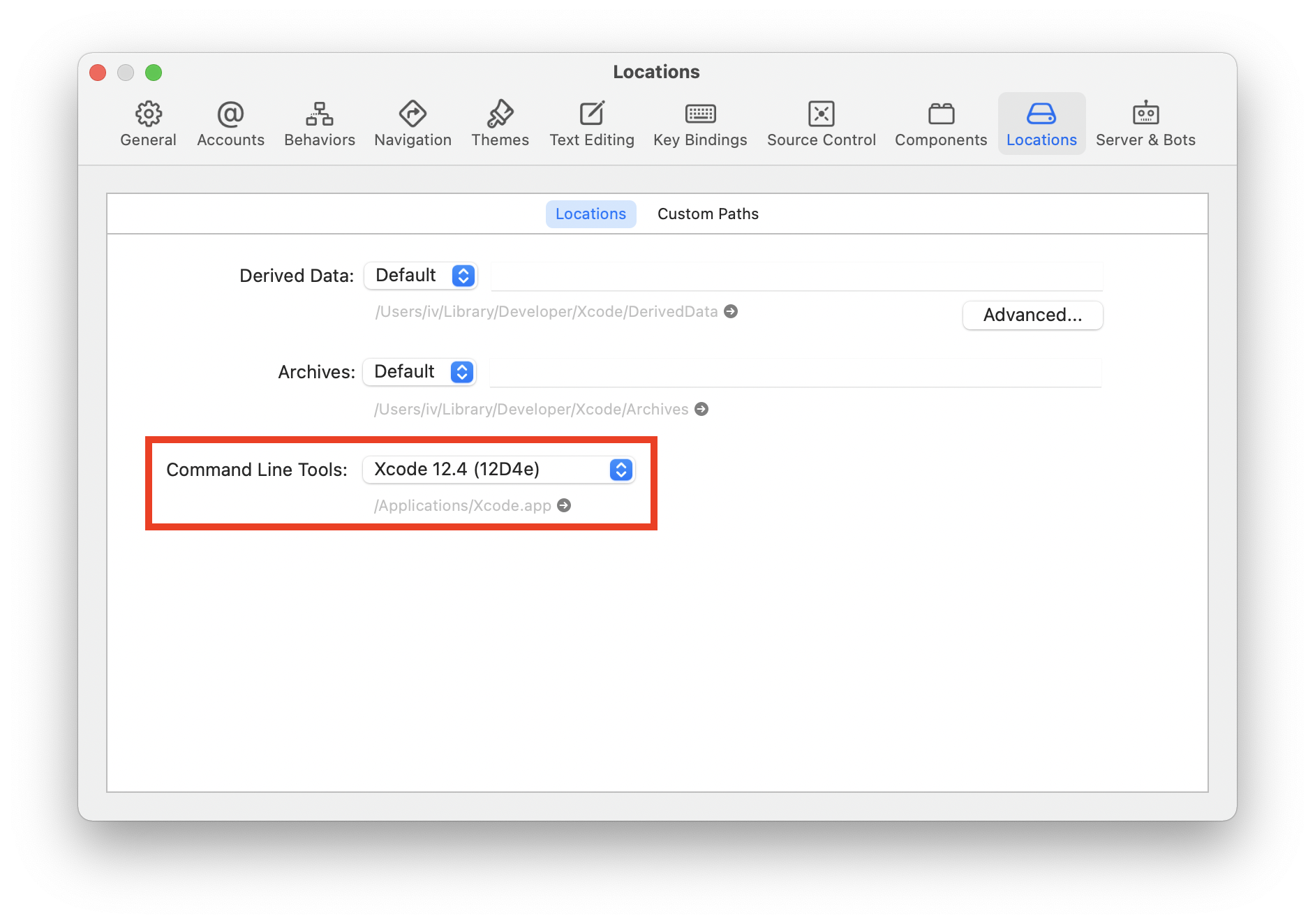
xcrun: error: invalid active developer path (/Library/Developer/CommandLineTools), missing xcrun at: /Library/Developer/CommandLineTools/usr/bin/xcrun
🌱 Encountered error during "swift package resolve". Use --verbose to see full output
🌱  Failed to resolve SwiftGen 6.4.0 with SPM
@vani2 Do you have Xcode installed?
ricardopereira
on 5 Apr 2021
Yes, I had, but there was no selected CLT in settings. And it has built my project w/o any error though. After selecting, SwiftGen was installed OK. Thanks.
vani2
on 6 Apr 2021
@vani2 Where I can find this CLT settings?
 Jonatthu
on 7 Apr 2021
Jonatthu
on 7 Apr 2021
@vani2 Where I can find this CLT settings?
vani2
on 7 Apr 2021
@vani2 thanks a lot!
Jonatthu
on 7 Apr 2021
I'm running into the same issue:
❯ brew install swiftgen
Error: swiftgen: no bottle available!
You can try to install from source with:
  brew install --build-from-source swiftgen
Please note building from source is unsupported. You will encounter build
failures with some formulae. If you experience any issues please create pull
requests instead of asking for help on Homebrew's GitHub, Twitter or any other
official channels.
For your information, I did brew update (3.1.7) and brew upgrade before trying to install.
 oleiade
on 14 May 2021
oleiade
on 14 May 2021
I checked in Mint installation and it's working fine on Apple Silicon.
Try:-
To install Mint:- brew install mint
To Install SwiftGen:- sudo mint install SwiftGen/SwiftGen
To manually run the SwiftLint and SwiftGen (navigate to project folder) :- mint run swiftgen
 mudithsilva
on 26 May 2021
mudithsilva
on 26 May 2021
@mudithsilva That's all fine and dandy, but I do not want to use Mint 👍🏻
oleiade
on 26 May 2021
Any update on this topic?
 Linquas
on 7 Jun 2021
Linquas
on 7 Jun 2021
Any update on this? It would be great to have this binary released :)
 pawisoon
on 25 Jun 2021
pawisoon
on 25 Jun 2021
Related issues
 bengilroy
·
3Comments
bengilroy
·
3Comments
 gereons
·
5Comments
gereons
·
5Comments
 BastiaanAndriessen
·
4Comments
BastiaanAndriessen
·
4Comments
 AliSoftware
·
6Comments
AliSoftware
·
6Comments
 embassem
·
3Comments
embassem
·
3Comments
Most helpful comment
@mudithsilva That's all fine and dandy, but I do not want to use Mint 👍🏻