Swift: let keras = Python.import("keras") ......Using TensorFlow backend.
Using TensorFlow backend.
Fatal error: 'try!' expression unexpectedly raised an error: Python exception: Traceback (most recent call last):
File "/Users/jpope/miniconda3/envs/gymai/lib/python2.7/site-packages/tensorflow/python/pywrap_tensorflow.py", line 58, in
from tensorflow.python.pywrap_tensorflow_internal import *
File "/Users/jpope/miniconda3/envs/gymai/lib/python2.7/site-packages/tensorflow/python/pywrap_tensorflow_internal.py", line 28, in
_pywrap_tensorflow_internal = swig_import_helper()
File "/Users/jpope/miniconda3/envs/gymai/lib/python2.7/site-packages/tensorflow/python/pywrap_tensorflow_internal.py", line 24, in swig_import_helper
_mod = imp.load_module('_pywrap_tensorflow_internal', fp, pathname, description)
ImportError: dlopen(/Users/jpope/miniconda3/envs/gymai/lib/python2.7/site-packages/tensorflow/python/_pywrap_tensorflow_internal.so, 6): Symbol not found: __ZN10tensorflow17FunctionCallFrame14ConsumeRetvalsEPNSt3__16vectorINS_6TensorENS1_9allocatorIS3_EEEE
Referenced from: /Users/jpope/miniconda3/envs/gymai/lib/python2.7/site-packages/tensorflow/python/_pywrap_tensorflow_internal.so
Expected in: /Library/Developer/Toolchains/swift-latest/usr/lib/swift/macosx/libtensorflow_framework.so
in /Users/jpope/miniconda3/envs/gymai/lib/python2.7/site-packages/tensorflow/python/_pywrap_tensorflow_internal.so
is there a way to get this symbol into the _pywrap_tensorflow_internal.so ?
do we need a special build ?
__ZN10tensorflow17FunctionCallFrame14ConsumeRetvalsEPNSt3__16vectorINS_6TensorENS1_9allocatorIS3_EEEE
sample project
https://github.com/johndpope/SwiftReinforce/commit/690c368b9129516715692873a6abed1498d68046
 johndpope
All 6 comments
I found a way forward / just edit config to use theano
code $HOME/.keras/keras.json tensorflow -> theano
Thread 1: Fatal error: 'try!' expression unexpectedly raised an error: Python exception: No module named cPickle
would be good to be able to dial up tensorflow python package here.
(I tried pip install six with no luck)
johndpope
on 21 Sep 2018
Probably need a desingated repo for python / swift problems
if I try
let torch = Python.import("torch") // pip install torch - I get this problem.
I will capture this here and post solution in case I solve this.
Fatal error: 'try!' expression unexpectedly raised an error: Python exception: module compiled against API version 0xa but this version of numpy is 0x9: file /usr/local/src/swift-build/swift/stdlib/public/core/ErrorType.swift, line 185
import numpy
numpy.version.version
numpy.version.version
'1.14.5'
pip install numpy=="1.14.5"
https://github.com/pytorch/pytorch
it seems like even if I install using sudo
sudo pip install numpy=="1.14.5" // succeeds
the base version of numpy on mac stays hardcoded to 1.8.0rc1
INFO: numpy version - 1.8.0rc1
let np = Python.import("numpy")
let numpy = Python.import("numpy")
print("INFO: numpy version - ",np.version.version)
It's like we need a way to guide python to select correct environment (rather than forcing end user to mess with system)
source activate gym
Python.activateEnvironment("gym")
sudo pip install --ignore-installed numpy=="1.14.5" // works but doesn't reflect

I thought it maybe a virtual env but 1.8.0rc1 persists
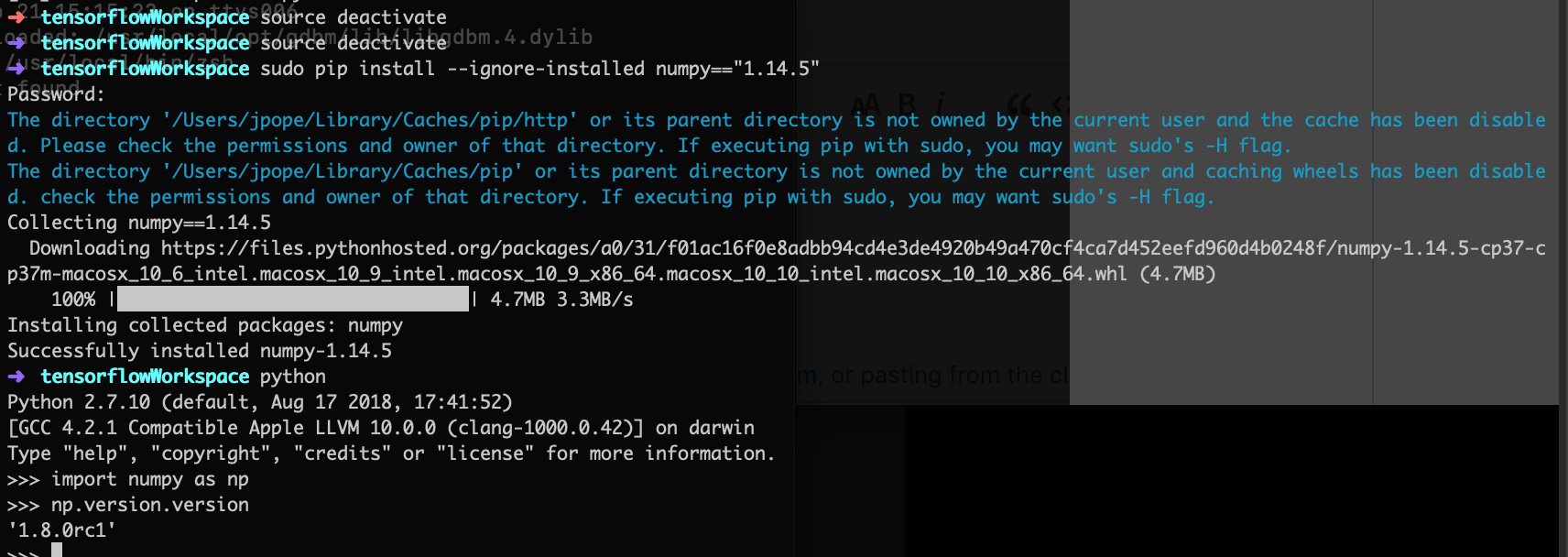
Terminal - problem persists

digging deeper / can confirm this
maybe I can delete the sysPath.
/System/Library/Frameworks/Python.framework/Versions/2.7/Extras/lib/python

sys = Python.import("sys")
print("INFO: macOS sysPath:", sys.path)
INFO: macOS sysPath: ['/Library/Python/2.7/site-packages/pip-9.0.1-py2.7.egg', '/System/Library/Frameworks/Python.framework/Versions/2.7/lib/python27.zip', '/System/Library/Frameworks/Python.framework/Versions/2.7/lib/python2.7', '/System/Library/Frameworks/Python.framework/Versions/2.7/lib/python2.7/plat-darwin', '/System/Library/Frameworks/Python.framework/Versions/2.7/lib/python2.7/plat-mac', '/System/Library/Frameworks/Python.framework/Versions/2.7/lib/python2.7/plat-mac/lib-scriptpackages', '/System/Library/Frameworks/Python.framework/Versions/2.7/lib/python2.7/lib-tk', '/System/Library/Frameworks/Python.framework/Versions/2.7/lib/python2.7/lib-old', '/System/Library/Frameworks/Python.framework/Versions/2.7/lib/python2.7/lib-dynload', '/Library/Python/2.7/site-packages', '/System/Library/Frameworks/Python.framework/Versions/2.7/Extras/lib/python', '/System/Library/Frameworks/Python.framework/Versions/2.7/Extras/lib/python/PyObjC']
johndpope
on 21 Sep 2018
fixed using insert
eg. ```swift
  sys.path.insert(0,path3)
    sys = Python.import("sys")
    print("INFO: macOS sysPath:", sys.path)

func importConda(){

    print("INFO: 🐍 conda environment:",environmentName)
    let  path2 = "/Users/\(NSUserName())/miniconda2/envs/\(environmentName)/lib/python2.7/site-packages/"
    sys.path.insert(0,path2)
    let  path3 = "/Users/\(NSUserName())/miniconda3/envs/\(environmentName)/lib/python2.7/site-packages/"
    sys.path.insert(0,path3)
    // N.B. use insert rather than append otherwise ran into problems
    // numpy version    //https://github.com/tensorflow/swift/issues/73 - numpy  1.8.0rc1

    print("INFO: sys path \n",path)


}
```
johndpope
on 21 Sep 2018
Were you able to import Keras? I used the sys.path.insert and that worked, but I get ImportError: dlopen(/Users/porter/anaconda3/envs/py2/lib/python2.7/site-packages/tensorflow/python/_pywrap_tensorflow_internal.so, 6): Symbol not found: __ZN10tensorflow11NodeBuilderC1EN4absl11string_viewES2_PKNS_19OpRegistryInterfaceE
 porterchild
on 8 Feb 2019
porterchild
on 8 Feb 2019
I made more instructions on getting up and running with miniconda https://github.com/johndpope/swifttorch
There’s a few gotchas with version mismatches and paths - try my xcodegen suggestion in above repo.
https://github.com/johndpope/SwiftTorch/blob/master/NewProjects.md
johndpope
on 9 Feb 2019
Thanks johndpope. I get an idea after reading it and finally solved my problem.
pip3 install 'numpy==1.16.1'
In my case it works.
 bbvch13531
on 9 Feb 2019
bbvch13531
on 9 Feb 2019
Related issues
 RogerS49
·
5Comments
RogerS49
·
5Comments
 donn
·
3Comments
porterchild
·
4Comments
donn
·
3Comments
porterchild
·
4Comments
 khirotaka
·
5Comments
porterchild
·
3Comments
khirotaka
·
5Comments
porterchild
·
3Comments
Most helpful comment
fixed using insert
eg. ```swift
```