Sway: Hitman game launcher is not clickable
- Sway Version:
sway version 1.2 (Sep 26 2019, Arch Linux)
- Debug Log:
No useful log in journalctl:
Sep 30 22:35:40 ansan /usr/lib/gdm-wayland-session[1650]: >>> Adding process 31201 for game ID 863550
Sep 30 22:35:40 ansan /usr/lib/gdm-wayland-session[1650]: >>> Adding process 31213 for game ID 863550
Sep 30 22:35:40 ansan /usr/lib/gdm-wayland-session[1650]: Fontconfig warning: "/etc/fonts/conf.avail/05-reset-dirs-sample.conf", line 6: unknown element "reset-dirs"
Sep 30 22:35:41 ansan /usr/lib/gdm-wayland-session[1650]: ERROR: ld.so: object '/home/jattali/.local/share/Steam/ubuntu12_32/gameoverlayrenderer.so' from LD_PRELOAD cannot be preloaded (wrong ELF class: ELFCLASS32): ignored.
Sep 30 22:35:41 ansan /usr/lib/gdm-wayland-session[1650]: Game update: AppID 863550 "", ProcID 31184, IP 0.0.0.0:0
Sep 30 22:35:41 ansan /usr/lib/gdm-wayland-session[1650]: Setting breakpad minidump AppID = 863550
Sep 30 22:35:41 ansan /usr/lib/gdm-wayland-session[1650]: Steam_SetMinidumpSteamID:  Caching Steam ID:  76561198001543971 [API loaded no]
Sep 30 22:35:41 ansan /usr/lib/gdm-wayland-session[1650]: ERROR: ld.so: object '/home/jattali/.local/share/Steam/ubuntu12_32/gameoverlayrenderer.so' from LD_PRELOAD cannot be preloaded (wrong ELF class: ELFCLASS32): ignored.
Sep 30 22:35:41 ansan /usr/lib/gdm-wayland-session[1650]: ERROR: ld.so: object '/home/jattali/.local/share/Steam/ubuntu12_32/gameoverlayrenderer.so' from LD_PRELOAD cannot be preloaded (wrong ELF class: ELFCLASS32): ignored.
Sep 30 22:35:41 ansan /usr/lib/gdm-wayland-session[1650]: Game update: AppID 863550 "", ProcID 31229, IP 0.0.0.0:0
Sep 30 22:35:41 ansan /usr/lib/gdm-wayland-session[1650]: Setting breakpad minidump AppID = 863550
Sep 30 22:35:41 ansan /usr/lib/gdm-wayland-session[1650]: Steam_SetMinidumpSteamID:  Caching Steam ID:  76561198001543971 [API loaded no]
Sep 30 22:35:41 ansan /usr/lib/gdm-wayland-session[1650]: >>> Adding process 31220 for game ID 863550
Sep 30 22:35:41 ansan /usr/lib/gdm-wayland-session[1650]: >>> Adding process 31222 for game ID 863550
Sep 30 22:35:41 ansan /usr/lib/gdm-wayland-session[1650]: >>> Adding process 31229 for game ID 863550
- Configuration File:
Nothing specific (IMO).
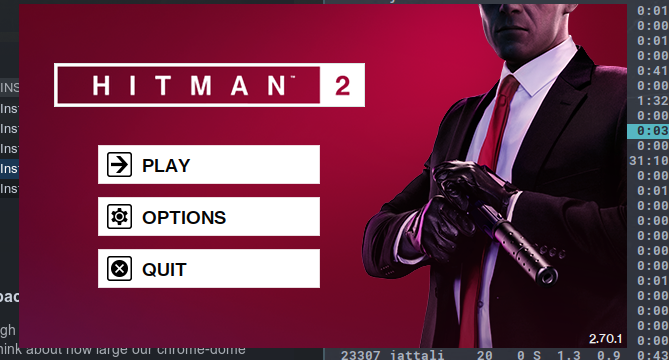
Finally, explain the steps you took in plain English to reproduce the problem below. Simply launch Hitman through Steam. The game launcher appears but none of the 3 buttons are clickable. It's as if the window does not exist. I tried to look for it using swaymsg -t get_tree but I cannot find it. Any interaction with the buttons simply go through and are received by whatever window is underneath.
See screenshot.
Not sure if this is as sway bug or a steam bug. Sorry for the noise if I put this in the wrong place.
- Stack Trace, if sway crashes:
No crash
 jtheoof
All 14 comments
It could be related to #1865 though, even though it's not the same UI as Steam at this point. ps points to this:
❯ ps -ef | rg HITMAN
jattali    32563   32562  0 22:48 ?        00:00:00 python3 /game/jattali/Steam/steamapps/common/Proton 4.11/proton waitforexitandrun /game/jattali/Steam/steamapps/common/HITMAN2/Launcher.exe
jattali    32568   32563  0 22:48 ?        00:00:00 steam /game/jattali/Steam/steamapps/common/HITMAN2/Launcher.exe
jattali    32614   32562  0 22:48 ?        00:00:00 Z:\game\jattali\Steam\steamapps\common\HITMAN2\Launcher.exe
This occurs with the LOTRO launcher and the EVE online launchers as well, when run from Steam or just using standard WINE. To play these games I run dwm since they don't work with Sway.
The LOTRO launcher I know uses Qt4, maybe it has something to do with that?
Unsure about Hitman, but the LOTRO and EVE launchers will follow you through workspaces in addition to being unclickable/unmovable
 Wychmire
on 4 Dec 2019
Wychmire
on 4 Dec 2019
Same issue with Trackmania and other games, the mouse seams to be stuck on the right of the screen. I can move the courser up and down, but not to the left/right.
 Lucaber
on 7 Apr 2020
Lucaber
on 7 Apr 2020
I have the same problem. As a workaround, I adapted flibitijibibo's Shenmue 1 & 2 workaround to work with Hitman 2:
#include <windows.h>

int main(int argc, char **argv)
{
        const char *name, *dir;
        STARTUPINFO startup;
        PROCESS_INFORMATION process;

        name = "Retail/HITMAN2.exe";
        dir = "Retail";

        ZeroMemory(&startup, sizeof(startup));
        ZeroMemory(&process, sizeof(process));
        startup.cb = sizeof(startup);
        if (CreateProcess(
                name,
                NULL,
                NULL,
                NULL,
                TRUE,
                0,
                NULL,
                dir,
                &startup,
                &process
        )) {
                WaitForSingleObject(process.hProcess, INFINITE);
                CloseHandle(process.hProcess);
                CloseHandle(process.hThread);
        }
        return 0;
}
Assuming you have Wine installed:
- Backup old Launcher.exe in Hitman 2 directory
winegcc launcher.c -o Launcher.exe- Copy Launcher.exe and Launcher.exe.so into Hitman 2 directory
You can also compile with mingw if you have that installed. The only difference is that there won't be a Launcher.exe.so to copy.
This will bypass the launcher entirely, allowing the game to work until the bug is fixed.
 aqxa1
on 8 Apr 2020
aqxa1
on 8 Apr 2020
Isn't this related to #4857? Tomb Raider is another game by Feral that has issues as well. The launcher is clickable, but the game cannot fullscreen properly.
 billop
on 25 Apr 2020
billop
on 25 Apr 2020
Tomb Raider (2013)? Anyway in #4857 the issues on my system can be worked around by various methods that don't involve altering the game, but with Hitman 2, nothing but completely bypassing the launcher works. So it's possible that the issue here is different.
aqxa1
on 26 Apr 2020
@aqxa1 Do you have any advice for adapting the fix to work with FSX? I have attached a screenshot of the game's directory

 rhysperry111
on 23 May 2020
rhysperry111
on 23 May 2020
@rhysperry111 It's a bit hard to tell just from that screenshot. Do you know which executable is the launcher itself?
EDIT: I'll add there's apparently a (Windows) tool to edit launchers in Steam in a generic way, according to this ProtonDB report on XCom 2. I believe they are referring to this: https://steamedit.tg-software.com/ and the Launch Editor option.
aqxa1
on 24 May 2020
@aqxa1 I believe it is fsx.exe
rhysperry111
on 24 May 2020
@rhysperry111 Okay, it then depends on which of those other executables are the actual game or games (the FS*.exe files, presumably). Perhaps something like:
name = "FS2002.exe"
dir = "."
and then compile launcher.c as winegcc -c launcher.c -o fsx.exe. Maybe try setting dir to NULL if it doesn't work (which will also use the current directory).
aqxa1
on 24 May 2020
@aqxa1 It did not work with any of the .exe files in the game's directory. I'm assuming this means it would require a more complicated fix
rhysperry111
on 24 May 2020
@rhysperry111 Yeah, that's probably the case. I just tested XCom 2 and couldn't get that to work (it seems to have multiple launcher files located across several directories). The game itself might need additional parameters too, and can't just be launched as a bare exe file.
I'd look at that SteamEdit util as well.
aqxa1
on 24 May 2020
So apparently the issue is views that start as override-redirect and then switch to normal views at runtime.
This exact problem was recently fixed in Wayfire with this: https://github.com/WayfireWM/wayfire/pull/706
How applicable is that fix to sway?
 junglerobba
on 28 Aug 2020
junglerobba
on 28 Aug 2020
Ah, right, I don't think we support that. We'd need to destroy/create views after they're mapped.
 emersion
on 28 Aug 2020
emersion
on 28 Aug 2020
Related issues
 Olie440
·
4Comments
Olie440
·
4Comments
 WhyNotHugo
·
3Comments
WhyNotHugo
·
3Comments
 cauebs
·
3Comments
cauebs
·
3Comments
 StephenBrown2
·
4Comments
StephenBrown2
·
4Comments
 ddevault
·
4Comments
ddevault
·
4Comments
Most helpful comment
This occurs with the LOTRO launcher and the EVE online launchers as well, when run from Steam or just using standard WINE. To play these games I run dwm since they don't work with Sway.
The LOTRO launcher I know uses Qt4, maybe it has something to do with that?
Unsure about Hitman, but the LOTRO and EVE launchers will follow you through workspaces in addition to being unclickable/unmovable