Sway: Jetbrains autocomplete popup loosing focus immediately
Hi,
When I do a "fuzzy search" ( Shift Shift ) or a "search file" ( Ctrl + N ), the popup appear and disappear in 1ms, I actually tried to uncheck "Hide navigation popups on focus loss" but it doesn't works :/.
Has anyone ever encountered this problem?
 Ogromny
All 144 comments
Both of those work normally for me in CLion. What Jetbrains product are you using? Do you have focus-follows-mouse enabled (I don't)?
 SpencerMichaels
on 28 Oct 2018
SpencerMichaels
on 28 Oct 2018
With CLion it's doesn't works, but, I tried with Intellij and it's works... I will try to reinstall CLion
Ogromny
on 29 Oct 2018
This should be an issue with jetbrains 2018.1 products: https://youtrack.jetbrains.com/issue/IDEA-188824
 ESipalis
on 30 Oct 2018
ESipalis
on 30 Oct 2018
The same problem occurs for me.
I use Intellij IDEA EAP.
Both, sway and IDEA are up to date.
Graphic driver - nouveau (if that matter).
Under GNOME Wayland everything works fine.
 I60R
on 3 Nov 2018
I60R
on 3 Nov 2018
Having the same problem with intel drivers and intellij fuzzy search. Did anybody find any workaround yet?
 pimeys
on 10 Dec 2018
pimeys
on 10 Dec 2018
Yes, switching boot JDK to OpenJDK as suggested in Jetbrains issue tracker solved issue for me. IDEA now looks ugly, but at least it's usable
I60R
on 10 Dec 2018
Thanks for the workaround, @I60R. For everyone else affected by this issue, you can change IDEA's JDK by setting the following environment variable:
export IDEA_JDK=/usr/lib/jvm/java-8-openjdk # Substitute path to the official JDK
 tindzk
on 24 Dec 2018
tindzk
on 24 Dec 2018
"Search everywhere" works for me on PHPStorm 2018.2.6.
2018.3 introduced New search popup and that is broken. It looks like sway isn't able to recognize that it is a dialog and spawns the popup next to the PHPStorm instance and then immediately closes it as it has no focus.
PHPStorm 2018.3.log (launched PHPStorm (centered loading screen opens) -> selected project in floating window -> main window opens -> opened "Search everywhere" multiple times -> exit sway)
Adding also PHPStorm 2018.2 where it is working fine for comparasion.
Using sway 1.0-beta.2-148-g33d9de88 and PHPStorm with bundled JRE.
Works fine on Weston and i3wm. Tested on clean PHPStorm installation and different OpenJDKs.
 francma
on 13 Jan 2019
francma
on 13 Jan 2019
I can reproduce the bug with Rider2018.3 which is another of their products.
I tested with focus_follows_mouse set to no, always and yes, with no success.
 monsieurh
on 21 Jan 2019
monsieurh
on 21 Jan 2019
In my case, I've switched the boot JDK to OpenJDK 11 on Arch, and I can at least get the popups staying on the screen. But there is frequent flickering of screen areas and other popups instead. I use Nouveau and have problems w/ the lastest version of IntelliJ Ultimate.
 dynaxis
on 25 Jan 2019
dynaxis
on 25 Jan 2019
Sort of solved my problem with setting boot JDK via application settings instead of setting it via environment variable. You can check your JDK version in (Menu > Help > About).
- _jre11-openjdk_ "search everywhere" works, but "intellisense" popup randomly disappears and dialogs are not centered
- _jre10-openjdk_ "search everywhere" works, but "intellisense" popup randomly disappears
- _jre8-openjdk_ "search everywhere" works, but "intellisense" popup randomly disappears
- _bundled-jdk_ "search everywhere" not working, "intellisense" popup working
francma
on 25 Jan 2019
Were you able to get fonts to look better with the OpenJDK? It seems all my JVM needs are covered with Emacs luckily, but would like to try not to switch back to i3 if I ever need Intellij again.
pimeys
on 27 Jan 2019
@pimeys in my case, font rendering is fine, but screens are flickering here and there. I tried OpenJDK 11 on Arch and using the lastest version of Sway via AUR.
dynaxis
on 28 Jan 2019
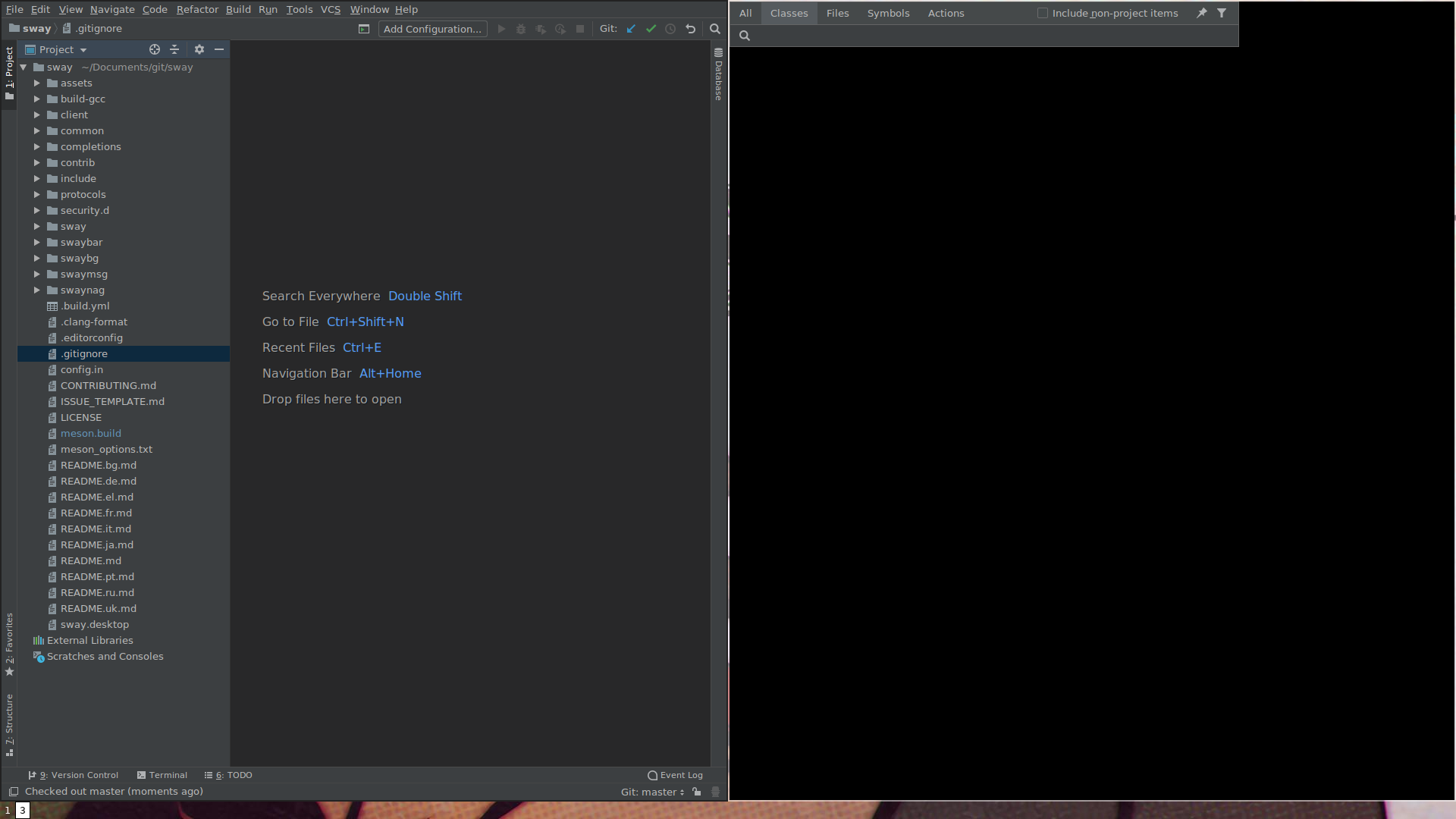
Some info about the window Class window created with Ctrl + N in CLion:
{
   "id": 43,
   "name": "win4",
   "rect": {
     "x": 960,
     "y": 1080,
     "width": 960,
     "height": 1057
   },
   "focused": false,
   "focus": [
   ],
   "border": "pixel",
   "current_border_width": 2,
   "layout": "none",
   "orientation": "none",
   "percent": 0.5,
   "window_rect": {
     "x": 2,
     "y": 2,
     "width": 956,
     "height": 1053
   },
   "deco_rect": {
     "x": 0,
     "y": 0,
     "width": 0,
     "height": 0
   },
   "geometry": {
     "x": 0,
     "y": 0,
     "width": 672,
     "height": 60
   },
   "window": 14680218,
   "urgent": false,
   "floating_nodes": [
   ],
   "sticky": false,
   "type": "con",
   "fullscreen_mode": 0,
   "pid": 10518,
   "app_id": null,
   "marks": [
   ],
   "window_properties": {
     "class": "jetbrains-clion",
     "instance": "sun-awt-X11-XWindowPeer",
     "title": "win4",
     "transient_for": 14680127
   },
   "nodes": [
   ]
 }
Screenshot of the window (right):
Related: #3106
 cedws
on 28 Jan 2019
cedws
on 28 Jan 2019
Also reproducible in rootston from https://github.com/swaywm/wlroots/commit/f24e17259e49aef55b7ada54793a4cdb49ae94a1
 YaLTeR
on 3 Feb 2019
YaLTeR
on 3 Feb 2019
reading the pycharm.sh stored from jetbrains-toolbox, I saw it's using PYCHARM_JDK and not IDEA_JDK.
using alias pycharm="export _JAVA_AWT_WM_NONREPARENTING=1; export PYCHARM_JDK=/usr/lib/jvm/java-11-openjdk; /usr/bin/pycharm" I managed to have shift-shift working.
 Agyar
on 7 Feb 2019
Agyar
on 7 Feb 2019
I have same problem with PhpStorm. All popups (Action, Search everywhere, New ...) just blink as it creates new tile next to editor and then disappear. Dialogs like settings, print, ... are working fine.
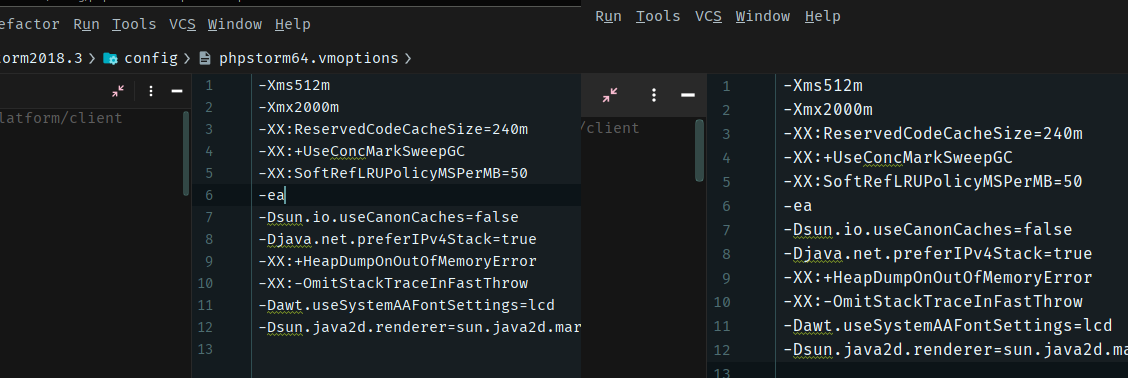
When I switch to JDK 11, dialogs working but fonts are different.
Left is JDK 11 right Shipped JDK
 zajca
on 13 Feb 2019
zajca
on 13 Feb 2019
@zajca fyi PhpStorm <= 2018.2.5-1 is working fine using the packaged jre.
 apreiml
on 13 Feb 2019
apreiml
on 13 Feb 2019
@apreiml you are right 2018.2.5 works just fine. Is there aby bug report in jetbrains youtrack? (I didn't find any)
zajca
on 14 Feb 2019
@zajca https://youtrack.jetbrains.com/issue/IDEA-202762 this seems filed 3 weeks ago.
dynaxis
on 14 Feb 2019
Seems to work with IntelliJ 2019.1 EAP + Jetbrains Runtime 11. (Though it's ridiculus that one has to set -Djdk.gtk.version=2 in order for JavaFX to work under Wayland...)
 jupblb
on 18 Feb 2019
jupblb
on 18 Feb 2019
interestingly enough, this only appears to happen with certain forms of autocomplete. For example, variable name autocomplete works fine, but function name autocomplete does not. Maybe this isn't a WM bug?
 eaceaser
on 23 Feb 2019
eaceaser
on 23 Feb 2019
Autocompletion popup hides when I select item which overflows (https://my.mixtape.moe/jntzoz.png) and then I select another one (arrow down/up). The overflow is a normal behaviour, not a bug. This happens with OpenJDK and latest sway from git. Works fine on Weston.
As a workaround I am currently using PHPStorm EAP with registry settings new.search.everywhere unset and with bundled JRE which does not have problem with autocomplete.
francma
on 23 Feb 2019
ahh its the overflow, I couldn't figure out what the characteristic was. Thanks for that workaround property to set!
eaceaser
on 23 Feb 2019
There's still no fix for this? I just noticed this after upgrading to Goland 2018.3 :(
edit: just reread this comment. The undertone was unintended. I meant a fix from jetbrains, since their bugtracker is full of similar bugs. Sorry and thanks for sway :)
 danielcb
on 16 Mar 2019
danielcb
on 16 Mar 2019
There's still no fix for this?
Please send a fix
 emersion
on 16 Mar 2019
emersion
on 16 Mar 2019
As a workaround I am currently using PHPStorm EAP with registry settings
new.search.everywhereunset and with bundled JRE which does not have problem with autocomplete.
This has been working perfectly for me whenever I need to navigate a Scala codebase, and it makes sense to use intellij.
pimeys
on 16 Mar 2019
Installing intellij-idea-ultimate-edition-jre (on arch) fixed this issue for me.
 ambiso
on 21 Mar 2019
ambiso
on 21 Mar 2019
With the jetbrains jdk (jbsdk8u202b1491_linux_x64, installed via the JB SDK Bintray Downloader plugin [1]) it also works for me now using sway 1.0 on gentoo.
danielcb
on 22 Mar 2019
Can confirm @francma 's findings after installing intellij-idea-ultimate-edition-jre on Arch. Autocomplete popups now stay, but "Open File", "Search Everywhere", etc. immediately disappear.
@ambiso , are you saying that both types of popups work for you now?
 lhanson
on 29 Mar 2019
lhanson
on 29 Mar 2019
I've reproduced this with verbose logging, here's what happens (Sway 1.0, IntelliJ 2019.1 as well as Intellij JRE installed):
2019-04-23 11:04:14 - [wlroots-0.5.0/xwayland/xwm.c:830] XCB_CREATE_NOTIFY (18874746)
2019-04-23 11:04:14 - [sway-1.0/sway/desktop/xwayland.c:583] New xwayland surface title='(null)' class='(null)'
2019-04-23 11:04:14 - [wlroots-0.5.0/xwayland/xwm.c:876] XCB_CONFIGURE_REQUEST (18874746) [672x60+1928,740]
2019-04-23 11:04:14 - [wlroots-0.5.0/xwayland/xwm.c:967] XCB_PROPERTY_NOTIFY (18874746)
2019-04-23 11:04:14 - [sway-1.0/sway/tree/view.c:348] View 0x5649ca18dda0 updated CSD to 1
2019-04-23 11:04:14 - [wlroots-0.5.0/xwayland/xwm.c:651] MOTIF_WM_HINTS (5)
2019-04-23 11:04:14 - [wlroots-0.5.0/xwayland/xwm.c:967] XCB_PROPERTY_NOTIFY (18874746)
2019-04-23 11:04:14 - [wlroots-0.5.0/xwayland/xwm.c:525] WM_PROTOCOLS (0)
2019-04-23 11:04:14 - [wlroots-0.5.0/xwayland/xwm.c:967] XCB_PROPERTY_NOTIFY (18874746)
2019-04-23 11:04:14 - [wlroots-0.5.0/xwayland/xwm.c:723] unhandled X11 property 36 (WM_CLIENT_MACHINE) for window 18874746
2019-04-23 11:04:14 - [wlroots-0.5.0/xwayland/xwm.c:967] XCB_PROPERTY_NOTIFY (18874746)
2019-04-23 11:04:14 - [wlroots-0.5.0/xwayland/xwm.c:479] NET_WM_PID 13604
2019-04-23 11:04:14 - [wlroots-0.5.0/xwayland/xwm.c:967] XCB_PROPERTY_NOTIFY (18874746)
2019-04-23 11:04:14 - [wlroots-0.5.0/xwayland/xwm.c:466] XCB_ATOM_WM_TRANSIENT_FOR: 0x5649ca3c2e20
2019-04-23 11:04:14 - [wlroots-0.5.0/xwayland/xwm.c:967] XCB_PROPERTY_NOTIFY (18874746)
2019-04-23 11:04:14 - [wlroots-0.5.0/xwayland/xwm.c:555] WM_HINTS (9)
2019-04-23 11:04:14 - [wlroots-0.5.0/xwayland/xwm.c:967] XCB_PROPERTY_NOTIFY (18874746)
2019-04-23 11:04:14 - [wlroots-0.5.0/xwayland/xwm.c:967] XCB_PROPERTY_NOTIFY (18874746)
2019-04-23 11:04:14 - [wlroots-0.5.0/xwayland/xwm.c:723] unhandled X11 property 291 (XdndAware) for window 18874746
2019-04-23 11:04:14 - [wlroots-0.5.0/xwayland/xwm.c:967] XCB_PROPERTY_NOTIFY (18874746)
2019-04-23 11:04:14 - [wlroots-0.5.0/xwayland/xwm.c:723] unhandled X11 property 466 (_MOTIF_DRAG_RECEIVER_INFO) for window 18874746
2019-04-23 11:04:14 - [wlroots-0.5.0/xwayland/xwm.c:967] XCB_PROPERTY_NOTIFY (18874746)
2019-04-23 11:04:14 - [wlroots-0.5.0/xwayland/xwm.c:555] WM_HINTS (9)
2019-04-23 11:04:14 - [wlroots-0.5.0/xwayland/xwm.c:967] XCB_PROPERTY_NOTIFY (18874746)
2019-04-23 11:04:14 - [wlroots-0.5.0/xwayland/xwm.c:502] NET_WM_WINDOW_TYPE (1)
2019-04-23 11:04:14 - [wlroots-0.5.0/xwayland/xwm.c:922] XCB_MAP_REQUEST (18874746)
2019-04-23 11:04:14 - [wlroots-0.5.0/xwayland/xwm.c:967] XCB_PROPERTY_NOTIFY (18874746)
2019-04-23 11:04:14 - [wlroots-0.5.0/xwayland/xwm.c:723] unhandled X11 property 271 (WM_STATE) for window 18874746
2019-04-23 11:04:14 - [wlroots-0.5.0/xwayland/xwm.c:967] XCB_PROPERTY_NOTIFY (18874746)
2019-04-23 11:04:14 - [wlroots-0.5.0/xwayland/xwm.c:941] XCB_MAP_NOTIFY (18874746)
2019-04-23 11:04:14 - [wlroots-0.5.0/xwayland/xwm.c:1206] XCB_CLIENT_MESSAGE (18874746)
2019-04-23 11:04:14 - [wlroots-0.5.0/types/wlr_surface.c:609] New wlr_surface 0x5649ca3ed310 (res 0x5649ca3ea6a0)
2019-04-23 11:04:14 - [wlroots-0.5.0/xwayland/xwm.c:1375] New xwayland surface: 0x5649ca3ed310
2019-04-23 11:04:14 - [wlroots-0.5.0/xwayland/xwm.c:391] XCB_ATOM_WM_CLASS: sun-awt-X11-XWindowPeer jetbrains-idea
2019-04-23 11:04:14 - [wlroots-0.5.0/xwayland/xwm.c:441] XCB_ATOM_WM_NAME: win30
2019-04-23 11:04:14 - [wlroots-0.5.0/xwayland/xwm.c:466] XCB_ATOM_WM_TRANSIENT_FOR: 0x5649ca3c2e20
2019-04-23 11:04:14 - [wlroots-0.5.0/xwayland/xwm.c:525] WM_PROTOCOLS (0)
2019-04-23 11:04:14 - [wlroots-0.5.0/xwayland/xwm.c:555] WM_HINTS (9)
2019-04-23 11:04:14 - [wlroots-0.5.0/xwayland/xwm.c:607] WM_NORMAL_HINTS (18)
2019-04-23 11:04:14 - [sway-1.0/sway/tree/view.c:348] View 0x5649ca18dda0 updated CSD to 1
2019-04-23 11:04:14 - [wlroots-0.5.0/xwayland/xwm.c:651] MOTIF_WM_HINTS (5)
2019-04-23 11:04:14 - [wlroots-0.5.0/xwayland/xwm.c:502] NET_WM_WINDOW_TYPE (1)
2019-04-23 11:04:14 - [wlroots-0.5.0/xwayland/xwm.c:441] XCB_ATOM_WM_NAME: win30
2019-04-23 11:04:14 - [wlroots-0.5.0/xwayland/xwm.c:479] NET_WM_PID 13604
2019-04-23 11:04:14 - [sway-1.0/sway/tree/root.c:209] Looking up workspace for pid 13604
2019-04-23 11:04:14 - [sway-1.0/sway/tree/arrange.c:78] Arranging 0x7ffea204c7f0 vertically
2019-04-23 11:04:14 - [sway-1.0/sway/desktop/transaction.c:413] Transaction 0x5649ca0a1d70 committing with 5 instructions
2019-04-23 11:04:14 - [wlroots-0.5.0/xwayland/xwm.c:967] XCB_PROPERTY_NOTIFY (18874746)
2019-04-23 11:04:14 - [wlroots-0.5.0/xwayland/xwm.c:967] XCB_PROPERTY_NOTIFY (926)
2019-04-23 11:04:14 - [wlroots-0.5.0/xwayland/xwm.c:1291] unhandled X11 event: FocusOut (10)
2019-04-23 11:04:14 - [wlroots-0.5.0/xwayland/xwm.c:967] XCB_PROPERTY_NOTIFY (926)
2019-04-23 11:04:14 - [wlroots-0.5.0/xwayland/xwm.c:967] XCB_PROPERTY_NOTIFY (926)
2019-04-23 11:04:14 - [sway-1.0/sway/desktop/transaction.c:494] Transaction 0x5649ca0a1d70 is ready
2019-04-23 11:04:14 - [sway-1.0/sway/desktop/transaction.c:281] Applying transaction 0x5649ca0a1d70
2019-04-23 11:04:14 - [sway-1.0/sway/tree/container.c:1080] Container 0x5649ca4479b0 entered output 0x5649ca2bef30
2019-04-23 11:04:14 - [wlroots-0.5.0/xwayland/xwm.c:967] XCB_PROPERTY_NOTIFY (18874746)
2019-04-23 11:04:14 - [wlroots-0.5.0/xwayland/xwm.c:555] WM_HINTS (9)
2019-04-23 11:04:14 - [wlroots-0.5.0/xwayland/xwm.c:955] XCB_UNMAP_NOTIFY (18874746)
2019-04-23 11:04:14 - [sway-1.0/sway/tree/arrange.c:190] Usable area for ws: 2560x1415@0,25
2019-04-23 11:04:14 - [sway-1.0/sway/tree/arrange.c:221] Arranging workspace '2' at 1920.000000, 25.000000
2019-04-23 11:04:14 - [sway-1.0/sway/tree/arrange.c:38] Arranging 0x7ffea204cc60 horizontally
2019-04-23 11:04:14 - [sway-1.0/sway/tree/arrange.c:78] Arranging 0x7ffea204cbd0 vertically
2019-04-23 11:04:14 - [sway-1.0/sway/tree/arrange.c:78] Arranging 0x7ffea204cbd0 vertically
2019-04-23 11:04:14 - [sway-1.0/sway/desktop/transaction.c:413] Transaction 0x5649ca47fe00 committing with 8 instructions
2019-04-23 11:04:14 - [wlroots-0.5.0/xwayland/xwm.c:955] XCB_UNMAP_NOTIFY (18874746)
2019-04-23 11:04:14 - [wlroots-0.5.0/xwayland/xwm.c:967] XCB_PROPERTY_NOTIFY (926)
2019-04-23 11:04:14 - [wlroots-0.5.0/xwayland/xwm.c:967] XCB_PROPERTY_NOTIFY (926)
2019-04-23 11:04:14 - [wlroots-0.5.0/xwayland/xwm.c:967] XCB_PROPERTY_NOTIFY (926)
2019-04-23 11:04:14 - [wlroots-0.5.0/xwayland/xwm.c:967] XCB_PROPERTY_NOTIFY (18874746)
2019-04-23 11:04:14 - [wlroots-0.5.0/xwayland/xwm.c:723] unhandled X11 property 291 (XdndAware) for window 18874746
2019-04-23 11:04:14 - [wlroots-0.5.0/xwayland/xwm.c:967] XCB_PROPERTY_NOTIFY (926)
2019-04-23 11:04:14 - [wlroots-0.5.0/xwayland/xwm.c:967] XCB_PROPERTY_NOTIFY (18874746)
2019-04-23 11:04:14 - [wlroots-0.5.0/xwayland/xwm.c:967] XCB_PROPERTY_NOTIFY (18874746)
2019-04-23 11:04:14 - [wlroots-0.5.0/xwayland/xwm.c:844] XCB_DESTROY_NOTIFY (18874746)
2019-04-23 11:04:14 - [sway-1.0/sway/desktop/transaction.c:494] Transaction 0x5649ca47fe00 is ready
2019-04-23 11:04:14 - [sway-1.0/sway/desktop/transaction.c:281] Applying transaction 0x5649ca47fe00
2019-04-23 11:04:14 - [wlroots-0.5.0/xwayland/xwm.c:967] XCB_PROPERTY_NOTIFY (18874595)
2019-04-23 11:04:14 - [wlroots-0.5.0/xwayland/xwm.c:967] XCB_PROPERTY_NOTIFY (18874595)
2019-04-23 11:04:14 - [wlroots-0.5.0/xwayland/xwm.c:441] XCB_ATOM_WM_NAME: caos-etl [~/src/caos/etl] - rg_chub - sisint (test) [console] - IntelliJ IDEA
2019-04-23 11:04:14 - [wlroots-0.5.0/xwayland/xwm.c:967] XCB_PROPERTY_NOTIFY (18874595)
2019-04-23 11:04:14 - [wlroots-0.5.0/xwayland/xwm.c:723] unhandled X11 property 37 (WM_ICON_NAME) for window 18874595
2019-04-23 11:04:14 - [wlroots-0.5.0/xwayland/xwm.c:967] XCB_PROPERTY_NOTIFY (18874595)
2019-04-23 11:04:14 - [wlroots-0.5.0/xwayland/xwm.c:723] unhandled X11 property 320 (_NET_WM_ICON_NAME) for window 18874595
Android Studio has the same problem with the "Search anywhere" popup closing immediately. Changing the boot SDK to Openjdk 11 was causing it to just show an error, but JDK 8 does work for me.
 vishnumad
on 29 Apr 2019
vishnumad
on 29 Apr 2019
As a workaround I am currently using PHPStorm EAP with registry settings
new.search.everywhereunset and with bundled JRE which does not have problem with autocomplete.
Wow, amazing! I have been struggling with the issue for a while, and can confirm that setting the new.search.everywhere=false property resolves the issue of the "search anywhere" popup disappearing for me on Goland.
 ahilsend
on 15 Jun 2019
ahilsend
on 15 Jun 2019
Where do I unset the said registry settings? I couldn't find it anywhere.
YaLTeR
on 15 Jun 2019
@YaLTeR You need to press Ctrl+Alt+Shift+/ and then select the first entry.
apreiml
on 16 Jun 2019
I'm on Arch and Android Studio also has issues, even if I use openjdk-8. The autocomplete popup works, but not the "find action" popup.
Interestingly, on PyCharm (also a JetBrains IDE) both autocomplete and "find action" poups work, but not the About popup (Help > About).
 abmantis
on 22 Jun 2019
abmantis
on 22 Jun 2019
Hi, this works for me on arch linux with intellij ultimate (2019.1.3-1, installed with pacman) after trying a lot:
IDEA_JDK=/usr/lib/jvm/java-11-openjdk intellij-idea-ultimate-edition
No problems with fonts.
 defel
on 26 Jun 2019
defel
on 26 Jun 2019
For Android Studio on sway on manjaro; OpenJDK 8 worked for me. UI is ok and all dialogs are showed properly.
export _JAVA_AWT_WM_NONREPARENTING=1; export STUDIO_JDK=/usr/lib/jvm/java-8-openjdk; /usr/bin/android-studio
 alkimake
on 3 Jul 2019
alkimake
on 3 Jul 2019
Not sure if it's quite the same problem, but I'm experiencing focus loss in the Intellij editor any time an autocomplete popup closes (e.g. if I select an autocomplete option), requiring a mouse click on the editor window in order to continue typing. Anyone else had this?
 kujeger
on 3 Jul 2019
kujeger
on 3 Jul 2019
For Android Studio on sway on manjaro; OpenJDK 8 worked for me. UI is ok and all dialogs are showed properly.
export _JAVA_AWT_WM_NONREPARENTING=1; export STUDIO_JDK=/usr/lib/jvm/java-8-openjdk; /usr/bin/android-studio
For me that does not work. The popup still looses focus and disappears. I'm using Arch by the way.
abmantis
on 4 Jul 2019
For me that does not work. The popup still looses focus and disappears. I'm using Arch by the way.
How about focus_follows_mouse no for sway ?
alkimake
on 4 Jul 2019
For me that does not work. The popup still looses focus and disappears. I'm using Arch by the way.
How about
focus_follows_mouse nofor sway ?
I already had that, and it is not working. :(
abmantis
on 4 Jul 2019
I've been encountering a possibly related issue.
After opening any menu bar dropdown and hovering an item with children, the parent dropdown loses interactivity after ~0.5 seconds.
Here's a video demonstrating the issue: [https://i.imgur.com/cESmUHI.mp4]
This issue exists across two machines, one Arch and one Ubuntu 19.04, in both IntelliJ IDEA Community Edition and PyCharm. I've tried with JetBrain's JDK, and OpenJDK 8 and 11, but that doesn't seem to affect this. I also tried turning off focus_follows_mouse, but no dice.
My current workaround for this and other JetBrains/sway issues is to run JetBrains IDEs through Xephyr. Performance is fine, and for the setup complexities are easily wrapped in a script.
 idle-z
on 17 Jul 2019
idle-z
on 17 Jul 2019
I have the same problem as @bmollot above. App menus lose focus and become unclickable when a submenu is triggered. For instance, open the "file" menu, scroll down to "open recent" or "other settings" (which open a submenu), then the menu itself stops receiving input.
Jetbrains java, ubuntu 19.04.
 luispabon
on 25 Jul 2019
luispabon
on 25 Jul 2019
I have both problems with recent versions. I managed to 'fix' the disappearing popups by trying various jdk versions but the menu losing focus stays whatever I do.
Earlier Versions, notably phpstorm 2018.1, work fine in every way thought.
changelogs from 2018.2 note ui improvements so the problems probably started there
Only drawback when using 2018.1 for me is that it does not talk to newer xdebug versions
 svensp
on 25 Jul 2019
svensp
on 25 Jul 2019
Everything used to work for me using Goland, but since the recent update to 2019.2, I have the same issues now with disappearing autocomplete popups, menu popup losing focus etc.
I will try now to switch sdks as well, the registry setting new.search.everywhere did not help to unset
 skaldesh
on 2 Aug 2019
skaldesh
on 2 Aug 2019
This is obviously shoddy code on the java sdk side, or jetbrains, or possibly both; I would wager however jetbrains' ides are a pretty common tool on sway's userbase. Is there anything that can be done or hacked to get these to work reliably? I totally understand sway aren't keen on supporting non-standard scenarios (like this, or nvidia, or X workarounds), but I imagine a lot of us compile sway from source and could maintain a patch set.
luispabon
on 2 Aug 2019
Downgrading to version 2019.1.3 solved my issues, I am using the bundled jre with it! So no update for the near future for me :/
skaldesh
on 2 Aug 2019
I have the same problem with Android-studio on Gentoo.
I'm using OpenJdk8
 valebes
on 17 Aug 2019
valebes
on 17 Aug 2019
Open "Help->Edit Custom Properties", uncomment 'suppress.focus.stealing=false' work for me.
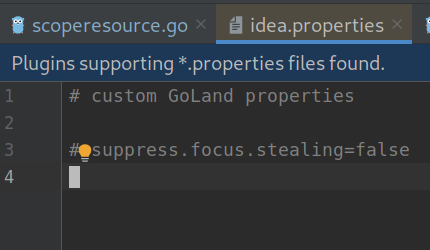
I added this option when use i3, but seems like no needed when use sway.
 zexi
on 21 Aug 2019
zexi
on 21 Aug 2019
This doesn't work for me. Weirdly, pycharm's auto complete doesn't auto close though, but phpstorm does as soon as I press arrow a second or third time.
luispabon
on 28 Aug 2019
Mutter Wayland had a similar issue, tracked in https://gitlab.gnome.org/GNOME/mutter/issues/819. This has recently been fixed with https://gitlab.gnome.org/GNOME/mutter/commit/8fd55fef853f1ca43d7b8766040b827a749187f0, which may be of some inspiration.
 kennylevinsen
on 29 Sep 2019
kennylevinsen
on 29 Sep 2019
I can confirm the problem with Android Studio. Quick search opens and immediately closes.
PyCharm works ok.
 ezaquarii
on 15 Nov 2019
ezaquarii
on 15 Nov 2019
Jabref is also broken.
 rumpelsepp
on 21 Nov 2019
rumpelsepp
on 21 Nov 2019
This is still an issue for me with the latest IntelliJ (193.5662.31) and sway 1.2.
There are several issues being tracked on the JetBrains issue tracker:
 BrassyPanache
on 14 Jan 2020
BrassyPanache
on 14 Jan 2020
Setting new.search.everywhere registry option to disabled did the trick for me.
 DiegoGuidaF
on 22 Jan 2020
DiegoGuidaF
on 22 Jan 2020
Focus-loosing behavior feels somewhat like the same problem with Wine #4857
 qthree
on 30 Jan 2020
qthree
on 30 Jan 2020
@eaceaser are you referring to this issue?
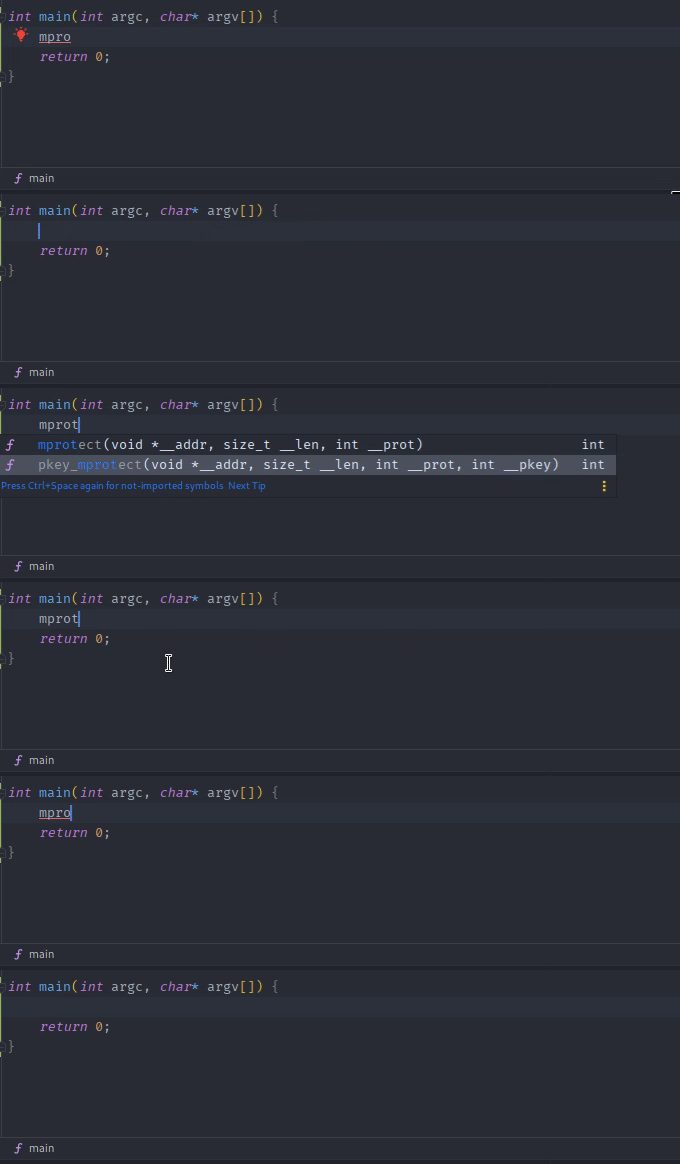
Seems like it indeed is an overflowing issue. Resizing it to contain the whole function signature will not cause it to close. Attempting to resize the window in the positive x-direction and/or negative y-direction will only resize it slightly and cause it to lose drag-focus. Dragging it the other way works fine as seen above.
Unticking ide.expansion.hints.enabled will fix this at the cost of not seeing the whole function signature.
Help -> About window is also completely broken
 Steverman
on 5 Feb 2020
Steverman
on 5 Feb 2020
@Steverman
Help -> Aboutwindow is also completely broken
I've found that if you click on Help and hold while dragging to the About menu it will open it. My guess is that when you click Help, then About separately, the release event of the second click hides the About window immediately.
 nenad
on 7 Feb 2020
nenad
on 7 Feb 2020
@Steverman yeah that looks like it
eaceaser
on 8 Feb 2020
@Steverman made it work for me as well like that, good find
luispabon
on 9 Feb 2020
Setting
new.search.everywhereregistry option to disabled did the trick for me.
Works for Android Studio 3.5, but it has no effect in 4.0.
ezaquarii
on 10 Feb 2020
I think I have the same issue with MATLAB. None of the above workaround works for me.
 SpeedJack
on 15 Feb 2020
SpeedJack
on 15 Feb 2020
I've just tried OpenJDK 13 with GoLand and CLion. Menus and autocomplete popups are finally working fine again. Maybe that helps anyone else.
 freswa
on 24 Feb 2020
freswa
on 24 Feb 2020
Is this related to opened submenus closing the parent menu when your mouse leaves the submenu?
Ie, right click / open a menu, move the mouse to another submenu, allow it to open, then move the mouse to something else in the parent menu and the whole thing closes?
 hypergig
on 26 Feb 2020
hypergig
on 26 Feb 2020
At least for me autocomplete problems come and go together with vanishing menus. So imho it's related.
freswa
on 26 Feb 2020
I've just tried OpenJDK 13 with GoLand and CLion. Menus and autocomplete popups are finally working fine again. Maybe that helps anyone else.
You finding any other issues? Every time I've tried versions not bundled with the app itself there's been problems.
luispabon
on 27 Feb 2020
Nothing in the past few days
freswa
on 27 Feb 2020
Tried openjdk13 & 14 with phpstorm and no dice, beyond some weird looking fonts on the file list :/
luispabon
on 28 Feb 2020
with openjdk 13, open actions (ctrl+shift+a) then type scratch then Enter to create a new scratch file. A menu will popup and disappear immediately, preventing you from creating a scratch file.
 MichaelBitard
on 28 Feb 2020
MichaelBitard
on 28 Feb 2020
@MichaelBitard True, that doesn't work for me either (never use it, so I didn't notice). But e.g. the branches popup works fine.
@luispabon I am on 13.0.2.u8-1 and Archlinux, if that makes a difference. Also I'm using these (I think unrelated) vmoptions:
# custom IntelliJ IDEA VM options

-Xms128m
-Xmx8g
-XX:ReservedCodeCacheSize=1G
-XX:+UseConcMarkSweepGC
-XX:SoftRefLRUPolicyMSPerMB=50
-ea
-Dsun.io.useCanonCaches=false
-XX:+HeapDumpOnOutOfMemoryError
-XX:-OmitStackTraceInFastThrow
So I've been checking out phpstorm 2020.1 EAP and it looks pretty bad. Menus appear centered on screen and autocomplete popups don't work at all - they show for 1 frame then disappear. The submenu problem is gone though - 1 step forward 2 backward.
https://www.youtube.com/watch?v=5IT09PUnDsA
Best watched at 0.25x speed. Uses OpenJDK 11 btw. They've clearly been tweaking the way their UI works though.
luispabon
on 28 Feb 2020
Is there any indication if this issue is with Sway, Java, or JetBrains products? So far this seems to be the most active JetBrains issue: https://youtrack.jetbrains.com/issue/JBR-2068
BrassyPanache
on 28 Feb 2020
It's an issue with Jetbrains and or whatever java toolkit they're using. I've posted the vid above on that bug report - release is about a month away so I'm not holding my breath here. JB's market is Windows and Mac, and on Linux it works perfectly in Gnome / Unity / KDE.
luispabon
on 29 Feb 2020
Agreed. I don't notice this problem with any other app on Sway except for IntelliJ IDEA (the only JetBrains app I use atm, and this is really testing my patience), independent of whatever JDK I run it under.
lhanson
on 29 Feb 2020
Thing is, I'm most productive using their IDEs - PHPStorm, Pycharm and Goland. I'm not going to be switching to other IDEs that simply aren't as good just to keep using Sway, which breaks my heart here. If the software I need to run doesn't work with the window manager I might have to switch to something else.
luispabon
on 29 Feb 2020
I definitely sympathize. I think I've reached the opposite conclusion, though: JVM development is brilliant under IntelliJ, but Sway integrates so seamlessly into the rest of my workflow that I'm not willing to give everything up for a single reticent IDE that introduces frustration every single day. We live in an era where language servers are integrated so well into much better text editors that I'm starting to seriously doubt what I gain from dealing with the frustration of a Java app making windows randomly disappear between me and my source files while forcing me to use the equivalent of Notepad to edit them.
I have an open offer to the Jetbrains team on the aforementioned ticket to help debug this since it's so easily reproducible, but my fucks given are rapidly approaching zero, which almost certainly mirrors their desire to accommodate neckbeards like us.
Since I've got actual work to do, my future interactions will probably be on the Neovim and/or ALE issue trackers where I'm 100% certain my fixes will be welcome.
lhanson
on 29 Feb 2020
I would consider switching IDEs, but there's no combination of config that can make vscode work anywhere nearly as well, at least for php, python and go.
luispabon
on 29 Feb 2020
All these issues are happening on Android Studio as well. And Android devs have no other IDE, that would be as efficient as AS.
 AmkSk
on 2 Mar 2020
AmkSk
on 2 Mar 2020
Funny thing is that it gets worse over time.
When a Dialog (for example the Setttings-Dialog) is open for a longer time of about one minute, the dialog will not get any click-events anymore and you have to navigate by keyboard. Its not too bad, but combined with the closing popups, it is a very bad experience.
defel
on 2 Mar 2020
In my case, if I use a short cut to bring such a popup up in JetBrains IDEs, it works. But from the menu, it doesn't (i.e. popup disappears immediately). I use Java bundled with JetBrains IDEs.
Also as @defel mentioned, if I open up a dialog (including Settings one), move the mouse out of it, bring it back, and mouse clicks don't work. But if I move the mouse completely out of the IDE and bring it back, then clicks start to work again. I revisited this issue while trying to find an issue already filed on the problem.
The trouble with JetBrains IDEs is a huge pain to me.
I originally used an old NVidia GPU with Nouveau, and the configuration caused problems (screen artifacts, etc.) only with JetBrains IDEs in my case. So I switched to an AMD one. :smile:
If this problem is gone, I'd be really happy.
dynaxis
on 4 Mar 2020
Also as @defel mentioned, if I open up a dialog (including Settings one), move the mouse out of it, bring it back, and mouse clicks don't work. But if I move the mouse completely out of the IDE and bring it back, then clicks start to work again. I revisited this issue while trying to find an issue already filed on the problem.
I feel like this might even be a separate issue as I can reproduce this in Chrome. If I upload a video with YouTube studio it displays a dialogue box. Chrome will not regain focus until I leave the desktop and come back to it.
As @dynaxis mentioned it is also reliably reproduced in IntellIJ by simply moving the mouse outside of a commit dialogue.
BrassyPanache
on 4 Mar 2020
JetBrains products most reliably have this behavior, but as another data point I notice that pop-up menus in Firefox (like when I click on an extension icon) tend to randomly close on me before I'm done with them in a similar manner.
lhanson
on 4 Mar 2020
Not sure if it's quite the same problem, but I'm experiencing focus loss in the Intellij editor any time an autocomplete popup closes (e.g. if I select an autocomplete option), requiring a mouse click on the editor window in order to continue typing. Anyone else had this?
Hello @kujeger,
I have this on Gentoo Linux (~amd64) and it's extremely annoying.
Probably, we have to submit an additional issue.
 Jamim
on 5 Mar 2020
Jamim
on 5 Mar 2020
Interesting, I have the exact same problem, also on Gentoo. It's the only thing broken for me in IDEA (so focus works for me), but since it makes working pretty much impossible it was the reason for me to switch back to i3 for the moment.
Interesting is that it just stops you from typing, you can still move the invisible cursor around with the arrow keys, so if you move it up or down, the active line highlight moves also up and down :man_shrugging:
 SuperTux88
on 5 Mar 2020
SuperTux88
on 5 Mar 2020
Interesting is that it just stops you from typing, you can still move the invisible cursor around with the arrow keys, so if you move it up or down, the active line highlight moves also up and down :man_shrugging:
Hi @SuperTux88,
Also, delete and backspace keys work, too.
Jamim
on 5 Mar 2020
It seems I could get menus an Shift+Shift in IntelliJ 2019.3.3 _mostly_ working on the JetBrains JDK 8.242b1644.3 (I wanted ligature support) for me by:
- Setting
jdk8-jetbarinsas the JRE for IntelliJ - Setting
_JAVA_AWT_WM_NONREPARENTING=1 - Adding
-Djbre.popupwindow.settype=falsetoidea64.vmoptionsfollowing this (pretty old) bug report: https://youtrack.jetbrains.com/issue/JBR-705 - Adding
new.search.everywhere=falsetoidea.propertiesfollowing https://github.com/swaywm/sway/issues/3007#issuecomment-466692570
However, the problem with dialogs not receiving keyboard input after losing and regaining focus still stands. It seems it's related to Swing (or AWT), as I can reproduce it in any Swing application. However, by pressing $mod+Shift+Space to make the dialog non-floating, it can receive keyboard input just fine, so I suspect the problem is somehow related to floating window handling, and not dialogs in general.
 kris7t
on 12 Mar 2020
kris7t
on 12 Mar 2020
With the "Choose Runtime" pluging, I selected the jbrsdk-8u242-linux-x64-b1644.3.tar.gz (please not that it is jbrsdk and not jbsdk). All popups worked fine and focus was not lost, but all popups and menus would show up centered on the screen. As suggested by @kris7t, adding -Djbre.popupwindow.settype=false to idea64.vmoptions fixed that and popups now show on the correct position.
Everything seems fine (for now).
Also, don't forget to update to wlroots 0.10.1, as 0.10 had some focus issues after popups show up.
abmantis
on 12 Mar 2020
The 2020.1 EAP keeps getting better and better
Looks like they've decided to re-implement menus as actual application windows 🤦
luispabon
on 12 Mar 2020
@abmantis it's works with the last CLion EAP thanks !
Ogromny
on 24 Mar 2020
It seems I could get menus an Shift+Shift in IntelliJ 2019.3.3 _mostly_ working on the JetBrains JDK 8.242b1644.3 (I wanted ligature support) for me by:
* Setting `jdk8-jetbarins` as the JRE for IntelliJ

* Setting `_JAVA_AWT_WM_NONREPARENTING=1`

* Adding `-Djbre.popupwindow.settype=false` to `idea64.vmoptions` following this (pretty old) bug report: https://youtrack.jetbrains.com/issue/JBR-705

* Adding `new.search.everywhere=false` to `idea.properties` following [#3007 (comment)](https://github.com/swaywm/sway/issues/3007#issuecomment-466692570)
However, the problem with dialogs not receiving keyboard input after losing and regaining focus still stands. It seems it's related to Swing (or AWT), as I can reproduce it in any Swing application. However, by pressing
$mod+Shift+Spaceto make the dialog non-floating, it can receive keyboard input just fine, so I suspect the problem is somehow related to floating window handling, and not dialogs in general.
I am still facing the issue with Android Studio's popups losing focus and not regaining it. Has anybody found any working fix? (Aside from toggling from floating to non-floating)
I think I have tried about everything mentioned in this issue...
Thank you!
DiegoGuidaF
on 1 Apr 2020
The 2020.1 EAP keeps getting better and better
Looks like they've decided to re-implement menus as actual application windows 🤦
Coming out in april! So any day now...
From the looks of the video, it seems like they addressed these issues in a more general way.
hypergig
on 8 Apr 2020
Yes, the EAPs for 2020.1 are working normally now without any of that funky stuff. But they still have the same problems as usual with menus and autocomplete popups.
luispabon
on 8 Apr 2020
Yes, the EAPs for 2020.1 are working normally now without any of that funky stuff. But they still have the same problems as usual with menus and autocomplete popups.
:facepalm: Well... to be honest, it was a long shot
hypergig
on 9 Apr 2020
I recently updated to goland 2020.1. With the suggestion from @abmantis (setting specific runtime + vm64 option) I have it almost stable now. I no longer loose focus on menus, autocomplete works...
Just the focus loss, for example, the settings page, once you move the cursor out of the settings's window's bounds, remains and annoys me
skaldesh
on 15 Apr 2020
@Steverman
Help -> Aboutwindow is also completely brokenI've found that if you click on Help and hold while dragging to the About menu it will open it. My guess is that when you click Help, then About separately, the release event of the second click hides the About window immediately.
@nenad
I feel that you might be onto something. I noticed that if you go fullscreen mode in Sway (default mod+f) and try to open About normally Sway will either "flicker" the Help button or constantly go in and out of fullscreen mode. Using your method will not cause this issue before you click the About button. I say before because it may happen in the beginning but as you drag down the cursor towards the About button it disappears
The fullscreen flickering will also happen if auto completion window pops up.
Steverman
on 19 Apr 2020
Just a quick update, IntelliJ IDEA 2020.1.1 installed from Flathub (https://flathub.org/apps/details/com.jetbrains.IntelliJ-IDEA-Community) works relatively well on Fedora 32/kernel 5.6/sway 1.4.
All popups including Search Everywhere seem to work well as long as they are opened using keyboard shortcuts.
When launched from menus, some (eg. Navigate -> Code, Help -> About) still have the flickering/disappearing issue.
@Steverman Mouse drag with menu works on Help -> About but not on Navigate -> Code
'''
IDE: IntelliJ IDEA (build #IC-201.7223.91, 30 Apr 2020 00:24)
OS: Linux (5.6.8-300.fc32.x86_64, amd64)
JRE: 11.0.6+8-b765.40 (JetBrains s.r.o)
JVM: 11.0.6+8-b765.40 (OpenJDK 64-Bit Server VM)
'''
 digitalstreamio
on 8 May 2020
digitalstreamio
on 8 May 2020
Android Studio 3.6.3 (Flathub installation) works relatively well with the two suggested changes.
- Setting env var
_JAVA_AWT_WM_NONREPARENTING=1 - Adding
new.search.everywhere=falsetoidea.properties
One minor issue is with a dialog loosing focus (File -> Settings) when user clicks on the app window and then back on the dialog. Mouse events are no longer sent to the dialog even if the dialog is in focus (although keyboard events still work).
digitalstreamio
on 8 May 2020
@digitalstreamio mouse events no longer sent to the dialog is something I'm finding very annoying as it affects other java based apps as well. Is there any known fix for this issue?
 ardevd
on 12 May 2020
ardevd
on 12 May 2020
@ardevd window focus with dialogs and subsequent loss of mouse events are still an issue with both IntelliJ and AndroidStudio. my workaround is to stick to keyboard but that may not work for everyone.
digitalstreamio
on 13 May 2020
My solution right now has been making all floating windows way bigger (ie.
commit screen occupies almost fullscreen) this way I don't accidentally
move my mouse outside of focus.
I wound't even consider this a workaround.. but it does indeed help quite a
bit.
On Wed, 13 May 2020 at 04:50, Sebastian Jastrzebski <
[email protected]> wrote:
@ardevd https://github.com/ardevd window focus with dialogs and
subsequent loss of mouse events are still and issue with both IntelliJ and
AndroidStudio. my workaround is to stick to keyboard but that may not work
for everyone.—
You are receiving this because you commented.
Reply to this email directly, view it on GitHub
https://github.com/swaywm/sway/issues/3007#issuecomment-627712749, or
unsubscribe
https://github.com/notifications/unsubscribe-auth/AA6XP6RYRLOUCMBV5ZA4X4TRRIDHPANCNFSM4F7WV52Q
.
DiegoGuidaF
on 13 May 2020
There is a corresponding issue in the Jetbrains bug tracker:
https://youtrack.jetbrains.com/issue/JBR-1822
Jamim
on 14 May 2020
I use a workaround to run JetBrains IDEs in Sway, I create a Xvnc session and use them there.
While not the best solution it may provide a working alternative before these issues get fixed.
https://gist.github.com/cartolari/95e2a0999434686dcd12df608f17845f
 cartolari
on 17 May 2020
cartolari
on 17 May 2020
Hi all,
This issue has become a bit of a catch-all for JetBrains IDE problems, so it's a bit hard to track what issues are still around, and which have been resolved by JetBrains. The titular issue, "Jetbrains autocomplete popup losing focus immediately", at least, no longer appears to happen (Shift+Shift and Ctrl+N dialogs work correctly) — is anyone still experiencing this?
That said, two fixes recently got merged into sway/wlroots master that should alleviate the more annoying of the problems in this thread:
- xwayland: pass focus to previous unmanaged surface on unmap
- xwayland: send focus change event unconditionally
The first fixes context menus disappearing when a submenu closes. The second fixes popup dialogs becoming unclickable if they ever lost focus. Some extra testing in case I inadvertently broke something else with these wouldn't be amiss :slightly_smiling_face:. See https://github.com/swaywm/sway/pull/5398 for some minor known issues; https://github.com/swaywm/sway/issues/4370 was also mentioned in this thread, but will be tracked in that issue instead.
These have been tested with the latest versions of PyCharm/CLion ("professional" variants), with the packaged JDK and default settings.
 Xyene
on 1 Jun 2020
Xyene
on 1 Jun 2020
Hi all,
This issue has become a bit of a catch-all for JetBrains IDE problems, so it's a bit hard to track what issues are still around, and which have been resolved by JetBrains. The titular issue, "Jetbrains autocomplete popup losing focus immediately", at least, no longer appears to happen (Shift+Shift and Ctrl+N dialogs work correctly) — is anyone still experiencing this?
This does still happen to me in Android Studio 4.0 (just released) with default configuration (I didn't import settings from 3.6). Using sway-git and wlroots-git from aur with the latest commit as of the time of posting.
Update: Fixed by launching with java 14:
STUDIO_JDK=/usr/lib/jvm/java-14-openjdk /usr/bin/android-studio
That said, two fixes recently got merged into sway/wlroots master that should alleviate the more annoying of the problems in this thread:
* [xwayland: pass focus to previous unmanaged surface on unmap](https://github.com/swaywm/sway/commit/613abdda6fa978480067a35c3adc46fb414b0b5c)

* [xwayland: send focus change event unconditionally](https://github.com/swaywm/wlroots/commit/0758a4fc9dac7a887517a40f31daaaf12540b7f5)
The first fixes context menus disappearing when a submenu closes. The second fixes popup dialogs becoming unclickable if they ever lost focus. Some extra testing in case I inadvertently broke something else with these wouldn't be amiss slightly_smiling_face. See #5398 for some minor known issues; #4370 was also mentioned in this thread, but will be tracked in that issue instead.
This works correctly! Haven't tested it much but will update accordingly. Thank you!
These have been tested with the latest versions of PyCharm/CLion ("professional" variants), with the packaged JDK and default settings.
DiegoGuidaF
on 2 Jun 2020
Yeap, I can confirm that the most annoying problems have been resolved by using the latest master of wlroots and sway, thanks @Xyene!
nenad
on 2 Jun 2020
Yeap, I can confirm that the most annoying problems have been resolved by using the latest master of wlroots and sway
I've installed sway and wlroots from master branches (9999 versions on Gentoo).
$ sway --version
sway version 1.4-613abdda (Jun  2 2020, branch 'HEAD')
Unfortunately, I still have the focus loss issue on closing of the autocomplete popup.
Jamim
on 2 Jun 2020
@Jamim what IDE is this with, what version of Java does it bundle, and does the STUDIO_JDK=/path/to/jdk14/java trick work?
PyCharm/CLion bundle Java 11 nowadays. However, Android Studio 4.0 -- and perhaps others -- ship with Java 8, which is effectively EOL at this point and doesn't work well at all with Sway (at the same time, being EOL, it's not really worth looking into _why_).
Xyene
on 3 Jun 2020
sway-git worked under Artix.
 kekek2
on 7 Jun 2020
kekek2
on 7 Jun 2020
if you are facing the floating menu issue the fastest way for me was to open Android Studio 4.0+
Then _Help > Open Custom VM Options_
And add this line as suggested above:
-Djbre.popupwindow.settype=false
close and reopen and now seems fixed
 matteocrippa
on 12 Jun 2020
matteocrippa
on 12 Jun 2020
-Djbre.popupwindow.settype=false VM Option works for me
sway 1.4, android studio 4.0 built May 20, 2020
 niktob560
on 14 Jun 2020
niktob560
on 14 Jun 2020
something news?
 Miuler
on 2 Jul 2020
Miuler
on 2 Jul 2020
Android Studio 4.0 works if you use Java 11, but from another Jetbrains IDE (not the generic Java 11 from your distro's repositories):
https://www.youtube.com/watch?v=r-4sk3Q3njA&feature=youtu.be
luispabon
on 28 Jul 2020
In IntelliJ IDEA the code auto-completion is a useful feature. However when using Sway 1.5 I have the issue that the cursor is not returned to the active editing window once a selection (or cancellation) of the auto-completion pop-up occurs.
I have attached an annotated Sway log
file of the sequence of events in the hope that it can trigger a few ideas.
There is mention of an unmanged surface in the log - so it may be reminiscent of the fix for #5347.
BrassyPanache
on 25 Aug 2020
It drives me crazy. With the new major Intellij version starting with 2020.1, almost everything worked for me.
Now, every update of GoLand makes matters worse again.
As of now, I have GoLand 2020.2.2 installed with sway v1.5
Issues:
- I can no longer create any file or directory. When attempting, a separate screen opens with just the input field at the top, left corner. However, I can not gain focus on this input field in any way...
- Double Shift does no longer open the search everywhere dialog
- When I am typing in the integrated terminal (and therefore must have focus on it) and I press Shift+Esc, I expect the terminal to close. Instead, most of the time my project hierarchy closes, because it somehow has some kind of focus, I guess
It is becoming ridiculous to be honest. I tried several times to switch to VSCode, but I always lack some functionality Intellij products have that I grew accustomed to over time... It is a nightmare right now
skaldesh
on 26 Aug 2020
Yeah, 2020.2 made it worse for me as well. Not as bad as before 2020.1, but of course we have to thank Sway for the fixes, not JetBrains.
 vmsh0
on 26 Aug 2020
vmsh0
on 26 Aug 2020
I downgraded to 2020.1 and now all issues I just mentioned are working again.
Guess I'll stick to a version again until the next major release, just like with 2019 :sweat_smile:
skaldesh
on 26 Aug 2020
I can no longer create any file or directory. When attempting, a separate screen opens with just the input field at the top, left corner. However, I can not gain focus on this input field in any way...
I was able to gain focus by switching the window to floating and then dragging it to my secondary monitor (using the modifier key) It's hysterical, but I hope it's only needed temporarily
 Biont
on 26 Aug 2020
Biont
on 26 Aug 2020
I was able to gain focus by switching the window to floating and then dragging it to my secondary monitor (using the modifier key) It's hysterical, but I hope it's only needed temporarily
I had the same thoughts, but since the issue persists since 2020.1.1, I just could not deal with it anymore
skaldesh
on 26 Aug 2020
Recompiling wlroots with x11-icccm resolved the issues I had with intellij idea, including some mentioned here.
kujeger
on 9 Sep 2020
What issues specifically?
luispabon
on 9 Sep 2020
In what release will commit 7ca9ef1 be?
 rubin55
on 22 Sep 2020
rubin55
on 22 Sep 2020
Fixing https://github.com/swaywm/sway/issues/5735 may help with some Jetbrains issues as well.
emersion
on 14 Oct 2020
I don't know if it will be helpful, but in Wayfire I recently fixed this issue in https://github.com/WayfireWM/wayfire/pull/778/
The basic idea is to treat non-dialog windows with a parent set as override-redirect views. This implies a few other things as well (for example, don't deactivate main view while the transient window is open).
 ammen99
on 14 Oct 2020
ammen99
on 14 Oct 2020
Okey, back at this again...
I have updated to Android Studio 4.1.0 since I require a bug fix that is implemented in this version.
However with the SDK that comes with it I have the issue mentioned on this thread, the popups close immediately, what is worse, is that what worked for me previously was changing the SDK to a different one (STUDIO_JDK=/usr/lib/jvm/java-14-openjdk /usr/bin/android-studio) but now this raises a seg_fault when loading certain java classes...
In case anybody has found a fix, the seg_fault I receive from Android Studio is:
GraphicsJNI: Unable to find class android/graphics/ColorSpace
The only solution I have found is launching Android Studio in an separate TTY with i3 running on it.
DiegoGuidaF
on 22 Oct 2020
@DiegoGuidaF I experienced a similar crash when attempting to use Android Studio 4.0.1 with java-14-openjdk as well as with java-14-jdk and java-11-openjdk, with that seg_fault and that same GraphicsJNI error (I think I saw your post on #5414 at that point).
I think there is either a GC issue between openjdk and jetbrain's distribution or modified/missing implementations, leading to that segfault.
What I've gotten to work, at least partially, is
1) reverting to the embedded jdk
2) adding this VM option as proposed previously in this thread
if you are facing the floating menu issue the fastest way for me was to open Android Studio 4.0+
Then _Help > Open Custom VM Options_
And add this line as suggested above:-Djbre.popupwindow.settype=falseclose and reopen and now seems fixed
3) starting Android Studio via the studio.sh script instead of the android-studio binary. I created a script in my user directory to start it:
#!/bin/bash
_JAVA_AWT_WM_NONREPARENTING=1\
  GDK_SCALE=2\
  /opt/android-studio/bin/studio.sh\
  & disown
I mean, talk about a hack.. Anyways, with all this it's working at least partially. Context menus work with the exception of the quick menu using shift + shift.
And all this was on 4.0.1, I don't know if it will work for 4.1.0. Good luck!
 caleb-allen
on 23 Oct 2020
caleb-allen
on 23 Oct 2020
For those still reporting issues, could you please provide more information on your install and environment? What versions of Sway and wlroots are you using? 1.5 at a minimum is needed; master contains more fixes, so if you're reporting please ensure the issue is still present in master. Was wlroots compiled with x11-icccm? (It should be, or there are funky problems with AWT.)
I ask because JetBrains IDEs, by and large, "work on my machine", out of the box and without workarounds. There are a few remaining issues regarding focus and dialog resizing in corner cases, but nothing deal-breaking like "the search everywhere dialog loses focus immediately".
There really aren't that many moving parts here, if we have the same JetBrains IDE versions (the latest) and have compiled Sway the same way (namely, from master with x11-icccm), we ought to be seeing the same results. I'd like to determine where the difference is, because without being able to reproduce the issue, not much can be done.
Xyene
on 23 Oct 2020
Maybe we should consider closing this meta-issue and asking people to open new individual issues if they can still reproduce on master and with x11-icccm.
emersion
on 23 Oct 2020
Arch Linux recently fresh install.
sway v1.5: PKGBUILD
wlroots 0.11.0-1: PKGBUILD _No idea if x11-icccm is compiled with wlroots._
xorg-server-xwayland 1.20.9-2
phpstorm 2020.2.3b202.7660.42-1
phpstorm-jre 2020.2.3b202.7660.42-1
_JAVA_AWT_WM_NONREPARENTING=1
/opt/phpstorm/jbr/bin/java -classpath /opt/phpstorm/lib/bootstrap.jar:/opt/phpstorm/lib/extensions.jar:/opt/phpstorm/lib/util.jar:/opt/phpstorm/lib/jdom.jar:/opt/phpstorm/lib/log4j.jar:/opt/phpstorm/lib/trove4j.jar:/opt/phpstorm/lib/jna.jar -Xms4048m -Xmx4048m -XX:ReservedCodeCacheSize=240m -XX:+UseConcMarkSweepGC -XX:SoftRefLRUPolicyMSPerMB=50 -ea -XX:CICompilerCount=2 -Dsun.io.useCanonPrefixCache=false -Djdk.http.auth.tunneling.disabledSchemes="" -XX:+HeapDumpOnOutOfMemoryError -XX:-OmitStackTraceInFastThrow -Djdk.attach.allowAttachSelf=true -Dkotlinx.coroutines.debug=off -Djdk.module.illegalAccess.silent=true -Dawt.useSystemAAFontSettings=lcd -Djdk.gtk.version=2 -Dsun.java2d.renderer=sun.java2d.marlin.MarlinRenderingEngine -Dsun.tools.attach.tmp.only=true -Djbre.popupwindow.settype=false -XX:ErrorFile=/home/einar/java_error_in_PHPSTORM_%p.log -XX:HeapDumpPath=/home/einar/java_error_in_PHPSTORM.hprof -Didea.vendor.name=JetBrains -Didea.paths.selector=PhpStorm2020.2 -Djb.vmOptionsFile=/home/einar/.config/JetBrains/PhpStorm2020.2/phpstorm64.vmoptions -Didea.platform.prefix=PhpStorm com.intellij.idea.Main
Issues
Help > Aboutcloses immediatelyNavigate > File Structurecloses immediately
Issues still present in master (sway-git and wlroots-git)
Navigate > File Structurecloses immediately
 eigan
on 23 Oct 2020
eigan
on 23 Oct 2020
For those still reporting issues, could you please provide more information on your install and environment? What versions of Sway and wlroots are you using? 1.5 at a minimum is needed; master contains more fixes, so if you're reporting please ensure the issue is still present in master. Was wlroots compiled with
x11-icccm? (It should be, or there are funky problems with AWT.)I ask because JetBrains IDEs, by and large, "work on my machine", out of the box and without workarounds. There are a few remaining issues regarding focus and dialog resizing in corner cases, but nothing deal-breaking like "the search everywhere dialog loses focus immediately".
There really aren't that many moving parts here, if we have the same JetBrains IDE versions (the latest) and have compiled Sway the same way (namely, from master with
x11-icccm), we ought to be seeing the same results. I'd like to determine where the difference is, because without being able to reproduce the issue, not much can be done.
I am using sway-git and wlroots-git from aur:
wlroots: 0.11.0.r69.g79c7591d-1
sway: 1.5-1be66c98 (Oct 22 2020, branch 'master')
As far as I understand, wlroots is already being compiled with x11-icccm:
    systemd: 1
    elogind: 0
    libseat: 0
   xwayland: 1
   x11_backend: 1
   xcb-icccm: 1
   xcb-errors: 1
But maybe I am missing something here.
Using android-studio 4.1.0.19-1 from the aur, I have the following issues:
- All menus appear on the center of the screen. ie. click the "File" option on the toolbar and the menu appears on the center of the screen.
- Any popup closes instantaneously, ie. The quick-access menu (2x shift), the Help -> About popup, the commit menu...
Setting -Djbre.popupwindow.settype=false fixes issue number one, however issue number 2 is a deal-breaker for me since it is a main part of my workflow.
Both this issues get fixed if starting android-studio with a more recent SDK, ie:
STUDIO_JDK=/usr/lib/jvm/java-11-openjdk /usr/bin/android-studio
Up until now I had been using this last fix, however with the new android-studio 4.1 I get a seg_fault from the IDE.
I am happy to provide logs if required or maybe help you out reproducing the issue on your side.
DiegoGuidaF
on 23 Oct 2020
@eigan So to confirm, your autocomplete popup and search-everywhere dialog works? I can confirm Navigate > File Structure is still broken on master, as well as in Wayfire (/cc @ammen99). However, it's pretty broken in i3 too: it closes itself on mouseout, if it has been mousein'd before.
Regardless, that sounds like a separate issue (feel free to open a new ticket).
@DiegoGuidaF I can observe both of your issues, with Android Studio installed from the tarball on https://developer.android.com/studio (looks to be what the PKGBUILD is doing anyway). It looks like AS behaves markedly different from PyCharm/Clion/PhpStorm.
Android Studio version from "About" popup
Android Studio 4.1
Build #AI-201.8743.12.41.6858069, built on September 23, 2020
Runtime version: 1.8.0_242-release-1644-b3-6222593 amd64
VM: OpenJDK 64-Bit Server VM by JetBrains s.r.o
Linux 5.8.0-0.bpo.2-amd64
GC: ParNew, ConcurrentMarkSweep
Memory: 1979M
Cores: 24
Registry: ide.new.welcome.screen.force=true

Current Desktop: Undefined
However, with -Djbre.popupwindow.settype=false in studio64.vmoptions, both issues 1) and 2) stop happening, with the default JRE.
The _About_ popup works without issue, the commit menu also does (I assume you mean the right click file → _Git_ → _Commit file_). The quick-access menu mostly works; it doesn't lose focus but has to be navigated by keyboard since it _does_ lose focus if you click anywhere on it.
I can reproduce the segfault, but this one is strictly in AS' court. It appears to be caused by android-layoutlib-native from plugins/. I installed Java 8-13 on my machine, and found the last version that doesn't cause segfaults is Java 10. Java 11 was chunky, so this is not _super_ surprising.
Xyene
on 24 Oct 2020
I can confirm
Navigate > File Structureis still broken on master, as well as in Wayfire (/cc @ammen99).
I think this all depends on the java version used (OpenJDK vs JetBrains JDK vs ...). For example I now updated to the latest Android Studio and menus don't work at all - but this is a client bug, menus have _NET_WM_WINDOW_TYPE_DIALOG ...
ammen99
on 24 Oct 2020
However, with
-Djbre.popupwindow.settype=falseinstudio64.vmoptions, both issues 1) and 2) stop happening, with the default JRE.The _About_ popup works without issue, the commit menu also does (I assume you mean the right click file → _Git_ → _Commit file_). The quick-access menu _mostly_ works; it doesn't lose focus but has to be navigated by keyboard since it _does_ lose focus if you click anywhere on it.
Just realized I didn't explain myself well in my previous post. When setting that option it does indeed fix the about popup, or the commit one as you said. However the quick-access menu doesn't work at all for me, it immediately closes, so no chance to use it with the keyboard as you say.
I can reproduce the segfault, but this one is strictly in AS' court. It appears to be caused by
android-layoutlib-nativefromplugins/. I installed Java 8-13 on my machine, and found the last version that doesn't cause segfaults is Java 10. Java 11 was chunky, so this is not _super_ surprising.
Yup, I totally understand this point and it makes sense.
DiegoGuidaF
on 26 Oct 2020
For me what fixed some of my issues with Android Studio (4.1) was the following desktop entry:
cat /usr/share/applications/android-studio.desktop
[Desktop Entry]
Version=1.0
Type=Application
Name=Android Studio
Exec=env _JAVA_AWT_WM_NONREPARENTING=1 env STUDIO_JDK=/usr/lib/jvm/java-14-openjdk android-studio %f
Icon=android-studio
Comment=The official Android IDE
Categories=Development;IDE;
Terminal=false
StartupNotify=true
StartupWMClass=jetbrains-studio
MimeType=application/x-extension-iml;
The About dialog still disappears after a few milliseconds, but at least the menus are not messed up anymore and CTRL+SHIFT+A works!
Edit: just tried w/ Goland as well - works fine:
[Desktop Entry]
Name=GoLand
Icon=/home/dvitali/.local/share/JetBrains/Toolbox/apps/Goland/ch-0/.icon.svg
StartupWMClass=jetbrains-goland
Comment=A clever IDE to Go
Exec=env _JAVA_AWT_WM_NONREPARENTING=1 env GOLAND_JDK=/usr/lib/jvm/java-14-openjdk "/home/dvitali/.local/share/JetBrains/Toolbox/apps/Goland/ch-0/202.7319.61/bin/goland.sh" %f
Version=1.0
Type=Application
Categories=Development;IDE;
Terminal=false
 denysvitali
on 10 Nov 2020
denysvitali
on 10 Nov 2020
For me what fixed some of my issues with Android Studio (4.1) was the following desktop entry:
cat /usr/share/applications/android-studio.desktop
[Desktop Entry]
Version=1.0
Type=Application
Name=Android Studio
Exec=env _JAVA_AWT_WM_NONREPARENTING=1 env STUDIO_JDK=/usr/lib/jvm/java-14-openjdk android-studio %f
Icon=android-studio
Comment=The official Android IDE
Categories=Development;IDE;
Terminal=false
StartupNotify=true
StartupWMClass=jetbrains-studio
MimeType=application/x-extension-iml;
The About dialog still disappears after a few milliseconds, but at least the menus are not messed up anymore and CTRL+SHIFT+A works!
Indeed the java 14 seems to be working fine with the latest android studio!
By launching it via STUDIO_JDK=/usr/lib/jvm/java-14-openjdk android-studio everything seems to work fine.
DiegoGuidaF
on 16 Nov 2020
Indeed the java 14 seems to be working fine with the latest android studio!
By launching it viaSTUDIO_JDK=/usr/lib/jvm/java-14-openjdk android-studioeverything seems to work fine.
This works for me for about 30 seconds, until I get the same crash I mentioned above. I think it's happening when I load any XML files and AS tries to load the UI preview:
2020-11-16 11:02:51,821 [  80921]   WARN - dering.imagepool.ImagePoolImpl - 0 maxSize for Bucket. This Bucket will not be used.
Unable to find class android/graphics/ColorSpace
2020-11-16 11:02:52,209 [  81309]   WARN - .uipreview.LayoutLibraryLoader - GraphicsJNI: Unable to find class android/graphics/ColorSpace
/usr/bin/android-studio: line 195: 2622596 Aborted                 (core dumped) "$JAVA_BIN" -classpath "$CLASSPATH" ${VM_OPTIONS} "-XX:ErrorFile=$HOME/java_error_in_STUDIO_%p.log" "-XX:HeapDumpPath=$HOME/java_error_in_STUDIO.hprof" -Didea.paths.selector=AndroidStudio4.1 "-Djb.vmOptionsFile=$VM_OPTIONS_FILES" ${IDE_PROPERTIES_PROPERTY} -Didea.platform.prefix=AndroidStudio -Didea.jre.check=true com.intellij.idea.Main "$@"
Edit I seem to be able to get it running without this crash using STUDIO_JDK=/usr/lib/jvm/java-8-jdk. Breaks the pop up windows again :\
caleb-allen
on 16 Nov 2020
I'll tag along on yet another Java application:
When using Ghidra some tooltips, like the Patch Instruction one, loses focus immediately, making the feature unusable.
To reproduce you can open ghidra on sway, create a sample project, go on any instruction then do the magic combo ctrl+shift+g. Right click → Patch Instruction also works. The instruction will become editable. If you try to edit any part of the instruction, the prediction tooltip will open and close immediately, reverting any change you tried to.
I tried JDK 11, 14 and master, none of those worked. I'm also using sway 1.5.1.
 GovanifY
on 2 Dec 2020
GovanifY
on 2 Dec 2020
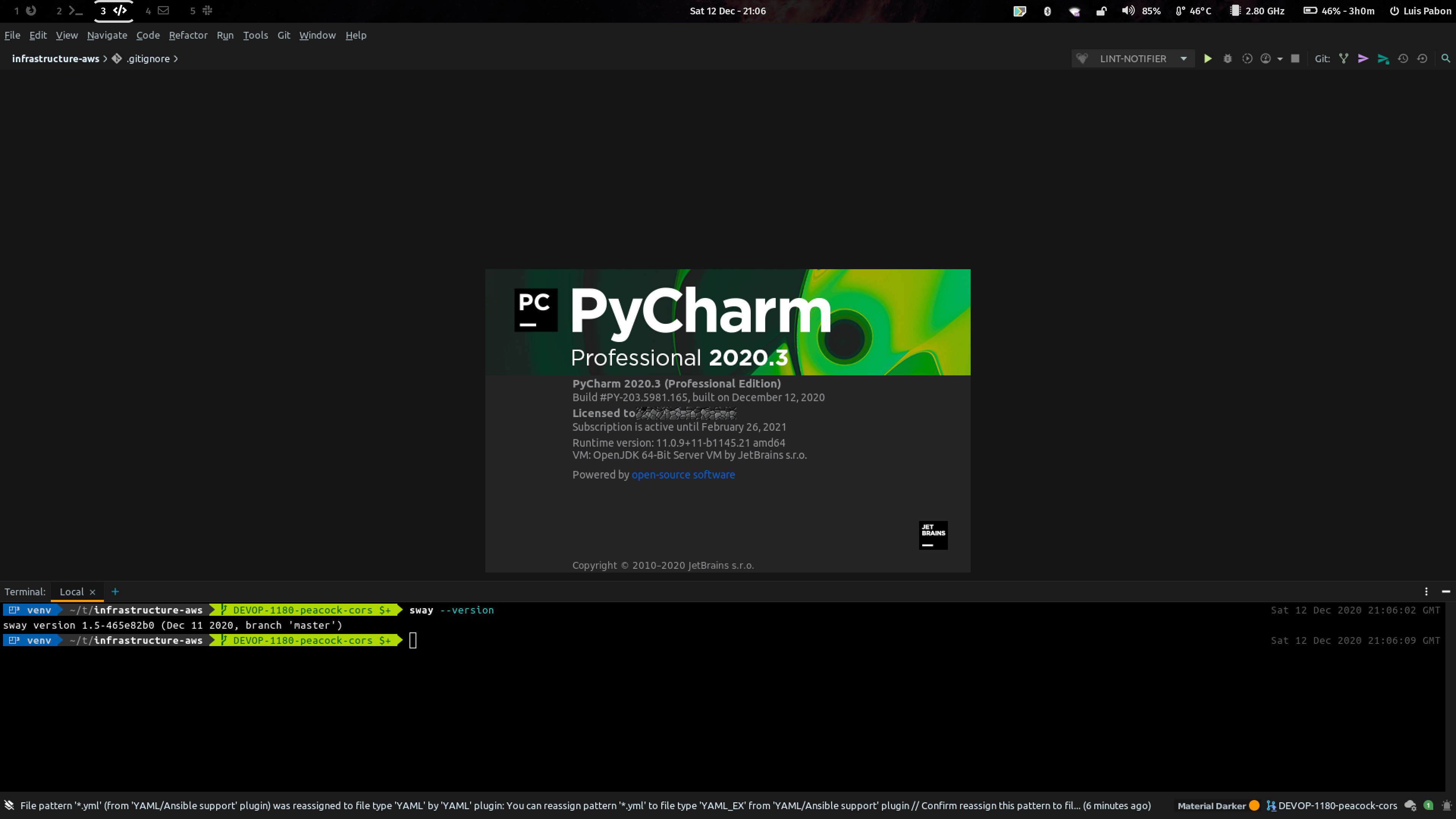
Just got my jetbrainses (pycharm, phpstorm & goland) updated to 2020.3 this week and they're working really well. Even old classics like the "about" window disappearing work now.
I have some floats configured in sway to make sure stuff like the splash screen and various popups are shown as popups and not tillable windows:
for_window [class="jetbrains-(.*)" title="Go to Line/Column"] floating enable
for_window [class="jetbrains-(.*)" title="Rename"] floating enable
for_window [class="jetbrains-(.*)" title="Open Project"] floating enable
for_window [class="jetbrains-(.*)" title="win0"] floating enable
I am on all latest on arch and still does not work. Also applied the additional floating rules. What might be different here?
 mindrunner
on 10 Dec 2020
mindrunner
on 10 Dec 2020
I'm using the snap versions with their built-in java.
luispabon
on 10 Dec 2020
What do you mean by snap version?
mindrunner
on 11 Dec 2020
Snap is a containerised packaging solution by canonical. Similar to flatpak in some ways.
luispabon
on 12 Dec 2020
Aah, yeap. Heard about it. I sometimes forget, that there is a world beyond Arch...
Anyways, most of the important Popups are working fine here (Double Shift, etc)
However, About Dialog still disappears just after being rendered.
mindrunner
on 12 Dec 2020
Definitely working here:
luispabon
on 12 Dec 2020
Related issues
 WhyNotHugo
·
3Comments
emersion
·
4Comments
WhyNotHugo
·
3Comments
emersion
·
4Comments
 J0nnyMak0
·
3Comments
J0nnyMak0
·
3Comments
 RyanDwyer
·
3Comments
RyanDwyer
·
3Comments
 StephenBrown2
·
4Comments
StephenBrown2
·
4Comments
Most helpful comment
Please send a fix