Swashbuckle.aspnetcore: Swagger UI shows empty page - How to fix?
_Stranded here after unsuccessfully publishing this issue at StackOverflow and swagger-api/swagger-ui:_
I added Swashbuckle.AspNet.Core to my repository and initialized everything using defaults.
Although I can see JSON output from /swagger/v1/swagger.json opening /swagger/index.html just yields an empty page.
Why?

Here's my code
```c#
public void ConfigureServices(IServiceCollection services)
{
services
.AddSwaggerGen()
.AddControllers()
;
}
// This method gets called by the runtime once. Use this method to configure the HTTP request pipeline.
public void Configure(IApplicationBuilder app, IWebHostEnvironment env, Options options)
{
if (env.IsDevelopment()) app.UseDeveloperExceptionPage();
app
.UseHttpsRedirection()
.UseRouting()
.UseAuthorization()
.UseEndpoints(endpoints => endpoints.MapControllers())
.UseSwagger()
;
if (env.IsDevelopment()) app.UseSwaggerUI();
}
```
 SetTrend
All 8 comments
Same problem here
Latest stable version of the NuGet package installed

Project is a standard ASP.Net core 3.1 app, straight off the template with no changes:

I've done a standard Swagger setup in the startup class, with no changes

The API works fine

The swagger doc is generated without any issues

Trying to access the UI, results in a blank page

Delving into the developer console shows us this :

The code dies while trying to execute a loop enumerating the urls property on configObject

If we break point just before the error, we see that configObject has no such property present on it

 shawty
on 30 Jul 2020
shawty
on 30 Jul 2020
Update:
If we change our code in Startup.cs so that it reads as follows
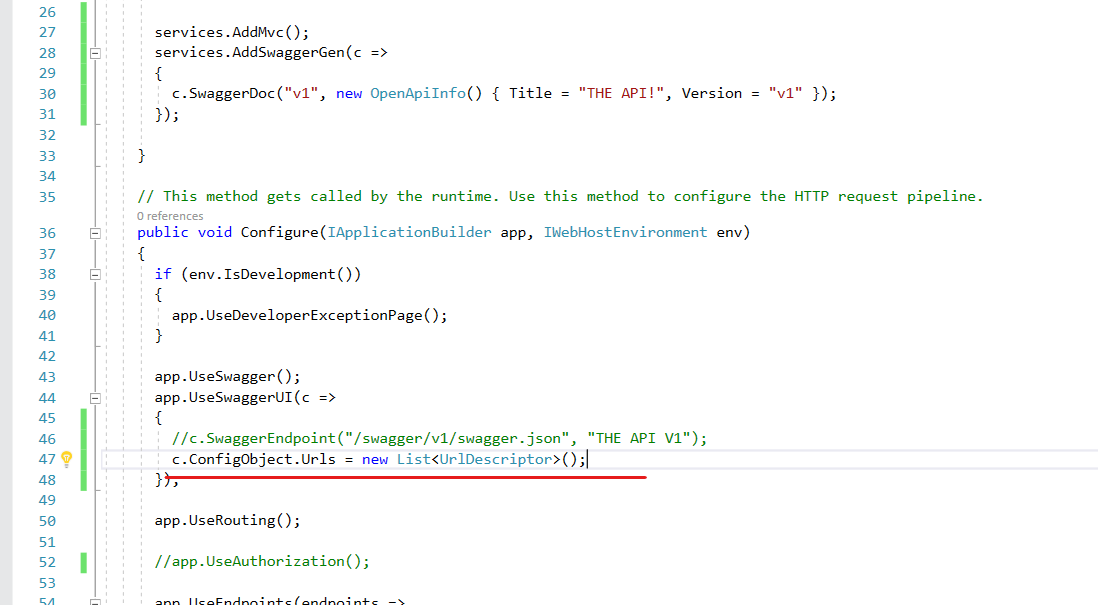
Note the addition of the new line (Underlined in red)
The UI then changes to show the following

The dev tools then show the following failure within "swagger-ui" itself

My guess here would be because there are no actual URL's in the URL collection of the config object.
shawty
on 30 Jul 2020
Update 2:
It appears that the "c.SwaggerEndpoint" call is NOT OPTIONAL and MUST BE SPECIFIED
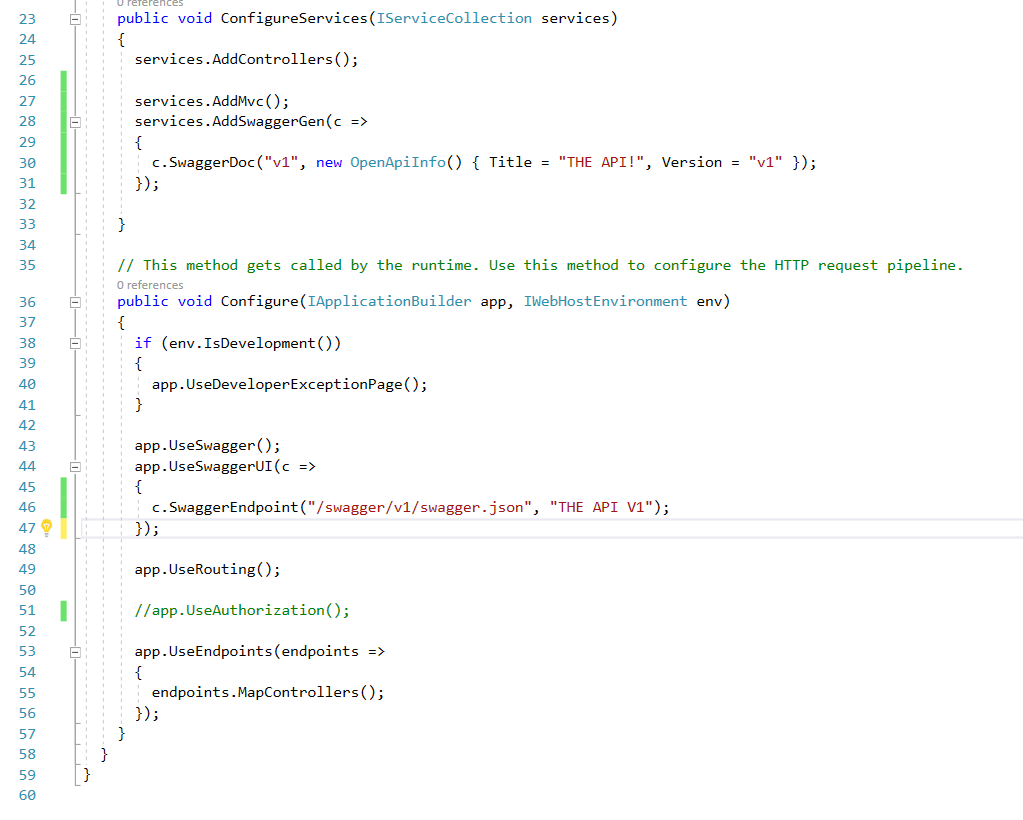
None of the documentation I've read tells the user this, and so it's quite feasible that like myself and @SetTrend that we would leave this out.
As for the reason I had that call commented out in my screen shots above, I was actually trying to solve A 404 error with "/swagger" not being found when I landed here.
I've since figured out that the cause of my problem was bogus advice from the MS-Docs site which suggests setting "c.RoutePrefix" to String.Empty.
@SetTrend for now you can resolve your problem, simply by specifying your "c.SwaggerEndpoint" call in the same manner I do in the above image. This add's a single swagger JSON document object to the UI for you to use.
shawty
on 30 Jul 2020
Excellent research, @shawty!
Thanks for sharing your findings here!
Would you suggest this issue to remain open until things are getting amended or would you suggest to close?
SetTrend
on 31 Jul 2020
I'll leave that descision to you @SetTrend :-)
My gut feeling here, is that it's not actually an issue, more of a case of the documentation needing to specifically say "You MUST do this"
and doc stuff like this is IMHO not an error.
However if it's left open then something which has the potential to be a common source of frustration, esp to new users will at least have a target with solution if it is left open, to help them.
shawty
on 31 Jul 2020
Hmmm ... I have a feeling that Swashbuckle should function properly right from the beginning, without providing any "custom" setting that ain't no custom setting. Instead of having everyone enter the same default line over and over again, the setup should set a default route that may be overwritten.
If that's the way the repository owner would want to go with, I'd gladly provide a pull request. I supposed it would be a snap to implement this?
SetTrend
on 31 Jul 2020
@SetTrend I've not looked deep enough into the code to be honest, it only bit me because I was trying to solve a micro-services rest boundary problem on one of my clients projects :-) but I guess it wouldn't be a huge ache, my best guess without looking at the code would be to copy the default generated URL into the config object in .NET at some appropriate point.
PS: I've answered your Stack Overflow post too :-)
shawty
on 31 Jul 2020
I now created a pull-request to solve this issue. If you like it, please up-vote 😏
SetTrend
on 2 Aug 2020
Related issues
 IanElsinga
·
20Comments
IanElsinga
·
20Comments
 ghost
·
51Comments
ghost
·
51Comments
 preese13
·
20Comments
preese13
·
20Comments
 cmaslen
·
25Comments
cmaslen
·
25Comments
 Tazer
·
20Comments
Tazer
·
20Comments
Most helpful comment
@SetTrend I've not looked deep enough into the code to be honest, it only bit me because I was trying to solve a micro-services rest boundary problem on one of my clients projects :-) but I guess it wouldn't be a huge ache, my best guess without looking at the code would be to copy the default generated URL into the config object in .NET at some appropriate point.
PS: I've answered your Stack Overflow post too :-)