Swashbuckle.aspnetcore: Help needed to implement custom authentication using new version?
Hello,
I implemented custom authentication using earlier version of Swashbuckle.AspNetCore by injecting a JS file, but it is not working with new version (adding old JS code below).
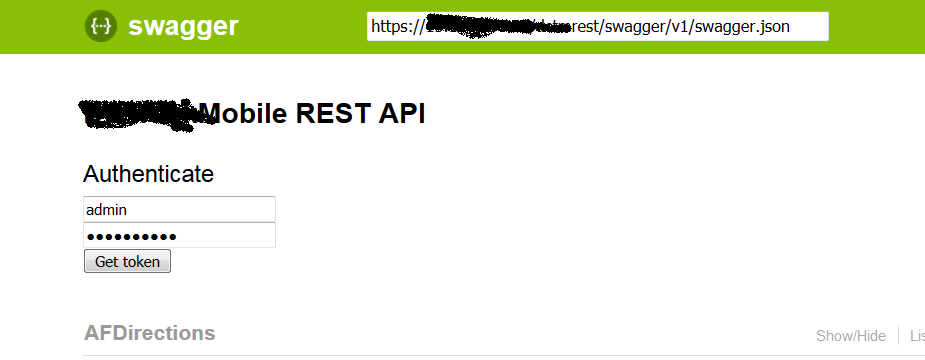
is there any way to resolve this with new version? Also is it possible to add User name password controls just below top bar for user input as shown in the attached image:
How old code works:
User name and Password controls for user input
JS code processes the input and get JWT token and attach it with Swagger request.
old js code:
(function () {
$(function () {
var tokenUi = '
Authenticate
' +'' +
'
' +
'' +
'
' +
'' +
'
' +
'
$(tokenUi).insertBefore("#resources_container");
    $("#input_authenticate").click(function () {
        var username = $("#input_username").val();
        var password = $("#input_password").val();
        encryptString(username, password);

    });
});


function getToken(username, password) {
    var request = "{ \"UserName\":\"" + username + "\", \"Password\":\"" + password.replace(/\"/g, "") + "\"}";
    $.ajax({
        contentType: "application/json",
        type: "post",
        url: "/api/auth/token",
        dataType: "json",
        data: request,
        success: function (data) {

            addAuthorization(data.tokentype + " " + data.token);
        },
        error: function (data) {
            alert(data.responseText);
            $("#input_username").val('');
            $("#input_password").val('');
        }
    });
};
function encryptString(username, password) {

    $.ajax({
        contentType: "application/json; charset=utf-8",
        type: "get",
        url: "/api/auth/token/encryptstring" + "/" + password,
        dataType: "text",
        data: "{}",
        success: function (data) {
            getToken(username, data);
        },
        error: function (data) {
            alert(data.responseText);
            $("#input_username").val('');
            $("#input_password").val('');
        }
    });
};

function addAuthorization(key) {
    window.swaggerUi.api.clientAuthorizations.add("key", new SwaggerClient.ApiKeyAuthorization("Authorization", key, "header"));
};
})();
 JKullappagari
All 2 comments
I find that it's rather difficult to implement custom authorization. The Swagger spec doesn't have a "custom" security scheme, so you have to make do with apikey/oauth/basic.
It seems that you only need a username and password. I'd suggest the following:
- Define a basic auth security scheme in ConfigureServices
services.AddSwaggerGen(s =>
{
    s.AddSecurityDefinition("Custom", new BasicAuthScheme { Description = "Custom Auth" })
});
- Decorate your endpoints with a custom SwaggerOperationFilter:
public class CustomAuthOperationFilter: IOperationFilter
{
    public void Apply(Operation operation, OperationFilterContext context)
    {
        if (operation.Security == null)
            operation.Security = new List<IDictionary<string, IEnumerable<string>>>();
        operation.Security.Add(new Dictionary<string, IEnumerable<string>>
        {
            { "Custom", new string []{} } // this should match the security definition name
        });
    }
}
[SwaggerOperationFilter(typeof(CustomAuthOperationFilter))]
public Task<IActionResult> Operation() {
    // ...
}


md5-60e8ed4f47fc8ab6cf84aa1ee8a75535


app.UseSwaggerUI(s =>
{
     s.IndexStream = () => new FileStream($"{AppDomain.CurrentDomain.BaseDirectory}/wwwroot/swagger.html", FileMode.Open);
});


md5-717107532990bffa082aa153a3c2034f


md5-4c70a0884d770a91b080618f32a379d1


md5-691c4ebe3feaa9f508c32b61dcdda7a3


function requestInterceptorCallback(request) {
    // kind of hacky, but the request interceptor callback is called for everything. there's really no way to
    // tell why it was called, so we guess as best we can
    if (typeof swaggerUi !== 'undefined') {
        var auth = swaggerUi.auth().toJS();
        if (auth.authorized) {
            if (auth.authorized.Custom)
                // setCustomHeaders will contain the logic you have above (encryptString(), getToken()
                request = setCustomHeaders(request, auth.authorized.Custom.value.username, auth.authorized.Custom.value.password);
        }
    }
    return request;
}


md5-d55a0b304919add35d79027f1c10f7eb


app.UseSwaggerUI(s =>
{
    s.InjectJavascript("/Scripts/customauth.js");
});
Like I said, not easy. I think the experience of implementing a custom auth scheme has led me to the following suggestions:
- Provide more information to requestInterceptor - why was it called? Perhaps have a "request.operation" object if you're making a "Try it Out" request.
- Why isn't the password included in the auth() state? It is included in the oauth2 state...
- Swashbuckle should make it easier to define a requestInterceptor that doesn't require overriding the index.html page.
Additionally I note that the oauth2 security scheme will try to do basic authentication with client_id/client_secret during password flow if a basic scheme has already been authorized. If I log out of the basic scheme, then oauth2 returns to its default behavior of including it in the request body, like I want it to.
Overall, this was far too difficult and time-consuming to figure out. There is no documentation on how to do what is probably not an uncommon API requirement. I spent a lot of time in the debugger and source code to come up with this, and I don't see that it would have been implemented better given the current state of SwaggerUI. I guess some of this is targeted at the SwaggerUI people, but my comment about making it easier to define a requestInterceptor is specific to Swashbuckle.
 cubikca
on 28 Jul 2018
cubikca
on 28 Jul 2018
Thanks for your suggestion. Let me try this.
JKullappagari
on 2 Aug 2018
Related issues
 flipchart
·
4Comments
flipchart
·
4Comments
 jderus
·
4Comments
jderus
·
4Comments
 nezoic
·
3Comments
nezoic
·
3Comments
 rgelb
·
3Comments
rgelb
·
3Comments
 brucewilkins
·
3Comments
brucewilkins
·
3Comments
Most helpful comment
I find that it's rather difficult to implement custom authorization. The Swagger spec doesn't have a "custom" security scheme, so you have to make do with apikey/oauth/basic.
It seems that you only need a username and password. I'd suggest the following:
Like I said, not easy. I think the experience of implementing a custom auth scheme has led me to the following suggestions:
Additionally I note that the oauth2 security scheme will try to do basic authentication with client_id/client_secret during password flow if a basic scheme has already been authorized. If I log out of the basic scheme, then oauth2 returns to its default behavior of including it in the request body, like I want it to.
Overall, this was far too difficult and time-consuming to figure out. There is no documentation on how to do what is probably not an uncommon API requirement. I spent a lot of time in the debugger and source code to come up with this, and I don't see that it would have been implemented better given the current state of SwaggerUI. I guess some of this is targeted at the SwaggerUI people, but my comment about making it easier to define a requestInterceptor is specific to Swashbuckle.