Swashbuckle.aspnetcore: 2.0.0 Swagger nGinx Location Mapping Relative URL
To be honest i'm not sure if this is a bug or not.
I have a nginx RP running with a location tag of _api/account, and it's pointing to the internal hosted application. Which ends up being http://localhost:8080/_api/account -> http://localhost:56530.
I... ASSUMED, possibly incredibly incorrectly.
That if i was to simply use a relative URL that it would pick it up on http://localhost:8080/_api/account/swagger/
And change the discovery URL.

It's pretty basic roll out,
 app.UseSwaggerUI(c =>
            {
             //   c.SwaggerEndpoint("/swagger/v1/swagger.json", "My API V1");
                c.SwaggerEndpoint("/_api/account/swagger/v1/swagger.json", "Route");
              });
Should the relative path use the request URI or is it simply going to use the internal application.
If i end up using just the simple /swagger/v1/swagger.json, it ends up like.
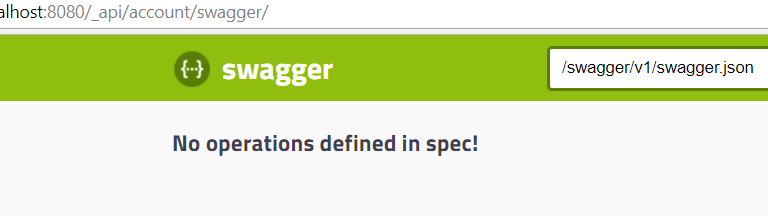
When i use:
app.UseSwaggerUI(c =>
            {
             //   c.SwaggerEndpoint("/swagger/v1/swagger.json", "My API V1");
               // c.SwaggerEndpoint("/_api/account/swagger/v1/swagger.json", "Route");
                c.SwaggerEndpoint("swagger/v1/swagger.json", "My API V1");
            });
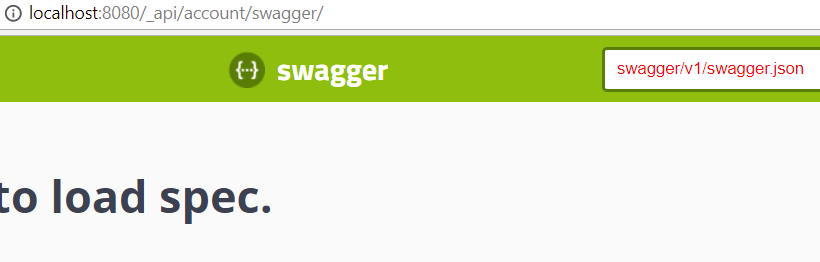
The nginx config just has a simple pass through.
  location /_api/account/ {
            proxy_redirect off;
            proxy_pass http://localhost:56530/;
            proxy_set_header Host $host;
        }
 vaustral
All 2 comments
It’s relative to the UI itself, which looks from your screen shot to be - http://localhost:8080/_api/account/swagger. If you include a leading slash it’s relative to the host. You want to make it relative to the UI. So ...
SwaggerEndpoint(“v1/Swagger.json”)
 domaindrivendev
on 23 Feb 2018
domaindrivendev
on 23 Feb 2018
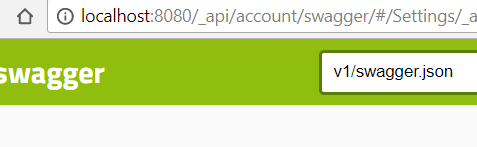
drops head on desk it works, thank you.
app.UseSwaggerUI(c =>
            {

              //  c.SwaggerEndpoint("/swagger/v1/swagger.json", "My API V1");
                c.SwaggerEndpoint("v1/swagger.json", "Route");
                //c.SwaggerEndpoint("swagger/v1/swagger.json", "My API V1");
            });
vaustral
on 23 Feb 2018
Related issues
 RehanSaeed
·
55Comments
RehanSaeed
·
55Comments
 neothoms
·
28Comments
neothoms
·
28Comments
 chrizy
·
22Comments
chrizy
·
22Comments
 danielPollackGitHub
·
27Comments
danielPollackGitHub
·
27Comments
 cjamesrohan
·
22Comments
cjamesrohan
·
22Comments
Most helpful comment
It’s relative to the UI itself, which looks from your screen shot to be - http://localhost:8080/_api/account/swagger. If you include a leading slash it’s relative to the host. You want to make it relative to the UI. So ...
SwaggerEndpoint(“v1/Swagger.json”)