Swashbuckle.aspnetcore: Default route issue http://localhost:port/swagger 404 error since VS2017 15.5.1
I recently upgraded Visual Studio 2017 15.5.1.
So far everything was working fine developing .NET Core (2.0) web apis but after the updates the problems started. The problems occur on existing projects as well as newly created ones.
When I now configure the App URL settings in the project properties to start at http://localhost:50000/swagger the browser opens and shows the wrong url, namely http://localhost:50000/swagger/api/values with the correct response of the ValuesController but not the swagger ui. At this point it shouldn't have the extension /api/values since it is not configured and I don't know why or where this is added (it's not in the configuration).
If I now enter (without stopping the app) http://localhost:50000/swagger I start receiving 404 errors an urls, even on http://localhost:50000/api/values.
If I now enter (without stopping the app) http://localhost:50000/swagger/swagger !!! UI shows but with issue about swagger.json of course.
Firing end points at this step seems to work but with strange 500.19 for somes. At this step no breakpoint in the debug are active and app is not stopping anymore on any breakpoints.
Nothing in configuration have changed only upgrade to VS2017 15.5.1.
Any idea to fix ?
Someone else have issue ?
 PhilippeCamou
All 30 comments
You could try to use this in Startup class
c#
public void Configure(IApplicationBuilder app, IHostingEnvironment env)
{
    app.UseSwaggerUI(options =>
    {
        options.RoutePrefix = "swagger/ui";
    });
}
 ChaosEngine
on 14 Dec 2017
ChaosEngine
on 14 Dec 2017
Thanks for reply but it has no effect.
I tried all what is possible around RoutePrefix and at the end UI shows with cascading 3 /swagger : http://localhost:50000/swagger/swagger/swagger !!!!!
There is an issue swagger / vs2017 15.5.1 or vs2017 15.5.1 / swagger as nothing changed but it stoped working.
Yes terday evening was at 4 http://localhost:50000/swagger/swagger/swagger/swagger when decide delete .vs directory of my solution to back at least at 2 http://localhost:50000/swagger/swagger....
PhilippeCamou
on 14 Dec 2017
To let you know i found a temporary fix :
1 - keep starting url in project option : http://localhost:50000/swagger.
2 - in startup.cs :
app.UseSwaggerUI(c =>
{
// force to add another /swagger to fix issue
c.SwaggerEndpoint("/swagger/swagger/v1/swagger.json", "My API V1");
});
3 : manually enter URL in chrome when app launched : http://localhost:50000/swagger/swagger.
Seems to work fine at this step.
App stpp on breakpoint as before.
But in my idea there is something to fix.
PhilippeCamou
on 14 Dec 2017
+1
SwaggerUI suddenly stopped working after upgrading Visual Studio.
http://localhost:50000/swagger/swagger does the job as a temp workaround.
 ppopadiyn
on 21 Dec 2017
ppopadiyn
on 21 Dec 2017
Had same issue, the swagger/swagger fix works, but is not good. Any one know whats going on?
UPDATE
It seems that swagger is somehow adding the routeprefix of swagger to every endpoint, so my "topics" controller actually is at /swagger/topics....
 matt-lethargic
on 2 Jan 2018
matt-lethargic
on 2 Jan 2018
any updates?
 alperen-kaplan
on 9 Jan 2018
alperen-kaplan
on 9 Jan 2018
Same here... I'be wasted whole day looking for a solution. This is not because VisualStudio but IIS Express.
Solution:
Update vs to 15.5.3 +
Delete .vs folder
Remember about '/' in path
c.SwaggerEndpoint("/swagger/v1/swagger.json", "My API V1");
I had error with swagger/swagger/swagger so I assumed that it is because IIS express configuration file :)
 Sebastian506563
on 11 Jan 2018
Sebastian506563
on 11 Jan 2018
Thank you sebastianpec!
For what it's worth I can reproduce this consistently now by setting the app url to
 tpferrara
on 12 Jan 2018
tpferrara
on 12 Jan 2018
Thanks Guys for helping me out with this exact scenario. I lost a full day of trying to debug.
I too updated VS and..bam....no more swagger.
Thanks to everyone for the work around. It worked for me.
1) deleted vs folder
2) changed
app.UseSwaggerUI(s =>
{
s.SwaggerEndpoint("/swagger/v1/swagger.json", "My Project API");
});
to
app.UseSwaggerUI(s =>
{
s.SwaggerEndpoint("/swagger/swagger/v1/swagger.json", "My Project API");
});
Albeit not the perfect scenario, but got me back to coding.
Hope this gets fixed in next version.
 henry-rodriguez
on 17 Jan 2018
henry-rodriguez
on 17 Jan 2018
I was also experiencing this issue. I couldn't get /swagger to work (would always kick to /swagger/swagger, but I was able to get api/docs to work with the following config:
      // Creates Swagger JSON
      app.UseSwagger(c =>
      {
        c.RouteTemplate = "api/docs/{documentName}/swagger.json";
      });

      // Enable middleware to serve swagger-ui (HTML, JS, CSS, etc.), specifying the Swagger JSON endpoint.
      app.UseSwaggerUI(c =>
      {
        c.SwaggerEndpoint("/api/docs/v1/swagger.json", "AnnexUI API V1");
        c.RoutePrefix = "api/docs";
      });
It may be worth noting that /swagger was working fine for me, even after updating visual studio. It wasn't until I edited my launchsettings.json file for the first time that this problem cropped up. Reverting the changes did not fix the issue.
 dannyrb
on 24 Jan 2018
dannyrb
on 24 Jan 2018
Fast fix:
- Go to project->properties->debug
- change App URL from http://localhost:52120/swagger to http://localhost:52120
- Run
- In browser go to http://localhost:52120/swagger
this fix wont change swagger urls, it is important if you have oauth authentication.
 lomchik
on 16 Feb 2018
lomchik
on 16 Feb 2018
For those still experiencing this issue:
- Change the application URL back to your default path without '/swagger'.
- Add 'swagger' to the 'Launch Browser' property (right click project, properties -> Debug).
- Open .vs/config/applicationhost.config and remove all application entries with the '/swagger' path on your site.
Should now work as expected
What was happening:
Swagger was appending the route to the end of your application path, if your application path is set as localhost:53250/swagger for example, then the swagger application will be {appUrl}/swagger which in this case would be localhost:53250/swagger/swagger.
VS have a property 'Launch Browser' which will leave the default application URL and just append the path which you want to browse, which in this case you want as swagger or your API docs.
VS also saves each and every application path you enter, so if you had once entered the path with a /swagger route, it will still be saved in the .config and hence each time you try to go to {app}/swagger it is going to the apps route, not to the route with /swagger appended.
 TeqGreg
on 27 Feb 2018
TeqGreg
on 27 Feb 2018
Is this an issue with SB, and if so what needs to change because it’s not clear to me? Or, can we close the issue now?
 domaindrivendev
on 28 Feb 2018
domaindrivendev
on 28 Feb 2018
As per Greg post 👍 here is a FUNCTIONAL launchSettings.json
{
"iisSettings": {
"windowsAuthentication": false,
"anonymousAuthentication": true,
"iisExpress": {
"applicationUrl": "http://localhost:51564/",
"sslPort": 0
}
},
"profiles": {
"IIS Express": {
"commandName": "IISExpress",
"launchBrowser": true,
"launchUrl": "swagger",
"environmentVariables": {
"ASPNETCORE_ENVIRONMENT": "Development"
}
},
"Ocuco.Web.Application": {
"commandName": "Project",
"launchBrowser": true,
"launchUrl": "api/values",
"environmentVariables": {
"ASPNETCORE_ENVIRONMENT": "Development"
},
"applicationUrl": "http://localhost:51565/"
}
}
}
backed to normal declaration in startup.cs
..... configureapp
app.UseSwaggerUI(c =>
{
c.SwaggerEndpoint("/swagger/v1/swagger.json", "My API V1");
});
....
Delete ".vs" directory locally to ensure VS recreate it correctly and it works...
Then yes issue can be close on my side
PhilippeCamou
on 28 Feb 2018
The issues is with appliacationhost.config after changing project properties > debug > App url. In my case I had to remove the following node from appliacationhost.config:
<application path="/swagger" applicationPool="Clr4IntegratedAppPool">
           <virtualDirectory path="/" physicalPath="C:\src\LM\LM.Web" />
 </application>
 laszczm
on 6 Apr 2018
laszczm
on 6 Apr 2018
In swagger 2.4.0 this is still a bug.
Repro steps:
- Set App URL to http://localhost:xxxxx/Swagger
- Run the app
- Navigate to http://localhost:xxxxx/Swagger/Swagger, and find Swagger there, unable to load the swagger json file
Recovery:
- Remove Swagger from the App URL
- Delete the .vs folder, and allow it to be rebuilt
- All is right with the world
 JamieMeyerImagine
on 9 May 2018
JamieMeyerImagine
on 9 May 2018
Same issue as @JamieMeyerImagine
Deleting the .vs folder worked for me too
Swagger 2.4.O
VS Enterprise 15.7.1
 JonLopezGarcia
on 11 May 2018
JonLopezGarcia
on 11 May 2018
you must deploy .Net Core application to IIS.
follow this guide.
https://neelbhatt.com/2018/01/30/deploy-net-core-application-to-iis-step-by-step-guide/
I was successful
 phanchaulong
on 16 May 2018
phanchaulong
on 16 May 2018
Guys this helped me. The issue is that you need to add / to the end of the url.
Accessinglocalhost:port/swagger/ui without slash at the end will result redirecting to swagger/swagger/ui/ and 404 error.
To make things work, add / at the end of swagger url:
localhost:port/swagger/ui/
(Pay attention to last slash: ui/)
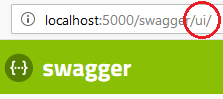
Example configuration:
                app.UseSwaggerUI(x =>
                {
                    x.RoutePrefix = "swagger/ui";
                });
 gmaf
on 23 May 2018
gmaf
on 23 May 2018
Try use this tutorial:
Enabling Swagger In Your .NET Core 2.0 Application - A Step By Step Guide
 lenoln
on 15 Jun 2018
lenoln
on 15 Jun 2018
I just installed Swashbuckle.AspNetCore 3.0.0. It worked for the first time. I was able to access the documentation via http://localhost:58030/swagger Then I removed the ValuesController (default controller in the VS template) and updated the LaunchUrl in launchSettings.json. Since then I have this same issue. No other changes were made and I use Visual Studio 2017.
 nxp2910
on 15 Aug 2018
nxp2910
on 15 Aug 2018
I have the same problem, unable to use swagger wtih VS2017. Chrome return ERR_CONNECTION_REFUSED
And yet I followed different tutorials and I created 5 test projects. I feel like I have tried everything.
 MatthieuHernandez
on 17 Oct 2018
MatthieuHernandez
on 17 Oct 2018
I had the same problem, Delete vs folder and it is working again. I am sure this is the perfect solution.
 bhosalemahesh899
on 28 Oct 2018
bhosalemahesh899
on 28 Oct 2018
The issue seems to be still actual. I have just updated VS to 15.9.3 and Swagger stopped working showing 404.
Configuration as follows:
            services.AddSwaggerGen(c =>
            {
                c.SwaggerDoc("v1", new Info { Title = "Travel API", Version = "v1" });
            });
            app.UseSwagger();
            app.UseSwaggerUI(c =>
            {
                c.SwaggerEndpoint("/swagger/v1/swagger.json", "Travel Miser API V1");
            });

            app.UseMvc();
Steps proceeded:
- .vs removed
- libraries reinstalled
- adding RoutePrefix
but all above unsuccessful.
Does anyone have any idea?
 slawek-kobiec
on 7 Dec 2018
slawek-kobiec
on 7 Dec 2018
I am having an issue with swashbuckle(4.0.1) on my .net core web api hosted on kubernetes...
after some time some endpoins on swagger UI disappears, even though they still work when called externally.
Any ideas?
 AndreCastilhoFilho
on 28 Dec 2018
AndreCastilhoFilho
on 28 Dec 2018
I'm having the same problem with version 4.0.1 and VS2019. Was anyone able to fix it or has any workaround?
PS: I was able to call [/swagger/v1/swagger.json] but UI does not work.
 vishwas-trivedi
on 2 Jun 2019
vishwas-trivedi
on 2 Jun 2019
For me, I happened after I moved my project to a different directory. Based upon one of the posts above I inspected by applicationhost.config file and under the
 rezlab
on 20 Jun 2019
rezlab
on 20 Jun 2019
Mine was a simple delete of the .vs folder. Thanks for all the tips on this page.
 joshmcode
on 29 Jul 2019
joshmcode
on 29 Jul 2019
even if the issue is in a closed state I would add to the previous answers that the main probleme resides in the configuration od IIS Express associated with visual studio 17.x and up,
You have just to create a new virtual directory with a new port number for the webApi Application after you have installed and configured Swagger on it.
 goliasse
on 28 Oct 2019
goliasse
on 28 Oct 2019
In my case, the following code in the Startup.cs file "if (env.IsDevelopment())" results to false because the IWebHostEnvironment was not recognized as 'Development'. In debug mode with a breakpoint set on the if statement, I can easily see the code inside the if statement being skipped. If I manually force it to execute the code inside the if statement, all works fine.
So, I realize that I was missing the environment variable: "environmentVariables": {"ASPNETCORE_ENVIRONMENT": "Development"} As PhilippeCamou mentioned in his previous link .
Once I added the environment variable, as mentioned below, all works fine.
"profiles": {
"IIS Express": {
"commandName": "IISExpress",
"launchBrowser": true,
"launchUrl": "swagger",
"environmentVariables": {
"ASPNETCORE_ENVIRONMENT": "Development"
}
},
 feli1998
on 10 Jan 2021
feli1998
on 10 Jan 2021
Related issues
 NinoFloris
·
3Comments
NinoFloris
·
3Comments
 mrmartan
·
3Comments
mrmartan
·
3Comments
 govin
·
3Comments
govin
·
3Comments
 nezoic
·
3Comments
nezoic
·
3Comments
 jluqueba
·
4Comments
jluqueba
·
4Comments
Most helpful comment
For those still experiencing this issue:
Should now work as expected
What was happening:
Swagger was appending the route to the end of your application path, if your application path is set as localhost:53250/swagger for example, then the swagger application will be {appUrl}/swagger which in this case would be localhost:53250/swagger/swagger.
VS have a property 'Launch Browser' which will leave the default application URL and just append the path which you want to browse, which in this case you want as swagger or your API docs.
VS also saves each and every application path you enter, so if you had once entered the path with a /swagger route, it will still be saved in the .config and hence each time you try to go to {app}/swagger it is going to the apps route, not to the route with /swagger appended.