Swashbuckle.aspnetcore: Uploading a File using IFormFile Should Show an Upload Button
I am using IFormFile in the following action method to upload a file to my API. This causes the Swagger UI to display a text box. Is there a way to show an upload button in the Swagger UI to upload a file with the application/zip MIME type?
[HttpPost("{GuideId}/content", Name = GuidesControllerRouteName.PostZipFile)]
[Consumes("application/zip")]
[ProducesResponseType(typeof(void), StatusCodes.Status201Created)]
[ProducesResponseType(typeof(void), StatusCodes.Status404NotFound)]
public Task<IActionResult> PostZipFile([FromBody] IFormFile zipFile)
{
}
In addition, I've tried using the following IOperationFilter based on this MVC 5 Swashbuckle code without success:
public class FormFileSchemaFilter : IOperationFilter
{
    public void Apply(Operation operation, OperationFilterContext context)
    {
        if (context.ApiDescription.ParameterDescriptions.Any(x => x.Type == typeof(IFormFile)))
        {
            var bodyParameter = operation.Parameters.OfType<BodyParameter>().First();
            bodyParameter.In = "formData";
            bodyParameter.Required = true;
            bodyParameter.Schema.Type = "file";
        }
    }
}
 RehanSaeed
All 55 comments
Another thing I've tried is abandoning using IFormFile altogether and using a Stream like so:
[HttpPost("{GuideId}/content", Name = "PostZipFile")]
[Consumes("application/zip")]
[ProducesResponseType(typeof(void), StatusCodes.Status201Created)]
[ProducesResponseType(typeof(void), StatusCodes.Status404NotFound)]
public Task<IActionResult> PostZipFile([FromBody] Stream stream)
{
}
In this case, according to the Swagger spec I'm not using a mulit-part form post so no need for an operation filter. However, this also shows a text box.
RehanSaeed
on 17 Oct 2016
Janak S. has provided an excellent solution for this. I believe it should produce your desired results.
Solution
All credit goes to Janak!
My Example:
Controller
public async Task<IActionResult> UploadFile(IFormFile filePayload) { var fileName = ContentDispositionHeaderValue .Parse(filePayload.ContentDisposition) .FileName .Trim('"'); if (filePayload.Length > 0) using (var fileStream = new FileStream(Path.Combine($"{_config.GetValue<string>("FileUploadPath")}", fileName), FileMode.Create)) await filePayload.CopyToAsync(fileStream); return new OkObjectResult("Success"); }
Operation Filter
public class FileOperationFilter : IOperationFilter { public void Apply(Operation operation, OperationFilterContext context) { if (context.ApiDescription.ParameterDescriptions.Any(x => x.ModelMetadata.ContainerType == typeof(IFormFile))) { operation.Parameters.Clear(); operation.Parameters.Add(new NonBodyParameter { Name = "FilePayload", // must match parameter name from controller method In = "formData", Description = "Upload file.", Required = true, Type = "file" }); operation.Consumes.Add("application/form-data"); } } }
Swagger config
services.AddSwaggerGen(c => { c.OperationFilter<FileOperationFilter>(); });

 temelvin
on 19 Oct 2016
temelvin
on 19 Oct 2016
Thanks for that, most useful.
When should you use IFormFile over just using this.Request.Body.Stream? What are the advantages of using IFormFile. I can understand using IFormFile to upload files in an MVC web app but what is the correct method of uploading files using ASP.NET Core when writing an API that would be consumed by a mobile device for example.
According to the Swagger specs, Type = "file" is only relevant for application/form-data. Is it possible to get a file upload button using this.Request.Body.Stream?
RehanSaeed
on 21 Oct 2016
I have written a more robust and generic version of FormFileOperationFilter. It supports:
- Just add it and it will do the right thing for any
IFormFileparameter found. - Other parameters can be used along with
IFormFile. - It adds the
formDataparameter in the correct order if you have other parameters. - It adds the
application/form-dataMIME type only if required.
Stuff that's missing:
- Support for
ICollection<IFormFile>. - It does not pick up the formFile parameter comment from the action method but instead just hard-codes it as "The file to upload".
Perhaps this should be in a PR?
public class FormFileOperationFilter : IOperationFilter
{
    private const string FormDataMimeType = "multipart/form-data";
    private static readonly string[] FormFilePropertyNames =
        typeof(IFormFile).GetTypeInfo().DeclaredProperties.Select(x => x.Name).ToArray();

    public void Apply(Operation operation, OperationFilterContext context)
    {
        if (context.ApiDescription.ParameterDescriptions.Any(x => x.ModelMetadata.ContainerType == typeof(IFormFile)))
        {
            var formFileParameters = operation
                .Parameters
                .OfType<NonBodyParameter>()
                .Where(x => FormFilePropertyNames.Contains(x.Name))
                .ToArray();
            var index = operation.Parameters.IndexOf(formFileParameters.First());
            foreach (var formFileParameter in formFileParameters)
            {
                operation.Parameters.Remove(formFileParameter);
            }

            var formFileParameterName = context
                .ApiDescription
                .ActionDescriptor
                .Parameters
                .Where(x => x.ParameterType == typeof(IFormFile))
                .Select(x => x.Name)
                .First();
            var parameter = new NonBodyParameter()
            {
                Name = formFileParameterName,
                In = "formData",
                Description = "The file to upload.",
                Required = true,
                Type = "file"
            };
            operation.Parameters.Insert(index, parameter);

            if (!operation.Consumes.Contains(FormDataMimeType))
            {
                operation.Consumes.Add(FormDataMimeType);
            }
        }
    }
}
@RehanSaeed - I would like to get better support for file uploads out-of-the-box. If it goes into the main code though, it might make more sense to add to the SwaggerGenerator instead of as an operation filter.
If you're interested in creating a PR that would be awesome - I'll mark it down for the 6.1 milestone and we can discuss the implementation details further. For now, I'm focused on getting 6.0.0 out.
Thanks for the support
 domaindrivendev
on 14 Nov 2016
domaindrivendev
on 14 Nov 2016
@domaindrivendev Will see about the PR if I get time. I realized that my code does not work if I create a model class which contains a IFormFile property. How do you handle this elsewhere?
Creating a model class is important if you want to write a custom validator attribute to validate IFormFile's to check for zero byte files, files too large and correct MIME types. The alternative is to add this validation logic in my action method which is ugly.
RehanSaeed
on 30 Nov 2016
@RehanSaeed, try this
@domaindrivendev, IFormFile is a general case, and practicing shamanism with IOperationFilter for this general case is not what all of us want.
Do you have plans of adding this case or would you like a pull request from us?
 xperiandri
on 10 Jan 2017
xperiandri
on 10 Jan 2017
@xperiandri - yes it's a known issue that I would like to address and yes I would like a PR. I'm always interested in PR's so long as they come with tests.
Ideally this would live in the SwaggerGenerator. However, there's some behavior in ApiExplorer that makes this change more difficult than in should be - that is, it flattens out complex type properties for all non-body (i.e. no FromBodyAttribute) action parameters into multiple ApiParameterDescriptions. I've submitted an issue to the ASP.NET Core folks and it sounds like they might take a look at improving things - https://github.com/aspnet/Mvc/issues/5673.
So, in the meantime, I'd be open to fixing Swashbuckle by wiring up an OperationFilter similar to yours out-of-the-box. Similar to the Annotations filters already there. Sounds like your one is close but still doesn't address the scenario where a class contains an IFormFile property. That and a few tests and we'd be good to go. Let me know if you have some cycles to look into this. Thanks for your support
domaindrivendev
on 11 Jan 2017
Yep, I didn't test it on a model with IFormFile property
xperiandri
on 11 Jan 2017
@RehanSaeed
I had to modify the filter a little bit to mix FromQuery parameters with IFormFile
The Query parameter may clash with file form fields. 'Name' for example.
I had to add
.Where(x => x.In == "form")
in
var formFileParameters = operation
                    .Parameters
                    .OfType<NonBodyParameter>()
                    .Where(x => x.In == "form")
                    .Where(x => FormFilePropertyNames.Contains(x.Name))
                    .ToArray();
                var index = operation.Parameters.IndexOf(formFileParameters.First());
 jonnybi
on 3 Feb 2017
jonnybi
on 3 Feb 2017
I've looked at all attempts in this issue and in #261 and combined the attempts to this OperationFilter.
To be clear, it supports a IFormFile property as an action parameter, a class as action parameter containing an IFormFile property. I've also fixed the bug the @jonnybi mentioned.
Setting the required property is not the responsibility of this filter IMO, it should be set with the required attribute because it might be optional. So I've removed that part from the filter.
If you guys agree I will write some tests and create a PR. Hopefully I'll have some time the coming week or so to write the tests.
``` c#
///
/// Adds support for IFormFile parameters in Swashbuckle.
///
public class FormFileOperationFilter : IOperationFilter
{
// TODO: Support ICollection
private const string formDataMimeType = "multipart/form-data";
private static readonly string[] formFilePropertyNames =
    typeof(IFormFile).GetTypeInfo().DeclaredProperties.Select(p => p.Name).ToArray();

public void Apply(Operation operation, OperationFilterContext context)
{
    var parameters = operation.Parameters;
    if (parameters == null || parameters.Count == 0) return;

    var formFileParameterNames = new List<string>();
    var formFileSubParameterNames = new List<string>();

    foreach (var actionParameter in context.ApiDescription.ActionDescriptor.Parameters)
    {
        var properties =
            actionParameter.ParameterType.GetProperties()
                .Where(p => p.PropertyType == typeof(IFormFile))
                .Select(p => p.Name)
                .ToArray();

        if (properties.Length != 0)
        {
            formFileParameterNames.AddRange(properties);
            formFileSubParameterNames.AddRange(properties);
            continue;
        }

        if (actionParameter.ParameterType != typeof(IFormFile)) continue;
        formFileParameterNames.Add(actionParameter.Name);
    }

    if (!formFileParameterNames.Any()) return;

    var consumes = operation.Consumes;
    consumes.Clear();
    consumes.Add(formDataMimeType);

    foreach (var parameter in parameters.ToArray())
    {
        if (!(parameter is NonBodyParameter) || parameter.In != "formData") continue;

        if (formFileSubParameterNames.Any(p => parameter.Name.StartsWith(p + "."))
            || formFilePropertyNames.Contains(parameter.Name))
            parameters.Remove(parameter);
    }

    foreach (var formFileParameter in formFileParameterNames)
    {
        parameters.Add(new NonBodyParameter()
        {
            Name = formFileParameter,
            Type = "file",
            In = "formData"
        });
    }
}
}
```
 nphmuller
on 17 Feb 2017
nphmuller
on 17 Feb 2017
@nphmuller, could you explain this private const string formDataMimeType = "application/form-data"; in detail, please?
What if a few IFormFile parameters will exist or collection of them?
xperiandri
on 17 Feb 2017
Which options of putting IFormFile work at all?
- Collection of IFormFile
IActionResult WebMethod(IFormFile[] files) - Files as parameters
IActionResult WebMethod(IFormFile file1, IFormFile file1) - Single object that contains IFormFile properties
IActionResult WebMethod(FileContainer container)
Will MVC resolve anything else?
xperiandri
on 17 Feb 2017
@xperiandri : About the mime type. I tried to reproduce the problem again, but I couldn't. So I might just have made a typo or something the first round. I'll change it back to multipart/form-data in my previous post.
Now about the scenarios:
- IFormFile[], IEnumerable
- This is supported (even the combination of these parameters in a single request):
``` c#
public class Request
{
public IFormFile File1 { get; set; }
public IFormFile File2 { get; set; }
} - This is supported (even the combination of these parameters in a single request):
public class Controller
{
[HttpPost("Upload")]
public IActionResult Upload([FromForm] Request request, [FromForm] IFormFile file3, [FromForm] IFormFile file4, [FromQuery] string FileName)
{
....
}
}
```
Note the query parameter which would get removed from the swagger docs if the following line was missing from the OperationFilter (the bug @jonnybi mentioned): if (!(parameter is NonBodyParameter) || parameter.In != "formData") continue;
By the way, I just did a quick check on supporting IFormFileCollection, but it seems v2 of the swagger spec doesn't support a multiple file parameter type. So every implementation would be a workaround for that.
See: https://github.com/swagger-api/swagger-ui/issues/823
nphmuller
on 17 Feb 2017
Implemented all scenarios except mixed (top level parameter and container).
The only thing I can't figure out is marked with TODO
``` C#
internal class FormFileOperationFilter : IOperationFilter
{
private struct ContainerParameterData
{
public readonly ParameterDescriptor Parameter;
public readonly PropertyInfo Property;
    public string Name => $"{Parameter.Name}.{Property.Name}";

    public ContainerParameterData(ParameterDescriptor parameter, PropertyInfo property)
    {
        Parameter = parameter;
        Property = property;
    }
}

private class ParameterByNameComparison : IComparer<IParameter>
{
    public int Compare(IParameter x, IParameter y) => string.Compare(x.Name, y.Name);
}

private static readonly IComparer<IParameter> comparer = new ParameterByNameComparison();

private static readonly ImmutableArray<string> iFormFilePropertyNames =
    typeof(IFormFile).GetTypeInfo().DeclaredProperties.Select(p => p.Name).ToImmutableArray();

public void Apply(Operation operation, OperationFilterContext context)
{
    var parameters = operation.Parameters;
    if (parameters == null)
        return;

    var @params = context.ApiDescription.ActionDescriptor.Parameters;
    if (parameters.Count == @params.Count)
        return;

    var formFileParams =
        (from parameter in @params
         where parameter.ParameterType.IsAssignableFrom(typeof(IFormFile))
         select parameter).ToArray();

    var iFormFileType = typeof(IFormFile).GetTypeInfo();
    var containerParams =
        @params.Select(p => new KeyValuePair<ParameterDescriptor, PropertyInfo[]>(
            p, p.ParameterType.GetProperties()))
        .Where(pp => pp.Value.Any(p => iFormFileType.IsAssignableFrom(p.PropertyType)))
        .SelectMany(p => p.Value.Select(pp => new ContainerParameterData(p.Key, pp)))
        .ToImmutableArray();

    if (!(formFileParams.Any() || containerParams.Any()))
        return;

    var consumes = operation.Consumes;
    consumes.Clear();
    consumes.Add("application/form-data");

    if (!containerParams.Any())
    {
        var nonIFormFileProperties =
            parameters.Where(p =>
                !(iFormFilePropertyNames.Contains(p.Name)
               && string.Compare(p.In, "formData", StringComparison.OrdinalIgnoreCase) == 0))
               .ToImmutableArray();

        parameters.Clear();
        foreach (var parameter in nonIFormFileProperties) parameters.Add(parameter);

        foreach (var parameter in formFileParams)
        {
            parameters.Add(new NonBodyParameter
            {
                Name = parameter.Name,
                //Required = , // TODO: find a way to determine
                Type = "file"
            });
        }
    }
    else
    {
        var paramsToRemove = new List<IParameter>();
        foreach (var parameter in containerParams)
        {
            var parameterFilter = parameter.Property.Name + ".";
            paramsToRemove.AddRange(from p in parameters
                                    where p.Name.StartsWith(parameterFilter)
                                    select p);
        }
        paramsToRemove.ForEach(x => parameters.Remove(x));

        foreach (var parameter in containerParams)
        {
            if (iFormFileType.IsAssignableFrom(parameter.Property.PropertyType))
                parameters.Add(new NonBodyParameter
                {
                    Name = parameter.Name,
                    Required = IsRequired(parameter.Property),
                    Type = "file"
                });
            else
            {
                var indexesOfTopLevelParam = @params
                    .Zip(Enumerable.Range(0, @params.Count), (p, i) => new KeyValuePair<ParameterDescriptor, int>(p, i))
                    .Where(pi => pi.Key.Name == parameter.Property.Name)
                    .Select(pi => pi.Value);
                int skipIndex;
                if (indexesOfTopLevelParam.Any())
                    skipIndex = indexesOfTopLevelParam.First();
                else
                    skipIndex = 0;

                var filteredParameters = parameters
                    .Where(p => p.Name == parameter.Property.Name
                             || p.Name.EndsWith("." + parameter.Property.Name))
                    .ToList();
                filteredParameters.RemoveAt(skipIndex);
                filteredParameters.First(p => p.Name == parameter.Property.Name)
                                  .Name = parameter.Name;
            }
        }

    }
    foreach (IParameter param in parameters)
    {
        param.In = "formData";
    }
    (parameters as List<IParameter>)?.Sort(comparer);
}

private static bool IsRequired(PropertyInfo propertyInfo)
    => propertyInfo.CustomAttributes
                   .OfType<RequiredAttribute>()
                   .Any();
}
Test controller
``` C#
[ApiVersionNeutral]
[Route("[controller]/[action]")]
public class FormFileController : Controller
{
    [HttpPost]
    public IActionResult Array([FromForm] IFormFile[] files, [FromForm] string name)
    {
        return Ok();
    }

    [HttpPost]
    public IActionResult IList([FromForm] IList<IFormFile> files, [FromForm] string name)
    {
        return Ok();
    }

    [HttpPost]
    public IActionResult TwoFiles([FromForm] IFormFile file1, [FromForm] IFormFile file2, [FromForm] string name)
    {
        return Ok();
    }

    [HttpPost]
    public IActionResult Container([FromForm] Container container, [FromForm] string Property)
    {
        return Ok();
    }

    [HttpPost]
    public IActionResult DoubleContainer([FromForm] DoubleContainer container, [FromForm] string Property)
    {
        return Ok();
    }

    [HttpPost]
    public IActionResult TwoContainers([FromForm] Container container1, [FromForm] Container container2, [FromForm] string Property)
    {
        return Ok();
    }
}

public class Container
{
    public int Property { get; set; }
    public IFormFile File { get; set; }
}

public class DoubleContainer
{
    public int Property { get; set; }
    public IFormFile File1 { get; set; }
    public IFormFile File2 { get; set; }
}
@xperiandri It's getting pretty complicated, but it seems to be working fine, with the exception of a couple of things:
- Combining a complex object and IFormFile doesn't work properly (See x1)
- Swagger UI doesn't work properly for a IFormFile collection. (Ok for me, since it's not supported anyway.)
- IFormFileCollection doesn't work. But as a workaround a collection of IFormFile objects can be used.
Combining an IFormFile collection and a single IFormFile parameter in an controller action also works. Which is really nice. :)
I.e.: IActionResult Upload(IFormFile[] files, IFormFile file)
x1:
``` c#
public class Request
{
public IFormFile File1 { get; set; }
}
public IActionResult Upload([FromForm] Request request, [FromForm] IFormFile file2)
Some other feedback:
- CustomAttributes.OfType<RequiredAttribute> is never going to give any results, because RequiredAttribute is not of the type CustomAttributeData (which is the collection type you're calling OfType() on.
- In your struct the Parameter property is never used. So you could use the Property property directly, instead of the struct.

In my code I have made a special filter to determine if an action parameter is required or not. It might help you with your todo:

``` c#
    /// <summary>
    /// Checks if a controller action parameter is decorated with a <see cref="RequiredAttribute"/> and
    /// adds this requirements to the swagger docs.
    /// </summary>
    public class RequiredParameterOperationFilter : IOperationFilter
    {
        public void Apply(Operation operation, OperationFilterContext context)
        {
            var actionParameters = context.ApiDescription.ActionDescriptor.Parameters.OfType<ControllerParameterDescriptor>();
            foreach (var actionParameter in actionParameters)
            {
                // Complex Form parameters are unpacked in swagger.
                // Try to map their properties to the unpacked variant.
                foreach (var property in actionParameter.ParameterType.GetProperties())
                    CheckIfRequired(operation, property, property.Name);

                CheckIfRequired(operation, actionParameter.ParameterInfo, actionParameter.Name);
            }
        }

        private void CheckIfRequired(Operation operation, ICustomAttributeProvider parameterType, string parameterName)
        {
            if (!parameterType.GetCustomAttributes(typeof(RequiredAttribute), false).Any()) return;
            var operationParameter = operation.Parameters.SingleOrDefault(p => p.Name == parameterName);
            if (operationParameter == null) return;
            operationParameter.Required = true;
        }
    }
If an operation contains parameters, that don't send in form (path or query parameters), it doesn't work:
foreach (IParameter param in parameters)
{
param.In = "formData";
}
I think this block should be removed and "param.In=..." should be moved here:
parameters.Add(new NonBodyParameter
{
Name = parameter.Name,
//Required = , // TODO: find a way to determine
Type = "file",
In = "formData"
});
 michael-andreev
on 5 May 2017
michael-andreev
on 5 May 2017
foreach (IParameter param in parameters)
            {
                param.In = param.In==null? "formData" : param.In;
            }
            (parameters as List<IParameter>)?.Sort(comparer);
This will fix it
 nicksav
on 19 Jun 2017
nicksav
on 19 Jun 2017
@xperiandri @nphmuller
I used the code from https://github.com/domaindrivendev/Swashbuckle.AspNetCore/issues/193#issuecomment-280808098 and I have tried to use IFormFile[] and IList<IFormFile> but it does not seem to work as I would expect. There is no file upload button shown in the swagger ui. I know the swagger spec does not support multiple file uploads anyways, but it would be nice to at least be able to upload a single file over the ui and multiple files not using the ui.

 maechler
on 22 Jul 2017
maechler
on 22 Jul 2017
This is what i did to show multiple file updloads:
[AttributeUsage(AttributeTargets.Method, AllowMultiple =true)]
    public sealed class SwaggerFormParameter : Attribute
    {
        public string Name { get; private set; }
        public string Type { get; private set; }
        public string Description { get; set; }
        public bool IsRequired { get; set; }

        public SwaggerFormParameter(string name, string type)
        {
            Name = name;
            Type = type;
        }

    }
public class ImportFileParamType : IOperationFilter
    {
        public void Apply(Operation operation, SchemaRegistry schemaRegistry, ApiDescription apiDescription)
        {
            var requestAttributes = apiDescription.GetControllerAndActionAttributes<SwaggerFormParameter>();
            foreach (var attr in requestAttributes)
            {
                if (operation.parameters == null)
                    operation.parameters = new List<Parameter>();

                if(operation.consumes.Count == 0)
                    operation.consumes.Add("multipart/form-data");

                operation.parameters.Add(
                    new Parameter
                    {
                        name = attr.Name,
                        description = attr.Description,
                        @in = "formData",
                        required = attr.IsRequired,
                        type = attr.Type,
                    });

            }
        }
    }
[HttpPost]
        [SwaggerFormParameter(RecipientFormField, "string", Description = "Email Sender")]
        [SwaggerFormParameter(PdfFileFormField, "string", Description = "Pdf Filename")]
        [SwaggerFormParameter("image1", "file", Description = "Bild 1")]
        [SwaggerFormParameter("image2", "file", Description = "Bild 2")]
        [SwaggerFormParameter("image3", "file", Description = "Bild 3")]
        [SwaggerFormParameter("image4", "file", Description = "Bild 4")]
        [SwaggerFormParameter("image5", "file", Description = "Bild 5")]
        [SwaggerFormParameter("image6", "file", Description = "Bild 6")]
        [SwaggerFormParameter("image7", "file", Description = "Bild 7")]
        [SwaggerFormParameter("image8", "file", Description = "Bild 8")]
        [SwaggerFormParameter("image9", "file", Description = "Bild 9")]
        [SwaggerFormParameter("image10", "file", Description = "Bild 10")]
        public async Task<HttpResponseMessage> CreatePdfAnsSendEmail()

Allthough this was not a .net core project it should be working in core too.
jonnybi
on 24 Jul 2017
@jonnybi Thanks for your solution! Although that is not exactly what I am looking for. I would expect the swagger ui to have a single file selection input field, with which I could select multiple images in the browser window that opens. But I guess that is not possible at the moment. That makes your solution probably the only solution possible to support multiple files by adding a fixed amount of upload fields.
maechler
on 24 Jul 2017
For multiple file upload you would want to set the multiple attribute on the input element.
I.e. <input type="file" multiple />
However, there is no way to set the multiple attribute (or an arbitrary attribute) on the input element using the NonBodyParameter class or the PartialSchema class.
 vanillajonathan
on 11 Aug 2017
vanillajonathan
on 11 Aug 2017
Issue with versioning on suggested solution
Can't wait for this to be included 😄
I tried to follow https://github.com/domaindrivendev/Swashbuckle.AspNetCore/issues/193#issuecomment-280808098 with an odd result. I have mine set up with versioning. What happens is when I go to submit I get a URL like this
http://localhost:60603/aim/v%7Bversion%7D/write/locations/import/file
where I was expecting, and all of the other routes correctly produce,
http://localhost:60603/aim/v1/write/locations/import/file
I will work through this (although pointers would be awesome) but wanted to provide feed back on this.
MINOR EDIT
just back tracking everything, I can't seem to find where it drops out so any help would be great. What i do see is that is the marked in the parameters for Path with the correct name by the time it hits consumes.Add("application/form-data");, it just is not replacing the version out so any posting gets the funny URL.
 quantum-fulltilt
on 31 Aug 2017
quantum-fulltilt
on 31 Aug 2017
@jeremyBass, see versioning samples.
You can go 2 ways:
- As in versioning sample, treat version as parameter
- As posted here, where parameter removed and replaced by real value
Then just apply document filter that rewrites URLs
C#
public class SetVersionInPaths : IDocumentFilter
{
    public void Apply(SwaggerDocument swaggerDoc, DocumentFilterContext context)
    {
        swaggerDoc.Paths = swaggerDoc.Paths
            .ToDictionary(
                path => path.Key.Replace("v{version}", swaggerDoc.Info.Version),
                path => path.Value
            );
    }
}
I ended up with adding just this filter to versioning sample
xperiandri
on 1 Sep 2017
@xperiandri That is a great way to go. Works like a charm.
quantum-fulltilt
on 1 Sep 2017
I made my own filter before finding this thread :(
Anyway maybe someone will find it useful for uploading files which can be a part of a more complex input parameter (no attributes or flags used, so should work out of the box in most cases *I think ;) )
https://gist.github.com/theCuriousOne/39b79e40e3e7194b7bdb66cc910ee1b4
(just made it, haven't tested everything)
 theCuriousOne
on 3 Oct 2017
theCuriousOne
on 3 Oct 2017
@xperiandri I fixed your Container Implementation:
```c#
internal class FormFileOperationFilter : IOperationFilter
{
private struct ContainerParameterData
{
public readonly ParameterDescriptor Parameter;
public readonly PropertyInfo Property;
    public string FullName => $"{Parameter.Name}.{Property.Name}";
    public string Name => Property.Name;

    public ContainerParameterData(ParameterDescriptor parameter, PropertyInfo property)
    {
        Parameter = parameter;
        Property = property;
    }
}

private static readonly ImmutableArray<string> iFormFilePropertyNames =
    typeof(IFormFile).GetTypeInfo().DeclaredProperties.Select(p => p.Name).ToImmutableArray();

public void Apply(Operation operation, OperationFilterContext context)
{
    var parameters = operation.Parameters;
    if (parameters == null)
        return;

    var @params = context.ApiDescription.ActionDescriptor.Parameters;
    if (parameters.Count == @params.Count)
        return;

    var formFileParams =
        (from parameter in @params
            where parameter.ParameterType.IsAssignableFrom(typeof(IFormFile))
            select parameter).ToArray();

    var iFormFileType = typeof(IFormFile).GetTypeInfo();
    var containerParams =
        @params.Select(p => new KeyValuePair<ParameterDescriptor, PropertyInfo[]>(
            p, p.ParameterType.GetProperties()))
        .Where(pp => pp.Value.Any(p => iFormFileType.IsAssignableFrom(p.PropertyType)))
        .SelectMany(p => p.Value.Select(pp => new ContainerParameterData(p.Key, pp)))
        .ToImmutableArray();

    if (!(formFileParams.Any() || containerParams.Any()))
        return;

    var consumes = operation.Consumes;
    consumes.Clear();
    consumes.Add("application/form-data");

    if (!containerParams.Any())
    {
        var nonIFormFileProperties =
            parameters.Where(p =>
                !(iFormFilePropertyNames.Contains(p.Name)
                && string.Compare(p.In, "formData", StringComparison.OrdinalIgnoreCase) == 0))
                .ToImmutableArray();

        parameters.Clear();
        foreach (var parameter in nonIFormFileProperties) parameters.Add(parameter);

        foreach (var parameter in formFileParams)
        {
            parameters.Add(new NonBodyParameter
            {
                Name = parameter.Name,
                //Required = , // TODO: find a way to determine
                Type = "file"
            });
        }
    }
    else
    {
        var paramsToRemove = new List<IParameter>();
        foreach (var parameter in containerParams)
        {
            var parameterFilter = parameter.Property.Name + ".";
            paramsToRemove.AddRange(from p in parameters
                                    where p.Name.StartsWith(parameterFilter)
                                    select p);
        }
        paramsToRemove.ForEach(x => parameters.Remove(x));

        foreach (var parameter in containerParams)
        {
            if (iFormFileType.IsAssignableFrom(parameter.Property.PropertyType))
            {
                var originalParameter = parameters.FirstOrDefault(param => param.Name == parameter.Name);
                parameters.Remove(originalParameter);

                parameters.Add(new NonBodyParameter
                {
                    Name = parameter.Name,
                    Required = originalParameter.Required,
                    Type = "file",
                    In = "formData"
                });
            }
        }
    }
}
}
```
 WilliamABradley
on 22 Feb 2018
WilliamABradley
on 22 Feb 2018
@WilliamABradley, could you highlight your changes?
xperiandri
on 22 Feb 2018
@xperiandri Here is a diff:
http://mergely.com/s63u01ly/
vanillajonathan
on 22 Feb 2018
Doesn't my version work?
Now I look at else clause and feel like I miss something
xperiandri
on 22 Feb 2018
The else clause didn't seem necessary. With the container based version, it would break swagger generation. The changes I made fix the replacement of the parameter.
Also, required now works, as it gets it from the old parameter it replaces.
WilliamABradley
on 22 Feb 2018
I had to do a following change to @WilliamABradley's code:
parameters.Add(new NonBodyParameter
{
    Name = parameter.Name,
    Required = originalParameter?.Required ?? true, // Otherwise I was gettting NullException
    Type = "file",
    In = "formData"
});
 Ciantic
on 26 Mar 2018
Ciantic
on 26 Mar 2018
Any chance to include any of this in the official version? The default UX around IFormFile is very bad right now, any improvement would be useful even if it won't cover all the possible cases...
 HarelM
on 4 May 2018
HarelM
on 4 May 2018
When using IFormFile, isn't anyone having trouble with validating the Swagger JSON in the editor ?
 gaui
on 11 May 2018
gaui
on 11 May 2018
I just created an OperationFilter that replaces the TextBox for the Browse Button in every IFormFile parameter. It also keeps the main attributes (name, description, required) of the original parameter unchanged:
public class FileOperationFilter : IOperationFilter
    {
        public void Apply(Operation operation, OperationFilterContext context)
        {
            for (var i = 0; i < context.ApiDescription.ActionDescriptor.Parameters.Count; i++)
            {
                if (context.ApiDescription.ActionDescriptor.Parameters[i].ParameterType == typeof(IFormFile))
                {
                    var parameter = operation.Parameters.FirstOrDefault(p => p.Name.Equals(operation.Parameters[i].Name, StringComparison.OrdinalIgnoreCase));
                    if (parameter == null) return;

                    // remove o parâmetro
                    operation.Parameters.Remove(parameter);

                    // insere o novo parâmetro modificado
                    var fileParam = new NonBodyParameter
                    {
                        Type = "file",
                        In = "formData",
                        Description = parameter.Description,
                        Name = parameter.Name,
                        Required = parameter.Required,
                    };
                    operation.Parameters.Insert(i, fileParam);
                    operation.Consumes.Add("multipart/form-data");
                }
            }
        }
    }
On AddSwaggerGen, add:
services.AddSwaggerGen(c =>
{
  c.OperationFilter<FileOperationFilter>();
}
 jwilbor
on 7 Jun 2018
jwilbor
on 7 Jun 2018
Is anyone work out multiple files upload? I don't known how to add
multiple="multiple"
attribute to the input tag.
 h82258652
on 12 Jun 2018
h82258652
on 12 Jun 2018
Moving to milestone 4.0.0 as ASP.NET Core 2.x has updates to simplify the implementation. That's the milestone where I plan on introducing ASP.NET Core 2.x as a lower bound.
domaindrivendev
on 15 Jun 2018
@jwilbor, you have this line:
var parameter = operation.Parameters.FirstOrDefault(p => p.Name.Equals(operation.Parameters[i].Name, StringComparison.OrdinalIgnoreCase));
where it should be:
var parameter = operation.Parameters.FirstOrDefault(p => p.Name.Equals(context.ApiDescription.ActionDescriptor.Parameters[i].Name, StringComparison.OrdinalIgnoreCase));
Otherwise, if the method gets multiple parameters and not just the file, you will override the wrong one.
Besides, thanks for sharing!
 jenyayel
on 22 Aug 2018
jenyayel
on 22 Aug 2018
Support for parameters and properties of type IFormFile now merged into master. Will be generally available with the upcoming 4.0.0 release. NOTE: IFormFileCollection and IEnumerable<IFormFile> is still not supported as Swagger 2.0 doesn't support an array of file parameters (see https://github.com/swagger-api/swagger-ui/issues/823 for more details).
You can try it now with the latest preview package on myget.org:
https://www.myget.org/feed/domaindrivendev/package/nuget/Swashbuckle.AspNetCore
domaindrivendev
on 4 Sep 2018
http://www.talkingdotnet.com/how-to-upload-file-via-swagger-in-asp-net-core-web-api/
post api/values/upload
public class SaveFileParam
    {
        public string UniqueId { get; set; }
        public IFormFile File { get; set; }
    }
[HttpPost]
[Route("upload")]
public void PostFile(SaveFileParam fileWithComplexobject)
{
   //TODO: Save file
}


md5-00b10d78b6e6190991c6b55bc602b74d


public class FileUploadOperation : IOperationFilter
{
    public void Apply(Operation operation, OperationFilterContext context)
    {
        if (operation.OperationId.ToLower() == "apivaluesuploadpost")
        {
            operation.Parameters.Clear();
           operation.Parameters.Add(new NonBodyParameter
                {
                    Name = "File",
                    In = "formData",
                    Description = "Upload File",
                    Required = false,
                    Type = "file"
                });
                operation.Parameters.Add(new NonBodyParameter
                {
                    Name = "UniqueId",
                    In = "formData",
                    Description = "Uniquie id",
                    Required = false,
                    Type = "string"
                });
            operation.Consumes.Add("multipart/form-data");
        }
    }
}


md5-f18052d367fa13c3be9d991d585fc45c


services.AddSwaggerGen();
services.ConfigureSwaggerGen(options =>
{
    options.SingleApiVersion(new Info
    {
        Version = "v1",
        Title = "My API",
        Description = "My First Core Web API",
        TermsOfService = "None",
        Contact = new Contact() { Name = "Talking Dotnet", Email = "[email protected]", Url = "www.talkingdotnet.com" }
    });
    options.IncludeXmlComments(GetXmlCommentsPath());
    options.DescribeAllEnumsAsStrings();
    options.OperationFilter<FileUploadOperation>(); //Register File Upload Operation Filter
});
Hope this might helps enjoy :) 👍
 mail2sarathee
on 17 Oct 2018
mail2sarathee
on 17 Oct 2018
@domaindrivendev Awesome to see this merged into master. Is there an expected timeline for 4.0.0 to be released.
If the answer is "a long time away", is there any chance of getting this filter put up as a nuget plugin, so that we can "install" it into existing 3.0 versions?
 Brondahl
on 28 Oct 2018
Brondahl
on 28 Oct 2018
@mail2sarathee Whilst I'm sure the effort is much appreciated by all, that implementation has significant flaws (hardcoded to a certain API endpoint, Arbitrarily changes the paramter name, wipes all other parameters, adds a UniqueId for no obvious reason) and this thread is a detailed discussion of how to implement the feature properly (with a final solution reached).
IMO your comment is actively detrimental to this thread and future programmers coming to read it.
Please could you delete it, to avoid confusion for future devs.
Brondahl
on 28 Oct 2018
Hello! I'm glad this thread is recently active ;-)
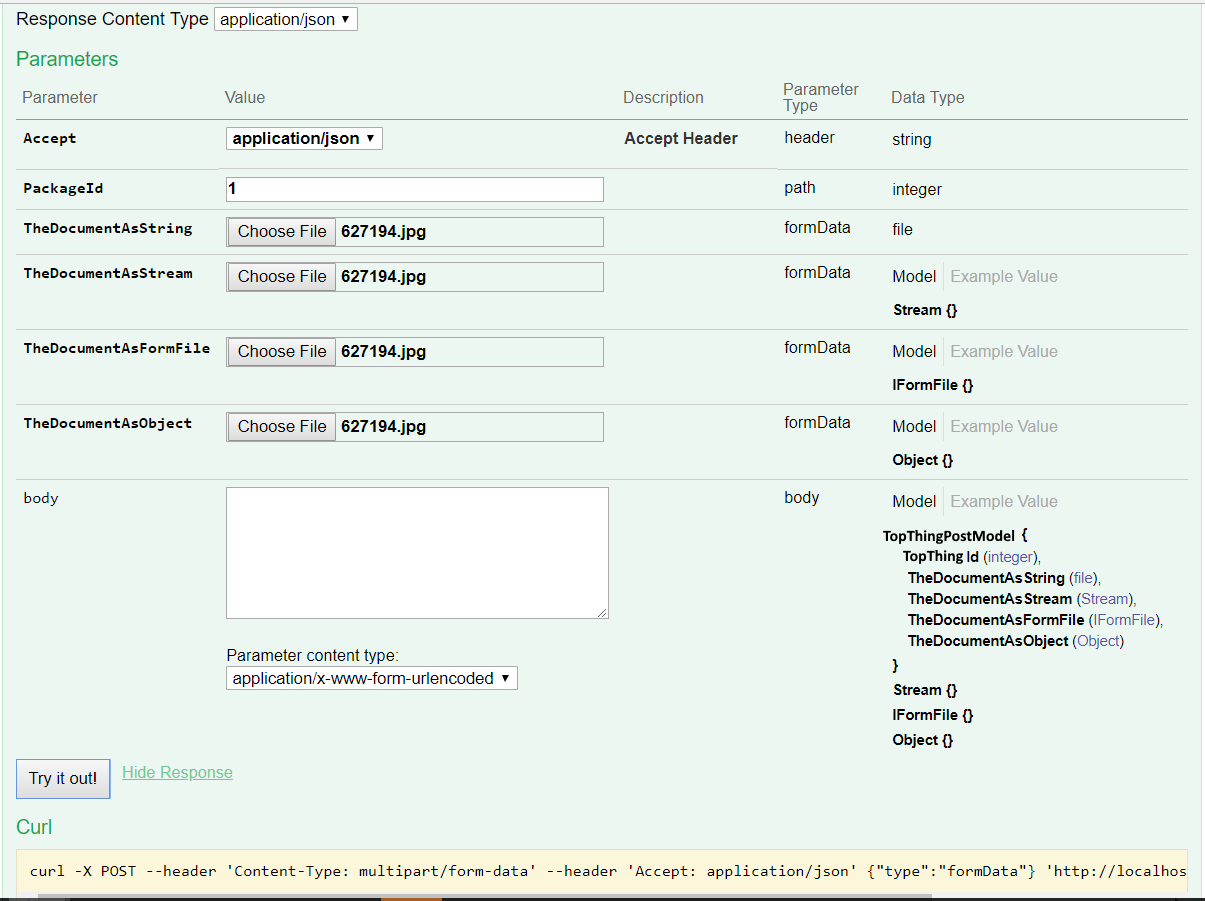
I'm trying to post a file as a property within a model.
It comes through as null or "[object] Object" depending on the file's property type.
Also, the following warning is output to the web server console (ServiceStack, but maybe relevant in this case?) ;
We're using Swashbuckle.AspNetCore (4.0.1). Do we need to downgrade?
warn: ServiceStack.Serialization.StringMapTypeDeserializer[0]
      Property 'thedocumentasstream' does not exist on type 'SubThingPostModel'
warn: ServiceStack.Serialization.StringMapTypeDeserializer[0]
      Could not create instance on 'SubThingPostModel' for property 'TheDocumentAsFormFile' with text value '[object File]'
Here's the model
[Api("Adds a document to the given TopThing")]
[Route("/TopThings/{TopThingId}/SubThings", "POST")]
public class SubThingPostModel
{
    [ApiMember(IsRequired = true, ParameterType = "path")]
    public int TopThingId { get; set; }

    //https://github.com/domaindrivendev/Swashbuckle.AspNetCore/issues/193
    [ApiMember(IsRequired = true, ParameterType = "formData", DataType = "file")]
    public string TheDocumentAsString { get; set; }

    [ApiMember(IsRequired = true, ParameterType = "formData", DataType = "file")]
    public Stream TheDocumentAsStream { get; set; }

    [ApiMember(IsRequired = true, ParameterType = "formData", DataType = "file")]
    public IFormFile TheDocumentAsFormFile { get; set; }

    [ApiMember(IsRequired = true, ParameterType = "formData", DataType = "file")]
    public object TheDocumentAsObject { get; set; }
}
Here's the action
public int Post([FromForm] SubThingPostModel subThingPostModel)
{
    //[FromForm] doesn't change anything

    //subThingPostModel.TopThingId is as expected
    //subThingPostModel.TheDocumentAsString == "[object] Object"
    //subThingPostModel.TheDocumentAsStream == null
    //subThingPostModel.TheDocumentAsFormFile == null
    //subThingPostModel.TheDocumentAsObject == "[object] Object"
    return 0;
}
The IFormFile property matches a test case posted by @xperiandri on 17Feb
Our pattern doesn't match any of the samples I've found while researching my issue. Perhaps we are using a bad pattern?
-Mike
Here's the UI
 ghost
on 28 Nov 2018
ghost
on 28 Nov 2018
Support for parameters and properties of type IFormFile now merged into master. Will be generally available with the upcoming 4.0.0
This doesn't seem to be working out of the box. Tried with both latest release and preview versions.
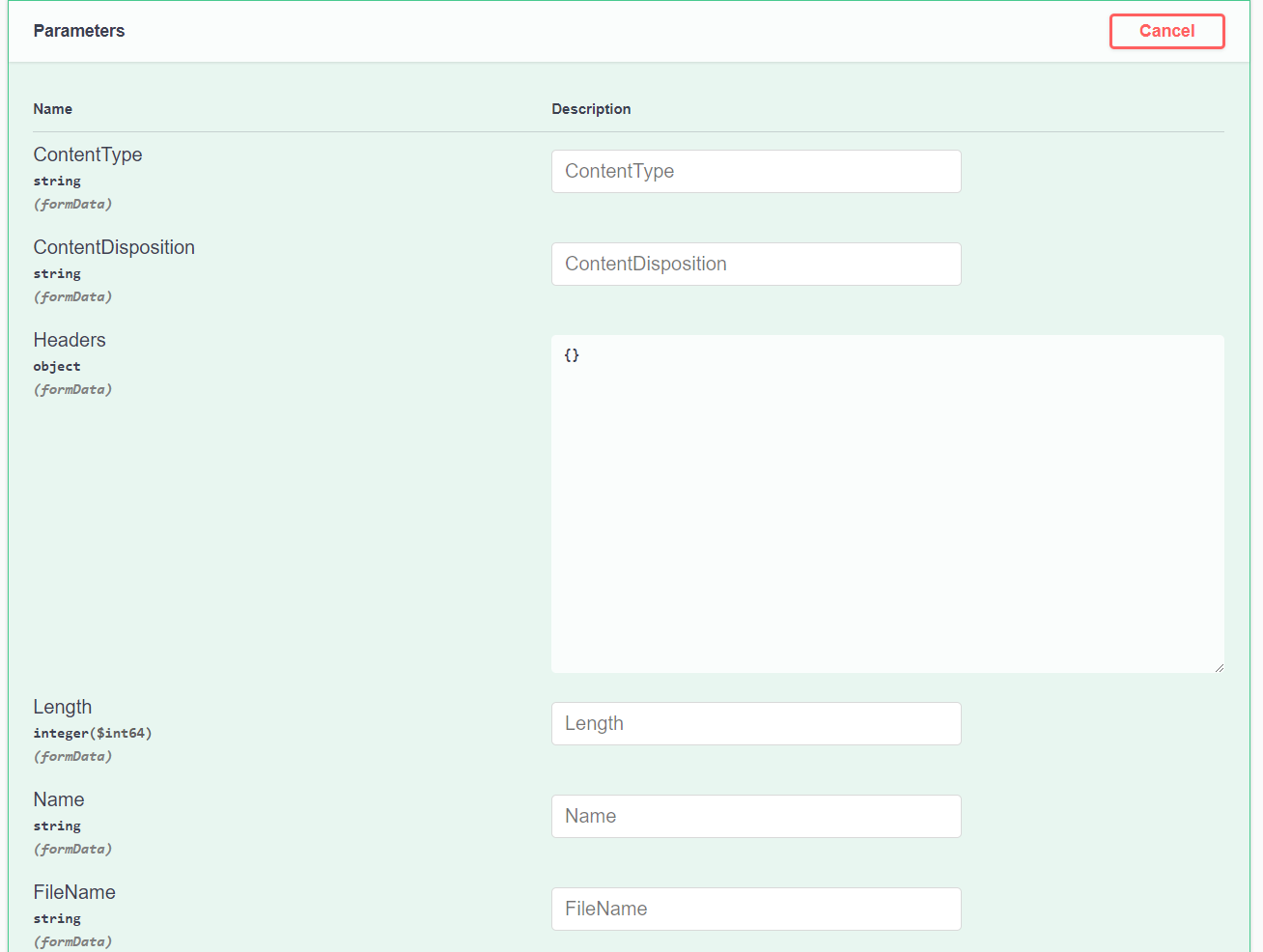
With [FromForm] it just generates a bunch of fields like _ContentType_, _ContentDisposition_, etc.
Without - generates a textbox for JSON input.
Can anybody please provide a working example without implementing custom OperationFilter or was support for this dropped along the way?
 alexb5dh
on 16 May 2019
alexb5dh
on 16 May 2019
@alexb5dh, have you read? https://github.com/domaindrivendev/Swashbuckle.AspNetCore/issues/193#issuecomment-326524450
xperiandri
on 16 May 2019
Hey, I'm also on Swashbuckle 4.0.1 and I have no clue how to get this working. I have the following endpoint method.
[HttpPost]
public IActionResult Post([FromForm] IFormFile file) { ... }
And it's still showing the old gnarly parameter list.
I have now become aware of https://github.com/domaindrivendev/Swashbuckle.AspNetCore/issues/1183 and have removed the [FromForm] attribute from the parameter. Things seem to work now.
Hopefully, this helps someone else. The reason I had [FromForm] on that parameter was because it's required unless you're also using the correct "compatibility version" or if you're on ASP.NET Core 3.x. Without one of these approaches, I was getting 415 Unsupported Media Type.
services.AddMvc().SetCompatibilityVersion(CompatibilityVersion.Version_2_2);
 AnthonyMastrean
on 2 Oct 2019
AnthonyMastrean
on 2 Oct 2019
Doesn't work for me at all, with or without fromform.
 FrankSzendzielarz
on 21 Oct 2019
FrankSzendzielarz
on 21 Oct 2019
Im using 5.0-rc4 with .net core 3 and removing fronform fixed it for me. It is now showing a file upload button.
HarelM
on 21 Oct 2019
Had to upgrade to the 5.0 rc4 before it would work. Monumental pain though, as I had to break practically everything to do so.
FrankSzendzielarz
on 22 Oct 2019
note: this still will not work if you have SerializeAsV2 = true;
you must be using OpenApi 3.0 for this to work correctly.
ghost
on 23 Oct 2019
note: this still will not work if you have SerializeAsV2 = true;
you must be using OpenApi 3.0 for this to work correctly.
You can add:
c.MapType(typeof(IFormFile), () => new OpenApiSchema() { Type = "file", Format = "binary" });
To AddSwaggerGen
And this will work with SerializeAsV2 = true
 peheje
on 18 Mar 2020
peheje
on 18 Mar 2020
public class FormFileOperationFilter : IOperationFilter
{
private const string FormDataMimeType = "multipart/form-data";
private static readonly string[] FormFilePropertyNames =
typeof(IFormFile).GetTypeInfo().DeclaredProperties.Select(x => x.Name).ToArray();public void Apply(Operation operation, OperationFilterContext context) { if (context.ApiDescription.ParameterDescriptions.Any(x => x.ModelMetadata.ContainerType == typeof(IFormFile))) { var formFileParameters = operation .Parameters .OfType<NonBodyParameter>() .Where(x => FormFilePropertyNames.Contains(x.Name)) .ToArray(); var index = operation.Parameters.IndexOf(formFileParameters.First()); foreach (var formFileParameter in formFileParameters) { operation.Parameters.Remove(formFileParameter); } var formFileParameterName = context .ApiDescription .ActionDescriptor .Parameters .Where(x => x.ParameterType == typeof(IFormFile)) .Select(x => x.Name) .First(); var parameter = new NonBodyParameter() { Name = formFileParameterName, In = "formData", Description = "The file to upload.", Required = true, Type = "file" }; operation.Parameters.Insert(index, parameter); if (!operation.Consumes.Contains(FormDataMimeType)) { operation.Consumes.Add(FormDataMimeType); } } }}
This example doesn't compile...
 Cloudmersive
on 5 Aug 2020
Cloudmersive
on 5 Aug 2020
note: this still will not work if you have SerializeAsV2 = true;
you must be using OpenApi 3.0 for this to work correctly.You can add:
c.MapType(typeof(IFormFile), () => new OpenApiSchema() { Type = "file", Format = "binary" });
To AddSwaggerGen
And this will work with SerializeAsV2 = true
This totally doesn't work unfortunately
Cloudmersive
on 5 Aug 2020
None of the solutions posted on this issue actually work. Why is this issue closed?
Cloudmersive
on 5 Aug 2020
@Cloudmersive The file upload worked for me out-of-the-box. The only thing that did not work properly is the multiple file upload since swagger adds an index after the property name (ex. Document1, Document2....) and that doesn't get bind with List
theCuriousOne
on 6 Aug 2020
Related issues
 brucewilkins
·
3Comments
brucewilkins
·
3Comments
 michael-x
·
3Comments
michael-x
·
3Comments
 flipchart
·
4Comments
flipchart
·
4Comments
 NinoFloris
·
3Comments
NinoFloris
·
3Comments
 voroninp
·
3Comments
voroninp
·
3Comments
Most helpful comment
I have written a more robust and generic version of
FormFileOperationFilter. It supports:IFormFileparameter found.IFormFile.formDataparameter in the correct order if you have other parameters.application/form-dataMIME type only if required.Stuff that's missing:
ICollection<IFormFile>.Perhaps this should be in a PR?