Swashbuckle.aspnetcore: Can't read swagger JSON in ASP.NET Core
Hi
I have read many posts on this issue but none of them seem to relate to the ASP.NET Core implementation.
Swashbuckle works perfectly on a development machine but when deployed to a server in a virtual directory (IIS application) it doesn't add the virtual folder to the swagger.json url and I get:
Can't read swagger JSON from http://localhost/swagger/v1/swagger.json
If I insert the virtual directory in the url in the box at the top of the page everything works fine (including the "Try It Out" buttons), but this is not user friendly for those who will be working with the api.
Thanks very much to anyone who can shed any light on this.
Ian Elsinga
 IanElsinga
All 20 comments
Hi again, sorry to bump this but I have spent hours on this and cannot resolve it. I attempted to provide the routeTemplate in the app.UseSwagger call but there was no change. In addition to the above issue, if I use servername instead of localhost it doesn't display anything but a green bar and a blank box.
Does swashbuckle for asp.net core not work at all in a non-dev environment?
Thanks very very much for any assistance or pointers in the right direction.
IanElsinga
on 14 Jul 2016
It's not the fact that it's a non-Dev environment, it's because you're using a virtual directory outside of your dev environment.
At the bottom of the readme, you'll see links to examples and there should be one there called VirtualDirectory. Check out its start up. You can Ignore the app.Map stuff as that's just for simulating a vdir but checkout the explicit setting of swaggerUrl in the call to UseSwaggerUi. Try this and it should work:
https://github.com/domaindrivendev/Ahoy/blob/master/test/WebSites/VirtualDirectory/Startup.cs
 domaindrivendev
on 14 Jul 2016
domaindrivendev
on 14 Jul 2016
Thanks very much - that fixed it for localhost but for local host only. Apologies for not seeing that in the samples. However it still doesn't work when using the server name or fqdn of the server. It just shows a green bar with a blank box. This is the code I have at the moment (it wouldn't work at all without setting the swaggerDoc.Host):
app.UseSwagger((httpRequest, swaggerDoc) =>
{
    swaggerDoc.Host = httpRequest.Host.Value;
});
app.UseSwaggerUi(swaggerUrl: Configuration["AppSettings:VirtualDirectory"] + "/swagger/v1/swagger.json");
I appreciate your help!
IanElsinga
on 14 Jul 2016
For anyone interested, the issue with using the server name in the url went away when I turned off IE compatibility mode.
IanElsinga
on 15 Jul 2016
This is still an issue and should probably be fixed. Sounds like of the two arguments that app.UseSwaggerUi(...) takes, the first (baseRoute) one is assumed to be relative to the application (virtual directory) while the second (swaggerUrl) is assumed to be relative to the Website root.
This means that the documentation (from the project's main page) is incorrect:
Once this is done, you should be able to spin up you app and browse the following Swagger JSON and UI endpoints respectively:
your-root-url/swagger/v1/swagger.json
your-root-url/swagger/ui
When the application is hosted in a virtual directory, application root is different than the web root.
 dkhanal
on 4 Aug 2016
dkhanal
on 4 Aug 2016
This is also the case when using web listener
 bklooste
on 23 Sep 2016
bklooste
on 23 Sep 2016
Can you please help us, how you resolved this issue
 radduri
on 25 Oct 2016
radduri
on 25 Oct 2016
If anyone is still having an issue with this I can share my working code...
IanElsinga
on 30 Oct 2016
I'm having this problem too @IanElsinga
 jayrulez
on 31 Oct 2016
jayrulez
on 31 Oct 2016
Can you share your working code where you fixed the issue @IanElsinga
 nirjal
on 24 Nov 2016
nirjal
on 24 Nov 2016
Apologies for the delay - here is all my swagger-related code from startup.cs:
public void ConfigureServices(IServiceCollection services)
{
    services.AddApplicationInsightsTelemetry(Configuration);
    services.AddMvc();
    services.AddSwaggerGen();
    services.ConfigureSwaggerGen(x =>
    {
        //x.DocumentFilter
        x.SingleApiVersion(new Info
        {
            Description = "Description goes here",
            Version = "v1.5",
            Title = "Api " + apiVersion
        });
        x.IncludeXmlComments(AppContext.BaseDirectory + "YourProject.Api.xml");
        x.IgnoreObsoleteProperties();
        x.IgnoreObsoleteActions();
        x.DescribeAllEnumsAsStrings();
    });
}
       public void Configure(IApplicationBuilder app, IHostingEnvironment env, ILoggerFactory loggerFactory)
        {
            loggerFactory.AddConsole(Configuration.GetSection("Logging"));
            loggerFactory.AddDebug();

           app.UseMvc();

            app.UseSwagger((httpRequest, swaggerDoc) =>
            {
                swaggerDoc.Host = httpRequest.Host.Value;
            });
            app.UseSwaggerUi(swaggerUrl: Configuration["AppSettings:VirtualDirectory"] + "/swagger/" + apiVersion + "/swagger.json");

        }


md5-d4a2d05ee1de5552a76b19ec5a58a621


 "AppSettings": {
    "VirtualDirectory": "/Api"
  }
Does that resolve the issue?
IanElsinga
on 24 Nov 2016
@IanElsinga Has anyone solved this? I have the same issue when deploying. I have tried every combination I can think of, with your answer and more.
 CodeSwimBikeRunner
on 7 Jan 2017
CodeSwimBikeRunner
on 7 Jan 2017
I also tried this but it is not working, Looking for some solution
 sachmahajan
on 9 Jan 2017
sachmahajan
on 9 Jan 2017
@IanElsinga, @sachmahajan - if you're still having issues you may want to check out the solution described in #171. In a nutshell, you provide Swagger JSON endpoints that are relative tho the swagger-ui page so you're configuration can be agnostic of virtual directories.
domaindrivendev
on 2 Feb 2017
Closing as this is essentially a dup of #171
domaindrivendev
on 2 Feb 2017
This fixed the issue for me. In Startup.cs I have added
app.UseSwaggerUI(c =>
{
     c.SwaggerEndpoint("/swagger/v1/swagger.json", "Service API V1");
});
Showing the service-methods locally is working out of the box. After deploy to the server I have edit the url to the swagger.json file and set: https://testservices.xyz.no/dev/myService/swagger/v1/swagger.json instead of the default: http://localhost:2345/swagger/v1/swagger.json
 ejutsogn
on 8 May 2017
ejutsogn
on 8 May 2017
Thanks for the tips everyone. Helped me figure out this issue quickly.
I had the same issue and did the following to use IIS Express when debugging, and IIS when deployed:
    public void Configure(IApplicationBuilder app, IHostingEnvironment env, ILoggerFactory loggerFactory)
    {
        // Enable middle ware to serve swagger-ui (HTML, JS, CSS etc.), specifying the Swagger JSON endpoint.
        app.UseSwaggerUI(c =>
        {
        #if DEBUG
            c.SwaggerEndpoint("/swagger/v1/swagger.json", "Jwt Security Api v1 (DEBUG)");
        #else
            c.SwaggerEndpoint("/[]virtualDir]/swagger/v1/swagger.json", "Jwt Security Api v1 (RELEASE)");
        #endif
    });
 timhodgson
on 18 Oct 2017
timhodgson
on 18 Oct 2017
Thanks @timhodgson. That worked for my project.
 vitruviauz
on 14 Sep 2018
vitruviauz
on 14 Sep 2018
I hope that helps
 kostas-kapasakis
on 14 May 2019
kostas-kapasakis
on 14 May 2019
Still anybody find solution for this issue
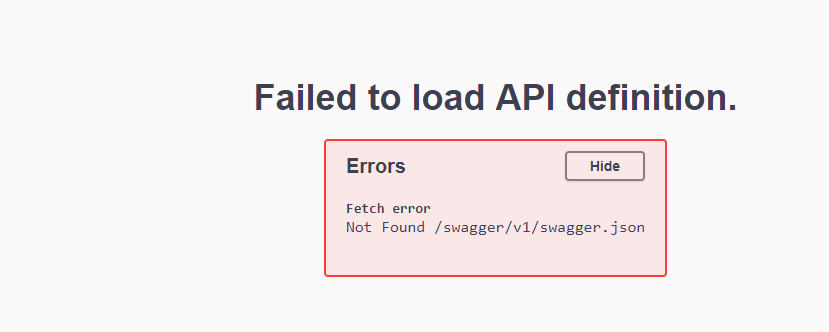
My StartUp file is below
public class Startup
{
public Startup(IConfiguration configuration)
{
Configuration = configuration;
}
    public IConfiguration Configuration { get; }

    // This method gets called by the runtime. Use this method to add services to the container.
    public void ConfigureServices(IServiceCollection services)
    {
        services.AddMvc().SetCompatibilityVersion(CompatibilityVersion.Version_2_2);
        services.AddSwaggerGen(c =>
        {
            c.SwaggerDoc("v1", new Info { Title = "ML API", Version = "v1" });

        });
    }

    // This method gets called by the runtime. Use this method to configure the HTTP request pipeline.
    public void Configure(IApplicationBuilder app, IHostingEnvironment env)
    {
        if (env.IsDevelopment())
        {
            app.UseDeveloperExceptionPage();
        }
        else
        {
            // The default HSTS value is 30 days. You may want to change this for production scenarios, see https://aka.ms/aspnetcore-hsts.
            app.UseHsts();
        }


        app.UseSwagger();
        app.UseSwaggerUI(c =>
        {
            c.SwaggerEndpoint("/swagger/v1/swagger.json", "ML API V1");
            c.RoutePrefix = string.Empty;
        });
        app.UseHttpsRedirection();
        app.UseMvc();

    }
}
But I am getting this file once I navigate through URL

 mayankgaur
on 20 Jun 2019
mayankgaur
on 20 Jun 2019
Related issues
 rgelb
·
3Comments
rgelb
·
3Comments
 NinoFloris
·
3Comments
NinoFloris
·
3Comments
 alasvant
·
3Comments
alasvant
·
3Comments
 jderus
·
4Comments
jderus
·
4Comments
 flipchart
·
4Comments
flipchart
·
4Comments
Most helpful comment
Can you please help us, how you resolved this issue