Swagger: Allow to change body parameter name derived from @Body()
I'm submitting a...
[ ] Regression
[ ] Bug report
[x] Feature request
[ ] Documentation issue or request
[ ] Support request => Please do not submit support request here, instead post your question on Stack Overflow.
Current behavior
I wrote a controller like this:
  @Post('/')
  @ApiImplicitBody({ name: 'body', type: MemberCreatePayloadApi })
  public async create(@Body() payload: MemberCreatePayloadApi): Promise<Member> {
  }
SwaggerModule produces the below api from my controller.
      "post": {
        "parameters": [
          {
            "name": "body",
            "required": true,
            "in": "body",
            "isArray": false,
            "schema": {
              "$ref": "#/definitions/MemberCreatePayloadApi"
            }
          },
          {
            "name": "MemberCreatePayloadApi",
            "required": true,
            "in": "body",
            "schema": {
              "$ref": "#/definitions/MemberCreatePayloadApi"
            }
          },
        ],
Expected behavior
@Body() makes a parameter named by argument type. But I want to change parameter name as I like.
# Expected output
      "post": {
        "parameters": [
          {
            "name": "body",
            "required": true,
            "in": "body",
            "isArray": false,
            "schema": {
              "$ref": "#/definitions/MemberCreatePayloadApi"
            }
          },
        ],
I try to modify explorer, the below code is expected to me but it may lose backward compatibility.
https://github.com/nestjs/swagger/blob/master/lib/explorers/api-parameters.explorer.ts#L90
- val => val.in === DEFAULT_PARAM_TOKEN || (val.name && val.in === 'body')
+ val => val.in === DEFAULT_PARAM_TOKEN || (val.in === 'body')
What is the motivation / use case for changing the behavior?
A client library swagger-js users should name request body parameter body.
Environment
@nestjs/core: 5.5.0
@nestjs/swagger: 2.5.1
Thanks.
 akkunchoi
All 12 comments
Since upgrading to Nest v5 (I have the latest versions of all packages) I get this weird behavior with@Body + @ApiImplicitBody. I guess it is related.
In the model
export class LoginDto {
  @ApiModelProperty({ required: true, description: 'email' })
  @IsEmail()
  email: string
  @ApiModelProperty({ required: true, description: 'password' })
  password: string
}
In the controller
ts
@ApiImplicitBody({
    type: LoginDto,
    name: 'credentials',
    description: 'User credentials',
    required: true,
    isArray: false
  })
  async login(@Body() credentials: LoginDto) { //...whatever }
Now in the swagger UI I see 2 required arguments, which is weird!

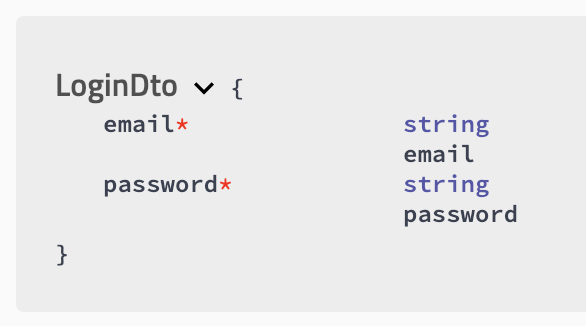
Before upgrading, I was only getting the credentials as required parameters, i.e. implicit body decorator was "winning". Now it seems to create a fictional required argument from the type of the method argument decorated with @Body :/
There is no way of avoiding this, I tried several combinations and the only working for me is omitting the @Body but I'd like to keep 'em both.
On the frontend I use swagger-es6 for generating the api and it is requiring me both arguments, which obviously does not make sense here...
This problem of duplicated arguments occurred on several routes. Perhaps allowing to select the name from @ApiImplicitBody as suggested here would help solve this problem
 lamuertepeluda
on 1 Feb 2019
lamuertepeluda
on 1 Feb 2019
I have the exact same problem except I use an Array of my DTO....which cannot be render properly without @ApiImplicitBody.
@nestjs version: 6.3.1
@nestjs/swaggerr: 3.0.2
swagger-ui-express: 4.0.6
    @Put('/:uid/products')
    @HttpCode(HttpStatus.OK)
    @ApiImplicitBody({ name: 'UpdateProductsDtos', type: UpdateProductDto, isArray: true })
    public async updateProducts(
        @Param('uid') uid: string,
        @Body() updateProductsDtos: UpdateProductDto[]
    ): Promise<GetProductDto[]> {
        console.log(updateProductsDtos);
        return null;
    }

Can we get an update on this?
 Christo676
on 15 Jun 2019
Christo676
on 15 Jun 2019
I have the exact same problem except I use an Array of my DTO....which cannot be render properly without @ApiImplicitBody.
@nestjs version: 6.3.1
@nestjs/swaggerr: 3.0.2
swagger-ui-express: 4.0.6@Put('/:uid/products') @HttpCode(HttpStatus.OK) @ApiImplicitBody({ name: 'UpdateProductsDtos', type: UpdateProductDto, isArray: true }) public async updateProducts( @Param('uid') uid: string, @Body() updateProductsDtos: UpdateProductDto[] ): Promise<GetProductDto[]> { console.log(updateProductsDtos); return null; }
Can we get an update on this?
@Christo676 , I have the same problem as you. I found a workaround for this, use "Array" as the name for ApiImplicitBody
    @Put('/:uid/products')
    @HttpCode(HttpStatus.OK)
    @ApiImplicitBody({ name: 'Array', type: UpdateProductDto, isArray: true })
    public async updateProducts(
        @Param('uid') uid: string,
        @Body() updateProductsDtos: UpdateProductDto[]
    ): Promise<GetProductDto[]> {
        console.log(updateProductsDtos);
        return null;
    }
 XiaolouT
on 18 Jul 2019
XiaolouT
on 18 Jul 2019
Even if you set name = 'ClassName' it kinda works, meaning you don't get duplicate definitions. But it also sucks. I also stumbled upon a worse case:
@ApiImplicitBody({
    required: true,
    name: 'value',
    type: InputType
  })
public myMethod(
  @Body( new TransformationPipe<InputType> )
  value: OutputType
){
 // stuff
}
with TransformationPipe<InputType> changing InputType into OutputType.
Now, my method clearly expects a OutputType instance, however the user has to see the InputType as argument for the API.
The problem is probably that @ApiImplicitBody should take precedence over @Body, but actually it is @Body that has the precedence
lamuertepeluda
on 18 Jul 2019
@lamuertepeluda , I agree with you. For some cases, it's helpful to generate model definition from @Body without @ApiImplicitBody. But when we want to define API document by @ApiImplicitBody , the @Body should be ignored.
XiaolouT
on 18 Jul 2019
Hi, I struggled for this issue again.
https://github.com/nestjs/swagger/compare/master...btree-tech:issue-185
It drops @Body reflected parameter when @ApiImplicitBody is described and leaves @Body reflected parameter when @ApiImplicitBody is not described.
Is there any problem?
akkunchoi
on 14 Aug 2019
Hi, I'm currently struggling with the same issue as many have stated above. I have been working with Swagger and the ApiImplicityBody() method hoping that it would provide me a view that showed the given attributes as being required - not the specific object being sent such as a DTO.
Has there been any update on this open issue?
 Lando424
on 19 Aug 2019
Lando424
on 19 Aug 2019
@kamilmysliwiec Hi, I fixed this issue as above. Can I get your opinion?
akkunchoi
on 12 Sep 2019
PRs are welcome! @akkunchoi
 kamilmysliwiec
on 12 Sep 2019
kamilmysliwiec
on 12 Sep 2019
Added in the next version (to install run npm i @nestjs/swagger@next). Note: remember to update @nestjs/common, @nestjs/core and typescript as well to ensure that you're using the latest versions.
Steps to migrate: https://github.com/nestjs/swagger/pull/355#issuecomment-547925879
kamilmysliwiec
on 30 Oct 2019
4.0.0 has been published
kamilmysliwiec
on 3 Dec 2019
This thread has been automatically locked since there has not been any recent activity after it was closed. Please open a new issue for related bugs.
![lock[bot] picture](https://avatars.githubusercontent.com/in/6672?v=4&s=40) lock[bot]
on 25 Apr 2020
lock[bot]
on 25 Apr 2020
Related issues
 leefordjudes
·
4Comments
leefordjudes
·
4Comments
 yuval-hazaz
·
3Comments
yuval-hazaz
·
3Comments
 Fiorello
·
5Comments
Fiorello
·
5Comments
 alisherks
·
4Comments
alisherks
·
4Comments
 kalaivanan-muthusamy
·
4Comments
kalaivanan-muthusamy
·
4Comments
Most helpful comment
@kamilmysliwiec Hi, I fixed this issue as above. Can I get your opinion?