Swagger-ui: Cosmetic: request header description set as placeholder for related textbox
Don't get distracted by values, please. Pictures = 1000 words:
swagger-json; request params:
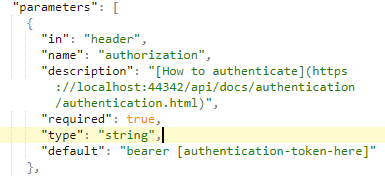
This is expected (swagger-json > default becomes input.value):
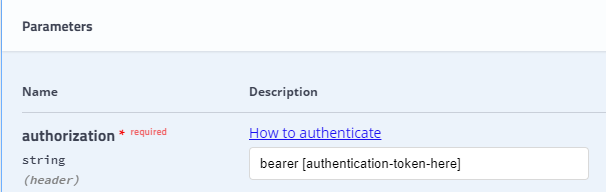
But, input.placeholder being set to swagger-json > name + " - " + description seems out of place:

Rendered HTML:

How about not setting the input.placeholder to anything, if same information is displayed right next to it (name, description). There is nothing new to show, really. Maybe, it could be set to default, so once retyped and then cleared, the user can still see what it was (although it won't be much useful, since browsers remove the placeholder value the moment you start typing).
 hlubovac
All 4 comments
Also, textboxes for all request param seem to be placed within the "Description" column, while there's some space to the right. Not a big deal, but hurts aesthetics a little bit :)

hlubovac
on 16 Nov 2017
What about striping all markup from the placeholder value, using a library like https://github.com/remarkjs/strip-markdown?
 dalbani
on 22 Oct 2018
dalbani
on 22 Oct 2018
I would like to provide (via some reasonable means) the text that Swagger UI will render as placeholder text. Using the description, which is immediately above the text input field (redundant) and often doesn't fit inside the input control isn't attractive and doesn't add value to the UI.
I suggest populating the placeholder text with either:
- The
examplevalue. I don't like that the example values become request defaults. If you don't want to make the example request, you have to delete the example values everytime you make a request using the UI. Setting the example as the placeholder text seems more intuitive to me. It shows the user an example of what could go in the field without providing the value as some sort of default. - The
summaryvalue. If people really like having the example values prepopulated, that's okay. One can just opt to not provide examples if they don't want this behavior. In this case, using thesummarytext as the placeholder text would at least provide an option for providing more concise text (that might fit inside the text input control) and it wouldn't be redundant with the already provideddescription.
My $0.02. 😎
 cmlccie
on 30 Jan 2019
cmlccie
on 30 Jan 2019
Agreed that it would help usability to be able to specify the placeholder value explicitly since "name - description" is often redundant and hard to read
 Safrone
on 13 Aug 2019
Safrone
on 13 Aug 2019
Related issues
 ilnurshax
·
3Comments
ilnurshax
·
3Comments
 SangeetaGulia
·
4Comments
SangeetaGulia
·
4Comments
 liuya05
·
3Comments
liuya05
·
3Comments
 nulltoken
·
3Comments
nulltoken
·
3Comments
 DavidBiesack
·
4Comments
DavidBiesack
·
4Comments
Most helpful comment
I would like to provide (via some reasonable means) the text that Swagger UI will render as placeholder text. Using the description, which is immediately above the text input field (redundant) and often doesn't fit inside the input control isn't attractive and doesn't add value to the UI.
I suggest populating the placeholder text with either:
examplevalue. I don't like that the example values become request defaults. If you don't want to make the example request, you have to delete the example values everytime you make a request using the UI. Setting the example as the placeholder text seems more intuitive to me. It shows the user an example of what could go in the field without providing the value as some sort of default.summaryvalue. If people really like having the example values prepopulated, that's okay. One can just opt to not provide examples if they don't want this behavior. In this case, using thesummarytext as the placeholder text would at least provide an option for providing more concise text (that might fit inside the text input control) and it wouldn't be redundant with the already provideddescription.My $0.02. 😎