Swagger-ui: Swagger-ui 3.x no longer detects content type based on parameter
In swagger-ui 2.x if there was a formData parameter Content-Type:application/x-www-form-urlencoded would be set automatically. Example:

With the new swagger-ui 3.x the ContentType isn't changed based on the presence of a formData parameter and sticks with content-type:application/json
 EWhite613
All 21 comments
There's some code in master[1] that sets application/x-www-form-urlencoded if a formData parameter is present. It is overridden by any consumes value, though.
I'm loosely in favor of how it currently works - there's a smart default for when a formData parameter is present, but there is a way to override that default by setting a consumes value.
The case could be made for only letting operation-level consumes override the formData smart default (ignoring top-level consumes). The specification is silent on this, so I imagine it's a decision we should make.
@webron, what are your thoughts? Is this a bug?
Also, @EWhite613 - providing a spec that reproduces this behavior would be very helpful. That's part of our new issue template, which you see when creating a new issue. Please use it in the future, mining for information on every bug report that we get eats up a lot of our time 😄
[1] https://github.com/swagger-api/swagger-ui/blob/master/src/core/plugins/spec/selectors.js#L300
 shockey
on 16 Aug 2017
shockey
on 16 Aug 2017
Also worth noting that swagger-client has its own logic that handles formData parameters and content-types in a similar fashion: https://github.com/swagger-api/swagger-js/blob/master/src/execute.js#L165
shockey
on 16 Aug 2017
@shockey so the logic is in master and not yet published to npm yet right?
EWhite613
on 16 Aug 2017
@EWhite613 sorry, that was a confusing way for me to put it - this functionality is live, it's released on npm.
This code was introduced a month or so ago, via https://github.com/swagger-api/swagger-ui/pull/3377.
I dug around some more and found a couple of issues discussing this: https://github.com/swagger-api/swagger-ui/issues/3375 for 3.x, and https://github.com/swagger-api/swagger-ui/issues/1938 for 2.x.
It _does_ look like multipart/form-data took precedence above the consumes value in the 2.x series, as evidenced by this PR: https://github.com/swagger-api/swagger-js/pull/772/files
I'm deferring to @webron on what our expected behavior for 3.x should be.
shockey
on 16 Aug 2017
Thankfully with OAS3 this will not be an issue.
The correct behavior, at least in what would be supportive to users, would be to default to application/x-www-form-urlencoded if there's formData parameters with no explicit consumes set.
If one of the formData parameters is of type file, then it should default to multipart/form-data, again, if consumes is not set explicitly.
 webron
on 17 Aug 2017
webron
on 17 Aug 2017
@EWhite613, I'll reiterate my request for a spec that reproduces this issue - I think we've covered the possible cases for this pretty well, but we need to see what you're describing before a decision can be made on how to move forward on this.
shockey
on 17 Aug 2017
This swagger spec can reproduce the issue on http://editor.swagger.io/
swagger: '2.0'
info:
  version: 1.0.0
  title: Swagger Petstore
  license:
    name: MIT
servers:
  - url: 'http://petstore.swagger.io/v1'
paths:
  /pets:
    post:
      summary: Create a pet
      operationId: createPets
      parameters:
        - description: UUID of the api-key owner
          in: formData
          name: owner
          type: integer
          required: true
      tags:
        - pets
      responses:
        '201':
          description: Null response
        default:
          description: unexpected error
          content:
            application/json:
              schema:
                $ref: '#/components/schemas/Error'
components:
  schemas:
    Pet:
      required:
        - id
        - name
      properties:
        id:
          type: integer
          format: int64
        name:
          type: string
        tag:
          type: string
    Pets:
      type: array
      items:
        $ref: '#/components/schemas/Pet'
    Error:
      required:
        - code
        - message
      properties:
        code:
          type: integer
          format: int32
        message:
          type: string
So now i basically i have to add
      consumes:
        - application/x-www-form-urlencoded
to all the swagger spec's that use in: formData, also have to do it for multipart
EWhite613
on 18 Aug 2017
Whether the issue related to content type not being identified, while sending form data parameters in Swagger 3.x is resolved in the latest release (Swagger*rc3/rc4) ? Or the issue is still open.
 balaji-tech87
on 11 Feb 2018
balaji-tech87
on 11 Feb 2018
Currently working with Swagger open api 3.0. I have an rest api with ten form parameters with consumes type as "application/x-www-form-urlencoded". While submitting from Swagger UI, I could see, the request is sent without content type. And due to this, getting the exception,
"java.lang.IllegalStateException: The @FormParam is utilized when the content type of the request entity is not application/x-www-form-urlencoded".
And in 3.x, if we manually add the consumes in editor also, the curl request is not generated with "application/x-www-form-urlencoded" and throws schema warning as well.
balaji-tech87
on 11 Feb 2018
Like @balaji-tech87 said, consumes doesn't fix it since it's not in 3.0 spec. However, the UI supports "formData" for in but refuses to send the data while executing. My guess is since 3.0 only supports the following for in: "query", "header", "path" or "cookie".
The only way we can use "application/x-www-form-urlencoded" is using request body which requires the user to edit it directly instead of passing values to parameters as was possible in 2.0.
 SwaroopH
on 17 Feb 2018
SwaroopH
on 17 Feb 2018
@SwaroopH Thanks for your inputs. But it was surprising, why it was not part of 3.0. And due to this, we are forced to change the existing framework for the api, which contains form parameters. Unfortunately which was not recommended.
balaji-tech87
on 20 Feb 2018
@shockey any thoughts on this? We really don't want to go back to 2.0 spec just to make the UI work.
SwaroopH
on 26 Feb 2018
As for the original issue - I would say that you'd just need to add the consumes property be cause as you mentioned it works.
As for OAS3 - we recently added support for formData so it should be all good now. I'll keep the issue open for a bit longer to get more feedback, but if none comes, we'll close it.
webron
on 5 Jul 2018
@webron are you saying we pass formData in in? That's not part of the OAS3 spec, right?
SwaroopH
on 6 Jul 2018
No, for OAS3 you'd need to use its own method of describing formData. You can find more information about it at https://swagger.io/docs/specification/describing-request-body/.
webron
on 6 Jul 2018
@webron Yup, that's what we use right now but the UI requires one to edit the JSON manually. For example, try this on the editor.swagger.io:
```YAML
openapi: 3.0.0
info:
title: Blog API
version: 0.1.0
components:
responses:
UnauthorizedError:
description: API key is missing or invalid
paths:
/addPost:
post:
requestBody:
required: true
content:
application/json:
schema:
type: object
properties:
title:
type: string
body:
type: string
required:
- title
- body
responses:
'200':
description: default response
content:
application/json:
schema:
type: object
properties:
title:
type: boolean
```
SwaroopH
on 6 Jul 2018
That's because you're defining the payload as json. If you change it to application/x-www-form-urlencoded it'll behave differently.
openapi: 3.0.0
info:
 title: Blog API
 version: 0.1.0
components:
 responses:
   UnauthorizedError:
     description: API key is missing or invalid
paths:
 /addPost:
   post:
     requestBody:
       required: true
       content:
         application/x-www-form-urlencoded:
           schema:
             type: object
             properties:
               title:
                 type: string
               body:
                 type: string
             required:
               - title
               - body
     responses:
       '200':
         description: default response
         content:
           application/json:
             schema:
               type: object
               properties:
                 title:
                   type: boolean
@webron my bad, didn't try that – this used to silently fail which seems to be supported in the recent releases like you mentioned earlier 👍
SwaroopH
on 6 Jul 2018
Glad you got it working. We'll give it a few more days before closing the issue.
webron
on 6 Jul 2018
Looks like this is working:
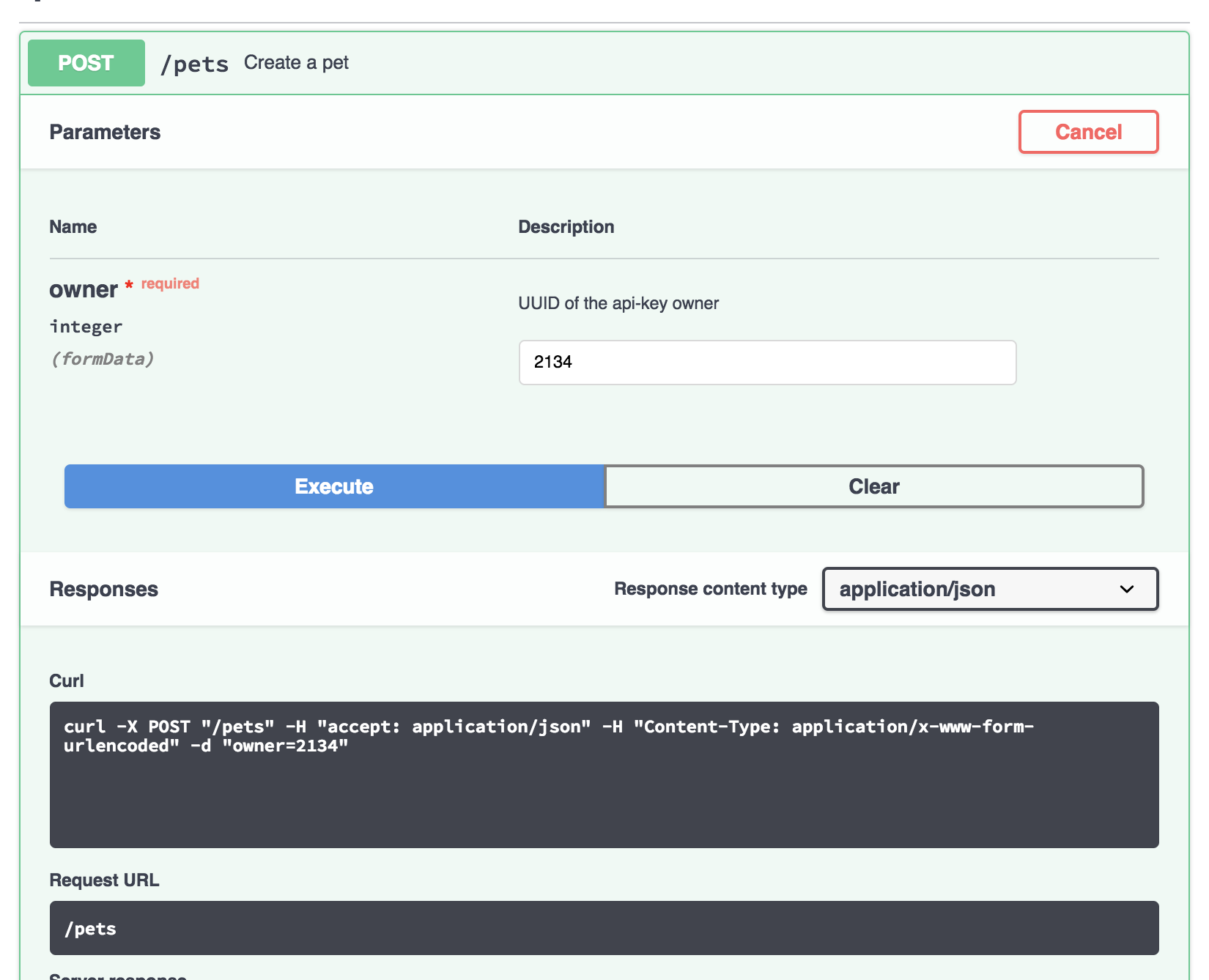
Closing!
shockey
on 9 Jul 2018
Related issues
 hnthu
·
3Comments
hnthu
·
3Comments
 DavidBiesack
·
4Comments
DavidBiesack
·
4Comments
 zilongl
·
3Comments
zilongl
·
3Comments
 MartinMuzatko
·
4Comments
MartinMuzatko
·
4Comments
 insideshell
·
3Comments
insideshell
·
3Comments
Most helpful comment
Glad you got it working. We'll give it a few more days before closing the issue.