Swagger-ui: Entering parameter value is slow
Swagger-UI version: 3.0.10
Swagger version: 2.0
When I use the "Try it out" feature and enter a value into parameter, the response time from entering the value to visually seeing the value is long. The result is the same if I am entering a value into a text field, typing a value into a JSON request body text area, or selecting a value from a dropdown.
Below is the Chrome profile while I am entering "asdf" into a text field. Each of the letters seems to equate to one of the four keypress events in the profile.
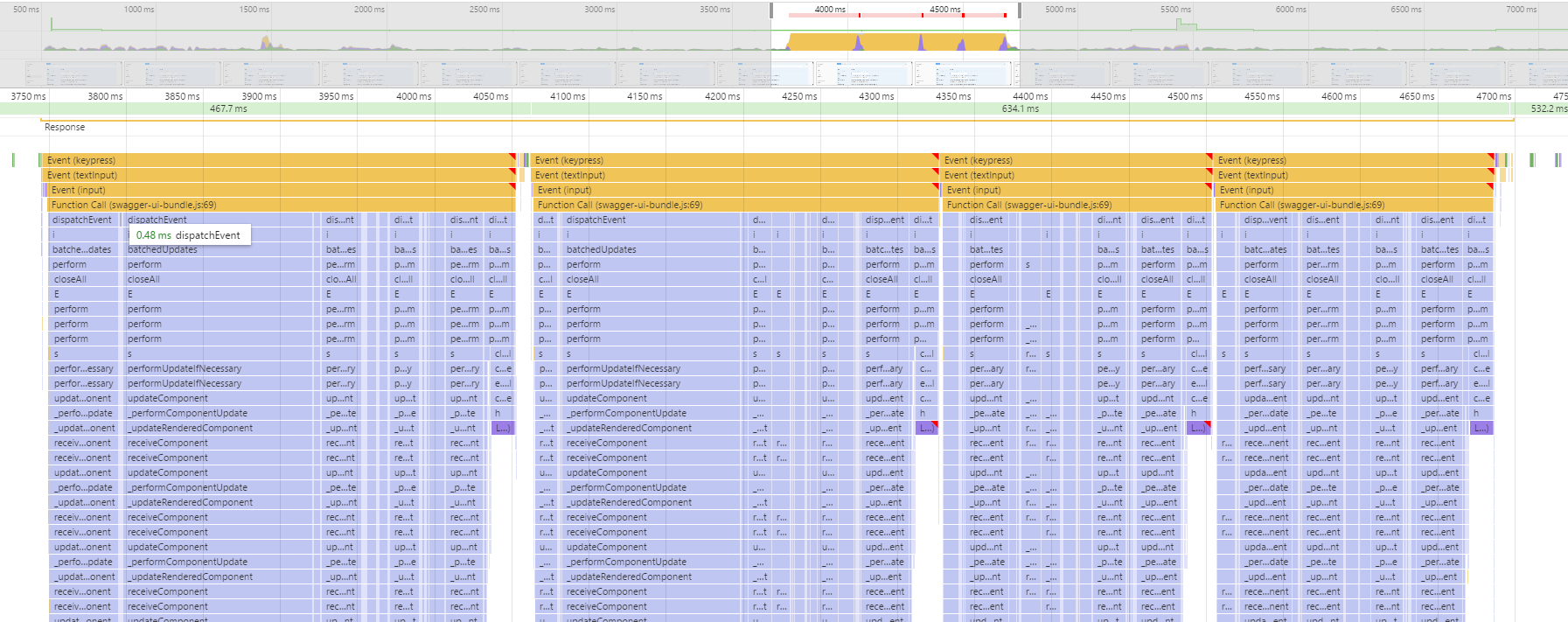
I've read all of the other issues about poor performance and I realize that I probably have a very large Swagger doc. However, we are currently using Swagger UI 2.1.5 and there is no delay when entering a value for a parameter. Obviously Swagger UI has changed quite a bit from that version to 3.0.10, but if that's the case I'm leaning towards Swagger UI being at least part of the issue.
I can send you my Swagger doc if you need it.
 ryanavogel
All 19 comments
@ryanavogel yeah, please send me the doc.
 webron
on 9 Jun 2017
webron
on 9 Jun 2017
@webron I emailed you the Swagger doc.
ryanavogel
on 15 Jun 2017
BTW, I'm using Swashbuckle to produce the Swagger doc.
ryanavogel
on 15 Jun 2017
I can confirm there's an issue. We'd need to investigate.
webron
on 21 Jun 2017
Experiencing the same issue.
Swagger-UI version: 3.0.21
Swagger version: 2.0
Doc size: 1.3 Mb
 orbex
on 26 Jul 2017
orbex
on 26 Jul 2017
Any plan on fixing this?
 samboairvm
on 31 Jul 2017
samboairvm
on 31 Jul 2017
Hi all,
I'm working on improving performance, one component at a time. If you could attach example specs (Gist should probably work) that have poor performance, it will help with testing.
 owenconti
on 17 Sep 2017
owenconti
on 17 Sep 2017
Maybe this helps...
Firefox (PaleMoon) whines about "mutating the [[Prototype]] of an object will cause your code to run very slowly; instead create the object with the correct initial [[Prototype]] value using Object.create" in swagger-ui-bundle.js:12:245
Also, because the spec-size was suspect, I tried reducing the size, but that did not help.
Even a spec-size of <500Kb has the same problem (rendering the UI itself was quicker though) of very slow response upon keystroke.
swagger.zip
orbex
on 30 Oct 2017
Looks like we're hitting requestFor a lot - during every render, for each operation, even if we're not in Try-It-Out mode. This may be contributing to the sluggishness.
 shockey
on 30 Oct 2017
shockey
on 30 Oct 2017
I faced this issue too with the latest version (3.4.3).
Downgrading to version 3.2.2 made the UI respond fast when entering parameters / request body on "Try it out" - mode.
I also tested version: 3.4.2 (slow), 3.3.2 (slow), 3.3.0(slow).
 niom
on 6 Nov 2017
niom
on 6 Nov 2017
@niom, I'm looking into this issue this week - it would be helpful if you could provide an API definition that reproduces the issue.
It's possible that the root cause of your problems are different from the folks upthread. :smile:
shockey
on 8 Nov 2017
@shockey I'll need to generate my own dummy API to reproduce this. So might take few days to get the data.
just to be clear what you mean with the API definition, swagger.json or something else? Can I export that data from swagger-ui if it's not the swagger.json?
I totally agree that the problem can be something totally different than with the folks upthread. I can create a separate issue for this if you want?
niom
on 8 Nov 2017
@niom:
just to be clear what you mean with the API definition, swagger.json or something else?
Yep, your swagger.json :smile:
If you're not in a position to share your API definition (like, if it's a private API for your company), you can test the change that I made in #3878 here: http://symptomatic-vein.surge.sh.
You can also email me (address in profile) your definition, if you'd prefer to not share it in a public GitHub thread.
Let me know if it works for you - others in this thread, feel free to give it a try as well!
Also - if I don't hear of any cases that have not been solved by the end of this week, I'm going to close out this ticket :+1:
shockey
on 8 Nov 2017
I can confirm that using my swagger spec on the link you provided @shockey the lag has gone and I no longer experience any kind of hanging whilst typing or interacting with my spec. Thanks very much :)
 Gitelaus
on 9 Nov 2017
Gitelaus
on 9 Nov 2017
I can also confirm that changes done to http://symptomatic-vein.surge.sh fix the slow input of parameters in 'Try it out' - mode
👍
niom
on 9 Nov 2017
@ryanavogel
If you are using Swashbuckle you might not see this fix for a while, at the speed things are moving there it might take a few months ...
You can try Swagger-Net very similar to Swashbuckle (it started as fork of it) but I'm using latest and greatest of all dependencies, also I've fixed a bunch of bugs and added some features.
 heldersepu
on 9 Nov 2017
heldersepu
on 9 Nov 2017
Fix released! Thanks for the help here, everyone.
@ryanavogel, I echo @heldersepu's suggestion of moving to tooling that includes Swagger-UI v3 :smile:
Closing!
shockey
on 11 Nov 2017
The issue exists.
Swagger-UI version: 3.8.0
Swagger version: 2.0
It can be reproduced with big swagger.json file.
In my project I have about 150 API functions and 185 definitions.
When I type something in input fields, there is a big performance issue.
Here is what I found:
Each time you press any key when editing input field, it causes re-render of the whole application. If you have a lot of functions/definitions, React needs to re-render them all, it is a rather slow operation.
How to check it out:
I can provide a swagger.json file with 1 API function and 100 definitions (Or you can create it by yourselves, just duplicate any definition 100 times). If you load this json file to swagger UI, you will see how slowly editing works. Then add this plugin:
const MyModels = function(system) {
    return {
        wrapComponents: {
            Models: (Original, system) => (props) => {
                console.log('render');
                return null;
            }
        }
    }
};

SwaggerUI({
    dom_id: '#app',
    url: 'swagger.json',
    plugins: [MyModels]
});
This plugin returns null instead of rendering huge Models (definitions) section.
After that swagger UI starts to work much faster.
Click "Try it out" and press any key in any input field. In console you will see "render" word from our MyModels plugin. So it means, that when you editing a parameter, it causes re-render Models section (and other parts of application).
You need to avoid such behavior.
 ivgrin
on 28 Dec 2017
ivgrin
on 28 Dec 2017
@ivgrin I'll follow up in #4057
shockey
on 28 Dec 2017
Related issues
 insideshell
·
3Comments
insideshell
·
3Comments
 SangeetaGulia
·
4Comments
SangeetaGulia
·
4Comments
 Deraen
·
4Comments
Deraen
·
4Comments
 zilongl
·
3Comments
zilongl
·
3Comments
 ilnurshax
·
3Comments
ilnurshax
·
3Comments