Swagger-ui: Swagger-ui oauth2 accesscode flow not working correctly
Hi All,
I started using swagger-ui to use with oauth2 access code flow with interactive facility( Try it out feature)
I downloaded latest master version and copied 'dist' folder and run 'live-server' by mounting to dist folder.It loads my test.yaml file and "Authorize" also will be appeared(But it is showing unlock icon though). Refer unlock-icon.png
Anyway once i click Authorize button, it shows the popup and i can enter client id and secret too. Refer authorize-popup.png
Then once i click Authorize button with correct client id and secret it will open a new window and i can see the generated code with the redirect url. But problem is, it won't close that window and it remain in the same page. That new window url something like this
http://localhost:3200/oauth2-redirect.html?code=fs-QFeYgj-bpXLjs8Fbak2pm2DwZZs0hc4QU0gKV&state=RnJpIEp1biAwMiAyMDE3IDExOjU4OjQ2IEdNVCsxMDAwIChBRVNUKQ%3D%3D
Can you just explain is this something on my code or defect? i spend more than 3 days to fix this issue with several tricks, but didn't success.
My security definitions on the yaml file looks like follow
securityDefinitions:
  OauthSecurity:
    type: oauth2
    flow: accessCode
    authorizationUrl: https://xxxxxx.xxxxx.xxxx/as/authorization.oauth2
    tokenUrl: https://yyyyy.yyyyy.yyyyy/as/token.oauth2
    grantType: authorization_code
    scopes:
      admin: Admin things

security:
 - OauthSecurity:
    - admin
Thank you very much for your help. Really looking forward for a quick reply :)


 chanurahemal
All 87 comments
I ran into this problem last night and finally solved this issue but ran into another one.
As far as fixing the above try using the oauth2-redirect.html in the dev-helpers folder. You will notice the oauth2.callback on line 39 has a couple of parameters that are needed.
oauth2.callback({auth: oauth2.auth, redirectUrl: redirectUrl});
Unfortunately for me when I attempt to try out the endpoint, my token is not included at all with the curl request. Can you report back if you experience the same issue?
 phenbach
on 2 Jun 2017
phenbach
on 2 Jun 2017
Thank you for your reply @phenbach
Yeah I also did the exactly same thing and got the same error as you mentioned. It doesn't set the token in curl command. It is undefined.
Anyway I don't know why there is different redirect HTML inside dev helper folder. I tried by rebuilding the code as well, but same.
Hopefully i get a solution soon as deadline is coming soon 😒
chanurahemal
on 2 Jun 2017
@chanurahemal If I find a solution I will post back, please do the same if you find one.
phenbach
on 2 Jun 2017
Thank you @phenbach again.
I need to add something. Once i used the redirect html from dev helper folder it didn't change anything. It gives a forbidan(403) error as it doesn't post any parameters like client id, redirct url, etc which is important. so it can't get the token basically. But when i used redirect html with following code( according to my understanding, this is from old version), it gave me same error as you mentioned above. It creates a form item and set variables run time.
sorry for the confusions as i did try so many scenarios during last 3 days and now memory is messed up. :(
<!doctype html>
<html lang="en-US">
<script
src="https://code.jquery.com/jquery-3.2.1.min.js"
integrity="sha256-hwg4gsxgFZhOsEEamdOYGBf13FyQuiTwlAQgxVSNgt4="
crossorigin="anonymous"></script>
<body onload="run()">
</body>
</html>
<script>
'use strict';
function run () {
var oauth2 = window.opener.swaggerUIRedirectOauth2;
var sentState = oauth2.state;
var isValid, qp;
qp = (window.location.hash || location.search).substring(1);
qp = qp ? JSON.parse('{"' + qp.replace(/&/g, '","').replace(/=/g, '":"') + '"}',
function (key, value) {
return key === "" ? value : decodeURIComponent(value)
}
) : {}
isValid = qp.state === sentState
if (oauth2.auth.schema.get("flow") === "accessCode" && !oauth2.auth.code) {
if (!isValid) {
oauth2.errCb({
authId: oauth2.auth.name,
source: "auth",
level: "warning",
message: "Authorization may be unsafe, passed state was changed in server Passed state wasn't returned from auth server"
});
}
if (qp.code) {
delete oauth2.state;
oauth2.auth.code = qp.code;
createForm(oauth2.auth, qp).submit();
window.close();
} else {
oauth2.errCb({
authId: oauth2.auth.name,
source: "auth",
level: "error",
message: "Authorization failed: no accessCode came from the server"
});
window.close();
}
} else {
oauth2.callback({auth: oauth2.auth, token: qp, isValid: isValid});
window.close();
}
}
function createForm(auth, qp) {
var form = document.createElement("form");
var schema = auth.schema;
var action = schema.get("tokenUrl");
var name, input;
var fields = {
code: qp.code,
"redirect_uri": location.protocol + "//" + location.host + location.pathname,
"grant_type": "authorization_code",
"client_secret": auth.clientSecret,
"client_id": auth.clientId
}
for ( name in fields ) {
input = document.createElement("input");
input.name = name;
input.value = fields[name];
input.type = "hidden";
form.appendChild(input);
}
form.method = "POST";
form.action = action;
document.body.appendChild(form);
return form;
}
</script>
Did this fix the problem?
phenbach
on 2 Jun 2017
No. When I use this code, it redirect the page properly, but token is being not set. Same error as you got
chanurahemal
on 2 Jun 2017
This is the latest update about this defect.
As @phenbach suggested i copied oauth2-redirect.html from dev-helpers to dist folder and restarted the server. Then i got following screen. Refer screen shot 1 and 2. It shows a 403 Forbidden error and it is obvious because it doesn't post any parameters like client_id, redirect_url, etc... when it try to get the access token. Refer Screen shot 2. as it doesn't post anything, obviously it generate 403 Forbidden error.
Please help me to resolve this error.


chanurahemal
on 4 Jun 2017
@bodnia can you please take a look at this issue?
 webron
on 5 Jun 2017
webron
on 5 Jun 2017
Thank you very much @webron
I am really stuck with this issue. If you want more details, please let me know
chanurahemal
on 5 Jun 2017
I'm having similar issues with the accessCode flow, and am interested in some fix.
In my case:
The oauth2-redirect page also does't close, and in the chrome console I can see the following error:

If I return to the main swagger-ui page, I also see a "failed to fetch" error.
As I see, the problem here is with CORS. In the console I get this error:
"Request header field access-control-allow-origin is not allowed by Access-Control-Allow-Headers in preflight response."
And in the preflight request for the POST that would return the access token I see the following:

And it's true, the "access-control-allow-origin" is not in the allowed headers, but I don't understand why it would even be requested...
 abustya
on 6 Jun 2017
abustya
on 6 Jun 2017
(Replacing the oauth2-redirect.html with the one in the dev-helpers fixes the first issue.)
abustya
on 6 Jun 2017
@abustya
Yes, i also got the same issue and it didn't appear after i used oauth2-redirct.html file from dev-helpers folder as you did.
Now problem is, when it try to get the access token, it doesn't post the parameter like client_id, redirct_urt, etc.. so it will return a forbiden(403) error.
chanurahemal
on 6 Jun 2017
Isn't your problem also with the preflight request? I see "OPTIONS" there...
abustya
on 6 Jun 2017
Request method is post, but there are no parameters in the body
chanurahemal
on 6 Jun 2017
I've managed to make it work. (I'm using "npm run dev" now.)
As I thought, the problem (at least mine) was with the "Access-Control-Allow-Origin" header being sent with the POST request which exchanges the code for a token.
Since I've removed it from this headers setup found in src\core\plugins\auth\actions.js, I can authenticate successfully with the code flow.
let _headers = Object.assign({
"Accept":"application/json, text/plain, */*",
"Access-Control-Allow-Origin": "*",
"Content-Type": "application/x-www-form-urlencoded"
}, headers)
I don't think it makes any sense to include this header in fetch requests since it is a response and not a request header.
abustya
on 7 Jun 2017
Does it effect when we do the changes to actions.js which is outside the dist folder. We just copy only use contents inside dist folder right?
chanurahemal
on 7 Jun 2017
The code from the src dir will be used only if you run the project with "npm run dev".
You can also rebuid the dist... it's written down in the readme.
abustya
on 7 Jun 2017
Yes, I rebuilt and run, but error remains same.
I need to run the project seperatly too
chanurahemal
on 7 Jun 2017
@abustya
I just tried the with "npm run dev" with removing that _header part as you described above. Now it generate code and it will be appeared in a new window, but it doesn't come back to swagger-ui screen again.
chanurahemal
on 8 Jun 2017
@bodnia Is there any update on this issue please?
chanurahemal
on 8 Jun 2017
The fix is in latest master, @chanurahemal @abustya @phenbach could you please verify
 bodnia
on 8 Jun 2017
bodnia
on 8 Jun 2017
Thank you @bodnia. I will test very soon and let you know for sure.
chanurahemal
on 8 Jun 2017
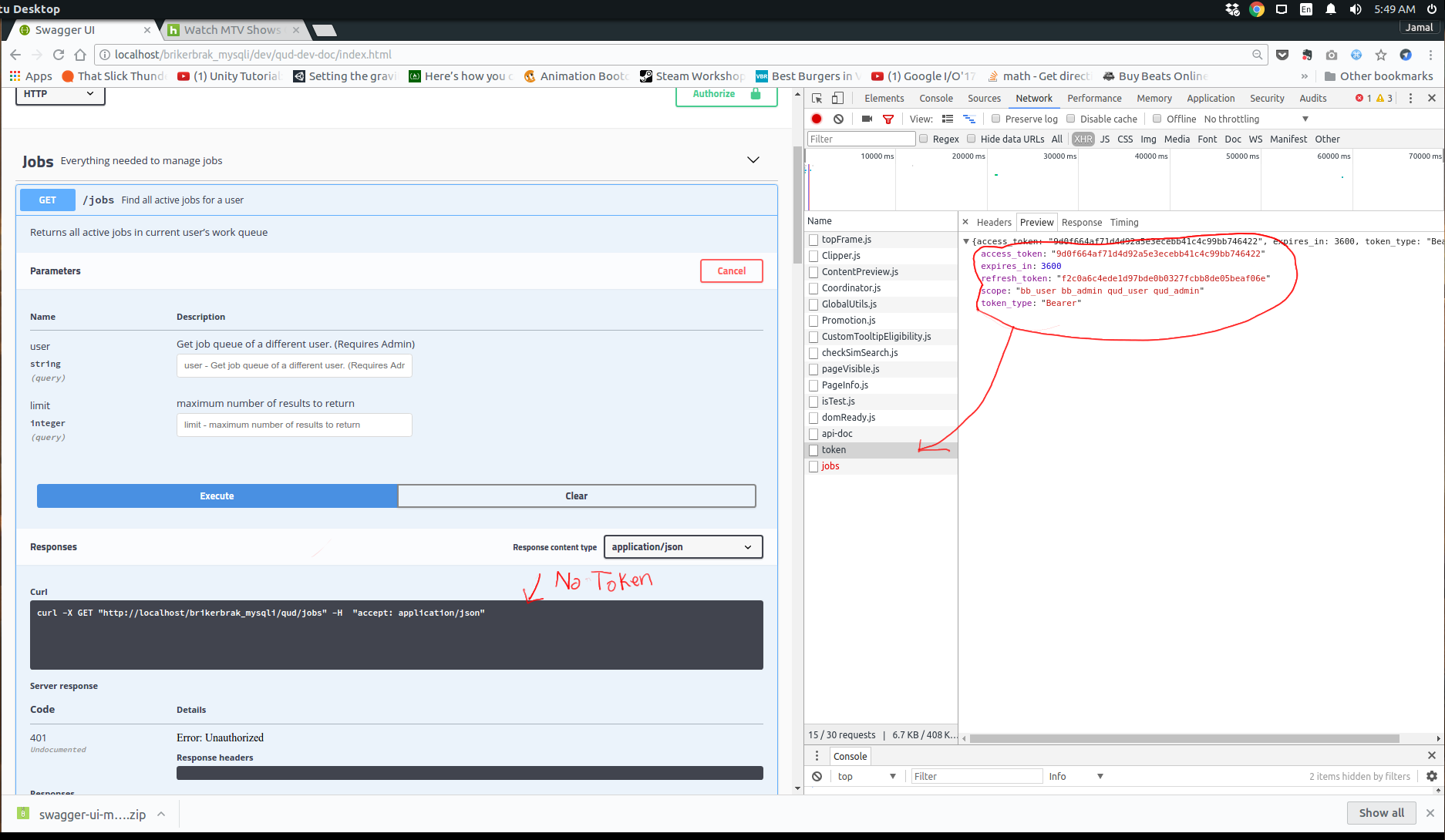
@bodnia The flow works but I am still experiencing the problem where when I tryout an endpoint the token is not included still exists.
phenbach
on 8 Jun 2017
Thank you very much @bodnia again.
I pulled latest master code base and test. But still get an different error. Once i click Authorize button and entered correct client_id and password it will redirect to swagger-ui with following error.
Please refer Authorize_request.png

image
@phenbach
chanurahemal
on 8 Jun 2017
@phenbach are you sure you have security defined for this operation GET /jobs? When there is security in operation (or it's inherited from the spec) - there is an auth icon to identify this.
bodnia
on 8 Jun 2017
@chanurahemal browser doesn't allow to fetch anything to another domain. I need to put 'access-control-allow-origin' back to the code.
bodnia
on 8 Jun 2017
@bodnia Yes, it should be i guess.
Please let us know, once you commit the changes
Thank you
chanurahemal
on 8 Jun 2017
@chanurahemal the fix is in the latest master
bodnia
on 8 Jun 2017
@bodnia
Now again get the 403(Forbidden) error as before, when try to get the token :(
chanurahemal
on 8 Jun 2017
@chanurahemal Is access-control-allow-origin header allowed for OPTIONS and POST requests?
bodnia
on 8 Jun 2017

chanurahemal
on 8 Jun 2017
@bodnia
Yes, I can access and get the token via Postman. It confirms, header allowed for OPTIONS and POST.
Should i do something special in swagger-ui?
chanurahemal
on 8 Jun 2017
@chanurahemal I'll get back to you shortly with more info
bodnia
on 8 Jun 2017
Thank you very much @bodnia . Really appreciated your help
chanurahemal
on 8 Jun 2017
@bodnia the/jobs get is failing because there is no token. Here is the same endpoint using the earlier version of swagger-ui and you can see the Bearer token is included in the curl command.
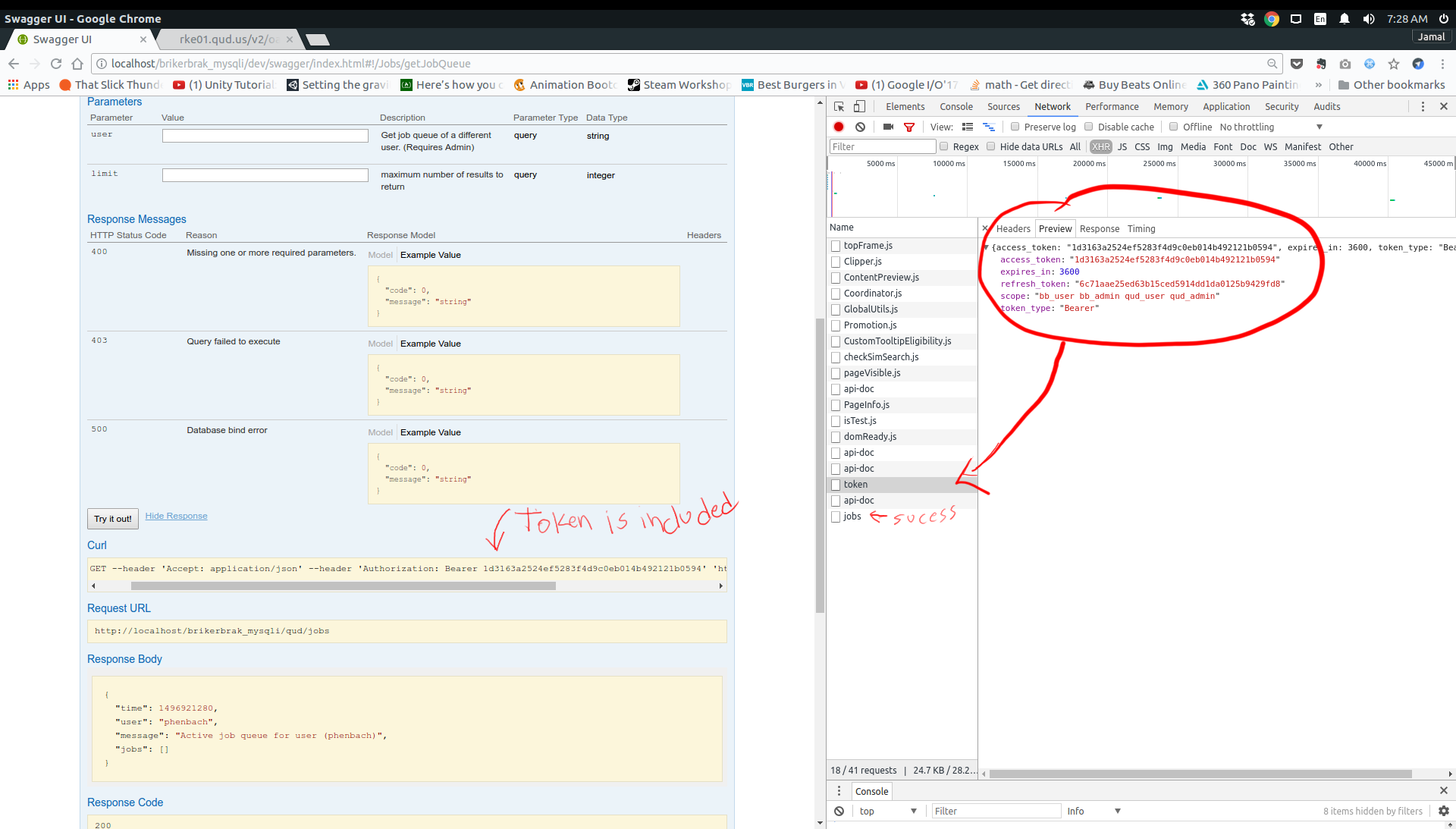
If there some sort of flag I am missing please let me know.
Here is my test config on the new swagger ui. Any help would be great
window.onload = function() {
// Build a system
const ui = SwaggerUIBundle({
url: "http://localhost/brikerbrak_mysqli/qud/api-doc",
oauth2RedirectUrl:"http://localhost/brikerbrak_mysqli/dev/qud-dev-doc/oauth2-redirect.html",
dom_id: '#swagger-ui',
presets: [
SwaggerUIBundle.presets.apis,
SwaggerUIStandalonePreset
],
plugins: [
SwaggerUIBundle.plugins.DownloadUrl
],
layout: "StandaloneLayout"
})
ui.initOAuth({
clientId: "qud",
clientSecret: "testpass",
realm: "qud-app",
appName: "qud",
scopeSeparator: " ",
additionalQueryStringParams: {}
});
window.ui = ui
}
@phenbach can you please share your spec? You can send it to @webron or me directly? My email address is anna.[email protected]
bodnia
on 8 Jun 2017
@phenbach Didn't you get that 403 error as i mentioned above?
chanurahemal
on 8 Jun 2017
@bodnia
Are you sure the "Access-Control-Allow-Origin" is being used correctly here?
As I understand, this is a strictly a response header (a server puts this in the response for an OPTIONS request), but now it is included in POST requests.
As this isn't an expected header in requests, the OAuth server we are using rejects it.
"browser doesn't allow to fetch anything to another domain. I need to put 'access-control-allow-origin' back to the code"
CORS requests should be enabled in the server at the "another domain", not in the client code...
abustya
on 8 Jun 2017
@chanurahemal
I think your OAuth server isn't configured to accept requests from localhost:3000.
This can't be solved in swagger-ui, only in the server.
abustya
on 8 Jun 2017
@bodnia This is the full log of the error
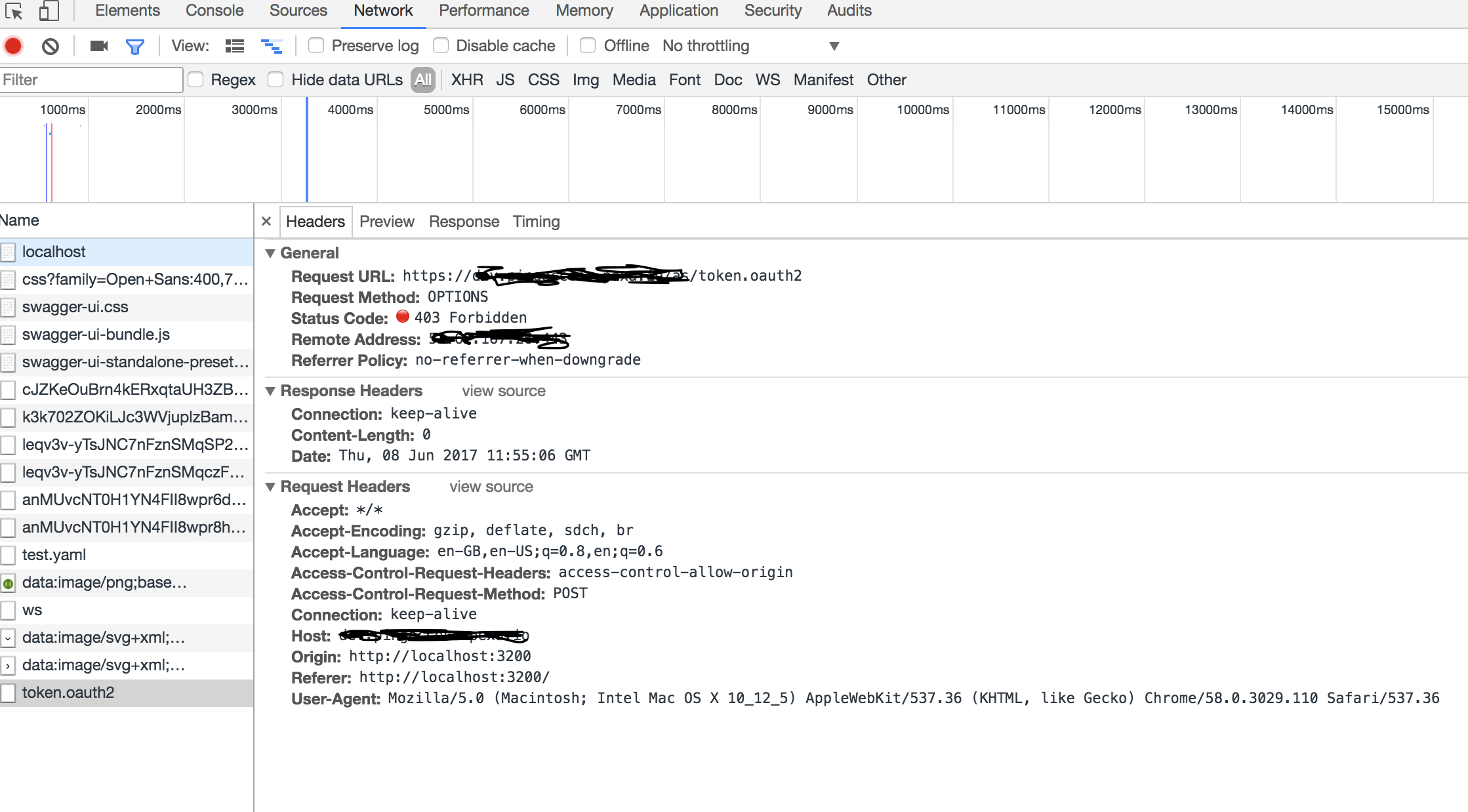
@phenbach This is the response i get.
chanurahemal
on 8 Jun 2017
@abustya Thank you
But can you notice, there are no any request parameters inside the body of the request. basically it doesn't submit any required parameters to get the token at all. I guess, that is the reason to fail that request. checked the Oauth server and it is configured to access request from my sever.
chanurahemal
on 8 Jun 2017
This isn't your POST request, it's a preflight request, that checks if cross-origin requests are allowed to the endpoint. You can see that the request method is OPTIONS.
The "Access-Control-Request-Method: POST" is a header, that shows, that the browser would like to do a POST and asks if it's possioble.
This is why the "content" isn't sent yet.
The problem is with the server you are trying to communicate with, some access policy is configured badly and it "catches" OPTIONS requests as well. Or it doesn't have CORS enabled at all...
abustya
on 8 Jun 2017
Really appreciated @abustya for your input.
I will check with them again and let you know.
chanurahemal
on 8 Jun 2017
@chanurahemal No i don't get a 403. I only received that when I didn't have a oauth2RedirectUrl specified. Because it was using some default localhost as a redirect until I added the following. Otherwise you get a CORS error.
url: "http://localhost/brikerbrak_mysqli/qud/api-doc",
oauth2RedirectUrl:"http://localhost/brikerbrak_mysqli/dev/qud-dev-doc/oauth2-redirect.html",
@bodnia I will get that emailed as soon as I can.
phenbach
on 8 Jun 2017
@bodnia I have sent an email with connection credentials and the url to my swagger-ui
phenbach
on 8 Jun 2017
@phenbach thanks for sending the spec.
In 2.x version securities worked not exactly how described in specification
To apply security to any operation you should add security field you can find more info about this here
It can be added directly to swagger object https://github.com/OAI/OpenAPI-Specification/blob/master/versions/2.0.md#fixed-fields and it will be inherited in all operations. And you can re-write inherited security in each operation https://github.com/OAI/OpenAPI-Specification/blob/master/versions/2.0.md#fixed-fields-5
Also security can be added to one single operation w/o specifying it in swagger object.
To disable security inherited from swagger object in separate operation, you need to add following to operation:
security: []
In your swagger object there is no security defined for any operation - that's why it doesn't add header with Bearer. Hope this helps, let me know if you have any questions
bodnia
on 9 Jun 2017
@bodnia Thanks for the info. Do I have this in the wrong place? When I add the security and click try I get the follow forEach error. Which mist mean I am getting close to having this resolved.
swagger-ui-bundle.js:62983 Uncaught TypeError: f.forEach is not a function
at f (swagger-ui-bundle.js:62983)
at Object.o [as buildRequest] (swagger-ui-bundle.js:62983)
at swagger-ui-bundle.js:25745
at swagger-ui-bundle.js:12407
at swagger-ui-bundle.js:6605
at swagger-ui-bundle.js:32087
at Object.r [as executeRequest] (swagger-ui-bundle.js:6605)
at swagger-ui-bundle.js:25745
at swagger-ui-bundle.js:12407
at swagger-ui-bundle.js:6605
I attached a screen on my part of my spec. You will see my addition at 2427, but the definitions start at 2413.
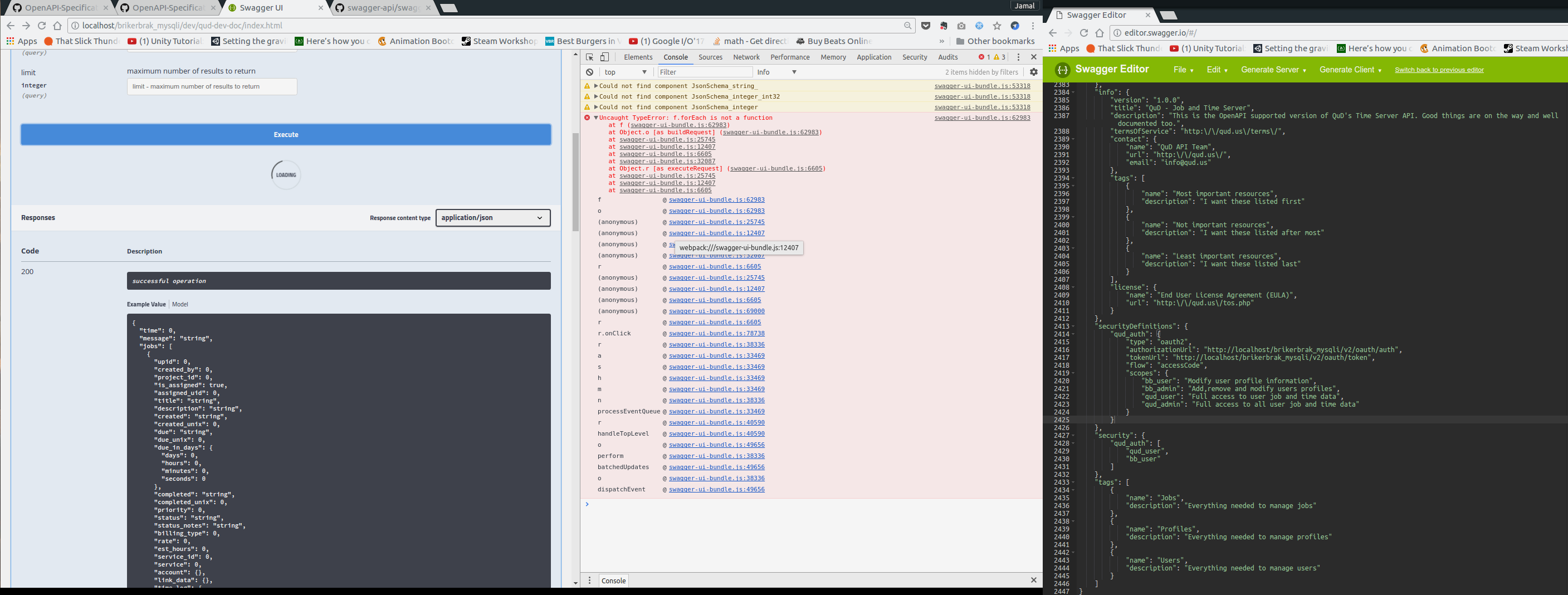
phenbach
on 9 Jun 2017
@phenbach security must be an array.
"security": [
        {
            "qud_auth": [
                "qud_user",
                "bb_user"
            ]
        }
    ]
@bodnia thanks that works!
phenbach
on 10 Jun 2017
Hi,
Still i couldn't get it to work. We are using Ping federate server for oauth 2 authentication. My doubt is if it it is forbidden for getting token request(preflight), how it get auth code correctly? it generate code correctly without any problem and only get error when try to get the token. Please advice me
Thank you
chanurahemal
on 11 Jun 2017
@chanurahemal what does the response message say when you receive the 403 error
phenbach
on 12 Jun 2017
@phenbach
Thank you very much for still trying to help me. It means a lot and i am really stuck with this. I tagged you on my above comment i have attached the response i get.
Thank you very much again and really appriciated
chanurahemal
on 12 Jun 2017
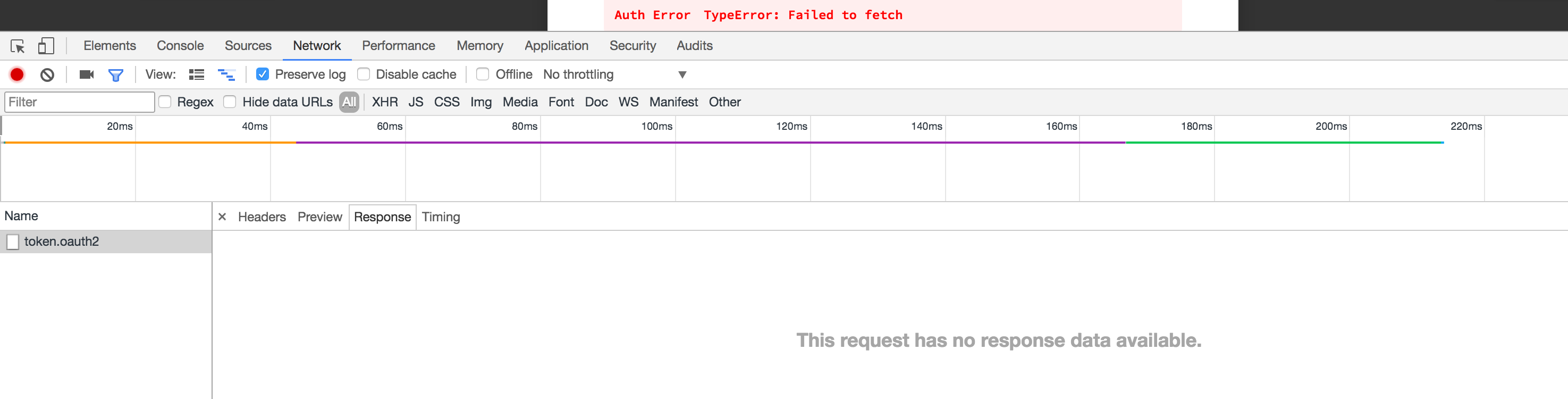
@chanurahemal that just shows the header. Can you tell me what actual response says in the response tab next to preview? There should be some details sent back that can help sort it out.
phenbach
on 12 Jun 2017
@phenbach
Please find the attachments. It has empty response. I have attached the console log as well
Thank you again.

chanurahemal
on 12 Jun 2017
@chanurahemal is your swagger-ui install located at localhost:3200 or just localhost? also have you set the redirect url to point to the corresponding redirect file. You are getting a CORS error. I have used PingFederate so it is hard to offer help. If your swagger ui is accessed with the url http://localhost:3200/index.html you need to http://localhost:3200/oauth2-redirect.html. If your local install doesn't have a port associated with it then 80 will be used by default. At the moment your redirect is looking to use port 3200.
Also you need to be sure that your setting in PingFederate has the redirect URL register there as well or you will get an error about the redirect url doesn't match what is in the auth database. This is usually in the same panel where you have the client name and client secret.
I ran into the CORS error because the default redirect url was being used. My workbench setup looks like the below. Because my swagger-ui install is located at http://localhost/brikerbrak_mysqli/dev/qud-dev-doc/index.html you will see how my oauth2RedirectUrl is set.
window.onload = function() {
  // Build a system
  const ui = SwaggerUIBundle({
      url: "http://localhost/brikerbrak_mysqli/qud/api-doc",
        oauth2RedirectUrl:"http://localhost/brikerbrak_mysqli/dev/qud-dev-doc/oauth2-redirect.html",
    dom_id: '#swagger-ui',
    presets: [
      SwaggerUIBundle.presets.apis,
      SwaggerUIStandalonePreset
    ],
    plugins: [
      SwaggerUIBundle.plugins.DownloadUrl
    ],
    layout: "StandaloneLayout"
  })
ui.initOAuth({
    clientId: "qud",
    clientSecret: "testpass",
    realm: "qud-app",
    appName: "qud",
    scopeSeparator: " ",
    additionalQueryStringParams: {}
  });
  window.ui = ui
}
@phenbach
Thank you
I used localhost:3200 and redirect url with licalhost:3200/oauth2-redirect.html. Redirect url is correctly set in pinfederater server as well.
I tried with mapping localhost to chanurahost:3200 as well, but get the same error.
I tried to hit OPTIONS method with token url in postman, it gives forbidden error. But when I directly hit token url with POST method using postman, it works.
According to my understanding, it gives error on OPTIONS method
chanurahemal
on 12 Jun 2017
BTW, what is the realm value?
chanurahemal
on 12 Jun 2017
@chanurahemal you may need to contact Ping Federate for support and see if they support this new version of swagger-ui. Have you tried the older version. My issue was the new version didn't work while the old version did. Apparently Ping Identity supports swagger based on this url https://ping.force.com/Support/Topic-Detail/Swagger but your issue appears to be a CORS problem that the provider is going to be better equipped to trouble shoot.
phenbach
on 12 Jun 2017
@chanurahemal the realm is something left up to the provider to use from what I can understand. I just set it just in case I need to use it in the future. Since we are in the middle of writing our server I am unsure of what we need and is useless.
phenbach
on 12 Jun 2017
@phenbach
You mean which version of swagger-ui? When i used older version, i got different errors and that's why i created this ticket? Did you manage to work access code work flow with previous version?
thank you
chanurahemal
on 13 Jun 2017
@chanurahemal yes I had always been able to get it to work in the older version. It was the issue with the redirect file and my security config in my spec that was causing my issue with the new version of swagger-ui. Half my problem was with the new version of swagger-ui redirect html and the other half was on my end because my spec was not fully configured to work with the way OAuth2 inherits security definitions.
phenbach
on 13 Jun 2017
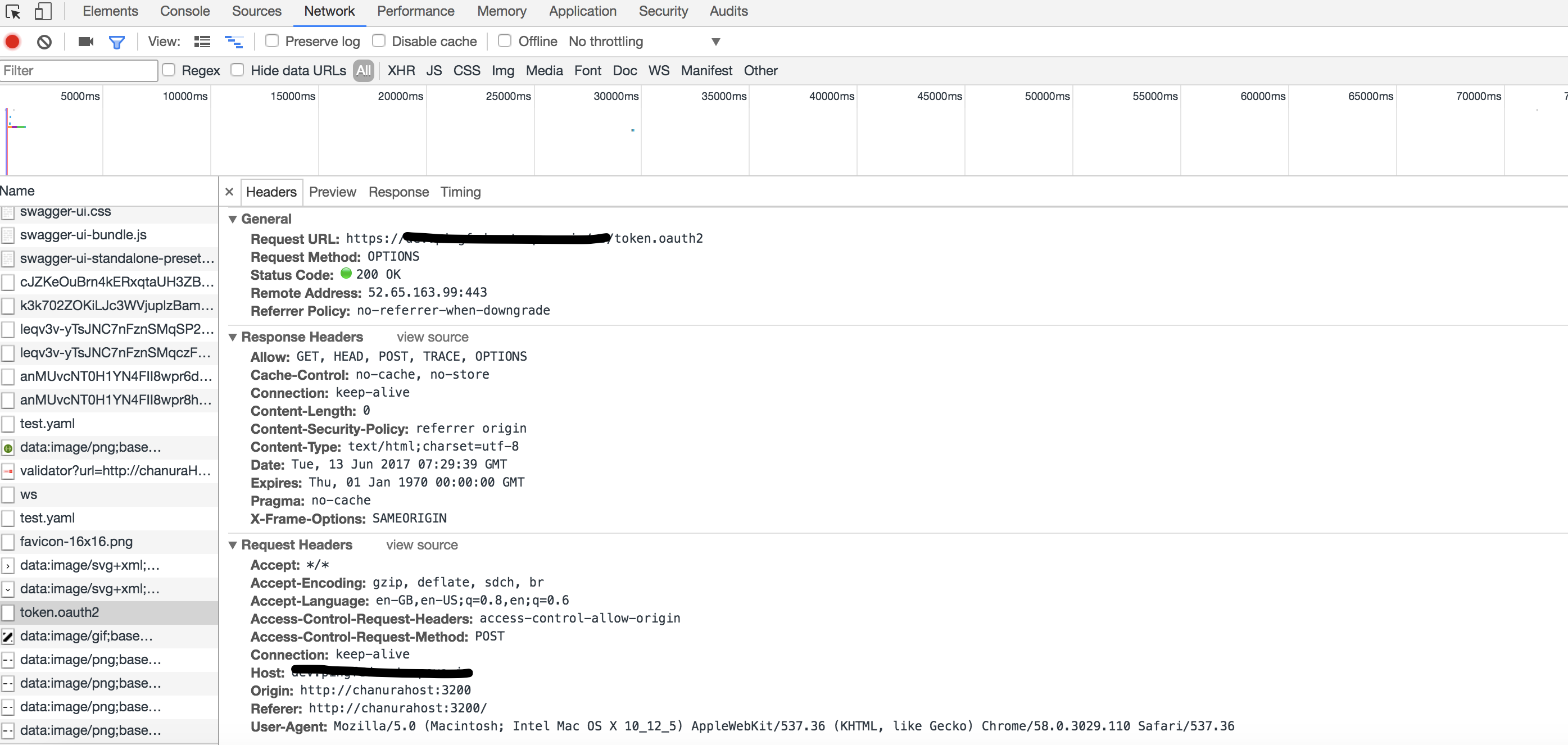
Hi,
I got a good progress about this and now that forbidden error is not appeared as pin federated server has given permission to OPTIONS method. But now i am getting a different error. Does anybody have an idea?

chanurahemal
on 13 Jun 2017
It looks like CORS (cross-origin resource sharing) isn't configured on the server you are accessing. There should be some "Access-Control-..." headers on the response.
I think you should consider reading a bit about how CORS works.
abustya
on 13 Jun 2017
Hi all my friends,
Finally I managed to get it done. As it is obviously something wrong in oauth2 server(ping), I created a proxy server(kind of) using spring boot and called api through it. Everything is working now.
I would like to thank everyone who helped me to get this done for their efforts. I also glad to see that, this ticket I opened initially, opened the gate to fix the issue and now it is working according to the way w want.
Thank you very much everyone again
Cheers
chanurahemal
on 24 Jun 2017
@phenbach where did you set the redirect URI? My Redirect URI is defaulting to localhost/swagger-o2c.html how to change it?
 thesourav123
on 3 Oct 2017
thesourav123
on 3 Oct 2017
@thesourav123, there's an oauth2RedirectUrl configuration option you can set. See the README for more details: https://github.com/swagger-api/swagger-ui#parameters.
 shockey
on 3 Oct 2017
shockey
on 3 Oct 2017
@shockey thanks got it. I am using a c# web api backend and by adding Swashbuckle it was pretty easy to integrate swagger. But, i am unable to find a way to add any additional parameters. I will really appreciate if you can specify what is the change in the JSON/YAML when we add oauth2RedirectUrl. Any samples?
thesourav123
on 3 Oct 2017
@thesourav123, ah, I see. Unfortunately, there's no way to set custom options in your definition :confused: oauth2RedirectUrl is an option that you pass to Swagger-UI when it's called by the webpage that's running it.
I don't _think_ Swashbuckle exposes a way to pass custom options, besides bringing your own index.html, which would probably work for your use case.
Also, if you're using Swashbuckle, you have the 2.x version of Swagger-UI. You can find the documentation for that version here, but you're in luck - that version also has an oauth2RedirectUrl.
That's about all I know about Swashbuckle - you may get better advice by opening a ticket there (but search for your question first!) :smile:
shockey
on 3 Oct 2017
@shockey Thank You very much. I got it. One last thing, the dev-helpers page redirect.html which closes the window and sets the Access Token in the field, has an oAuth2 object which gets its value from window.opener.swaggerUIRedirectOauth2. Since, its a new window, how will it get the value of the swagger Instance?
thesourav123
on 3 Oct 2017
@thesourav123, no worries. Pages that are opened programmatically have a reference to the window object of the page that opened them, through window.opener.
If you have any further questions, I ask you to open a new ticket. With respect to those who contributed their input upthread, I'd like to keep this issue on the topic of access code functionality. Thanks!
shockey
on 3 Oct 2017
@thesourav123 I think you already have this worked out but if not the redirect URL is configured in index.html where you swagger is installed around line 73 you will see where everything is configured. For me the initOAuth was not defined so I had to add it myself. You asked for an example here is my test fine and how it is setup.
<script>
window.onload = function() {
  // Build a system
  const ui = SwaggerUIBundle({
    url: "http://localhost/myapp/api-doc",
    dom_id: '#swagger-ui',
    presets: [
      SwaggerUIBundle.presets.apis,
      SwaggerUIStandalonePreset
    ],
    plugins: [
      SwaggerUIBundle.plugins.DownloadUrl
    ],
    layout: "StandaloneLayout"
  })

 ui.initOAuth({
     clientId: "appid1234",
     clientSecret: "thatpassword",
     oauth2RedirectUrl:"http://localhost/myapp/oauth_redirect.html"
 });
  window.ui = ui
}
</script>
phenbach
phenbach
on 3 Oct 2017
None of the configuration worked for me.
How did you guys got oauth.callback in your scope ? my code look like @phenbach.
- How can I access
window.opener.swaggerUIRedirectOauth2.? - Is there a documentation for OAuth2 somewhere?
 kopax
on 27 Nov 2017
kopax
on 27 Nov 2017
@kopax Here is a link to everything about OAuth2 https://oauth.net/2/ there are a bunch of Server and Client Libraries that may help you https://oauth.net/code/
phenbach
on 27 Nov 2017
@kopax, the variables you mentioned oauth.callback and window.opener should be available on the page that your OAuth2 server redirects to. The builtin version of this page is found in the repository at dev-helpers/oauth2-redirect.html, and a custom path can be set by calling the initOAuth method with a oauth2RedirectUrl value once you've called Swagger-UI.
There's not a lot of documentation about the internal methods mentioned here, since they weren't intended to be used outside of the core project. If you meant OAuth2 itself, @phenbach's links are a good place to start.
If you find yourself still in the weeds here, feel free to open a new issue, follow the issue template, and ping me there - I can try to get you sorted 😄
shockey
on 28 Nov 2017
@phenbach thank you but I am using OAuth2 since a while and I appreciate your comment but I don't need help understanding the specification.
The problem is not OAuth2 but my understanding of your documentation.
@kopax, the variables you mentioned oauth.callback and window.opener should be available on the page that your OAuth2 server redirects to.
My OAuth client is configured for auto-approving so there is no form to approve for the OAuth client and the redirect URL is an endpoint that return the site map in JSON.
Thanks for offering your help, I have opened #3953
kopax
on 28 Nov 2017
Closing due to inactivity.
This is simply to keep our issue tracker clean - feel free to comment if there are any further thoughts or concerns, and we'll be happy to reopen this issue.
shockey
on 23 Oct 2018
How can I get the client_key and secret_key and how can I apply redirection?
 ksac1
on 25 Jan 2019
ksac1
on 25 Jan 2019
You get those from the service provider. You typically go into the control panel and input a client name and redirect URL and it generates a client secret
phenbach
on 25 Jan 2019
Hey,
Thanks for the reply.
I really don't have any client_id, and client_key from the service provider.
How can I get from the service provider for OAuth 2?
How can I see the client name and the redirect URL in the control panel?
On Fri, Jan 25, 2019 at 12:17 PM Faphenbach Phenbach <
[email protected]> wrote:
You get those from the service provider. You typically go into the control
panel and input a client name and redirect URL and it generates a client
secret—
You are receiving this because you commented.
Reply to this email directly, view it on GitHub
https://github.com/swagger-api/swagger-ui/issues/3172#issuecomment-457541261,
or mute the thread
https://github.com/notifications/unsubscribe-auth/As0NzoPIIHNNzyl9ae-tro-UMW_jzT6uks5vGufWgaJpZM4Nt4-V
.
ksac1
on 25 Jan 2019
Unfortunately setting client id and redirects are different on different services. You just need to Google
phenbach
on 25 Jan 2019
I am facing the same inssue in SWAGGER , I am using Spring boot with swagger
i am getting below error
{"error":"invalid_client","error_description":"Browser requests to the token endpoint must use Proof Key for Code Exchange."}
Please help
 Ripul89
on 28 May 2019
Ripul89
on 28 May 2019
@phenbach
Please help me on this
Ripul89
on 28 May 2019
@chanurahemal
Please help me on this
Ripul89
on 28 May 2019
Hi All,
How to remove origin header form the request?
Ripul89
on 4 Jun 2019
Auth ErrorSyntaxError: Unexpected token < in JSON at position 0
Getting that error after callback. Anyone?
 BartusZak
on 1 Jul 2019
BartusZak
on 1 Jul 2019
I’m going to lock this as the original issue is long since resolved.
@Ripul89: there is no way to remove Origin, it’s a security-related header that your web browser automatically sets for cross-origin requests. You should serve Swagger-UI alongside your API if you want to avoid doing cross-origin requests.
@BartusZak: sounds like your service is sending back something under than JSON. < usually is a hint that it’s sending HTML back, do you happen to default to sending back an index.html in your service if a path isn’t valid? Double check your URL.
For any outstanding concerns, please open a new issue and follow the issue template.
Thanks everyone!
shockey
on 1 Jul 2019
Related issues
 zilongl
·
3Comments
zilongl
·
3Comments
 SangeetaGulia
·
4Comments
SangeetaGulia
·
4Comments
 songtianyi
·
3Comments
songtianyi
·
3Comments
 nulltoken
·
3Comments
nulltoken
·
3Comments
 LaysDragon
·
3Comments
LaysDragon
·
3Comments
Most helpful comment
@phenbach
securitymust be an array.