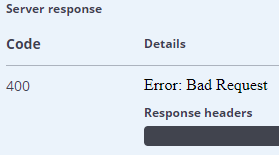
Swagger-ui: Response body and headers are not displayed for errors

This happens with responses with code 500 and 422 (and maybe others).
Steps to reproduce:
- Go to http://petstore.swagger.io/
- Place an order for a pet (
POST /store/order) with the following request body
```json
{
    "id": 0,
    "petId": 12321312312312312,
    "quantity": -1,
    "shipDate": "asdasdasd",
    "status": "asdasdas",
    "complete": 12312312
}
```
- swagger-ui version: 3.0.8
- a swagger file reproducing the issue: http://petstore.swagger.io/v2/swagger.json
Probably related to #3021.
 EvgenyOrekhov
All 39 comments
The same here. It is very strange that no response body is displayed.
 rstraszewski
on 6 May 2017
rstraszewski
on 6 May 2017
+1
 jiyonghong
on 16 May 2017
jiyonghong
on 16 May 2017
same here, also happens with version 3.0.10
 skors
on 18 May 2017
skors
on 18 May 2017
Version 3.0.10 here.
I got the error body and headers showing by fixing thesrc/core/components/live-responses.jsx on line 25++
From this:
const body = response.get("text")
const status = response.get("status")
const url = response.get("url")
const headers = response.get("headers").toJS()
To this:
const body = response.get("response").get("text")
const status = response.get("status")
const url = response.get("url")
const headers = response.get("response").get("headers").toJS()
But this "fix" messes up the successful requests... I'm not that strong at React (or JS for that matter) so hopefully someone more gifted than me can backtrack and figure out why the error object has the response nested and the success object does not. 😄
 ahallora
on 22 May 2017
ahallora
on 22 May 2017
Any update on this?
 Tarekajaj
on 30 May 2017
Tarekajaj
on 30 May 2017
There's a pending PR that might resolve it. Otherwise, I'd urge you to submit a PR to help us fix the issue.
 webron
on 31 May 2017
webron
on 31 May 2017
i had same error, i reviewed my api again and find out that there were some errors.
my error is fixed now. Check your code again may be you find out something.
 dataexpert9
on 2 Jun 2017
dataexpert9
on 2 Jun 2017
Same issue here with 3.0.12. When sending an incorrectly formatted POST request, the UI only shows "Error: Bad Request" whereas e.g. CURL returns the complete response body (in our case with additional info about the malformed input).

 sobayed
on 7 Jun 2017
sobayed
on 7 Jun 2017
I have the same error, the UI only shows me the HTTP code and not the response content.
Any update?
 dario30186
on 8 Jun 2017
dario30186
on 8 Jun 2017
there was error in my code that is why I was having this error . review
your code again may be.
On Jun 8, 2017 8:33 PM, "dario30186" notifications@github.com wrote:
I have the same error, the UI only shows me the HTTP code and not the
response content.
Any update?—
You are receiving this because you commented.
Reply to this email directly, view it on GitHub
https://github.com/swagger-api/swagger-ui/issues/3041#issuecomment-307140475,
or mute the thread
https://github.com/notifications/unsubscribe-auth/AMfaQT4vU31kinZ1u3kJEs6OVHqqQxhlks5sCBRUgaJpZM4NSF_L
.
dataexpert9
on 8 Jun 2017
Same here, @dario30186 .
Folks,
Do you agree that this issue is the most important of all that you have with Swagger-UI? For me, yes. In overall Swagger UI is so great.
 yuricamara
on 8 Jun 2017
yuricamara
on 8 Jun 2017
I don't think there is an error in my code, with version 3.0.7 it works and not with 3.0.12. I need the last version because there is a bug fix very important for my project present in it
dario30186
on 8 Jun 2017
@dataexpert9, could you give us a code example that works with this issue? I tried a lot of things.
yuricamara
on 8 Jun 2017
@dataexpert9 maybe you could describe your error in the documentation. So it could help others to fix it, too.
P.S.
@yuricamara had the same intention. For me, swagger validator and swagger-editor both giving no failures
skors
on 8 Jun 2017
I managed to get the error showing in a nice fashion by changing src/core/compontents/live-response.jsx to this:
const body = (response.get("response") ? response.get("response").get("text") : response.get("text"))
{/* ... */}

!isError ? null : <div>
  <h4>{`${response.get("name")}: ${response.get("message")}`} </h4>
  <ResponseBody content={ body }
                    contentType={ contentType }
                    url={ url }
                    headers={ headers }
                    getComponent={ getComponent }/>
</div>
`{
"swagger": "2.0",
"info": {
"version": "1.0.1",
"title": "Webservices For Test Project",
},
"host": "",
"basePath": "",
"tags": [
{
"name": "Login",
"description": "Login Services"
},
{
"name": "Signup",
"description": "Signup Services"
}
],
"schemes": [
"http"
],
"paths": {
 "/find-user-stream": {

  "post": {
    "description": "Find User Stream",
    "summary": "Find Summary Of User Based On ID",
    "tags": [
      "Streams"
    ],
    "operationId": "Find Stream",
    "produces": [
      "application/json"
    ],
    "parameters": [
      {
        "name": "user_id",
        "in": "formData",
        "required": true,
        "type": "integer",
        "description": "user_id of the user"
      },
      {
        "name": "token",
        "in": "header",
        "required": true,
        "type": "string",
        "description": "token returned from (Register / Login API)"
      }
    ],
    "responses": {
      "200": {
        "description": ""
      }
    }
  }
},
 "/user-details": {

  "post": {
    "description": "Find User Details By ID",
    "summary": "Find User Details Based On ID",
    "tags": [
      "Profile"
    ],
    "operationId": "Find User Details",
    "produces": [
      "application/json"
    ],
    "parameters": [
      {
        "name": "user_id",
        "in": "formData",
        "required": true,
        "type": "integer",
        "description": "user_id of the user"
      },
      {
        "name": "token",
        "in": "header",
        "required": true,
        "type": "string",
        "description": "token returned from (Register / Login API)"
      }
    ],
    "responses": {
      "200": {
        "description": ""
      }
    }
  }
},
"/search-friend-list": {

  "post": {
    "description": "Get Frield List Of User",
    "summary": "Friend List Of User",
    "tags": [
      "Friends And Followers"
    ],
    "operationId": "Get All Friends List",
    "produces": [
      "application/json"
    ],
    "parameters": [
      {
        "name": "token",
        "in": "header",
        "required": true,
        "type": "string",
        "description": "token returned from (Register / Login API)"
      }
    ],
    "responses": {
      "200": {
        "description": ""
      }
    }
  }
},
"/search-friend": {

  "post": {
    "description": "Search Friend On The Basis Of Username",
    "summary": "Search Friend From Username",
    "tags": [
      "Friends And Followers"
    ],
    "operationId": "Search Specific Friend",
    "produces": [
      "application/json"
    ],
    "parameters": [
      {
        "name": "token",
        "in": "header",
        "required": true,
        "type": "string",
        "description": "token returned from (Register / Login API)"
      },
      {
        "name": "search_string",
        "in": "path",
        "required": true,
        "type": "string",
        "description": "Username Of User"
      }
    ],
    "responses": {
      "200": {
        "description": ""
      }
    }
  }
},
 "/login": {
  "post": {
    "description": "Log in a registered app user.",
    "summary": "Login",
    "tags": [
      "Authentication"
    ],
    "operationId": "Login",
    "produces": [
      "application/json"
    ],
    "parameters": [
      {
        "name": "email",
        "in": "formData",
        "required": true,
        "type": "string",
        "description": "Email address of the user"
      },
      {
        "name": "password",
        "in": "formData",
        "required": true,
        "type": "string",
        "description": "Password of the user"
      },
      {
        "name": "role_id",
        "in": "formData",
        "required": false,
        "type": "integer",
        "default": 2,
        "description": "Used for Admin portal only."
      }
    ],
    "responses": {
      "200": {
        "description": ""
      }
    }
  }
},
 "/register": {
  "post": {
    "description": "Create New User.",
    "summary": "User Sign Up",
    "tags": [
      "Sign Up"
    ],
    "operationId": "Set Credentials",
    "consumes": [
      "application/x-www-form-urlencoded"
    ],
    "produces": [
      "application/json"
    ],
    "parameters": [
      {
        "name": "email",
        "in": "formData",
        "required": true,

        "type": "string",
        "default":"",
        "description": "Email of user"
      },{
        "name": "password",
        "in": "formData",
        "required": true,
        "type": "string",
        "default":"",
        "description": "Password Of User"
      },{
        "name": "full_name",
        "in": "formData",
        "required": true,
        "type": "string",
        "default":"",
        "description": "Confirm Password Of User"
      }

    ],


    "responses": {
      "200":{
          "description": "",
        }

    }
  }
},
"/facebook": {
  "post": {
    "description": "Facebook API",
    "summary": "User Login",
    "tags": [
      "Get Data"
    ],
    "operationId": "Set Credentials",
    "consumes": [
      "application/x-www-form-urlencoded"
    ],
    "produces": [
      "application/xml; charset=UTF-8"
    ],
    "parameters": [
      {
        "name": "_token",
        "in": "formData",
        "required": true,

        "type": "string",
        "default":"",
        "description": "Token For Facebook"
      }

    ],


    "responses": {
      "200":{
          "description": "",
        }

    }
  }
},
},
}`
I had same issue but now fixed. i just added
"consumes": [
          "application/x-www-form-urlencoded"
        ],
        "produces": [
          "application/xml; charset=UTF-8"
        ],
these two lines.
may be this could help
dataexpert9
on 9 Jun 2017
@dataexpert9 , There isn't any error response in your example.
@ahallora , How about doing a pull request with your solution?
yuricamara
on 9 Jun 2017
@yuricamara yeah sure why not.
Here is file . Change extension of file
swagger.txt
dataexpert9
on 9 Jun 2017
@dataexpert9 there are no error models mapped with your responses.
I think that for other users like for me, the problem is that we don't have any body in case of error response even if we map it with the right model
dario30186
on 9 Jun 2017
any updates ? or maybe I should go back to use 2.x ?
 kliyes
on 14 Jun 2017
kliyes
on 14 Jun 2017
i have just checked version 3.0.14 and it works again.
see https://github.com/swagger-api/swagger-ui/issues/3041#issuecomment-308387783
skors
on 14 Jun 2017
I have just checked version 3.0.14/gf23b7044 (the one that's at http://petstore.swagger.io/) and it still doesn't work.
EvgenyOrekhov
on 14 Jun 2017
Checked now an doesn't work with 3.0.14. It still doesn't display the headers and the body of the response.
Response:
Request URL:http://localhost:8000/mobile/init?macAddress=00%3A00%3A00%3A00%3A00%3ASS
Request Method:GET
Status Code:400 Bad Request
Response headers:
Access-Control-Allow-Headers:x-requested-with, Authorization, X-Auth-Token, Content-Type
Access-Control-Allow-Methods:POST, PUT, GET, OPTIONS, DELETE
Access-Control-Allow-Origin:*
Access-Control-Expose-Headers:x-auth-token, Request-Id, Content-Length
Access-Control-Max-Age:3600
Content-Encoding:gzip
Content-Length:258
Content-Type:application/json; charset=utf-8
Date:Thu, 15 Jun 2017 07:02:13 GMT
Request-Id:888724a1e80848608b812096c3937a98
Response body:
{"ErrorCode":"VALIDATION","Message":"Input data is not valid","ErrorFields":[{"Key":"macAddress","Value":"not valid mac address format, please use MM:MM:MM:SS:SS:SS or MM-MM-MM-SS-SS-SS"}]}
 gallifabio
on 14 Jun 2017
gallifabio
on 14 Jun 2017
for me, its working
see next comment
skors
on 14 Jun 2017
sorry for spamming all... the old ui was cached within chrome... I can confirm it still doesn't work...
skors
on 14 Jun 2017
Check the master branch, the fix is there, just not released yet (will be this Friday).
webron
on 14 Jun 2017
Folks, I deployed the current master branch to a static host for your convenience.
This deployment should have the fix: http://swagger-ui-master-061417-000820.surge.sh/
As @webron said, the fix should go live in a released version on Friday.
 shockey
on 14 Jun 2017
shockey
on 14 Jun 2017
Tried @shockey's version (3.0.14/g00745bc-dirty), it displays response body but not headers, so the issue is only partially fixed.

EvgenyOrekhov
on 14 Jun 2017
Sure, we'd be happy to review a PR that fixes that too, just like we reviewed the PR that fixed the response rendering itself.
webron
on 14 Jun 2017
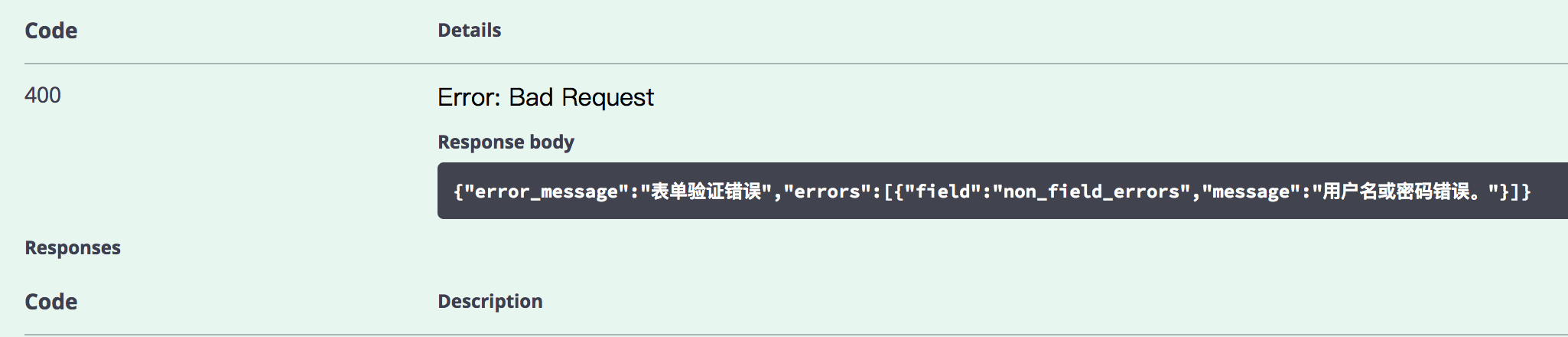
I just update to 3.0.15, and as @EvgenyOrekhov said, no headers displayed in server response, and the response body is not formatted as human-readable: (XML example already showed in Evgeny's screenshot)
kliyes
on 17 Jun 2017
I can't find version 3.0.15, can you send a link? Does it solve the issue?
 talbensimhon71
on 21 Jun 2017
talbensimhon71
on 21 Jun 2017
tested version 3.0.16, still no headers... response body is visible, but not formatted.

skors
on 21 Jun 2017
This issue is not closed - so it means it's not resolved. We _will_ close the issue, once it's fully resolved. Be aware though that we are _not_ actively working on a fix right now due to time and resource contraints, but we _will_ review PRs that help solve the issue.
webron
on 21 Jun 2017
It appears to me that #3072 resolved this. Can anyone confirm?
cc: @skors @EvgenyOrekhov @kliyes
shockey
on 14 Jul 2017
@shockey Yes, it works at http://petstore.swagger.io/ (version 3.0.18/g4acb95b-dirty).

EvgenyOrekhov
on 14 Jul 2017
Thanks, @EvgenyOrekhov!
I'm going to close this issue - if anyone is continuing to have problems with this, please comment and we'll reopen.
shockey
on 14 Jul 2017
On version 3.0.21 I am still seeing "Unknown response type" returned in Swagger UI for the response object, though the headers do display fine. If I execute the curl command manually I receive the json response that I expect (and have defined in my swagger).

Edit: Sorry please disregard. I forgot to add "application/json" to my produces definition. This is working fine.
 Trantius-Rune
on 27 Jul 2017
Trantius-Rune
on 27 Jul 2017
The petstore example is not currently displaying response bodies in the Responses section, even though the schema's are specified.
http://petstore.swagger.io/
 stoutfiles
on 31 Jul 2017
stoutfiles
on 31 Jul 2017
@stoutfiles working for me (see below), what operation are you using to test this?

shockey
on 31 Jul 2017
Related issues
 sgyang
·
4Comments
sgyang
·
4Comments
 nulltoken
·
3Comments
nulltoken
·
3Comments
 zilongl
·
3Comments
zilongl
·
3Comments
 SangeetaGulia
·
4Comments
SangeetaGulia
·
4Comments
 songtianyi
·
3Comments
songtianyi
·
3Comments
Most helpful comment
Same here, @dario30186 .
Folks,
Do you agree that this issue is the most important of all that you have with Swagger-UI? For me, yes. In overall Swagger UI is so great.