Swagger-ui: Responsebody of BadRequest (and other errors)
when trying to get the users and do supply a wrong api-version in the header it always just returns Bad Request and not showing the response body..
The json of the response body should've been:
{
    "code":400,
    "message":"BadRequest: The HTTP resource that matches the request URI 'http://localhost:30002/users' does not support the API version '1.3'.",
    "meta":{
        "apiVersion":[
            "1.3"
        ]
    }
}
When i'm running the request with Curl it does give me the desired output.
When reporting an issue, please provide the following details:
swagger-ui version
Using version: 3.0.8
Swagger file:
swagger: '2.0'
info:
  title:  Development
  description: Api
  version: "1.0"

###############################################
# General information                         #
###############################################
host: localhost:30002
basePath: /
schemes:
  - http
produces:
  - application/json
consumes:
  - application/json
tags:
  - name: users
    description: Operations for users

###############################################
# Security                                    #
###############################################
securityDefinitions:
  implicit:
    type: oauth2
    description: Secure access using implicit grant
    flow: implicit
    authorizationUrl: http://localhost:30001/connect/authorize
    scopes:
      api: Full access to all resources
  authorizationCode:
    type: oauth2
    description: Secure access using authorization grant flow
    flow: accessCode
    authorizationUrl: http://localhost:30001/connect/authorize
    tokenUrl: http://localhost:30001/connect/token
    scopes:
      api: Full access to all resources
security:
  - implicit:
    - api
  - authorizationCode:
    - api


###############################################
# Parameters                                  #
###############################################
parameters:
  apiVersion:
    in: header
    name: api-version
    type: string
    format: string
    description: Api version to use
    required: false
    default: '1.0'
###############################################
# Responses                                   #
###############################################
responses:
  error:
    description: An error has occured while handling the request. Check the content of the message for the error details.
    schema:
      $ref: '#/definitions/error'
###############################################
# Definitions                                 #
###############################################
definitions:
  user:
    type: object
    description: Defines a user. This can be a driver, backoffice employee, etc.
    properties:
      id:
        type: integer
        format: int32
        description: Uniquely identifies the user.
      key:
        type: string
        description: Uniquely identifies the user to the ERP system.
      name:
        type: string
        description: The display name of the user.
      email:
        type: string
        description: The e-mail address of the user.
  error:
    type: object
    description: Describes the error that occured during the request.
    properties:
      code:
        type: string
        description: The error code that occured.
      message:
        type: string
        description: A user readable message that describes the error in detail for the developer.
      meta:
        type: object
        description: |
          Contains more information about the error message. For example when a validation error occurs, this field describes the fields that were invalid and the validation error that occured. The content of this object can vary based on the type of error.
    required:
      - code
      - message

###############################################
# Paths                                       #
###############################################
paths:
  /users:
    parameters:
        - $ref: '#/parameters/apiVersion'
    get:
      tags:
        - users
      summary: Get all the available users.
      description: Returns all the available users connected to the company.
      responses:
        200:
          description: Successful.
          schema:
            type: array
            items:
              $ref: '#/definitions/user'
        default:
          $ref: '#/responses/error'
 Baklap4
All 7 comments
Obviously we can't test that because we don't have the server you're running with.
Try opening the developer tools in your browsers and check the network tab when you try it out.
What's the actual response you see in the console?
 webron
on 3 May 2017
webron
on 3 May 2017
Of course you can test it easily
Step 1
Create a GET route for anything you like
Step 2
Define a reponse model like i did
Step 3
Define a model which the api will return
Step 4
Check with a valid request
Step 5
Check with a not valid request < Which triggers a bad request
Step 6
Match Step 5 with the curl request generated by swagger-ui
Output of curl in my example:
{
    "code":400,
    "message":"BadRequest: The HTTP resource that matches the request URI 'http://localhost:30002/users' does not support the API version '1.3'.",
    "meta":{
        "apiVersion":[
            "1.3"
        ]
    }
}
Output in swagger-ui
Bad Request << nothing more nothing less
Expected the schema i've defined in my yaml to be filled in and shown to the user of swagger-ui
Baklap4
on 3 May 2017
Same issue:
3.x:

2.x:

I want it shows the response body no matter what status code it is, otherwise I have to read the response body in Chrome Web Developer Tools:

 Zonciu
on 31 May 2017
Zonciu
on 31 May 2017
Same thing here
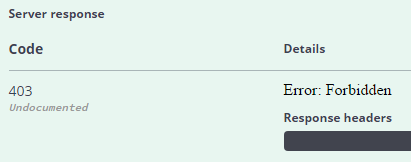
It does the same thing wether the error is documented or not, but its ok with success codes (200-299)
 clery
on 12 Jun 2017
clery
on 12 Jun 2017
Closing as duplicate of #3041.
webron
on 12 Jun 2017
I love the fact that #3041 is created later and this is marked as duplicate hahah :joy: The first explains it better though + providing a sample :+1:
Baklap4
on 12 Jun 2017
It's true - however the majority of the discussion is there. I could have been technically right and closed the other in favor of this one, but preferred going with where the main focus is.
webron
on 13 Jun 2017
Related issues
 insideshell
·
3Comments
insideshell
·
3Comments
 Deraen
·
4Comments
Deraen
·
4Comments
 LaysDragon
·
3Comments
LaysDragon
·
3Comments
 shockey
·
3Comments
shockey
·
3Comments
 ilnurshax
·
3Comments
ilnurshax
·
3Comments
Most helpful comment
Same issue:


3.x:
2.x:
I want it shows the response body no matter what status code it is, otherwise I have to read the response body in Chrome Web Developer Tools:
